Scenario
As an officer I am trying to see what my client did on December 23, 2019…
- I can look at the points on the map, but it will take a long time to figure out the places he stopped and for how long he was there.
- I can use the existing GPS Analytics and look at the stops for that day. On that day he went to a location that is unidentified. It is labeled “A.” I now must determine what is at “A.”
- I also notice that a five-minute stop was missed because the default stop settings are 10 minutes.
- I would not be able to use this if I were evaluating my client’s activity today…
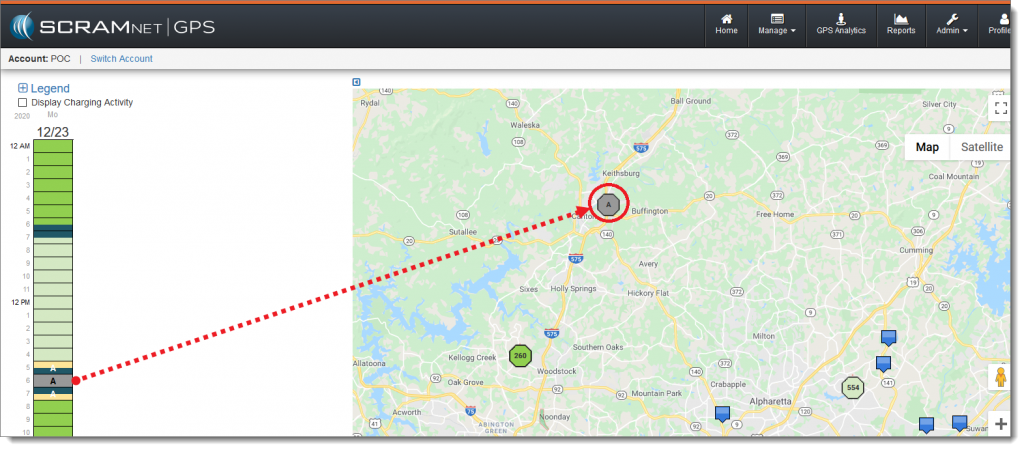
Difficult to tell what the client was doing and what point “A” is (click to enlarge).
With SCRAMNET GPS Analytics 2.0, I can use the Daily Activity Routine view to very quickly determine that he stopped at Chick-fil-A on his way to work and American Health Imaging on his way home from work – and I can make this determination even if I am looking at today’s data.
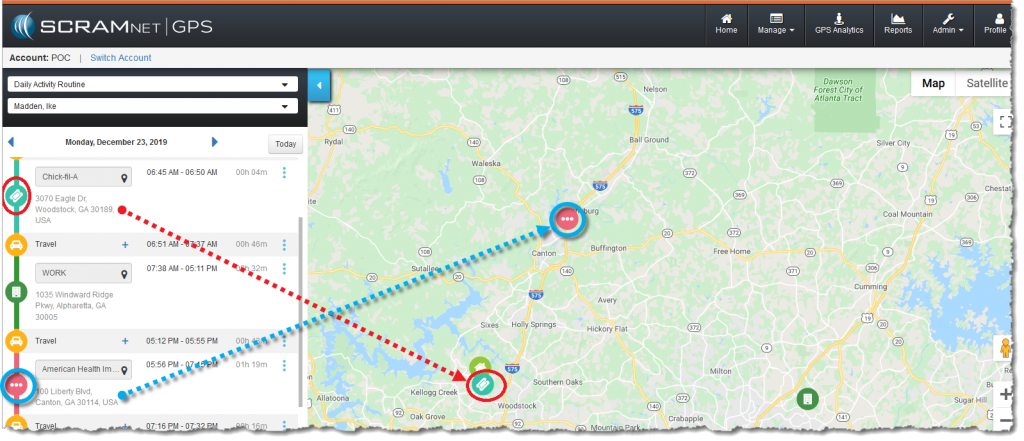
Quickly identify stop locations and durations (click to enlarge)
Next Steps
- Start over with Pattern of Life access and navigation
- Review the Stop Categories
- Revisit the Weekly and Monthly Views
- Review the Daily Activity Routine View
- Step back to the Account View
- Contact Us with questions