Tip: Hover your mouse pointer over any icon on the SCRAMNET GPS Dashboard to reveal a description of the event or alert associated with it.
General
Icon
Description
Flashing red dots indicate an active critical event. These events should be considered high priority and require immediate attention. The events that generate a flashing red dot are Device Tampers, Strap Tampers, and Exclusion Zone violations.
Flashing blue dots indicate a cleared critical event. For example, the GPS location information indicates the bracelet has exited an Exclusion Zone. These events should be considered high priority and require immediate investigation and follow-up.
Solid red dots indicate an active Inclusion Zone violation, active Communication, or Location Failure. These events should be considered urgent and require attention and a possible follow-up with the client.
Solid blue dots indicate a cleared Inclusion Zone violation, Communication, or Location Failure. These events may require attention and a possible follow-up with the client.
Solid green dots indicate no events currently active or cleared for the client. Green is good.
Note paper next to a dot indicates that a “tagged” note has been added to an active alert and allows you to quickly view the recorded actions taken to resolve the alert.
Yellow warning signs indicate action is required due to a device assignment failure or a device charging issue.
Battery
Icon
Description
Blinking Red Icon – Battery is critically low and will be depleted within one to two hours.
Blinking Gray Icon – The current battery level has not been communicated to SCRAMNET GPS for over two (2) hours.
Potential Dead Battery – This status occurs when there is a Communication Failure that immediately follows a Critically Low Battery event.
Low Battery – The voltage is low and will deplete within four hours.
Gray Low Battery – The current battery voltage has not been communicated to SCRAMNET GPS for over two (2) hours.
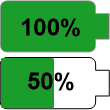
Green Battery – The current battery voltage percentage is displayed.
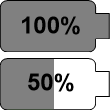
Gray Battery – The current battery level has not been communicated to SCRAMNET GPS for over two (2) hours. The percentage displayed is the battery level at the time communication with the device was interrupted.
Lightning Bolt Icon – The bracelet is currently attached to AC power.
Loading Icon – The battery status is updating. The update could take several minutes to complete.
Beacon (if applicable)
Beacon icons are displayed in the Beacon column on the SCRAMNET GPS Dashboard.
Icon
Description
Flashing red dots indicate an active critical and Serious Beacon event. These events should be considered high priority and require immediate attention. The events that generate a flashing red dot for a Beacon are Housing Tamper, Battery Low, Critical Low, and AC Unplug violations.
Solid blue dots indicate a cleared Communication events. These events may require attention and a possible follow-up with the client.
Chain links indicate that the SCRAM GPS device is currently tethered to a SCRAM GPS Beacon.
Broken chain links indicate that the SCRAM GPS device is no longer tethered to a SCRAM GPS Beacon.
A solid red dot with an “x” inside indicates that the SCRAM GPS Beacon has stopped communicating with SCRAMNET GPS.
Arrows pointing right and left indicate that the SCRAM GPS Beacon potentially has been moved from its original location when assigned.
Yellow warning signs indicate action is required due to a Beacon assignment failure.
Yellow exclamation mark signs indicate the Beacon is in a Pending Assignment status.
Victim Notification (if applicable)
On the client Dashboard page, an icon to the right of the client’s name indicates that a victim has been associated with that client in the SCRAMNET GPS monitoring system.
Icon
Description
Red victim avatar – Victim has at least one open alert or event.
Yellow victim avatar – Victim registration is pending.
Green victim avatar – Victim has no open alerts or events.