SCRAMNET GPS Administrators may limit who can suspend alerts for a client to Administrator users only. This will prevent users with Officer permissions from suspending alerts for clients; only users with Administrator permissions will be able to suspend alerts.
Enable or disable this feature by accessing the checkbox in the Account Settings dialog (Admin > Account Settings > Accounts (tab) > Allow Suspend Alerts feature Only for Admin):
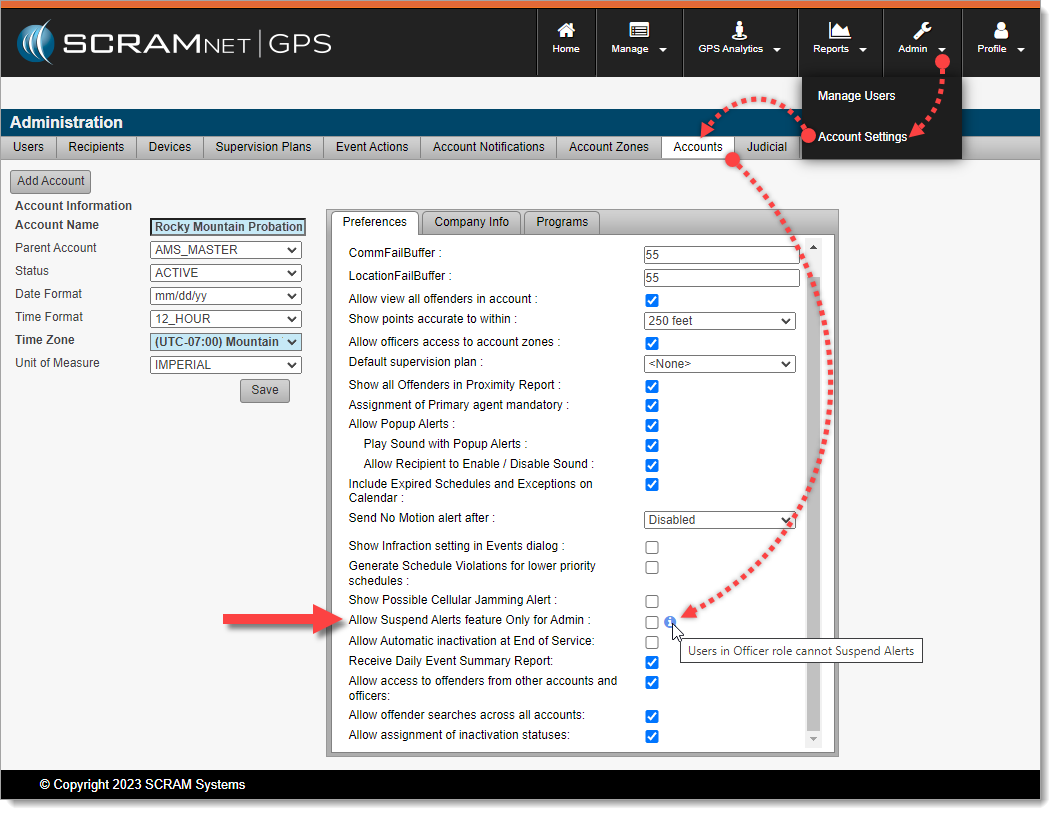
Allow Suspend Alerts feature Only for Admin (click to enlarge)
Once enabled, only SCRAMNET GPS Account Administrators may suspend alerts for clients. Officers will have to request assistance from their Administrator(s) in order to suspend alerts for clients under their supervision.