The wireless communications module in the SCRAM GPS device can detect the presence of another device that is creating a radio frequency (RF) disturbance in the wireless signal of the SCRAM GPS device. If this RF disturbance in the signal subsequently causes an interruption in the signal between the SCRAM GPS device, the cellular wireless tower it was registered to at the time, and an adjacent tower, then a Possible Cellular Jamming alert will generate.
 |
The appearance of a Possible Cellular Jamming alert in SCRAMNET GPS does not necessarily mean the client intentionally blocked the signal. It simply indicates that there was RF interference present, and that interference caused an interruption in the signal between the SCRAM GPS device and the nearest wireless tower. The RF disturbance could have been created by anything in the surrounding environment that emits radio frequencies. |
Switching it On and Off
Enable or disable this alert by accessing it in the Account Settings dialog (Admin > Account Settings > Accounts (tab) > Show Possible Cellular Jamming Alert):
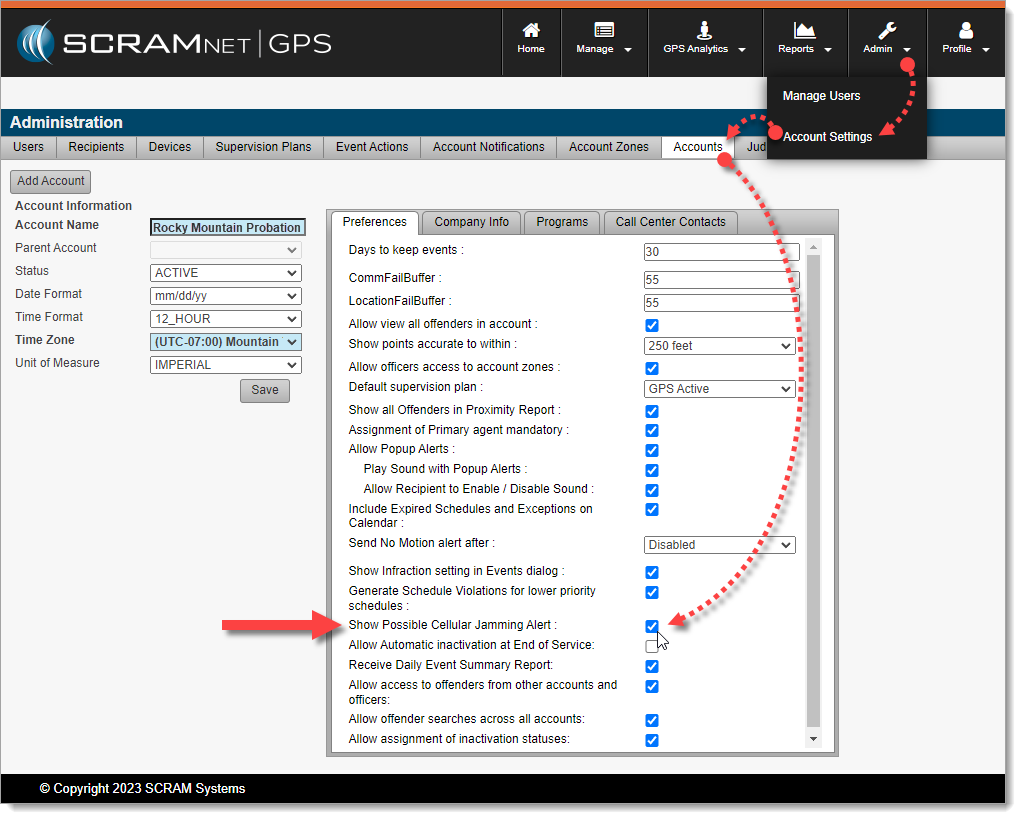
Enable/Disable Possible Cellular Jamming Alerts in GPS Administration (click to enlarge)
Once enabled, SCRAMNET GPS Account Administrators may configure the AutoClear settings in the Account Notifications dialog (Admin > Account Settings > Account Notifications (tab) > Locator Notifications (tab) > Warning (tab):
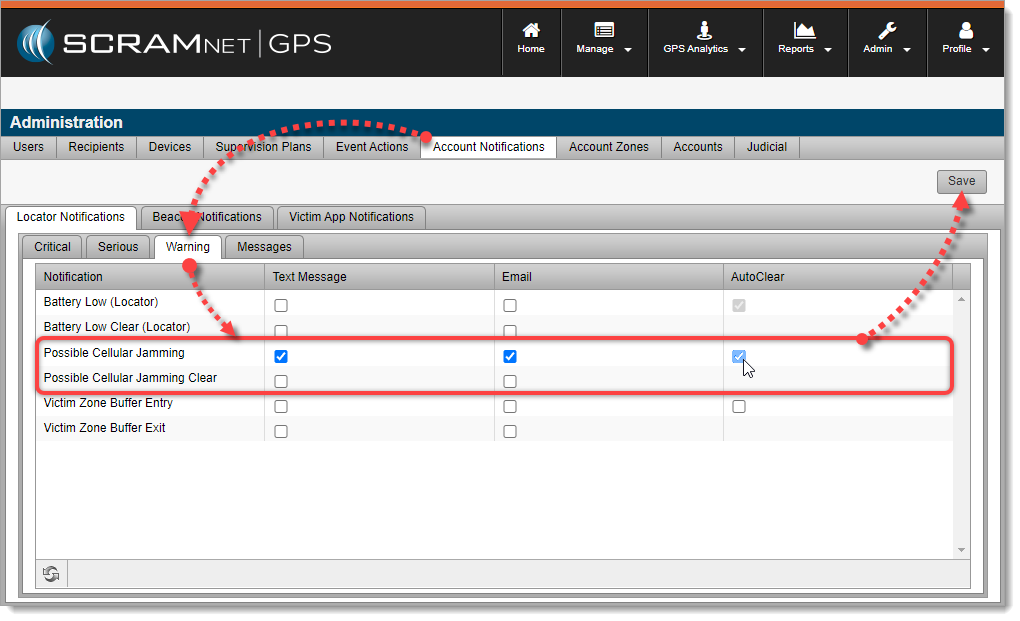
Possible Cellular Jamming Alert Notification Settings (click to enlarge)
 |
When AutoClear is checked, the alert will automatically clear when the corresponding clear event is received. |
Receiving Client Notifications
Once the Possible Cellular Jamming alert is enabled, you may subscribe Users, Recipients, and/or Victims to receive notifications by activating them via the Notifications tab on the Client Profile.
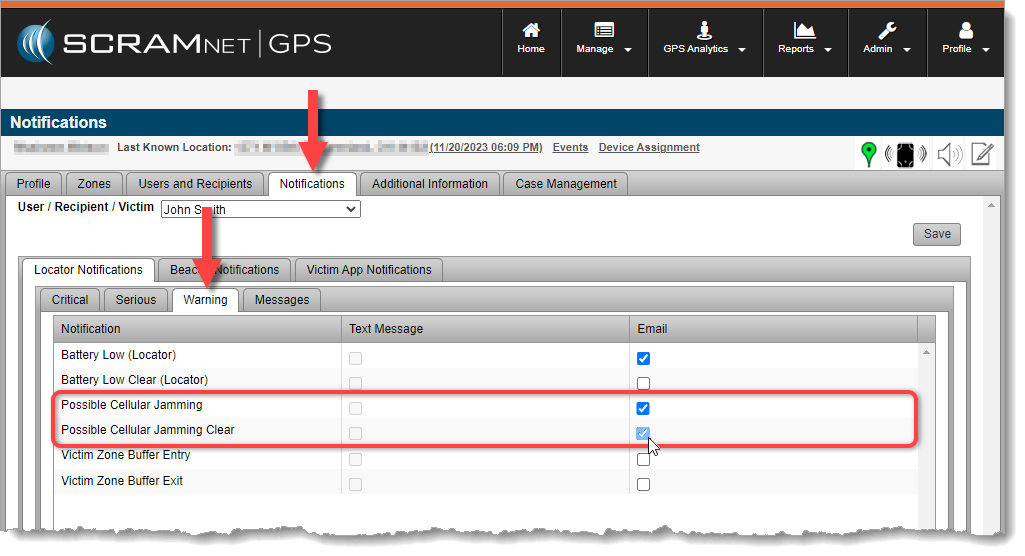
Enable Client Notifications for Users, Recipients, and Victims (click to enlarge)
The Possible Cellular Jamming alert will also appear on the Client Events dialog along with all other enabled events and alerts:
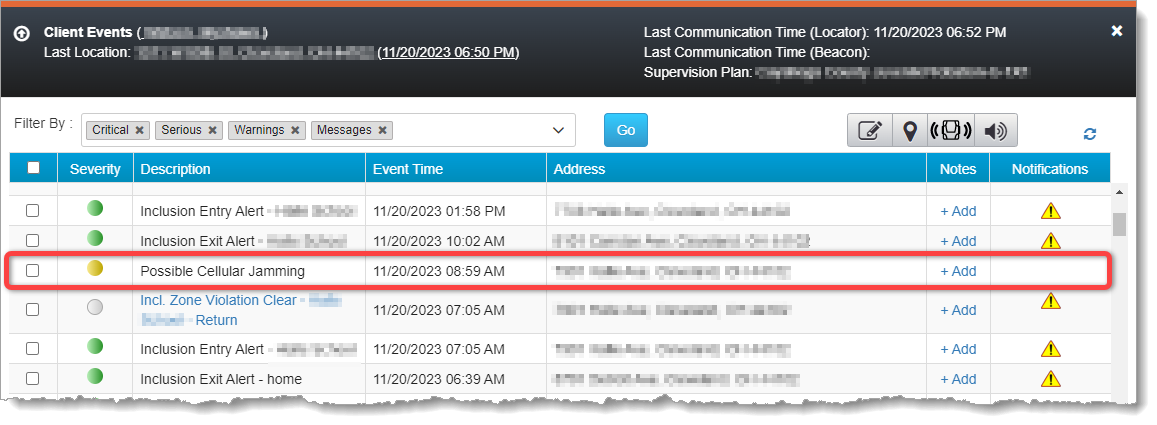
Possible Cellular Jamming Alert on the Client Events Dialog (click to enlarge)
The SCRAM GPS device will send a corresponding clear event when the disturbance has cleared, however, Officers & Agents may also manually clear the event.
Troubleshooting
To troubleshoot a Possible Cellular Jamming alert, try calling the client on the client’s mobile phone while the Possible Cellular Jamming alert is still active (red). If the call will not connect (goes immediately to voicemail, e.g.), then it is possible that cellular signals in the client’s vicinity are being blocked and further investigation may be warranted.
If you are able to reach the client, ask the client to move to another position at least 35 feet from their current position. If the alert clears (yellow) and does not re-generate when the client returns to their original position, then it may have been caused by random RF interference. If the alert clears, but then re-generates once the client returns to their original position, then further investigation may be warranted.
If you notice a pattern of the Possible Cellular Jamming alert generating in the same geographical location for a client repeatedly, then – depending on the nature of the location where the alert generates and whether or not you would expect a high level of RF interference in that environment – further investigation may be warranted.