Tip of the Month

As of, February 1st, 2023, two new product certification courses, SCRAM Remote Breath Pro Fundamentals (Level 1) and SCRAM CAM Installer Fundamentals (Level 1), are available in the SCRAM Systems University Course Catalog.

Remote Breath Pro Fundamentals Course

Overview

SCRAM Remote Breath Pro Fundamentals training consists of three tutorials covering the different aspects of managing a breath alcohol monitoring program. The course begins with how to use the SCRAMNET monitoring system, introduces you to the SCRAM Remote Breath Pro device, and concludes with a certification exam.

The tutorial topics included are:

  1. SCRAM Remote Breath Pro Client Setup and Equipment Assignment
  2. SCRAM Remote Breath Pro Client Management
  3. SCRAM Remote Breath Pro Client Discharge

The course includes a certification exam, so successful learners who pass with a score of 80% or better will be considered certified in SCRAM Remote Breath Pro Fundamentals (Level 1).

Learning Objectives

By the end of this e-learning program, the successful learner will be able to:

  1. Assign a SCRAM Remote Breath Pro device to a client.
  2. Create a breath-testing schedule.
  3. Enable Courtesy Reminders for the client.
  4. Locate equipment-related and non-compliance alerts in SCRAMNET.
  5. Set up the appropriate equipment-related and non-compliance notifications for your monitoring program.
  6. Generate client monitoring program reporting.
  7. Discharge a client from the monitoring program.
  8. Navigate to the relevant SCRAM Help pages and contact information for additional support.

SCRAM CAM Installer Fundamentals Course Overview

SCRAM CAM Installer Fundamentals (level 1) training consists of three tutorials covering different aspects of managing a SCRAM CAM monitoring program. The course begins with how to use the SCRAMNET monitoring system and install and assign the SCRAM CAM Bracelet and SCRAM Base Stations. Next, it covers how to complete required equipment maintenance and finishes with how to end the client’s monitoring program. You are required to pass a certification exam to complete the course.

The tutorial topics included are:

  1. SCRAM CAM Client Setup and Equipment Assignment
  2. SCRAM Equipment Maintenance
  3. SCRAM CAM Client Discharge

The course includes a certification exam, so successful learners who pass with a score of 80% or better will be considered certified in SCRAM CAM Installer Fundamentals (Level 1).

Learning Objectives

By the end of this e-learning program, the successful learner will be able to:

  1. Assign a SCRAM CAM Bracelet to a client.
  2. Complete equipment-related maintenance alerts in SCRAMNET.
  3. Discharge a client from the monitoring program.
  4. Navigate to the relevant SCRAM Help pages and contact information for additional support.

How to Enroll

To enroll in these new courses, please log into SCRAM Systems University and select the Get Item button for the SCRAM Remote Breath Pro Fundamentals and SCRAM CAM Installer Fundamentals courses in the Course Catalog.
SCRAM Remote Breath Pro – click to enlarge
SCRAM CAM Installer Fundamentals – click to enlarge

If you do not yet have an account, access the login page and click the Register Now! link. Use your organization’s unique registration key to fill out the registration form to request access to the site. Once your access request is approved, you will receive an email with all the information you need to access the course catalog and enroll in our course offerings.

If a registration key has not been provided to you, or if you need help with the site, please email us at training@scramsystems.com.
Continue Reading

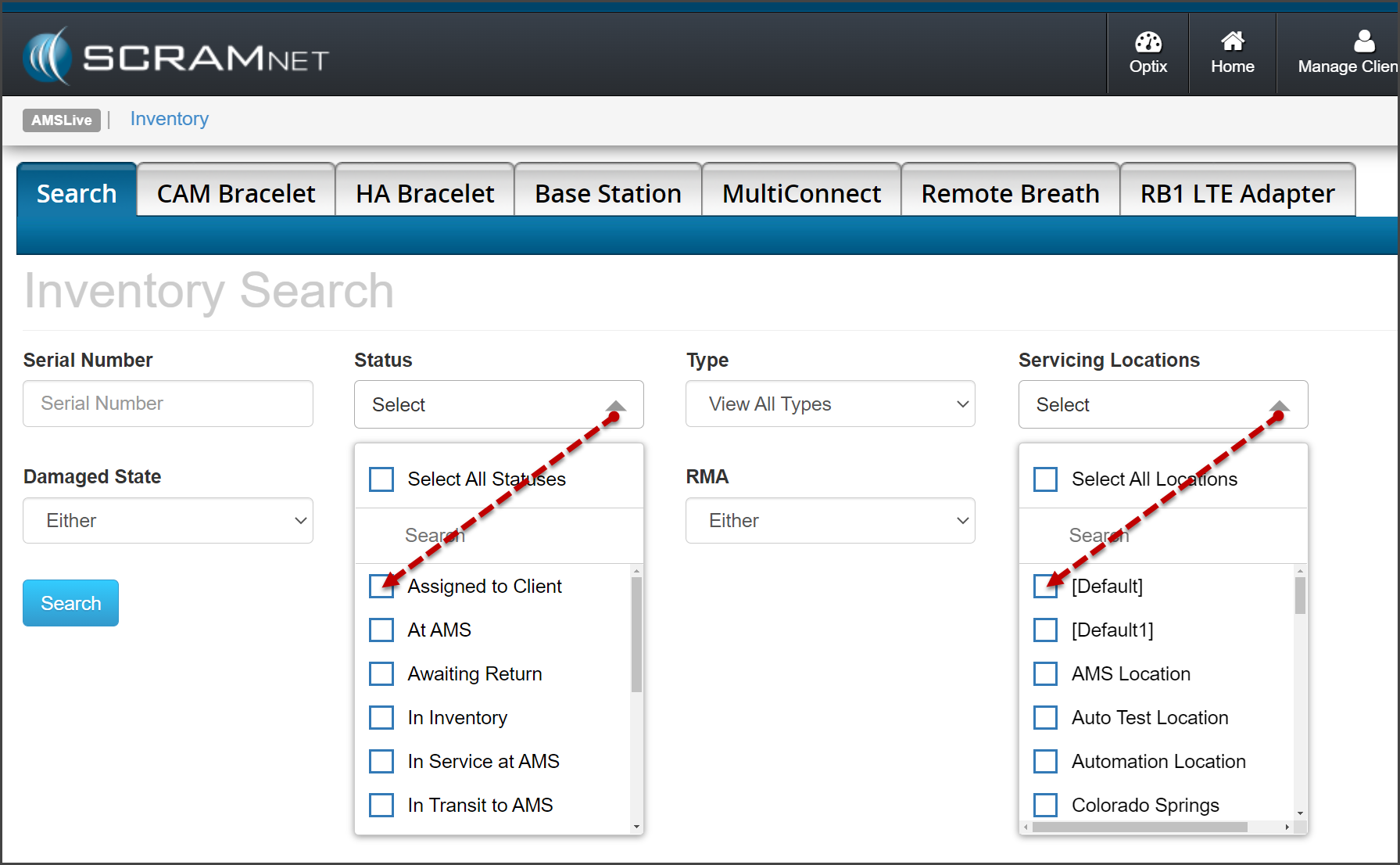
Enhancements made to the Inventory page in SCRAMNET include:

  • The StatusServicing Locations, and Region dropdown filters will allow you to select multiple options when searching your inventory
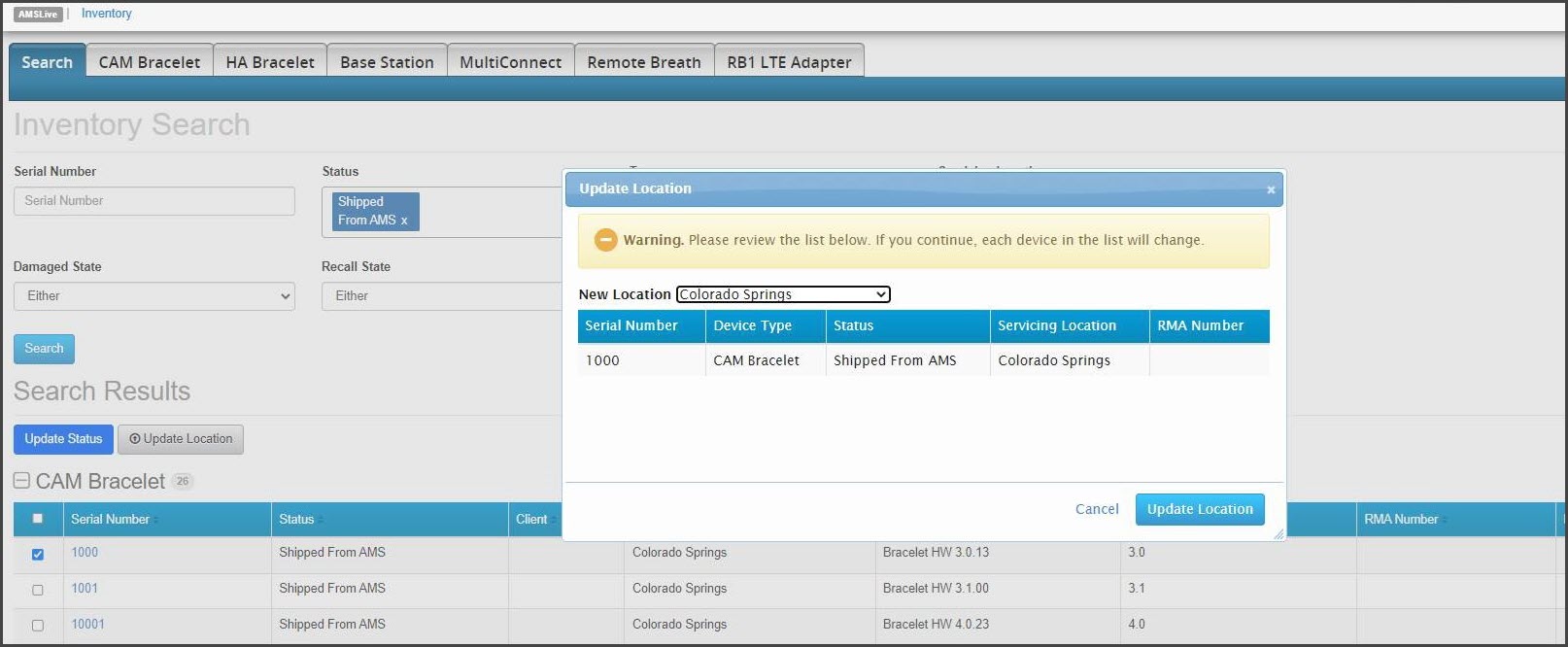
  • You may update the Servicing Location for equipment in a “Shipped from AMS” status to reflect the specific “branch office” to which the equipment has been shipped  
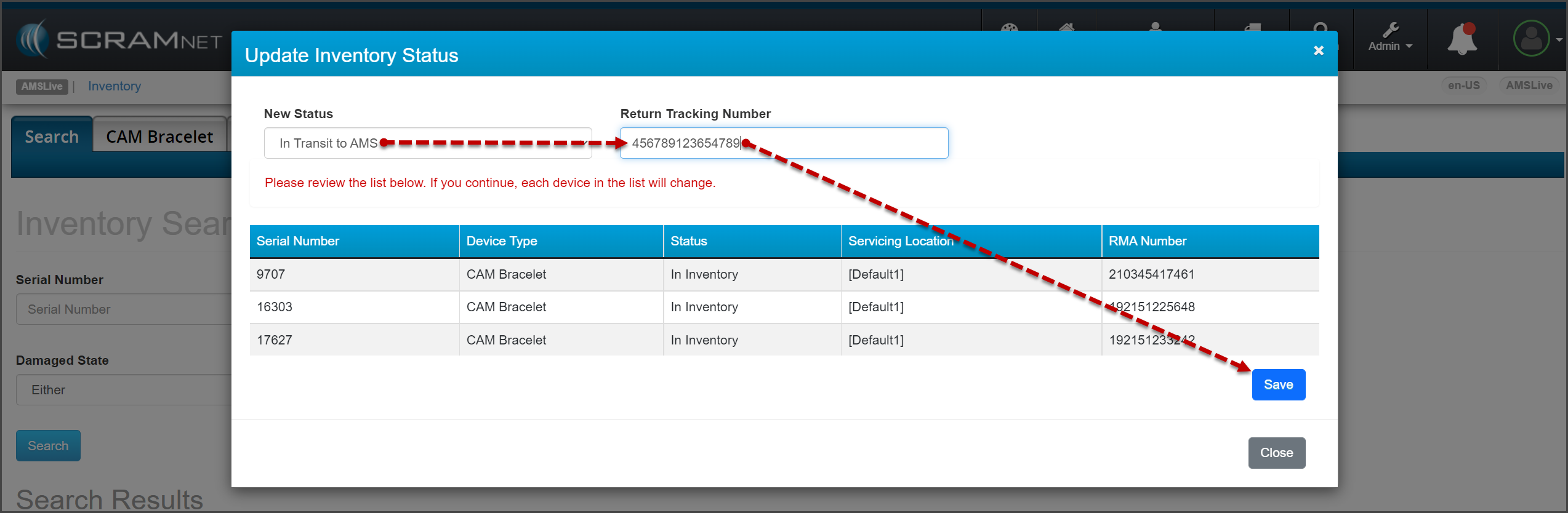
  • Return Tracking Number is now a required field in SCRAMNET for “In Transit to AMS equipment that has been “RMA’d”

Multi Select Filters

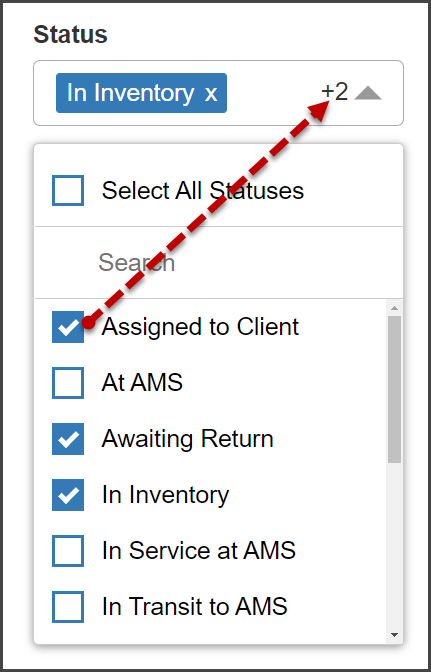
Starting on the Inventory page in SCRAMNET, open the dropdown filters and check the checkboxes to select one or more filter options.   

Inventory Search Filters (click to enlarge)

After opening the dropdown menu, the filter’s heading will display the first option selected, as well as the total number of additional selections made. In this example, the option of  “In Inventory” was selected first, and two additional options were added.

Number of Filters Applied (click to enlarge)

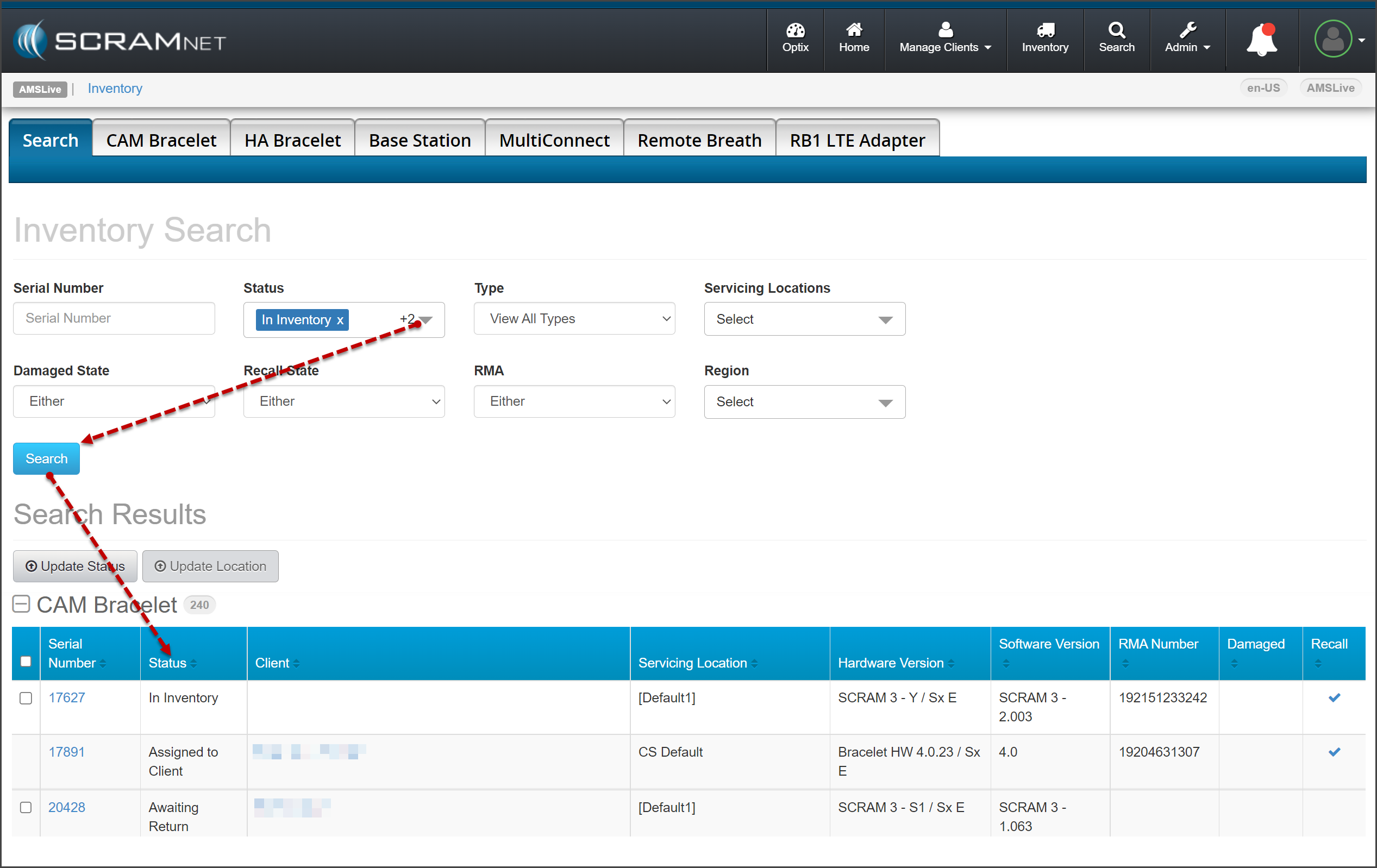
After choosing your options, select the Search button.

Search Results with Filters Applied (click to enlarge)
InformationAs a reminder, to make changes to multiple devices’ statuses or servicing locations, the selected devices must be in the identical status and location.

Update Servicing Location for “Shipped from AMS” Devices

In some scenarios, SCRAM Systems ships equipment directly to our Service Providers’ separate inventory locations. With this update, the inventory managers for these Service Providers may update the Servicing Locations while the equipment is in a “Shipped from AMS” status. Once the equipment is delivered to the location, the inventory manager for that Servicing Location may update the equipment to an “In Inventory” status.

Update the Servicing Location (click to enlarge)

Add FedEx Tracking Numbers

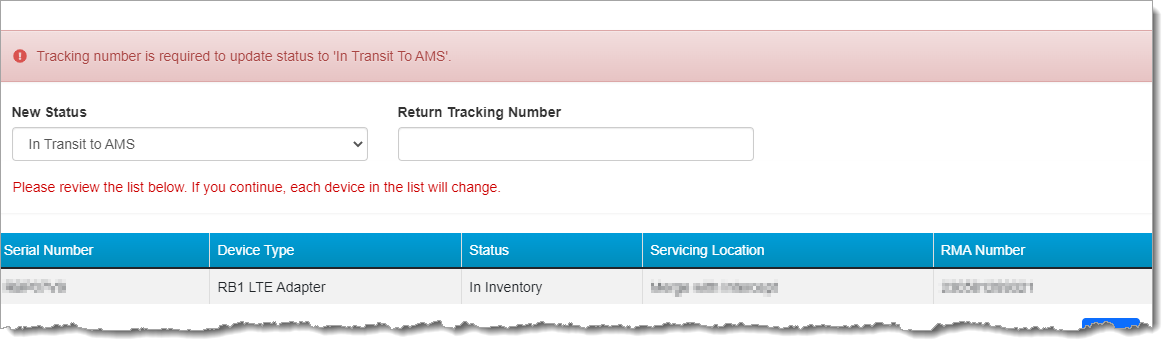
When returning equipment to SCRAM Systems, after selecting the status of “In Transit to AMS” on the Update Inventory Status pop-up, you must add FedEx tracking information.  

Add the Return Tracking Number (click to enlarge)
Return Tracking Number Error Message (click to enlarge)

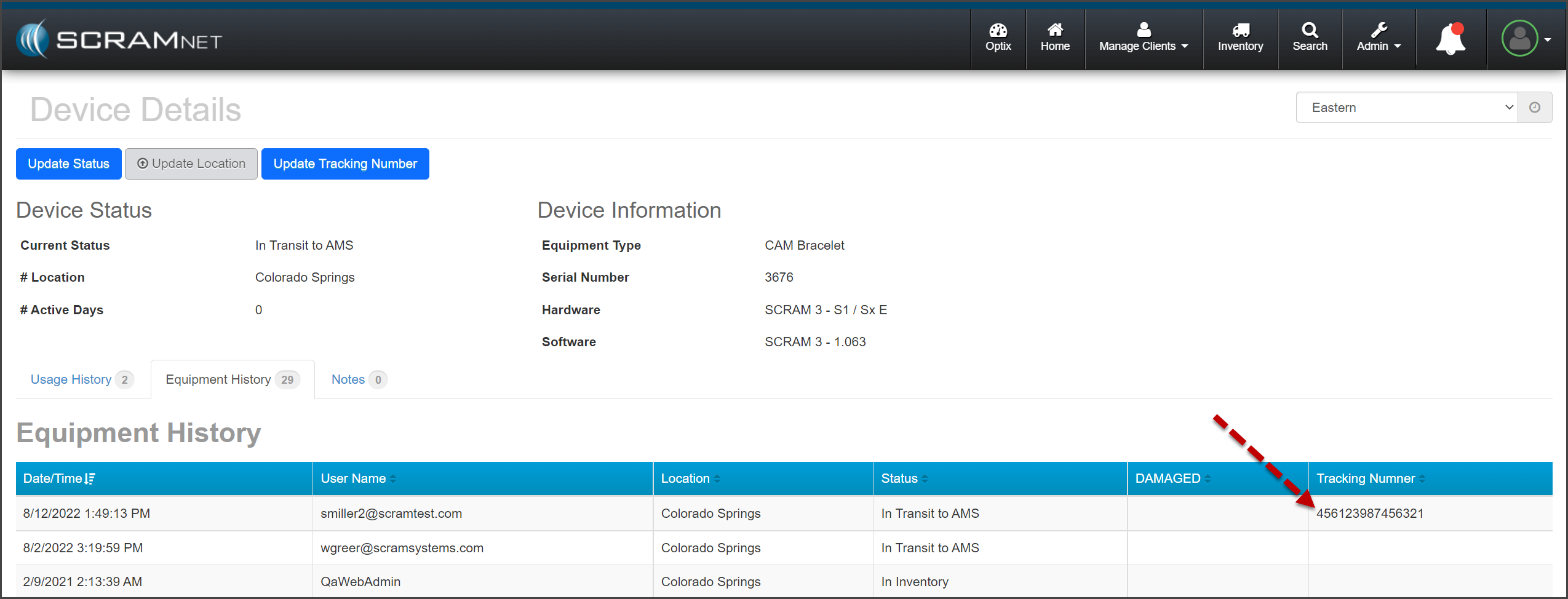
Once you select the Save button on the pop-up, the tracking information is recorded on the Device Details page for each device.  

Tracking Info on the ‘Device Details’ Page (click to enlarge)
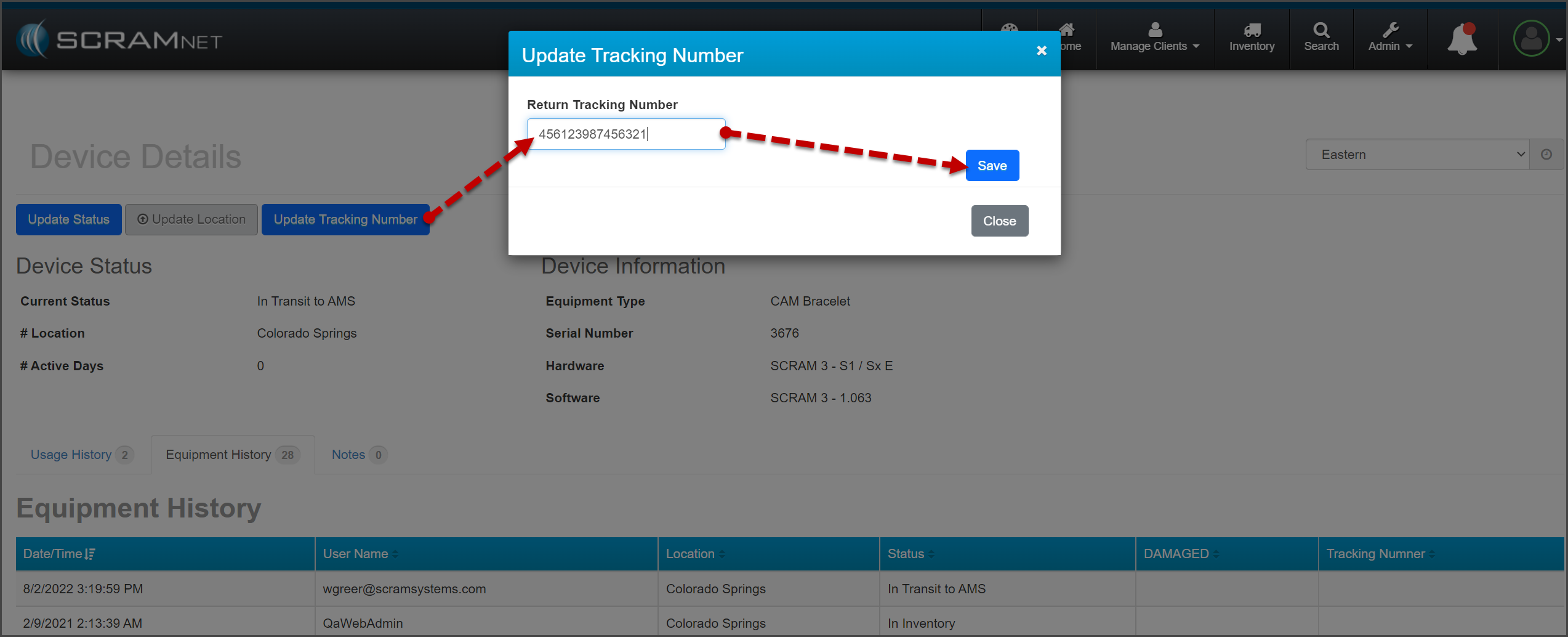
InformationIf the tracking information needs to be edited after initially entering it, you may update the tracking number on the Device Details page for the device.
Update the Tracking Number on the ‘Device Details’ Page (click to enlarge)

Continue Reading

Getting Ready for RB Pro

SCRAM Systems has released a new version of its SCRAM Remote Breath Program Participant Agreement (the “Agreement”). This new Agreement is now the default document that will appear whenever you click on the ‘SCRAM Program Participant Agreement’ link for an RB client in SCRAMNET. Language has been updated throughout the Agreement to make it work with either the current SCRAM Remote Breath device (“RB Classic”), or the soon-to-be-released SCRAM Remote Breath Pro device (“RB Pro”).

Dual Device Support… and more

Most of you will be offering some combination of both RB Classic and RB Pro devices in your monitoring programs until the end of July 2023; so we’ve consolidated the devices into a single Agreement to make administration of your programs easier. Updates were also made to the language surrounding courtesy reminders, replacement pricing, as well as how we handle the personal data we collect from clients. Terminology, like “Participant,” “Agency,” and “Device,” for example, are also defined more clearly at the beginning of this new Agreement.

A blank copy of the new Agreement is also available at the bottom of the Remote Breath Participant Agreements & Videos help page.

Continue Reading

Direct Connect v1 No Longer Works with Your SCRAM Systems Equipment

On June 17, 2021, SCRAM Systems® released Direct Connect Version 2. This new version of the Direct Connect application replaces the old version, and no longer requires you to log in each time you launch it. The new application uses your Microsoft Windows login credentials to automatically log you in.

If you receive the error message, “Unable to access SCRAMnet Updater Service. Error Code 1000/1002,” that means you are attempting to use the old version.

Uninstall the Old Version

SCRAM Systems is not able to remotely identify which computers have been upgraded to the new Direct Connect software; so to avoid any issues in downloading and assigning devices, it is strongly recommended that you follow the Microsoft-recommended instructions on how to uninstall Direct Connect v1 from your monitoring program computers.

Direct Connect v2 Installation Instructions

Visit the Direct Connect Installation page of the SCRAM Systems Help & Support site to learn how to install the Direct Connect v2 application on your monitoring program computers.

Continue Reading

Why You Need to Take Action

On February 22, 2022, AT&T Wireless stopped supporting its 3G cellular network nationwide. This means that the cellular technology that runs SCRAM 3G Wireless Base Station (WBS) devices has either already stopped working, or will in the near future as AT&T continues its turndown efforts.

SCRAM Systems is first and foremost committed to public safety. Since AT&T has already begun decommissioning 3G cell towers, we cannot guarantee your SCRAM WBS 3G devices will continue to operate; so to ensure continuity of your monitoring program, SCRAM Systems advises that you replace your 3G WBS devices with new 4G LTE-compatible SCRAM Wireless Base Stations as soon as possible.

Once the AT&T 3G cellular towers are decommissioned in your area, your 3G WBS devices will no longer communicate, which will render the clients they are assigned to unmonitored. Replace your 3G SCRAM Wireless Base Stations with LTE-compatible SCRAM Wireless Base Stations immediately, to ensure there is no disruption to your monitoring program.

How to Distinguish a 3G WBS from a 4G LTE WBS

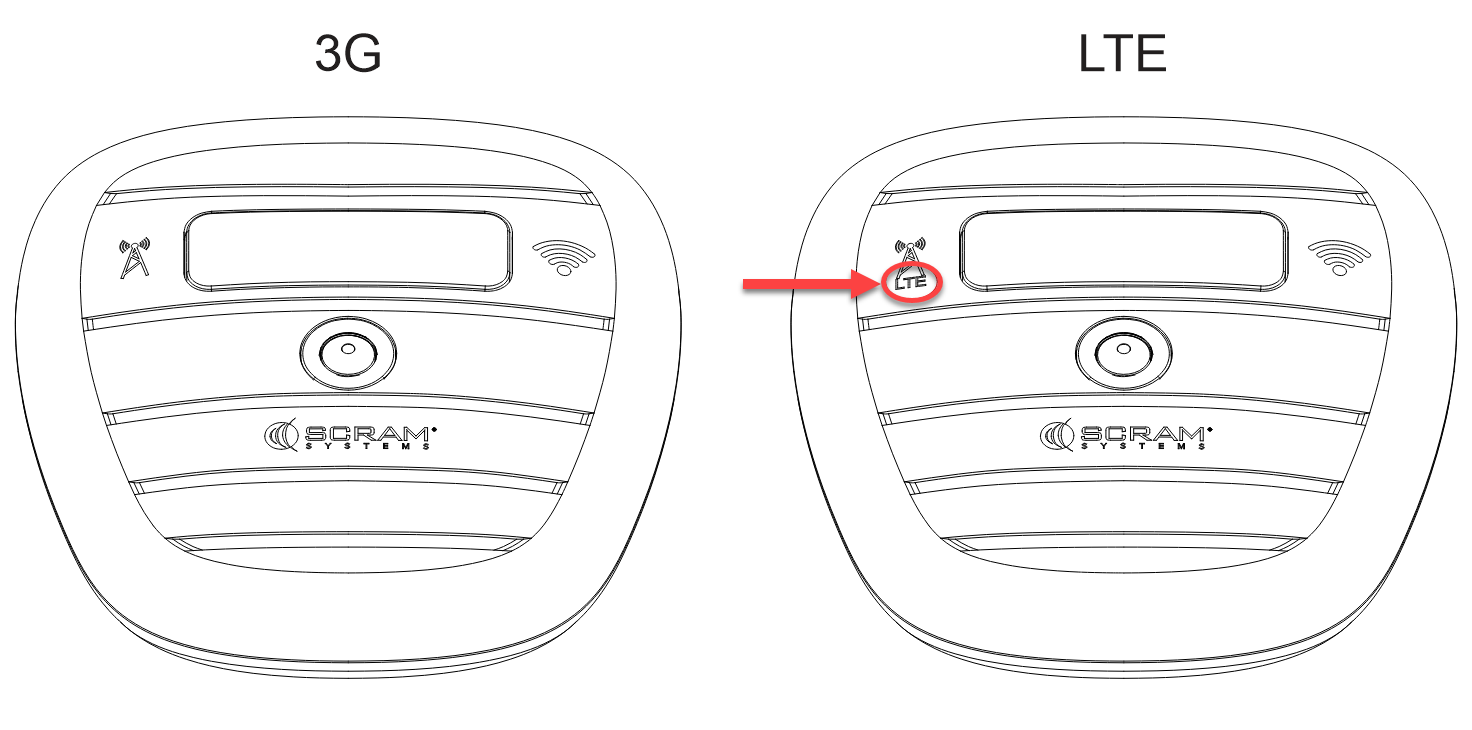
The front casing of a 4G LTE SCRAM Wireless Base Station includes the letters “LTE” just beneath the image of the wireless network (cellular) antenna, which is located just to the left of the display screen.

3G WBS vs. 4G LTE WBS (click to enlarge)

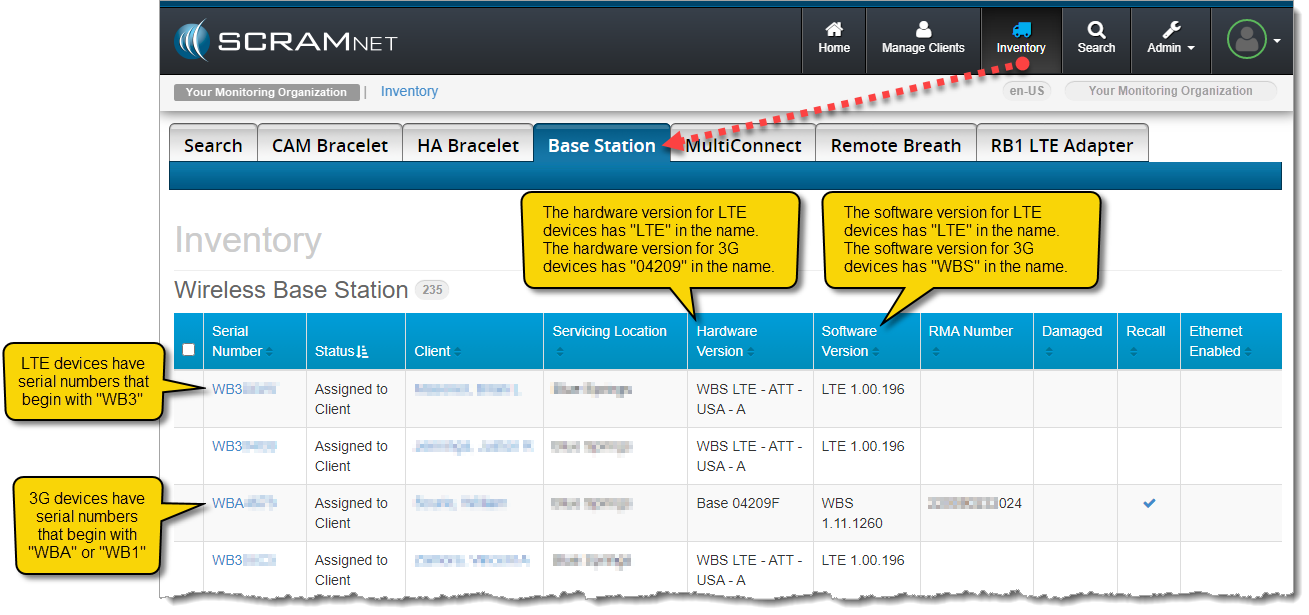
Additionally, the serial numbers for LTE devices begin with “WB3,” whereas the serial numbers for 3G WBS devices begin with “WBA” or “WB1.” Besides using the serial number, on the SCRAMNET Inventory page you can identify the type of WBS devices you have in your inventory by looking at their hardware and software versions.

3G WBS vs LTE WBS in SCRAMNET (click to enlarge)

The hardware version for LTE devices has “LTE” in its name and the hardware version for 3G devices has “04209” in its name. Similarly, the software version for LTE devices has “LTE” in the name; however, the software version for 3G devices has “WBS” in the name.

Next Steps

Contact your SCRAM Systems Account Representative to learn how to replace your 3G WBS inventory with 4G LTE-compatible SCRAM Wireless Base Stations, and read our SCRAM LTE Upgrade FAQ for more information about AT&T’s 3G to 4G-LTE network upgrade.

Continue Reading

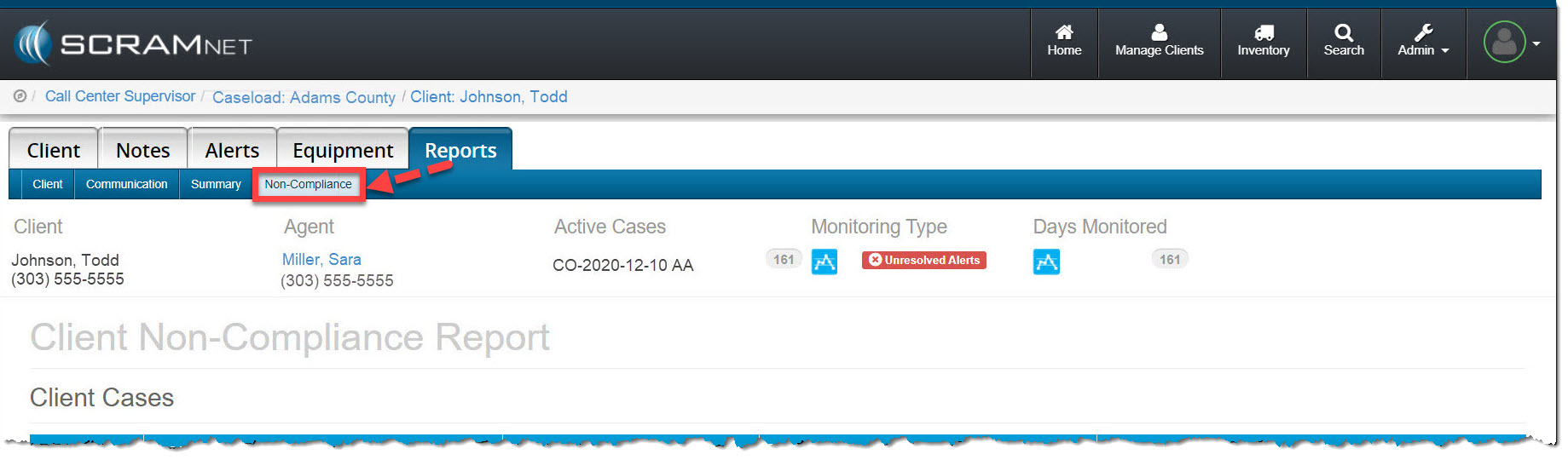
On the afternoon of March 24, 2022, SCRAM Systems® released a new and improved Client Non-Compliance Report in SCRAMNET. This redesigned and streamlined report replaces both the former non-compliance report as well as the custom “Court Report.” The new Client Non-Compliance Report is conveniently located under the client’s Reports tab in SCRAMNET

Client Report tab Non-Compliance subtab highlighted
Non-Compliance Report sub-tab (click to enlarge)

Here are the enhancements you will see:

  • Multiple confirmed alerts may be included in a single report and will be listed chronologically
  • The alert confirmation criteria are included in the report
  • The Manufacturer’s Description of Technology has been updated
  • A Data Interpretation Summary has been added to the report
  • Your organization’s name now appears on the cover page as the preparer of the report
  • The client’s data interpretation is included with each graph
  • Reports are immediately available on-demand in an easy-to-print format

View an example Client Non-Compliance Report (PDF).

To view the step-by-step instructions to create a non-compliance report for a client, visit the Non-compliance Report Help article located in the CAM Help section.

Continue Reading

Press 1 for RMA Assistance

SCRAM Systems now offers enhanced assistance when you wish to request a Return Merchandise Authorization (RMA) for one of your SCRAM Systems devices. When you call our Customer Service telephone support line, select Option 1 to be connected to an specialist who will guide you through the steps to take prior to returning your monitoring device to SCRAM Systems. Oftentimes our specialists can help you get your device working again, without you having to pull it out of circulation and wait for a replacement.

When you call into our Customer Service telephone support center, please use the following options to get your call routed to the most appropriate agent:

  • For assistance with a Return Merchandise Authorization or RMA, press 1
  • For GPS assistance, press 2
  • For questions regarding alcohol and house arrest monitoring services, press 3
  • For equipment inventory and order questions, press 4
  • For TouchPoint related inquiries, press 5
  • For 24/7 and Nexus related questions, press 6
  • For reporting and other general inquiries, press 7

We hope you will find this new level of service helpful, as it is always our goal to streamline our processes to serve you better.

Continue Reading

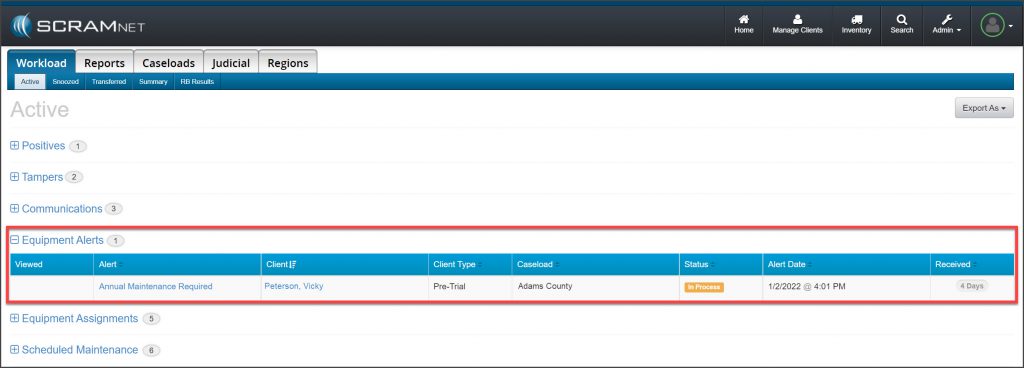
SCRAM Systems has changed the timing of the SCRAM CAM bracelet Annual Maintenance Required alert in SCRAMNET. Instead of being alerted at 366 days of on-ankle use, you will now be alerted that an RMA has been issued for the device on Day 355. This will allow you 10 days to arrange to meet with the client and replace the bracelet. The device will stop generating non-compliance alerts on Day 366. Details below.

At 300 to 354 days of on-ankle use:

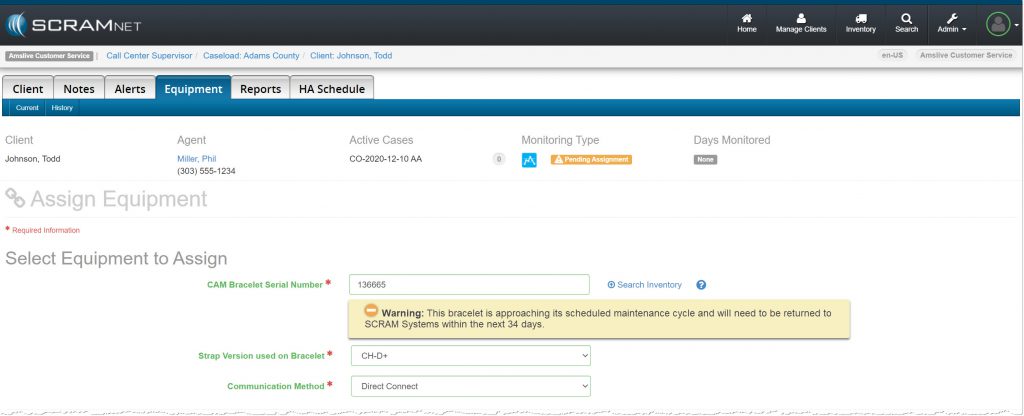
  • A warning message will display under the SCRAM CAM bracelet serial number on the Equipment Assignment page in SCRAMNET.
    • This message provides the number of assigned days available before the bracelet will reach 365 days of on-ankle use and will require replacement.
    • This will aid you in assigning the appropriate SCRAM CAM device from your inventory to meet your clients’ monitoring requirements.
  • The bracelet is still available for client monitoring at this point in time.
Warning Message (click to enlarge)

At 355 days of on-ankle use:

  • An Annual Maintenance RMA is issued for the device, which generates an “Annual Maintenance Required” alert on the Workload page under the ‘Equipment Alerts’ section in SCRAMNET.
  • You have 10 days from this point to replace the SCRAM CAM device and return it to SCRAM Systems for reconditioning and calibration.
  • At this time, the client is still being monitored, and alerts will continue to generate in the system for all non-compliance events.
‘Annual Maintenance Required’ Equipment Alert (click to enlarge)

On Day 366 of on-ankle use:

  • The status of the RMA issued for the device updates to “Failed.”
  • Alcohol and Tamper alerts stop generating in the system for non-compliance events. The client is effectively no longer being monitored.
  • The bracelet should be replaced immediately.  

Continue Reading

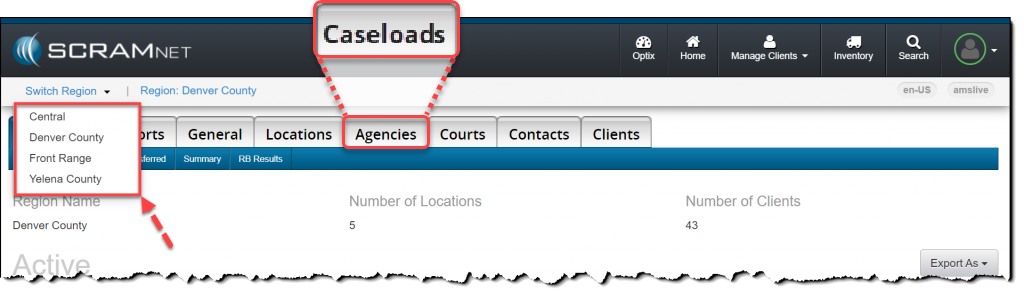
On the afternoon of Thursday, October 28, 2021, all instances of “Agency” that appear in SCRAMNET were changed to “Caseload.” This change applies to items in the site such as page titles, tabs, buttons, as well as various other objects.

The “Agencies” tab is now “Caseloads” (click to enlarge)

Check out the new Manage Caseloads Facility in SCRAMNET!

Related Article

Implementing this change aligns SCRAMNET with terminology currently being used in the field of public safety. The SCRAM Systems Help & Support site has been updated to reflect this change.

Continue Reading

Since its launch three months ago, SCRAM Systems has supported both the new Direct Connect Version 2 – or “DC v2” – and the previous Direct Connect Version 1 – or “DC v1.” Effective November 1, 2021, SCRAM Systems will be retiring DC v1, and the DC v1 software will no longer work with your SCRAM Systems equipment.

On June 17, 2021, SCRAM Systems® released Direct Connect Version 2. This new version of the Direct Connect application no longer requires you to log in each time you launch it. Instead, the application uses your Microsoft Windows login credentials to automatically log you in. In other words, if agent John Doe logs into Windows on a computer and then launches Direct Connect, it will record John Doe’s Windows Username on SCRAMNET, which may or may not match John Doe’s SCRAMNET login ID. What this means is:

If your monitoring organization has one computer you use to do all your Direct Connects, then SCRAMNET will reflect the username of whomever logged into that computer last; so if the agent who logs in first thing in the morning neglects to log out, it’s possible it will look like that agent did all the DCs for all clients all day long.

DC v2 Installation Instructions

Visit the Direct Connect Installation page of the SCRAM Systems Help & Support site to learn how to install the Direct Connect v2 application on your organization’s monitoring program computers. SCRAM Systems is not able to remotely identify which computers have been upgraded to the new Direct Connect software; so to avoid any issues in downloading and assigning devices, it is recommended that you uninstall Direct Connect v1 from your monitoring program computers, since DC v1 will no longer work after November 1st.

Continue Reading