Tip of the Month

RE: Fraudulent Phone Calls Targeting Individuals on Electronic Monitoring

To our valued partners,

We want to make you aware of a recent increase in fraudulent phone calls being made to individuals involved in electronic monitoring (EM) or community supervision programs. These scams are occurring nationwide in the United States, and have affected programs using a variety of EM technologies—not just SCRAM Systems monitoring technologies.

In these calls, the scammer poses as a representative of a sheriff’s office, court, or monitoring company and claims that the individual owes money, is in violation, or could be taken back into custody unless a payment is made immediately. The goal of these calls is to create fear and prompt a quick payment.

Please note the following:

  • There has been no data breach or security incident at SCRAM Systems.
  • This is not a SCRAM-specific issue. Similar scams have targeted programs using other EM devices, as well as drug-testing and supervision programs with no electronic monitoring at all.
  • These scams appear to draw on publicly available information or data obtained through unrelated means.

If any client, agency, or staff member receives such a call:

  1. Do not provide any personal or payment information.
  2. Do not make any payment requests over the phone.
  3. Immediately contact local law enforcement to report the incident.
  4. Notify your SCRAM Account Manager or SCRAM Systems Customer Support so we can assist with awareness and tracking.

SCRAM Systems continues to monitor these incidents closely and remains in contact with law enforcement and agency partners. Protecting the integrity of our programs and the safety of the individuals we serve is our top priority.

Thank you for your continued vigilance and partnership.

Sincerely,
John Hennessey
Chief Operating Officer
SCRAM Systems
jhennessey@scramsystems.com
815-342-4469
Download a copy of this notice

Continue Reading

Proper Alignment of the Device Strap and Backplate

To ensure the backplate is oriented correctly for installation:

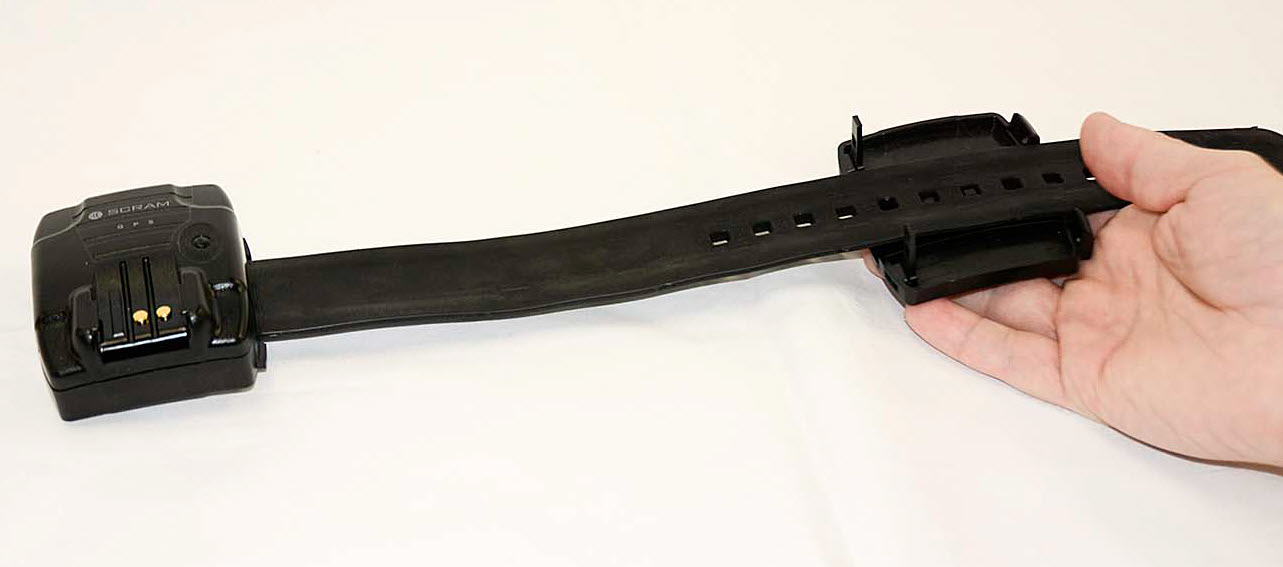
  1. Place the bracelet face up on a desk with the strap on the right side.
  2. Next, place the backplate under the strap with the large posts closest to the bracelet.

The farther away the backplate is positioned from the bracelet body, the larger the circumference of the strap.

The device strap is laid on top of the device backplate such that the two long posts on the backplate are nearest the device itself, and three notches in the strap align with the three pegs in the backplate. This is correct.
Proper Alignment of GPS Device Strap and Backplate
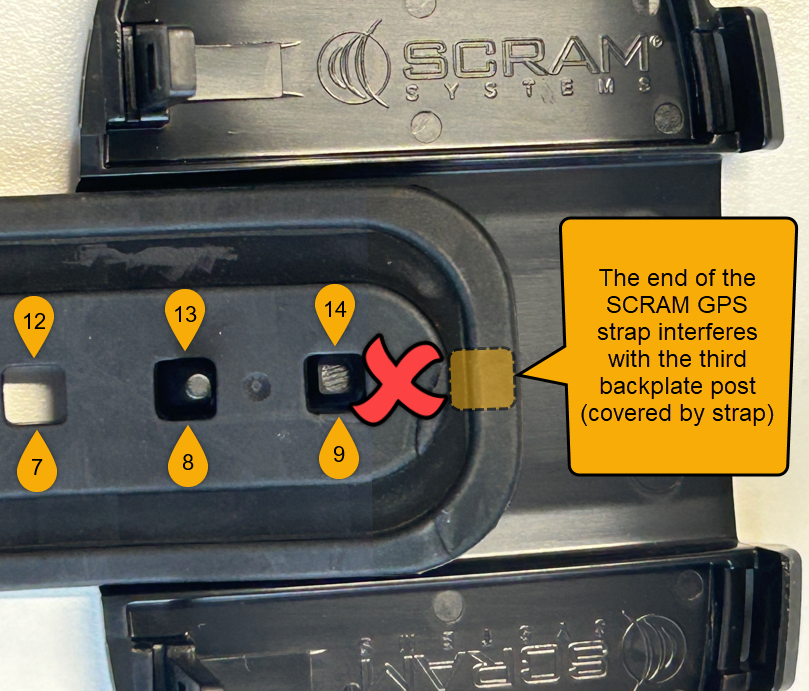
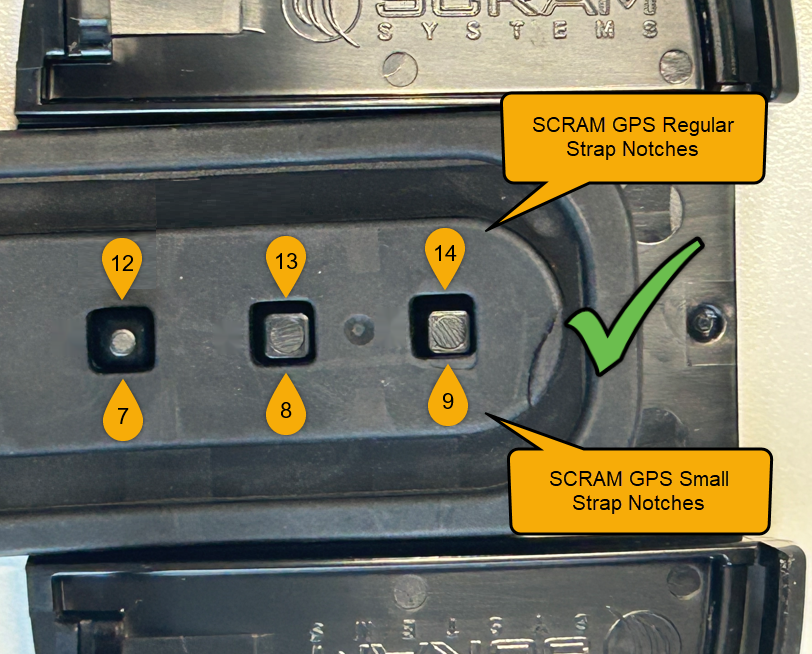
Important! IMPORTANT! There are nine sizing notches in a “small” (sometimes referred to as “juvenile”) SCRAM GPS strap, and 14 sizing notches in a “regular” (adult) SCRAM GPS strap. Ensure that the three raised pegs in the backplate fit into three of the available sizing notches in the strap. DO NOT attempt to secure the strap on only the last two notches of the strap (8 & 9 for small, or 13 & 14 for regular); otherwise the backplate will not close flush against the device casing and may result in tamper alerts being generated in SCRAMNET GPS.
The end of the device strap is laid on top of the device backplate such that the last three notches in the strap align with the three pegs in the backplate. This is correct.
Proper Positioning of the end of SCRAM GPS Straps on Backplate (click to enlarge)
The end of the device strap is laid on top of the device backplate such that the only two of the last three notches in the strap align with the three pegs in the backplate, and the end of the strap interferes with the third peg in the backplate. This is incorrect.
Improper GPS Strap Positioning (click to enlarge)

Continue Reading

After extensive research and testing, SCRAM Systems has decided to move away from its previous line of device cleaning agents in favor of a simplified – but equally effective – approach. Effective immediately, SCRAM Systems recommends all SCRAM devices be cleaned and disinfected with 3% Hydrogen Peroxide (H2O2) Solution. Yes, the stuff in the brown bottle you can get at any local supermarket or drug store.

When used correctly and allowed to remain on surfaces for 10-15 minutes, 3% Hydrogen Peroxide solution is an effective disinfectant, but without the harsh fumes or smell associated with the previous selection of disinfectants. For this reason, 3% Hydrogen Peroxide solution is now the only cleaner approved by SCRAM Systems.

Finish Your Existing Stock of Cleaners

Although SCRAM Systems now recommends 3% Hydrogen Peroxide solution as its only approved cleaning and disinfecting agent for SCRAM devices, you are still welcome to use up your existing stock of previously-approved alcohol-free cleaning agents. Once those previously-purchased cleaning and disinfecting agents are depleted, however, please do not replenish them, and instead make the switch to 3% Hydrogen Peroxide solution.

Where to Get It

3% Hydrogen Peroxide solution is available at almost any local supermarket or drug store, and you are welcome to purchase bottles of it from those local outlets. SCRAM Systems also has supplies in stock and available to order from the SCRAMNET Equipment Order Form or through your SCRAM Systems account representative.

3% hydrogen peroxide benefits: More readily available and easy to find. Can be purchased locally or ordered from SCRAM Systems.
An effective disinfectant when left on surfaces for 10-15 minutes.
More affordable than previous approved cleaners.
Lower levels of fumes and smell!
Brown Bottle Benefits

How to Use It

SCRAM Systems has updated all of its training and help resources to reflect the change. Additionally, the Quick Reference Guides (booklets) for all products have also been updated. Please visit the SCRAM Device Cleaning page on the SCRAM Systems Help and Support site to navigate to cleaning help for your specific device and situation. You may also download our all-in-one Disinfect and Clean SCRAM Equipment “quick sheet,” which includes a one-page matrix on the last page that summarizes the cleaning steps for each device – perfect for printing off and posting at a cleaning station!

Continue Reading

It can sometimes be difficult for a client with a breathing issue, such as COPD or asthma, to provide a breath sample with enough air volume in it to test. The SCRAM Remote Breath Pro (RB Pro) device is designed to test a breath sample for alcohol once 1.5 liters of air has passed through it. The device will, however, test a breath sample for alcohol once 1.3 liters of air has passed through it, if it senses the breath sample air pressure dropping.

Tips for Breath-Testing Success

  1. Doublecheck the Straw: RB Pro breath tubes are fatter on one end versus the other. Make sure your client is inserting the “skinny” end of the straw all the way down into the device and then blowing through the fatter end.
  2. Keep it Clear: There is an exhaust port on the bottom of the RB Pro device. If that port is covered, it will create backpressure through the breath tube and make it difficult to pass enough air through the device. Ensure that your client is not inadvertently covering the exhaust port with a thumb or the palm of their hand, and make sure they never take a breath test with the device lying flat on a table.
  3. Start Strong: Blowing a large volume of air through the breath tube early tells the RB Pro device to start measuring air volume immediately. Starting gently and increasing volume causes some amount of air to pass through the device before it begins measuring to the target volume (1.5 L).

Following these tips will give your clients the best chance at successfully completing their SCRAM Remote Breath monitoring program.

Continue Reading

If you have been on the SCRAM GPS Help site recently, you have probably noticed that many of the help articles have been moved to new locations within the site, as indicated by a moving truck icon followed by a link to the article’s new location.

An example of the moving truck icon followed by a description of where the article has moved and a hyperlink to the article.
Moving Truck Example

We are in the process of redesigning the site to bring it in line with our other SCRAM products and services help sites.

How it Was

Previously, SCRAM GPS help was organized in a couple of different ways. There was a Getting Started section, which covered a wide array of SCRAM GPS-related device and monitoring software setup topics, followed by a series of monitoring system or individual device-specific help sections, which only covered topics related to the monitoring system or one specific device. This hybrid design created many duplicate articles. For example, the Add Client article was covered in both the Getting Started and the SCRAMNET GPS sections. Similarly, the SCRAM GPS Bracelet Installation article could be found in both the Getting Started and GPS Bracelet sections.

A help structure with a varying flow and duplicate articles is difficult to maintain and lends itself to potential article content mismatches. To improve the user experience, we decided to change the overall structure and flow of the site, and in so doing remove the duplicate articles.

How it Will Be

Moving forward, the SCRAM GPS Help portion of the SCRAM Systems Help & Support site will be organized in much the same way as the SCRAM CAM, HA, and RB portions of the site are organized. The help topics will be organized into a “client’s lifecycle on the program” flow, from Getting Started to Client Discharge. Between those two bookends will be topics like Client Management, Caseload Management, and Equipment Maintenance. A Program Administration section will round out the GPS Help topics.

The SCRAM GPS Help articles you’ve come to depend on will be – or already are – in the process of moving to these new top-level sections. We’ll even be adding some new help articles along the way. The “moving truck” will be there to guide you through the changes. Once the new structure is completely in place and we have given everyone a chance to update their help article bookmarks, we will “park” the moving trucks.

Thank You

Thank you for your patience during this redesign and transition. It will be worth it in the end.

Continue Reading

With the end of Summer closing in, some of your clients who are wearing SCRAM CAM Devices as part of their monitoring program requirements, may be looking forward to squeezing in a vacation before their kids head back to school, for example.

If you have clients who fit that description, SCRAM Systems recommends that Program Participants who will be traveling by air while wearing a SCRAM CAM Device, carry a printed copy of their signed SCRAM CAM or SCRAM CAM+HA Program Participant Agreement, along with a printed copy of our Air Travel Safety Statement, to share with airport security and airline personnel if needed.

Continue Reading

You may have noticed that when it is time to assign equipment, after adding your client to the SCRAMNET GPS monitoring system, you are now prompted to make a “Participant Agreement Acknowledgement.” A Participant Agreement is a legal contract between you – as agent for the monitoring services provider or supervising authority – and the client.

SCRAM Systems strongly recommends using a signed Participant Agreement for every client in your program.

Within the Agreement, you and your organization agree to fit the client with a SCRAM GPS device and provide all the necessary accessories (charging cable, e.g.) for your client to be successful in their monitoring program, and the client agrees to wear the device and follow the rules of the monitoring program as described in the Agreement.

Your organization may use its own agreement it has developed in-house and evolved over time, or your organization may use the SCRAM Systems-developed SCRAM GPS Program Participant Agreement that we too have evolved over time, and vetted with our internal legal counsel. Either way, SCRAM Systems strongly recommends using a signed Participant Agreement for every client in your program, as it provides legal protection to both you as agent and your organization.


Where to Find the SCRAM Systems GPS Participant Agreements

The SCRAM Systems developed GPS Participant Agreements are available in two places on the Help Site:

  1. The SCRAM GPS Participant Agreements & Videos page (the SCRAM GPS Overview and Rules video is also an excellent resource available for you to use during device assignment)
  2. The SCRAM GPS Documents page located in the References section of SCRAM GPS Help.

The New Participant Agreement Acknowledgement

The addition of the Acknowledgement to the enrollment process grew out of a need for better recordkeeping. The Acknowledgement is simply a record of which Agreement was used at the time of enrollment and does not impact the level of court support you receive from SCRAM Systems.

Learn more about the Participant Agreement Acknowledgement enhancement to SCRAMNET GPS.

Continue Reading

Re: Fraudulent Phone Calls, Client Safety, & Data Security Assurance

To Our Valued Partners,

We want to take a moment to reassure you that there has been no data breach at SCRAM Systems. Our internal security teams have conducted a thorough review of recent reports, and there is no indication that any data has been accessed or compromised from SCRAM Systems’ servers.

What we are observing appears to be part of a broader scam targeting individuals on Electronic Monitoring (EM) programs nationwide—regardless of the device manufacturer or service provider. These fraudulent calls have been reported by clients wearing a variety of monitoring devices from multiple vendors and appear to stem from publicly available information or data obtained through unrelated means.

SCRAM Systems is actively monitoring the situation and remains in close contact with partners and relevant authorities to ensure the integrity of our systems and support the safety of monitored individuals.

In the meantime, we continue to recommend the following:

  • If a client receives a suspicious or threatening call, they should immediately contact local law enforcement and report the incident.
  • If you have any client reports or specific details to share, we welcome you to pass them along so we can escalate internally and contribute to broader awareness and monitoring efforts.

We are also available to set up a call should you wish to discuss this matter further.

Thank you for your continued partnership and vigilance.

Sincerely,

John Hennessey

Chief Operating Officer

SCRAM Systems

jhennessey@scramsystems.com

815-342-4469
Download a copy of this letter

Continue Reading

SCRAM Systems has recently learned of a telephone-based scam that targets the clients of electronic monitoring (EM) programs. Currently, the scam appears to be centered in the states of North Carolina and Tennessee, and focused on EM clients. In this scam, a caller poses as a member of local law enforcement – or in one case, as a SCRAM Systems representative – and then demands payment and/or bank account information from the client over the phone for EM device monitoring services. The scammer additionally threatens arrest or other legal consequences for failure to comply.

Please be aware that SCRAM Systems will never contact your clients to request payments. We have engaged our Security Team to investigate this further, and we encourage you to share news of this potential fraud with your monitoring program clients, as well as any monitoring program team member who interfaces with clients.

You may also wish to share news of this scam with recently-released clients who are not court-ordered to be fitted with an EM device, as they may be targeted by scammers who claim they are to be fitted with one and must pay for it in advance.

If you have any questions or receive reports of fraud attempts, please contact SCRAM Systems Customer Service.

Continue Reading

Tips Warning: Corrosion of internal components may occur if these instructions are not followed.

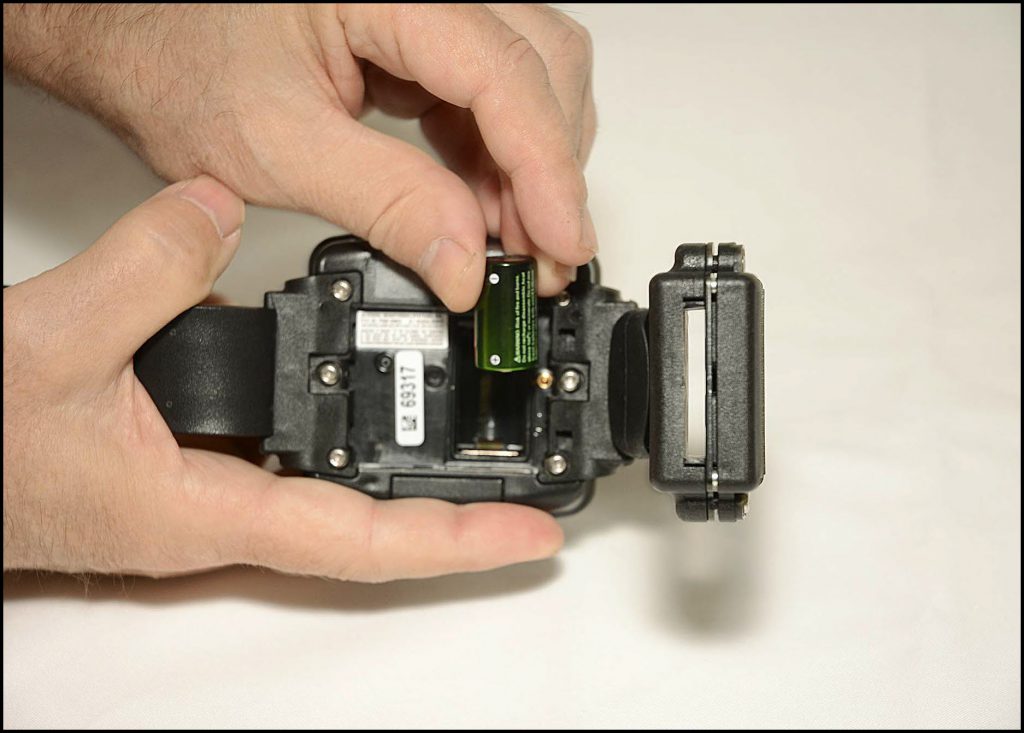
Follow these instructions to ensure your battery and faceplate are installed correctly to get the most out of your alcohol monitoring device.

Clean the Battery Compartment

  1. Remove the old faceplate and battery and dispose of them in accordance with local regulations.
    Important! Important: Never reuse a SCRAM CAM battery. Once removed, dispose of it or recycle it in accordance with local regulations and replace it with a new battery.
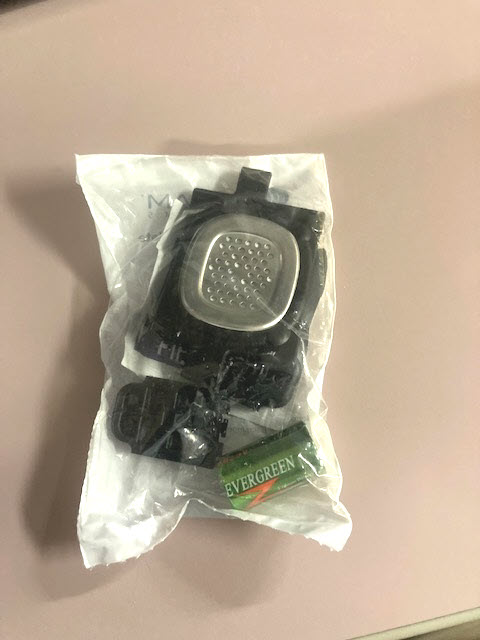
  2. Open a Battery/Faceplate Kit (P/N 03628 on the SCRAM Equipment Order Form).
    SCRAM Battery/Faceplate Kit (click to enlarge)
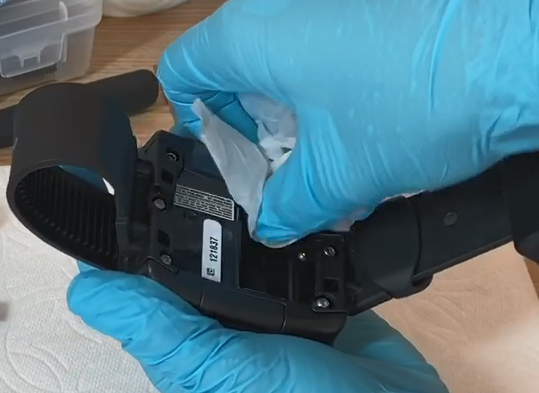
  3. Using the wipe provided in the kit, wipe the battery contacts in the device battery compartment, and then dry the contacts with a paper towel or microfiber cloth.
Image of Cleaning Bracelet Battery Contacts
Cleaning Bracelet Battery Contacts (click to enlarge)

Install the Battery

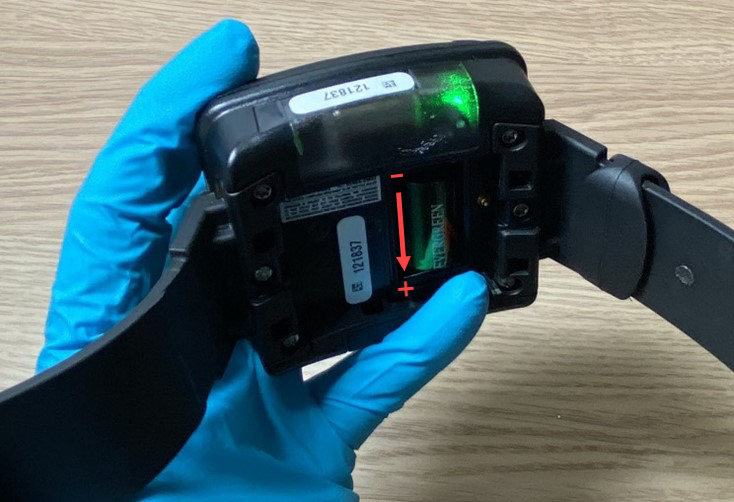
Install Battery Positive (+) Side Down (click to enlarge)
  1. Place the battery in the battery compartment with the positive end of the battery positioned towards the bottom of the bracelet body (it points downward).
  2. Ensure you see a green light when the battery is installed. The green light will turn off after five seconds.
Image of Battery Installed in Bracelet with Green Light On
Battery Installed in Bracelet with Green Light On (click to enlarge)

Install the Faceplate

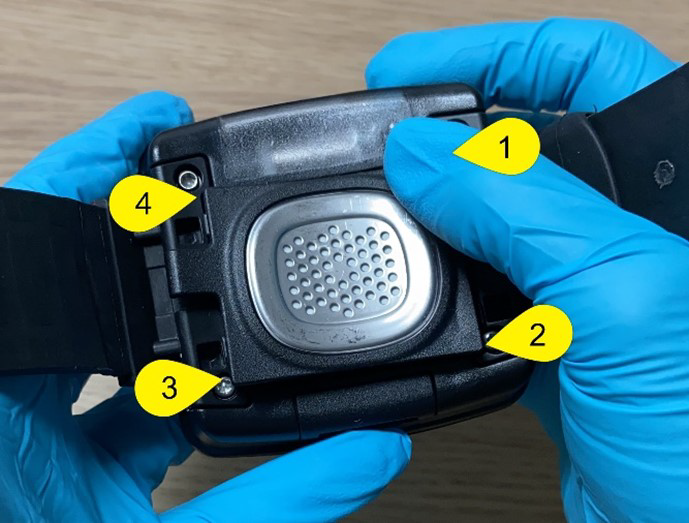
  1. Lay the replacement faceplate over the battery compartment.
  2. Starting in the upper right corner, press down firmly until you hear/feel a click.
  3. Moving clockwise on the faceplate, press down firmly in each of the remaining corners. Ensure you hear/feel a click in each corner.
  4. It may be necessary to remove the faceplate and reinstall if you do not hear or feel a click in each corner of the faceplate.
Image of Installing Faceplate on Bracelet
Installing Faceplate on Bracelet (click to enlarge)
Tips Warning: Moisture may seep through the faceplate seals and corrode internal components if the faceplate is not thoroughly attached – you must hear/feel four distinct clicks!

Continue Reading