SCRAM GPS Device

On 24 March 2026, SCRAM Systems deployed an enhancement to the Suspend Alerts facility in SCRAMNET GPS that allows for continuous suspension of alerts over a series of consecutive days.

Scenario

In some cases, it would be practical to suspend GPS alerts continuously across multiple days. For example, for a client on a monitoring program that allows the client to live at home and go to work during the work week, but the client must report to jail for incarceration through the weekend, it would be useful to be able to suspend alerts generated by the SCRAM GPS device for the weekend hours during which the client is incarcerated.

Pre-Enhancement

Prior to this enhancement, officers were able to schedule alert suspension for the desired days, but not continuously from a start-time on day one to an end-time on the last day. For example, if an officer wished to suspend alerts from Friday at 8 PM to Sunday at 4 PM with no gaps in between, the officer would complete the SCRAMNET GPS Suspend Alerts page as follows:
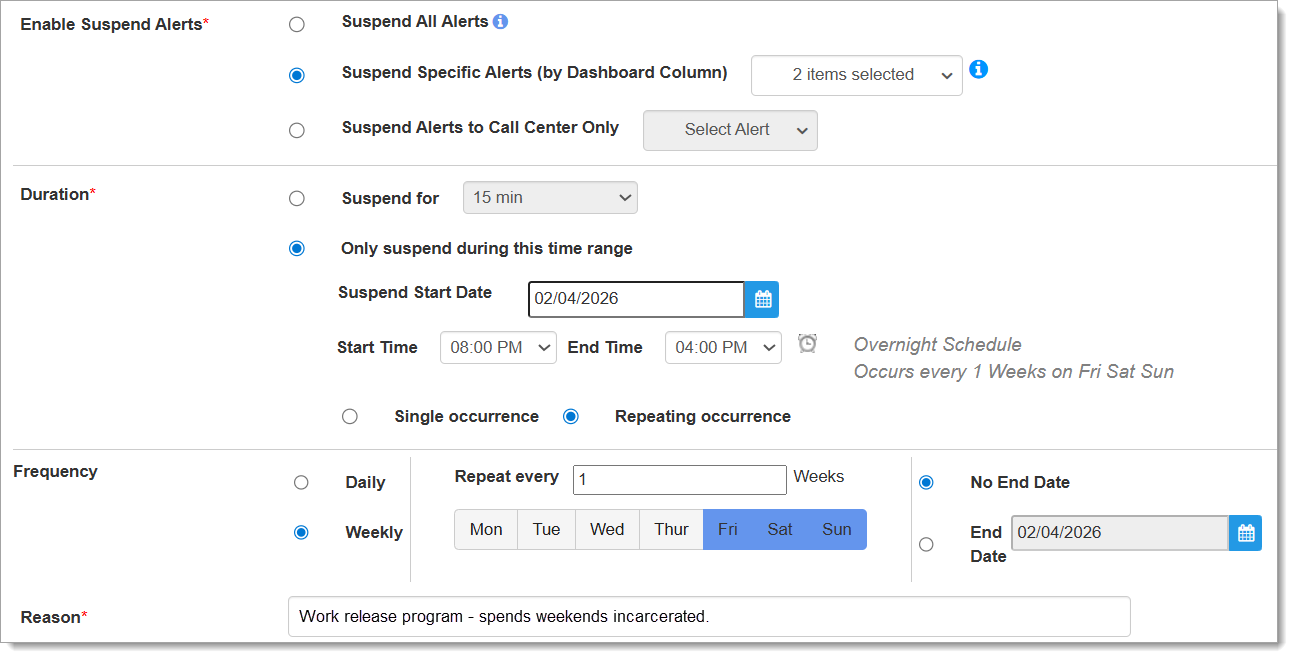
Pre-Enhancement Alert Suspension Configuration (click to enlarge)

Instead of a continuous alert suspension through the weekend, however, this would result in GPS alerts being suspended from 8PM Friday to 4PM Saturday; then again from 8PM Saturday to 4PM Sunday. But from 4PM Saturday to 8PM Saturday, there would be a four-hour gap during which GPS alerts could generate while the client is still incarcerated.

Post-Enhancement

With the release of this enhancement, officers may now schedule an alert suspension not only for the desired days, but continuously from the desired start-time on the first day to the end-time on the last day. Using the same scenario as above, the officer would complete the SCRAMNET GPS Suspend Alerts page as follows, but now including the use of the new “All Day” checkbox:
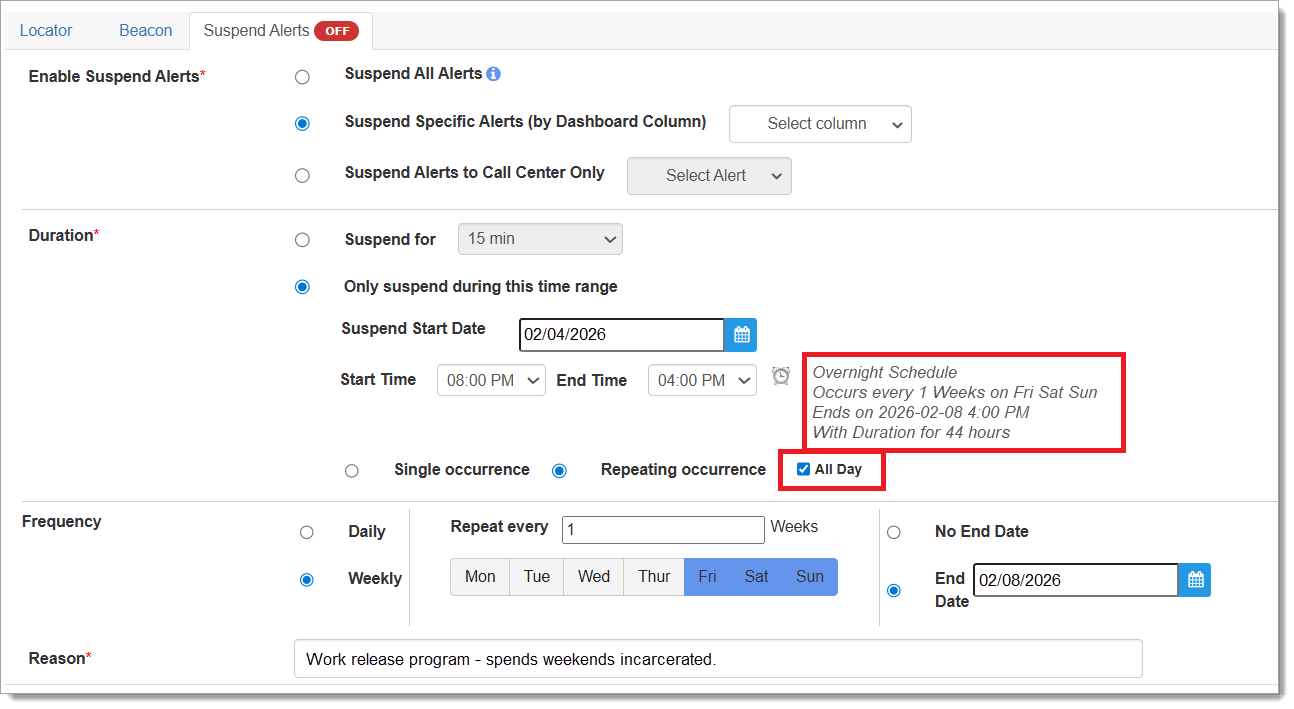
Post-Enhancement Alert Suspension Configuration (click to enlarge)

Enhanced Confirmation Messaging

Updated messaging confirms the officer’s selections prior to saving, including a message about the total duration of the alert suspension. If a mistake is made in the configuration input by the officer, updated error messaging explains the mistake prior to saving as well:
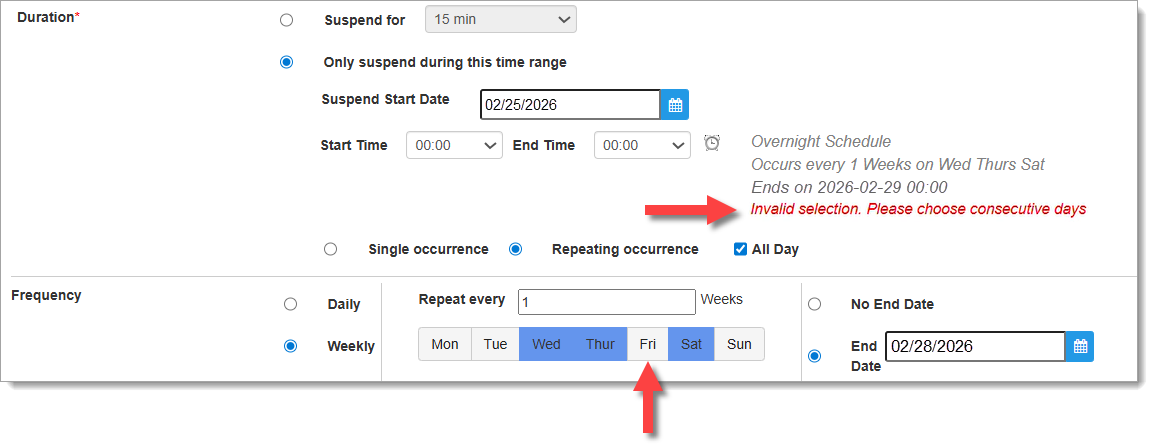
Updated Messaging Provides Confirmation and Error Information (click to enlarge)

In the example above, the officer checked the “All Day” checkbox to indicate continuous alert suspension across multiple days, however, the officer also selected Wednesday, Thursday, and Saturday as the Weekly Frequency; Friday was not selected. The “All Day” feature only works if consecutive days are selected, and the error message indicates this in red text.
Continue Reading

Proper Alignment of the Device Strap and Backplate

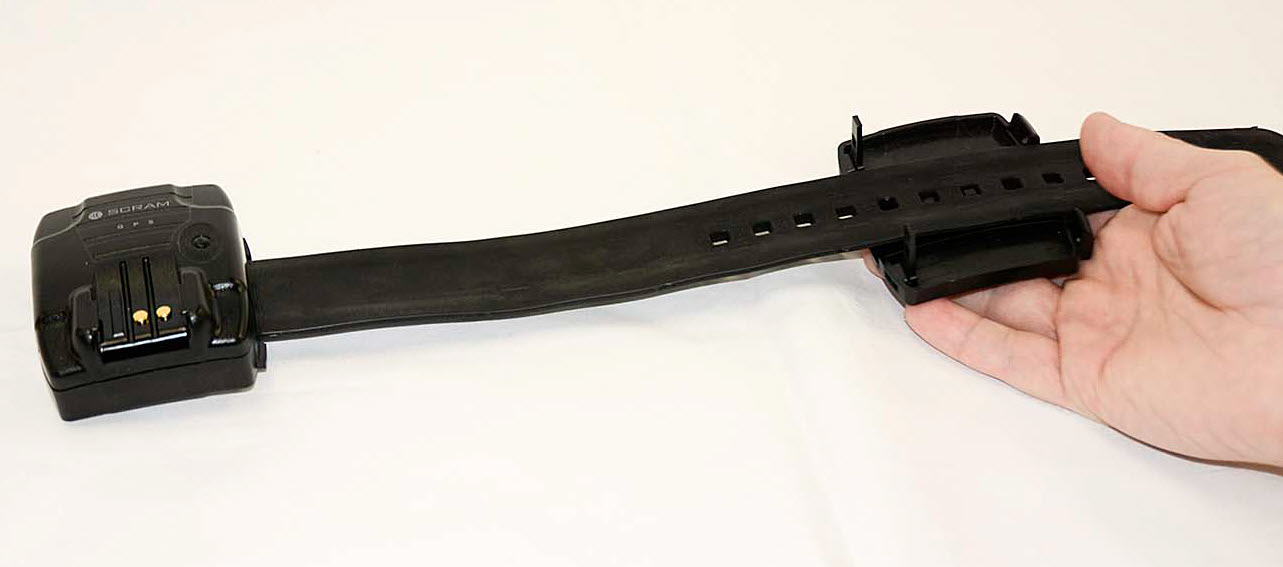
To ensure the backplate is oriented correctly for installation:

  1. Place the bracelet face up on a desk with the strap on the right side.
  2. Next, place the backplate under the strap with the large posts closest to the bracelet.

The farther away the backplate is positioned from the bracelet body, the larger the circumference of the strap.

The device strap is laid on top of the device backplate such that the two long posts on the backplate are nearest the device itself, and three notches in the strap align with the three pegs in the backplate. This is correct.
Proper Alignment of GPS Device Strap and Backplate
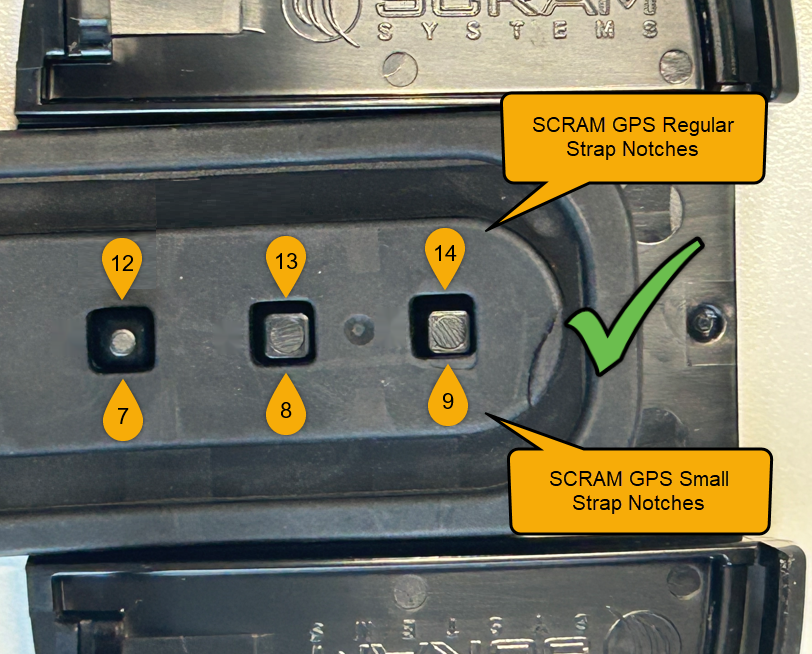
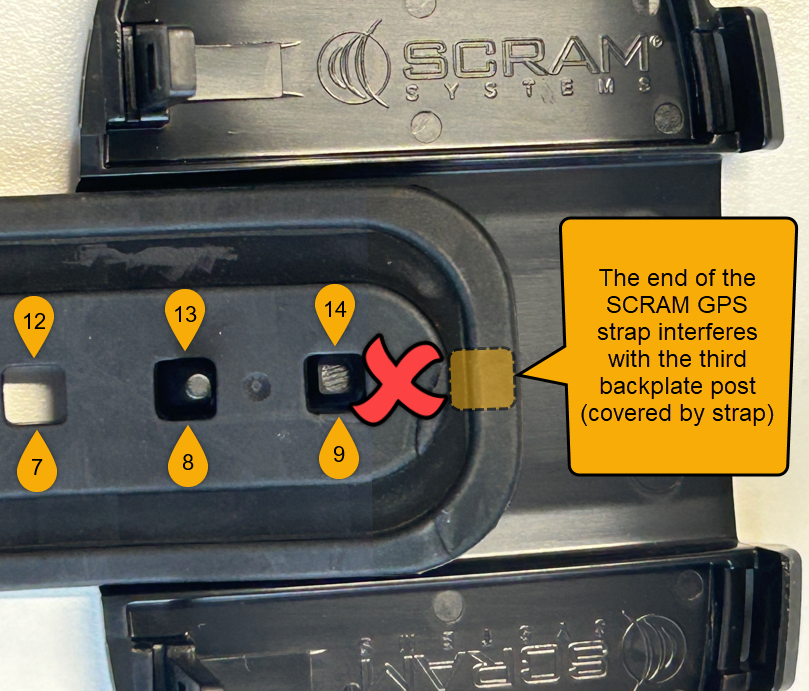
Important! IMPORTANT! There are nine sizing notches in a “small” (sometimes referred to as “juvenile”) SCRAM GPS strap, and 14 sizing notches in a “regular” (adult) SCRAM GPS strap. Ensure that the three raised pegs in the backplate fit into three of the available sizing notches in the strap. DO NOT attempt to secure the strap on only the last two notches of the strap (8 & 9 for small, or 13 & 14 for regular); otherwise the backplate will not close flush against the device casing and may result in tamper alerts being generated in SCRAMNET GPS.
The end of the device strap is laid on top of the device backplate such that the last three notches in the strap align with the three pegs in the backplate. This is correct.
Proper Positioning of the end of SCRAM GPS Straps on Backplate (click to enlarge)
The end of the device strap is laid on top of the device backplate such that the only two of the last three notches in the strap align with the three pegs in the backplate, and the end of the strap interferes with the third peg in the backplate. This is incorrect.
Improper GPS Strap Positioning (click to enlarge)

Continue Reading

Based on SCRAM GPS customer feedback, SCRAM Systems is introducing two new No Motion-related features in SCRAMNET GPS:

  1. New ‘No Motion Cleared’ Alert for SCRAM GPS 9 Plus Devices
  2. Ability to Include or Exclude No Motion Alerts from Alert Suspensions
Information SCRAMNET GPS deployments typically occur on Thursdays at 7:00 AM EST in the US, 10:00 PM AEST in Australia, and the following 12:00 AM EST (Friday) in Canada. Please refer to the official SCRAM Systems email communication associated with this release for more details. During the 15-minute deployment, you may not be able to access SCRAMNET GPS, but messages from the SCRAM GPS device will continue to be processed uninterrupted.

New ‘No Motion Cleared’ Alert for SCRAM GPS 9 Plus Devices

Based on customer feedback, we have added the ability to indicate when a No Motion alert on a SCRAM GPS 9 Plus device has auto-cleared. This displays a blue icon on the Dashboard and allows users to document how the alert was handled.

SCRAM GPS 9 Plus Device No Motion Alert Auto-Clear on the Dashboard (click to enlarge)

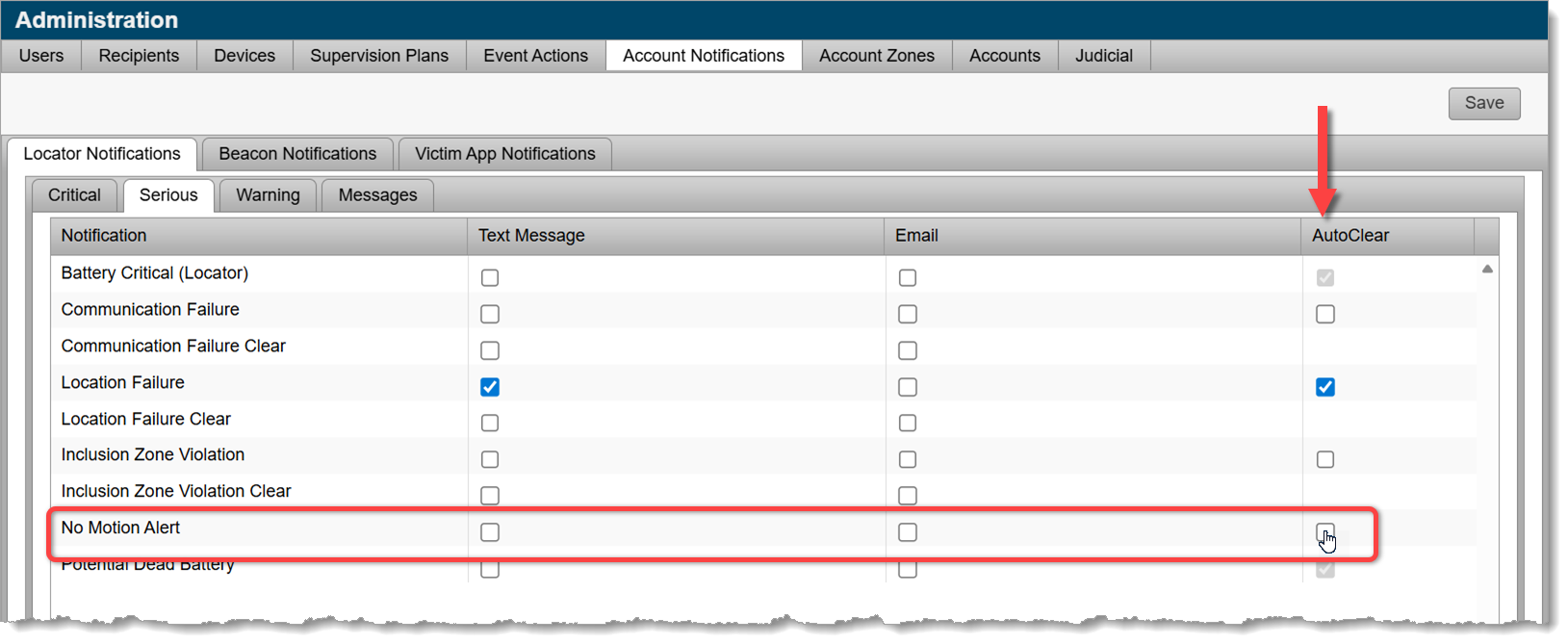
Administrators can enable this feature by selecting the No Motion Alert “AutoClear” checkbox in Account Notifications.

Activate No Motion Alert Auto-Clear on the Account Notifications Page (click to enlarge)

New No Motion Alert Suspension Feature

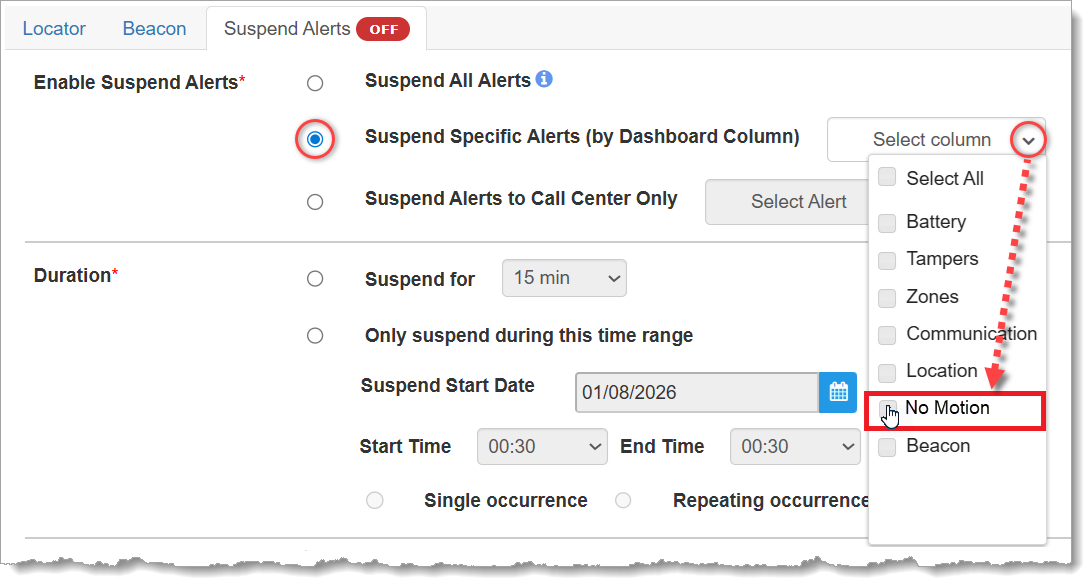
Under the suspend alerts section, SCRAMNET GPS users are now able to include or exclude No Motion alerts from the alert suspension process.

Include or Exclude No Motion Alerts from Alert Suspension (click to enlarge)

Continue Reading

SCRAM Systems is introducing several new enhancements to the SCRAMNET GPS monitoring system. While many of the enhancements are either caseload-specific or back-end updates, two notable enhancements will be available to all SCRAM GPS customers:

  1. New Icon to Indicate Wi-Fi points for SCRAM GPS 9 Plus Devices
  2. Account Level Setting to Set Default for Client SSN Checkbox
Information SCRAMNET GPS deployments typically occur on Thursdays at 7:00 AM EST in the US, 10:00 PM AEST in Australia, and the following 12:00 AM EST (Friday) in Canada. Please refer to the official SCRAM Systems email communication associated with this release for more details. During the 15-minute deployment, you may not be able to access SCRAMNET GPS, but messages from the SCRAM GPS device will continue to be processed uninterrupted.

New Icon to Indicate Wi-Fi points for SCRAM GPS 9 Plus Devices

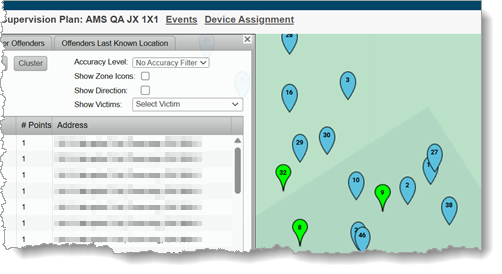
Location points that are derived from Wi-Fi hotspots instead of through GPS or Cell Tower Points (CTP) will now be displayed with a blue icon. This will allow users to immediately identify the source of the location points without drilling down.

Wi-Fi Points Display in Blue

Account Level Setting to Set Default for Client SSN Checkbox

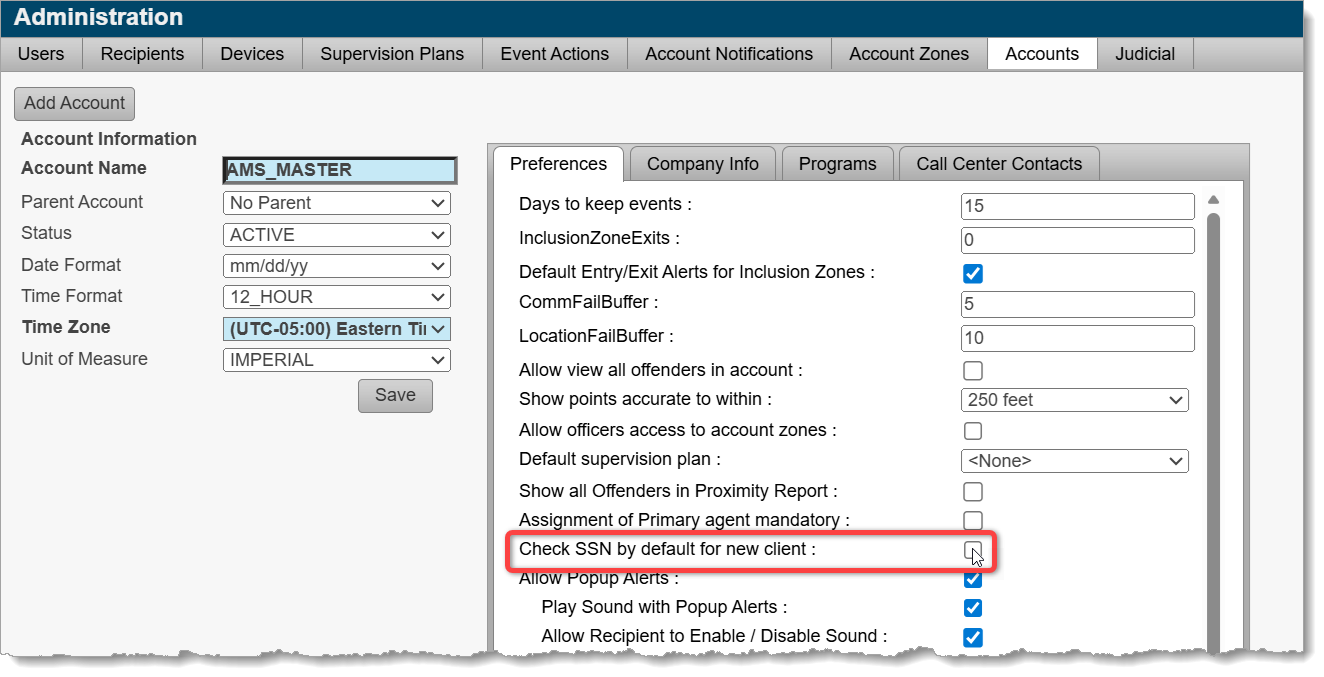
With this release, Administrators may select a checkbox at the account level that ensures that all new clients added will have the SSN checkbox enabled. Enabling this checkbox encrypts the social security number of the client in reports and provides an additional level of protection for that information.

New Checkbox: Check SSN by default for new client (click to enlarge)

Continue Reading

At 5:00 AM MST on Tuesday, November 4, 2025, SCRAM Systems will release an enhancement that will give you more duration options for suspending client alerts.

Information During the 15-minute deployment, you may not be able to access SCRAMNET GPS, but messages from the SCRAM GPS device will continue to be processed uninterrupted.

New, Longer Suspension Durations

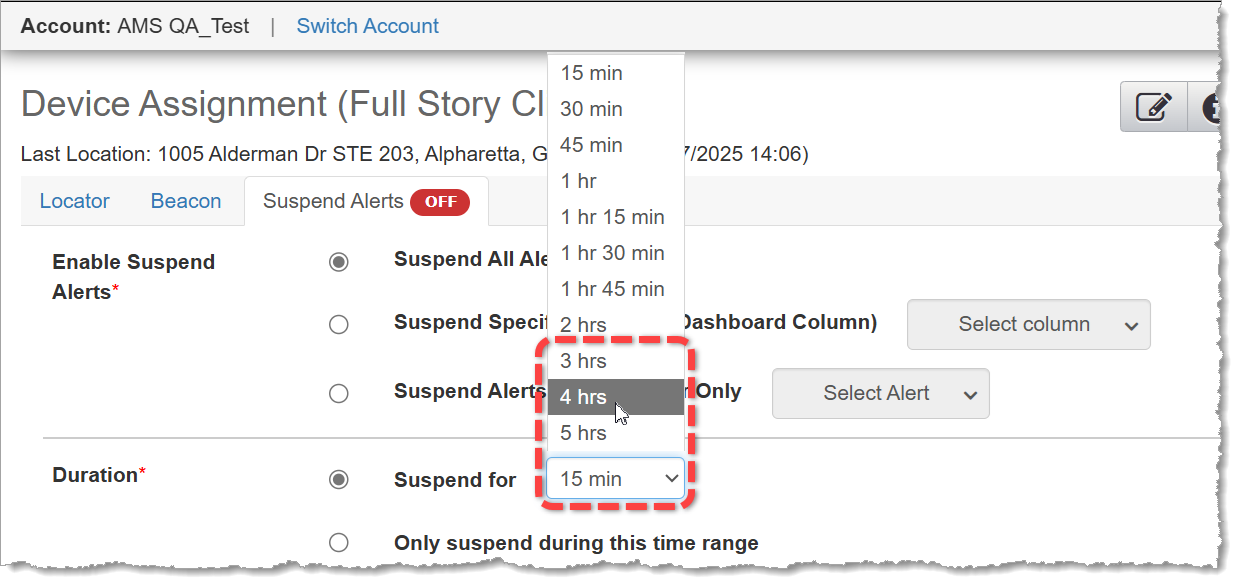
Three, four, and five-hour durations have been added to the “Suspend for” dropdown menu. These expanded durations may be useful in situations where your client is scheduled to be in a location for a relatively long time that is normally “off limits,” or is an impaired communications environment.

3 hrs, 4 hrs, and 5 hrs are now available alert suspension durations (click to enlarge)

Please visit the Suspend Event Notification article in SCRAM GPS Help for detailed instructions on how to use this feature.

Continue Reading

At 5:00 AM MDT on Thursday, September 18, 2025, SCRAM Systems will introduce a new third option to the Participant Agreement Acknowledgement during device assignment in SCRAMNET GPS.

Information During the 15-minute deployment, you may not be able to access SCRAMNET GPS, but messages from the SCRAM GPS device will continue to be processed uninterrupted.

Device Assignment Enhancement

In June of 2025, SCRAM Systems released an enhancement in SCRAMNET GPS that requires you to make a “Participant Agreement Acknowledgement.” The addition of this acknowledgement to the enrollment process grew out of a need for better recordkeeping. This acknowledgement is simply a record of which Agreement was used at the time of enrollment and does not impact the level of court support you receive from SCRAM Systems.

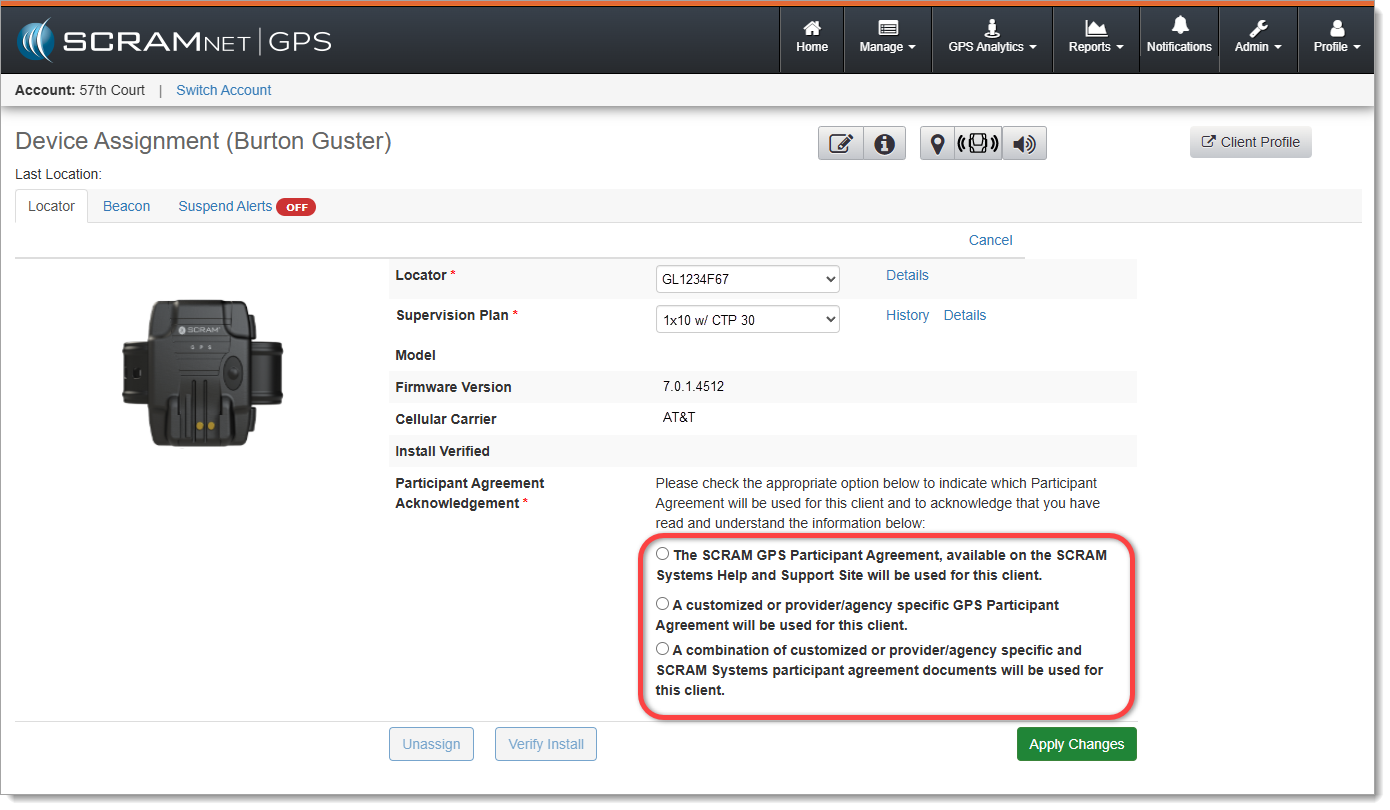
Originally, you were presented with two choices. With this release you will now have three options from which to choose:

  1. The SCRAM GPS Participant Agreement, available on the SCRAM Systems Help and Support Site will be used for this client.
  2. A customized or provider/agency specific GPS Participant Agreement will be used for this client.
  3. NEW! A combination of customized or provider/agency specific and SCRAM Systems participant agreement documents will be used for this client.
The new ‘Participant Agreement Acknowledgement’ section on the Device Assignment page in SCRAMNET GPS (click to enlarge)

First Option

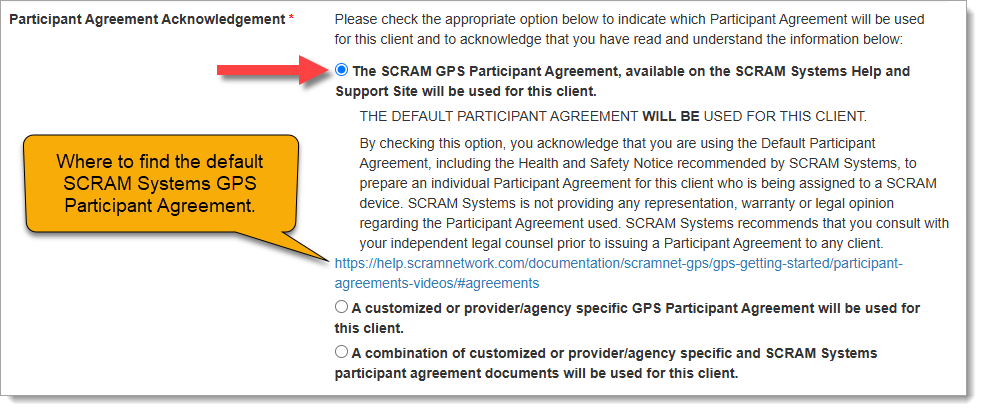
Customers who use the SCRAM Systems-provided SCRAM GPS Program Participant Agreement and Health & Safety Notice, which is available for download from SCRAM Systems Help & Support, will choose the first option, “The SCRAM GPS Participant Agreement, available on the SCRAM Systems Help and Support Site will be used for this client.” This option indicates that you are using the default SCRAM GPS Participant Agreement that was developed by SCRAM Systems and is currently available in SCRAM GPS Help.

Once you have chosen an option, a more detailed explanation of the choice you have made will appear, along with a link to the SCRAM GPS Participant Agreement documents on GPS Help:

Participant Agreement Acknowledgement Option 1 chosen (click to enlarge)

Second Option

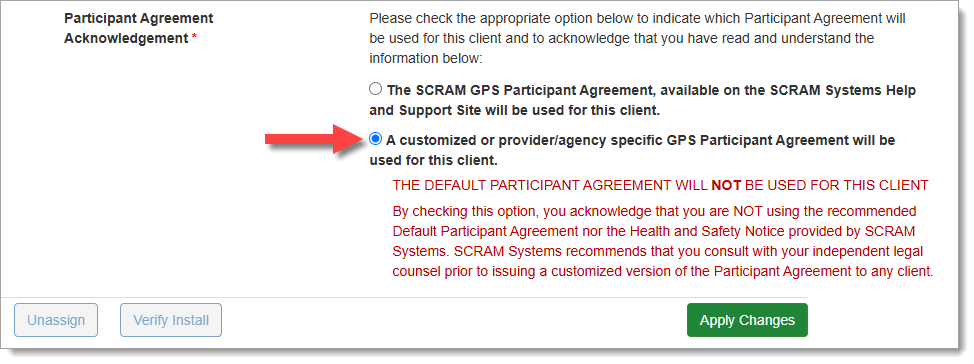
Customers who use their own monitoring program participation agreements, which they have developed in-house, independent of SCRAM Systems, and are NOT accessed from SCRAM Systems Help & Support, should choose the second option, “A customized or provider/agency specific GPS Participant Agreement will be used for this client,” as shown below:

Participant Agreement Acknowledgement Option 2 chosen (click to enlarge)

Third Option

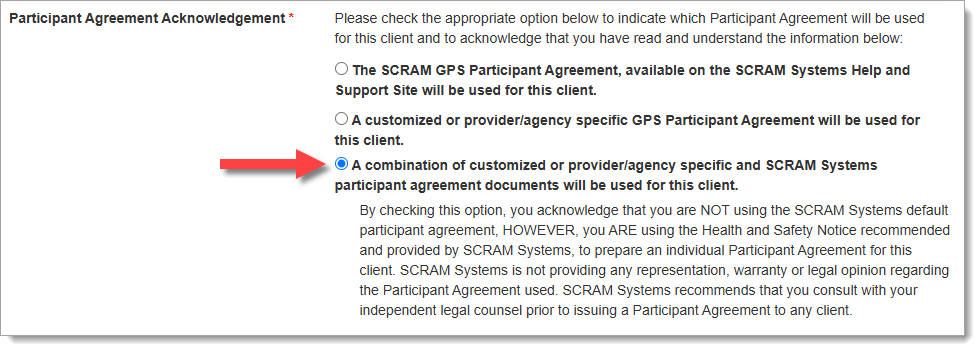
Customers who use their own monitoring program participation agreements, which they have developed in-house and independent of SCRAM Systems, but combine it with the SCRAM Systems Health & Safety Notice, should select the third Participant Agreement Acknowledgement option.

Participant Agreement Acknowledgement Option 3 chosen (click to enlarge)
ImportantIf you are unsure about the type of monitoring program participation agreement used by your organization, ask your supervisor or program administrator.

Completing the Device Assignment

Once you have chosen the appropriate Participant Agreement Acknowledgement, then Apply Changes and continue with the device assignment process as usual.

TipTip: Regardless of which option you select, SCRAM Systems recommends you print two copies of the Participant Agreement and have the client and agent sign both copies – one copy for your records and one copy for the client’s records.

Audit Report

The Participant Agreement Acknowledgement selection made will be reflected in the Audit Report. This ensures a comprehensive and auditable history of agreement usage for each device assignment.

Continue Reading

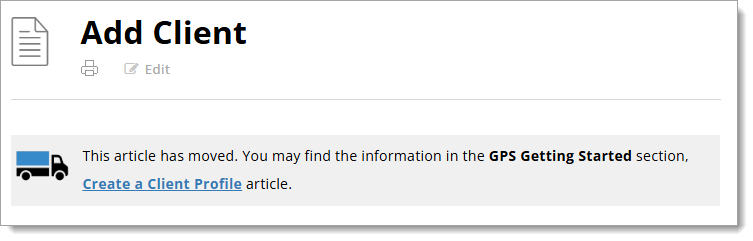
If you have been on the SCRAM GPS Help site recently, you have probably noticed that many of the help articles have been moved to new locations within the site, as indicated by a moving truck icon followed by a link to the article’s new location.

An example of the moving truck icon followed by a description of where the article has moved and a hyperlink to the article.
Moving Truck Example

We are in the process of redesigning the site to bring it in line with our other SCRAM products and services help sites.

How it Was

Previously, SCRAM GPS help was organized in a couple of different ways. There was a Getting Started section, which covered a wide array of SCRAM GPS-related device and monitoring software setup topics, followed by a series of monitoring system or individual device-specific help sections, which only covered topics related to the monitoring system or one specific device. This hybrid design created many duplicate articles. For example, the Add Client article was covered in both the Getting Started and the SCRAMNET GPS sections. Similarly, the SCRAM GPS Bracelet Installation article could be found in both the Getting Started and GPS Bracelet sections.

A help structure with a varying flow and duplicate articles is difficult to maintain and lends itself to potential article content mismatches. To improve the user experience, we decided to change the overall structure and flow of the site, and in so doing remove the duplicate articles.

How it Will Be

Moving forward, the SCRAM GPS Help portion of the SCRAM Systems Help & Support site will be organized in much the same way as the SCRAM CAM, HA, and RB portions of the site are organized. The help topics will be organized into a “client’s lifecycle on the program” flow, from Getting Started to Client Discharge. Between those two bookends will be topics like Client Management, Caseload Management, and Equipment Maintenance. A Program Administration section will round out the GPS Help topics.

The SCRAM GPS Help articles you’ve come to depend on will be – or already are – in the process of moving to these new top-level sections. We’ll even be adding some new help articles along the way. The “moving truck” will be there to guide you through the changes. Once the new structure is completely in place and we have given everyone a chance to update their help article bookmarks, we will “park” the moving trucks.

Thank You

Thank you for your patience during this redesign and transition. It will be worth it in the end.

Continue Reading

At 5:00 AM MDT on Thursday, August 28, 2025, SCRAM Systems will introduce two important feature enhancements for SCRAM GPS 9 Plus devices in SCRAMNET GPS:

  1. Enhancements to the Potential Cell Jamming Alert
  2. Updates to the Battery Fully Charged Event
Information During the 15-minute deployment, you may not be able to access SCRAMNET GPS, but messages from the SCRAM GPS device will continue to be processed uninterrupted.

Potential Cell Jamming Alert

This enhancement release will enable SCRAMNET GPS to utilize data from additional sensors within SCRAM GPS 9 Plus devices to both generate and clear Potential Cell Jamming alerts. Communication and battery sensors, among others, will supplement the generation and clearing of these alerts.

Battery Fully Charged Event

Occasionally, events will come in from SCRAM GPS 9 Plus devices that indicate the battery has been fully charged when in fact the device has not. With this enhancement, additional data will be used and analyzed prior to the SCRAMNET GPS Dashboard displaying Battery Fully Charged events.

Continue Reading

You may have noticed that when it is time to assign equipment, after adding your client to the SCRAMNET GPS monitoring system, you are now prompted to make a “Participant Agreement Acknowledgement.” A Participant Agreement is a legal contract between you – as agent for the monitoring services provider or supervising authority – and the client.

SCRAM Systems strongly recommends using a signed Participant Agreement for every client in your program.

Within the Agreement, you and your organization agree to fit the client with a SCRAM GPS device and provide all the necessary accessories (charging cable, e.g.) for your client to be successful in their monitoring program, and the client agrees to wear the device and follow the rules of the monitoring program as described in the Agreement.

Your organization may use its own agreement it has developed in-house and evolved over time, or your organization may use the SCRAM Systems-developed SCRAM GPS Program Participant Agreement that we too have evolved over time, and vetted with our internal legal counsel. Either way, SCRAM Systems strongly recommends using a signed Participant Agreement for every client in your program, as it provides legal protection to both you as agent and your organization.


Where to Find the SCRAM Systems GPS Participant Agreements

The SCRAM Systems developed GPS Participant Agreements are available in two places on the Help Site:

  1. The SCRAM GPS Participant Agreements & Videos page (the SCRAM GPS Overview and Rules video is also an excellent resource available for you to use during device assignment)
  2. The SCRAM GPS Documents page located in the References section of SCRAM GPS Help.

The New Participant Agreement Acknowledgement

The addition of the Acknowledgement to the enrollment process grew out of a need for better recordkeeping. The Acknowledgement is simply a record of which Agreement was used at the time of enrollment and does not impact the level of court support you receive from SCRAM Systems.

Learn more about the Participant Agreement Acknowledgement enhancement to SCRAMNET GPS.

Continue Reading

At 5:00 AM MDT on Thursday, June 26, 2025, SCRAM Systems will introduce a new Participant Agreement Acknowledgement feature in SCRAMNET GPS.

Information During the 15-minute deployment, you may not be able to access SCRAMNET GPS, but messages from the SCRAM GPS device will continue to be processed uninterrupted.

Device Assignment Enhancement

When it is time to assign equipment after adding your client to SCRAMNET GPS, before you may continue with the assignment process, you will have to make a “Participant Agreement Acknowledgement.” The addition of this acknowledgement to the enrollment process grew out of a need for better recordkeeping. This acknowledgement is simply a record of which Agreement was used at the time of enrollment and does not impact the level of court support you receive from SCRAM Systems.

You will be presented with two choices:

  1. The SCRAM GPS Participant Agreement, available on the SCRAM Systems Help and Support Site will be used for this client.
  2. A customized or provider/agency specific GPS Participant Agreement will be used for this client.
The new ‘Participant Agreement Acknowledgement’ section on the Device Assignment page in SCRAMNET GPS (click to enlarge)

Customers who use the SCRAM Systems-provided SCRAM GPS Program Participant Agreement and Health & Safety Notice, which is available for download from SCRAM Systems Help & Support, will choose the first option, “The SCRAM GPS Participant Agreement, available on the SCRAM Systems Help and Support Site will be used for this client.” This option indicates that you are using the default SCRAM GPS Participant Agreement that was developed by SCRAM Systems and is currently available in SCRAM GPS Help.

Once you have chosen an option, a more detailed explanation of the choice you have made will appear:

Participant Agreement Acknowledgement Option 1 chosen (click to enlarge)

Customers who use their own monitoring program participation agreements, which they have developed in-house, independent of SCRAM Systems, and are NOT accessed from SCRAM Systems Help & Support, should choose the second option, “A customized or provider/agency specific GPS Participant Agreement will be used for this client,” as shown below:

Participant Agreement Acknowledgement Option 2 chosen (click to enlarge)
ImportantIf you are unsure about the type of monitoring program participation agreement used by your organization, ask your supervisor or program administrator.

Completing the Device Assignment

Once you have chosen the appropriate Participant Agreement Acknowledgement, then Apply Changes and continue with the device assignment process as usual.

TipTip: Regardless of which option you select, SCRAM Systems recommends you print two copies of the Participant Agreement and have the client and agent sign both copies – one copy for your records and one copy for the client’s records.

Audit Report

The Participant Agreement Acknowledgement selection made will be reflected in the Audit Report. This ensures a comprehensive and auditable history of agreement usage for each device assignment. The Audit Entry is shown as one of the following:

  • SCRAM Systems Approved Participant Agreement – YES
  • SCRAM Systems Approved Participant Agreement – NO

Continue Reading