With the end of Summer closing in, some of your clients who are wearing SCRAM CAM Devices as part of their monitoring program requirements, may be looking forward to squeezing in a vacation before their kids head back to school, for example.
If you have clients who fit that description, SCRAM Systems recommends that Program Participants who will be traveling by air while wearing a SCRAM CAM Device, carry a printed copy of their signed SCRAM CAM or SCRAM CAM+HA Program Participant Agreement, along with a printed copy of our Air Travel Safety Statement, to share with airport security and airline personnel if needed.
Re: Fraudulent Phone Calls, Client Safety, & Data Security Assurance
To Our Valued Partners,
We want to take a moment to reassure you that there has been no data breach at SCRAM Systems. Our internal security teams have conducted a thorough review of recent reports, and there is no indication that any data has been accessed or compromised from SCRAM Systems’ servers.
What we are observing appears to be part of a broader scam targeting individuals on Electronic Monitoring (EM) programs nationwide—regardless of the device manufacturer or service provider. These fraudulent calls have been reported by clients wearing a variety of monitoring devices from multiple vendors and appear to stem from publicly available information or data obtained through unrelated means.
SCRAM Systems is actively monitoring the situation and remains in close contact with partners and relevant authorities to ensure the integrity of our systems and support the safety of monitored individuals.
In the meantime, we continue to recommend the following:
If a client receives a suspicious or threatening call, they should immediately contact local law enforcement and report the incident.
If you have any client reports or specific details to share, we welcome you to pass them along so we can escalate internally and contribute to broader awareness and monitoring efforts.
We are also available to set up a call should you wish to discuss this matter further.
Thank you for your continued partnership and vigilance.
SCRAM Systems has recently learned of a telephone-based scam that targets the clients of electronic monitoring (EM) programs. Currently, the scam appears to be centered in the states of North Carolina and Tennessee, and focused on EM clients. In this scam, a caller poses as a member of local law enforcement – or in one case, as a SCRAM Systems representative – and then demands payment and/or bank account information from the client over the phone for EM device monitoring services. The scammer additionally threatens arrest or other legal consequences for failure to comply.
Please be aware thatSCRAM Systems will never contact your clients to request payments. We have engaged our Security Team to investigate this further, and we encourage you to share news of this potential fraud with your monitoring program clients, as well as any monitoring program team member who interfaces with clients.
You may also wish to share news of this scam with recently-released clients who are not court-ordered to be fitted with an EM device, as they may be targeted by scammers who claim they are to be fitted with one and must pay for it in advance.
Important: Never reuse a SCRAM CAM battery. Once removed, dispose of it or recycle it in accordance with local regulations and replace it with a new battery.
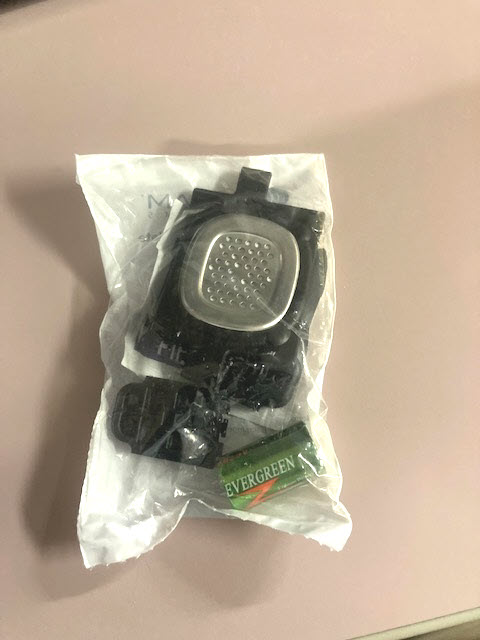
Open a Battery/Faceplate Kit (P/N 03628 on the SCRAM Equipment Order Form).
SCRAM Battery/Faceplate Kit (click to enlarge)
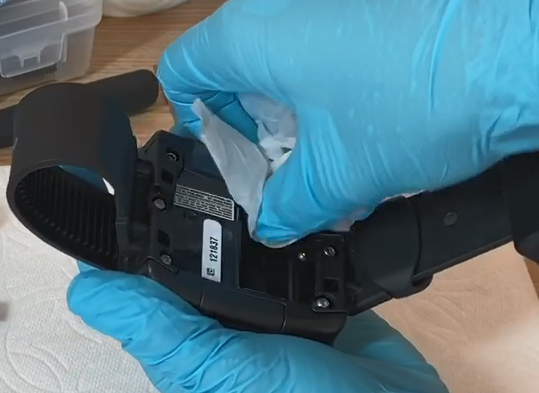
Using the wipe provided in the kit, wipe the battery contacts in the device battery compartment, and then dry the contacts with a paper towel or microfiber cloth.
Cleaning Bracelet Battery Contacts (click to enlarge)
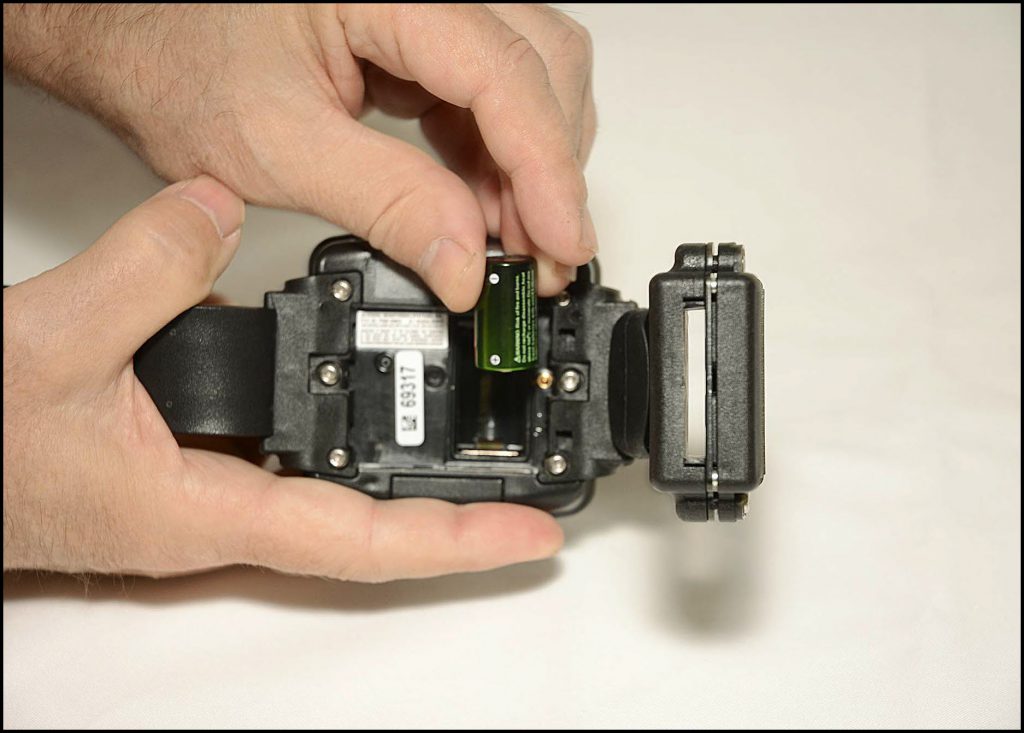
Install the Battery
Install Battery Positive (+) Side Down (click to enlarge)
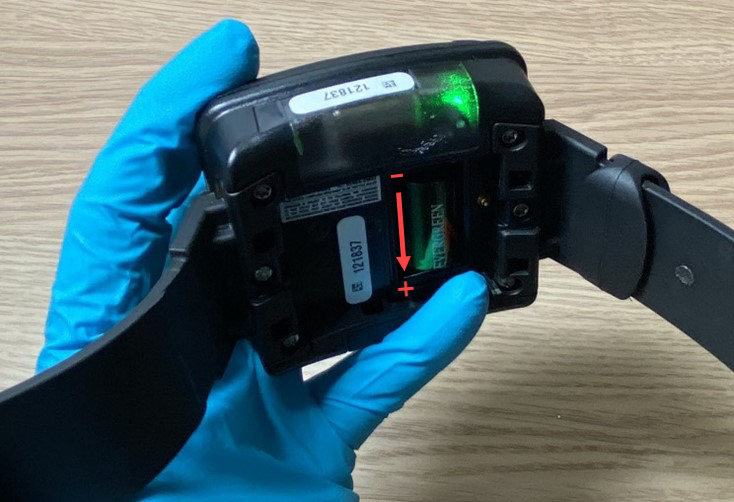
Place the battery in the battery compartment with the positive end of the battery positioned towards the bottomof the bracelet body (it points downward).
Ensure you see a green light when the battery is installed. The green light will turn off after five seconds.
Battery Installed in Bracelet with Green Light On (click to enlarge)
Install the Faceplate
Lay the replacement faceplate over the battery compartment.
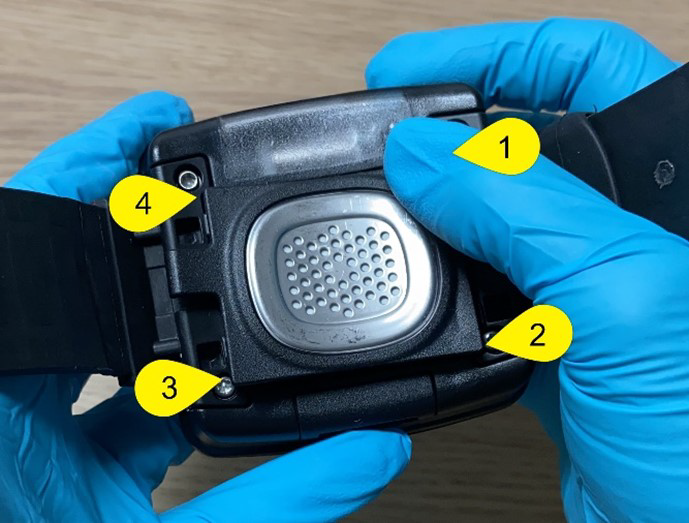
Starting in the upper right corner, press down firmly until you hear/feel a click.
Moving clockwise on the faceplate, press down firmly in each of the remaining corners. Ensure you hear/feel a click in each corner.
It may be necessary to remove the faceplate and reinstall if you do not hear or feel a click in each corner of the faceplate.
Installing Faceplate on Bracelet (click to enlarge)
Warning: Moisture may seep through the faceplate seals and corrode internal components if the faceplate is not thoroughly attached – you must hear/feel four distinct clicks!
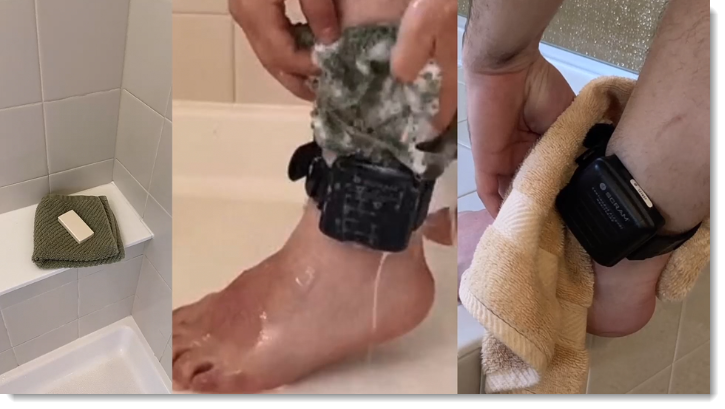
To help decrease the possibility of skin irritation, rashes, or infections developing on your SCRAM CAM clients’ ankles, encourage them to exercise a daily cleansing routine. SCRAM Systems strongly recommends clients follow these steps to wash their ankles under and around the device:
Apply soap to a clean, damp washcloth and wash your ankle by inserting the washcloth between the device and your skin, and then removing it.
Repeat the motion until all areas between the device and your ankle have been washed.
When you are done cleaning your ankle, rinse the area off to remove the soap.
Lastly, use a dry washcloth or towel to thoroughly dry underneath and around the device.
Wash the skin around the ankle with a washcloth, rinse, and dry the area completely
WARNINGS:
The device should not be submerged under water – showers are recommended.
If your client has a specific health condition or concern, be sure they discuss it with you, their supervising authority, and a medical practitioner.
…that is the question this Tip of the Month will attempt to answer.
RMA Requests
Generally speaking, the decision to request a Return Merchandise Authorization boils down to device functionality. SCRAM devices are used daily; so normal wear and tear – scratches, scuffs, and even minor dents in plastic casings – is to be expected. As long as the wear on the device does not impede its functional ability to monitor clients, then the device is not eligible for an RMA.
As long as the wear on the device does not impede its functional ability to monitor clients, then the device is not eligible for an RMA.
If, however, a SCRAM device is not operating as expected, please follow the appropriate troubleshooting steps for the device prior to requesting an RMA. You may also contact SCRAM Systems Customer Service for device troubleshooting assistance prior to requesting an RMA. Regardless of how you request an RMA, you will be required to describe how you attempted to troubleshoot the device first.
Requesting an Inspection Report
If you require SCRAM Systems to inspect a returned device and write a report of our findings – because the device’s functionality is in question, or because the report is needed so you may charge a client for billable damage, e.g. – then please be sure to provide the name and mailing address of the individual within your organization who should receive the report when you request it.
SCRAM Systems has moved from its Mineral Avenue address in Littleton, Colorado. When conducting business with us, be sure to use the appropriate address:
RMA Address
When a Return Merchandise Authorization (RMA) is issued for one of your SCRAM Systems devices, please ensure that the return shipping address on the label reads:
SCRAM Systems (AMS) 8100 Southpark Way Littleton, CO 80120
If your return shipping labels have the old, now-obsolete Mineral Avenue address on them, please discard them and request new labels from your SCRAM Systems Account Manager or Regional Sales Manager.
Payments Address
When making a bill payment to SCRAM Systems for monitoring services, equipment purchases and rentals, or any other reason, please remit payment to the SCRAM Systems bank lockbox:
Alcohol Monitoring Systems, Inc. PO Box 561097 Denver, CO 80256-1097
Do not remit payments to the now-obsolete Mineral Avenue address or to the Southpark Way address.
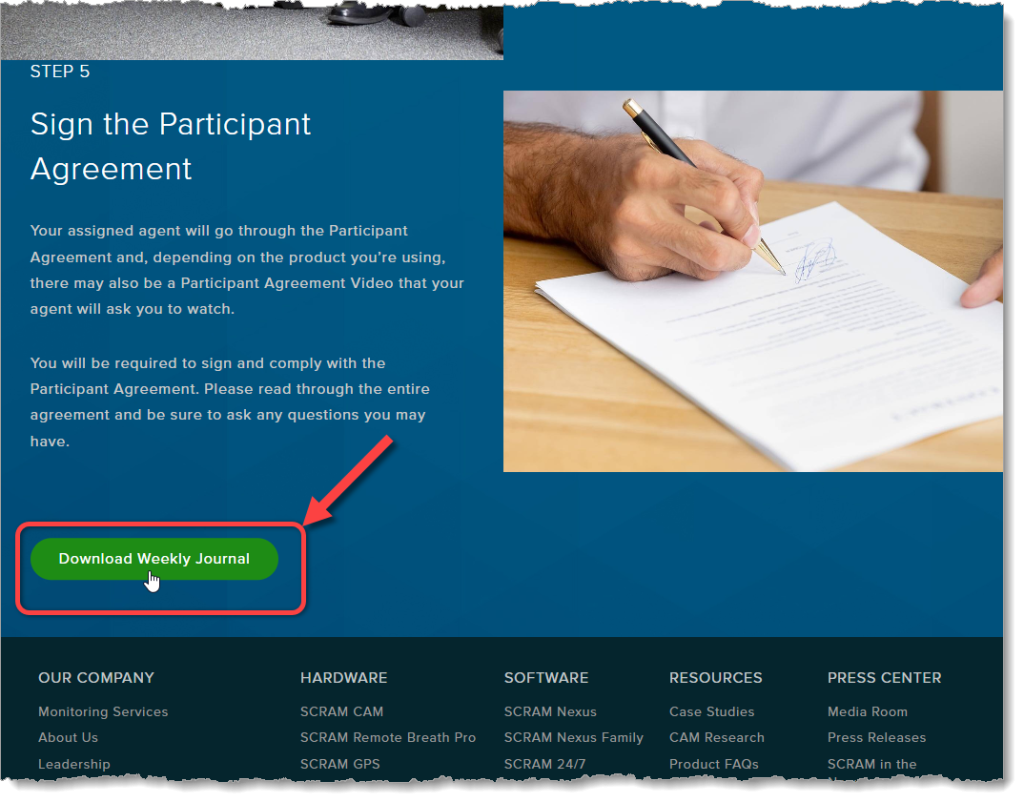
As part of our ongoing effort to improve the experience for our customers, agents, officers, and clients, we at SCRAM Systems have developed a simple weekly journal page that clients may download and print to help them keep track of their daily activities while they are participating in the SCRAM Systems Monitoring Program.
Where to Find It
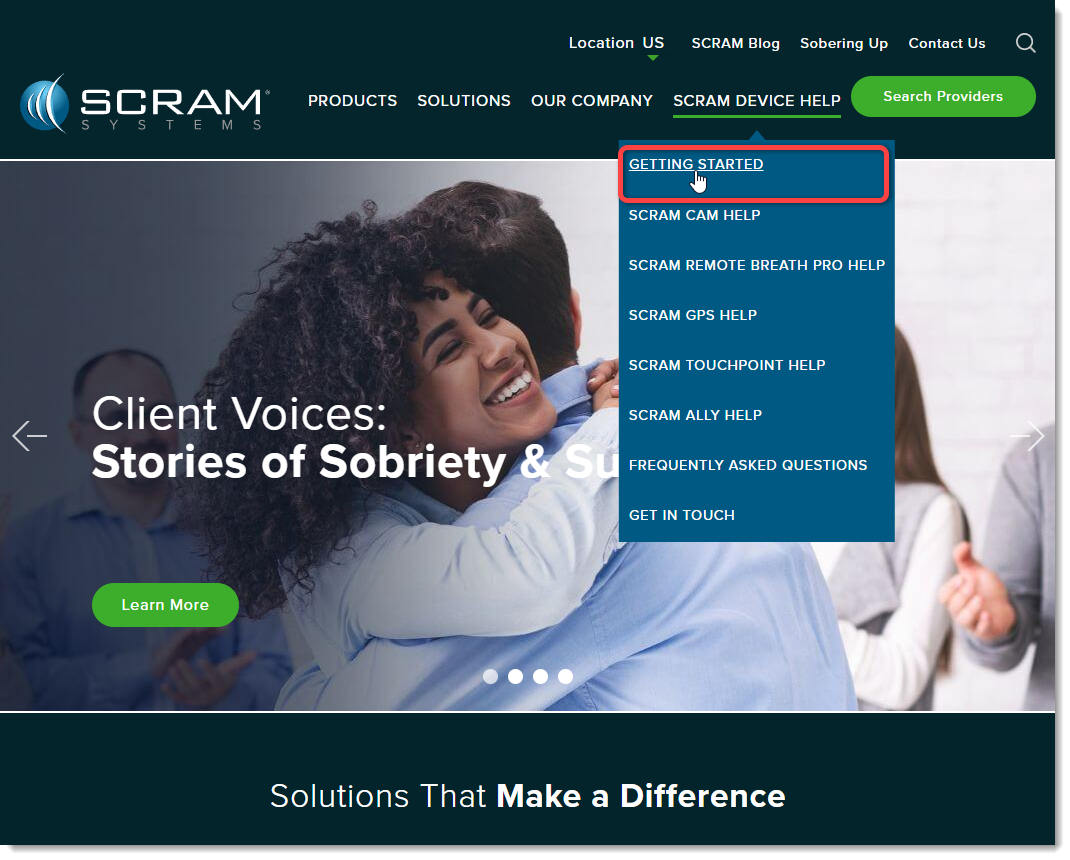
In addition to being available to customers, agents, and officers on the SCRAM Systems Help & Support homepage under the “Quick Links” heading, the simple two-page (one page front-and-back) PDF download is also available directly to clients on our public website (www.scramsystems.com) on the Getting Started page under the SCRAM Device Help dropdown menu:
Select ‘Getting Started’ from the SCRAM Device Help Menu
On June 12, 2024, SCRAM Systems will release two enhancements centered around the process of checking in a device as damaged.
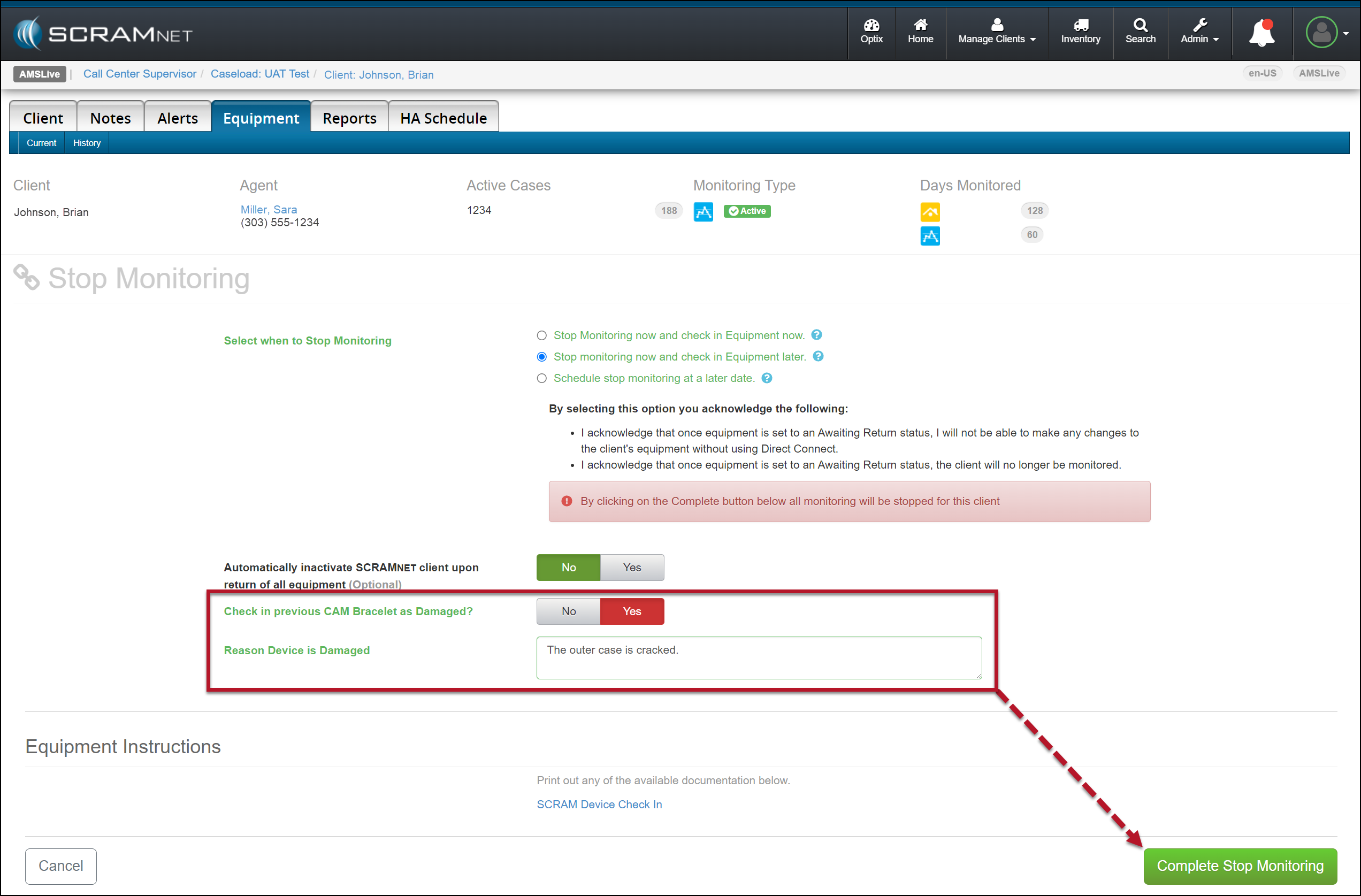
You will now have the option to flag a device as damaged when stopping the monitoring for the client.
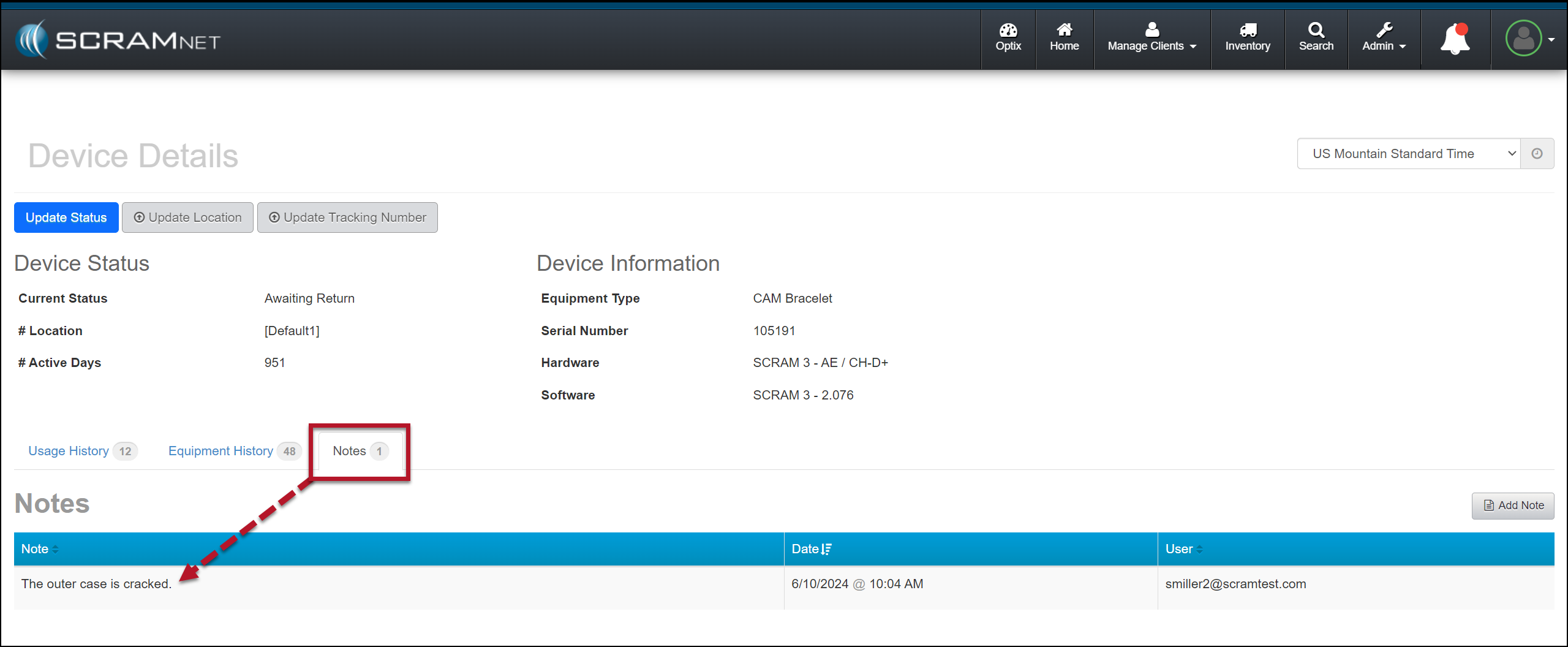
The notes entered for a device being checked in as damaged will now be visible on the Device Details page in SCRAMNET.
Not seeing the enhancement in SCRAMNET? Clear your cache and cookies and refresh your browser window.
Stop Monitoring and Check In Device as Damaged
When stopping the monitoring, for your client in SCRAMNET, you may flag a device as damaged by setting the “Check in previous [Device type] as Damaged?” option to Yes. Once set, add a note explaining why you flagged the device as damaged, and then complete the stop-monitoring process as usual.
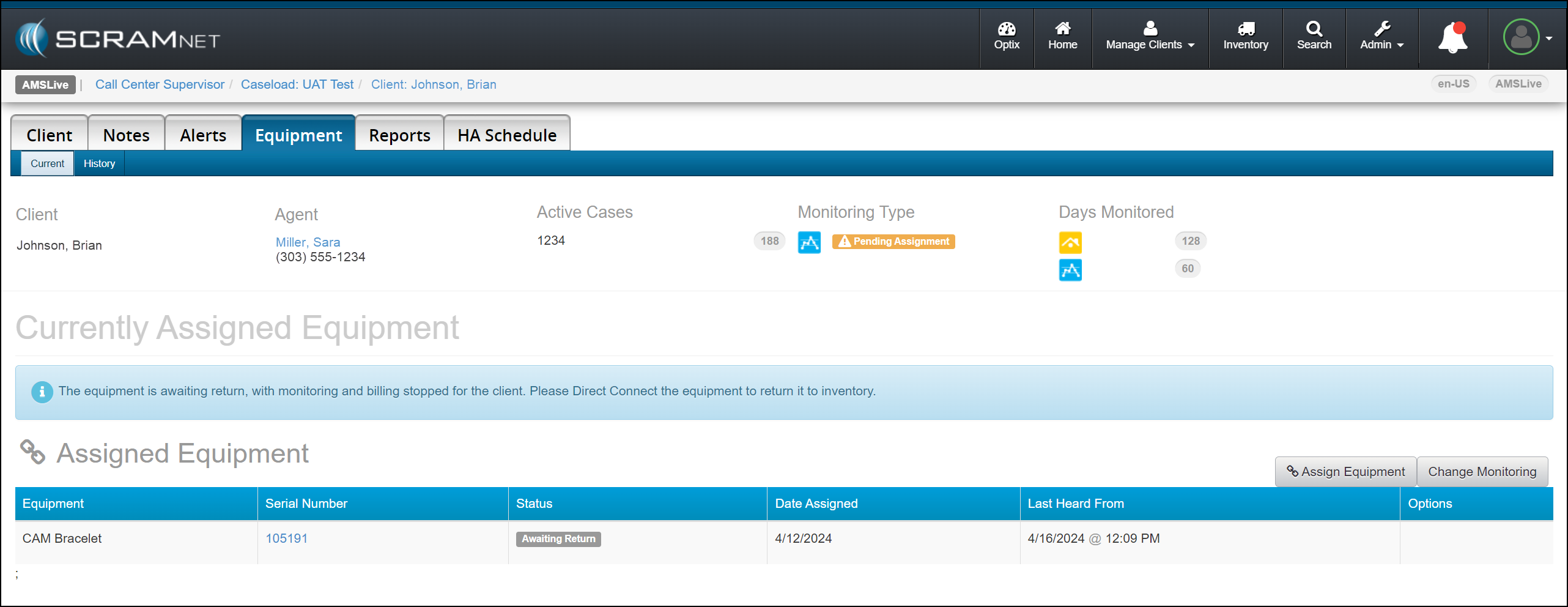
Example of a SCRAM CAM Client in SCRAMNET
Stop Monitoring page, Device Flagged as Damaged (click to enlarge)Client’s Equipment page Device Awaiting Return Status Displayed (click to enlarge)
Once the device status is updated to either “Pending Removal” or “Awaiting Return” based on the Stop Monitoring page selection, complete the process to return the device to your inventory.
SCRAM Systems recommends selecting the “Stop monitoring now and check in Equipment later” option when flagging a damaged device. This ensures billing is stopped for the client when a device cannot be checked in following the normal process.
When scheduling the stop monitoring for a later date, you cannot flag a device as damaged.
Flagging a device as damaged on the Stop Monitoring page does not automatically update its status to “In Inventory.” You must complete the check-in process to ensure billing and monitoring for the client are stopped.
When a device is flagged as damaged on the Replace Equipment page, it will automatically be updated to an “In Inventory” status.
Device Details Damage Notes
Once a device has been flagged as damaged, you may view the notes associated with the damaged device on the Device Details page in SCRAMNET.
Device Details Page with Notes Tab Selected (click to enlarge)
This information is helpful to reference when troubleshooting a device or requesting an RMA.
The damage notes will remain visible on your Device Details page until the device is returned and serviced at SCRAM Systems. At that time, they will no longer be visible.
When a Return Merchandise Authorization (RMA) is issued for one of your SCRAM Systems devices, please ensure that the return shipping address on the label reads:
Alcohol Monitoring Systems 8100 Southpark Way Littleton, CO 80120
If your return shipping labels have the old Mineral Avenue address on them, please discard them and request new labels from your SCRAM Systems Account Manager or Sales representative.