SCRAM Remote Breath Device

Rescheduled for November 17, 2022 Deployment

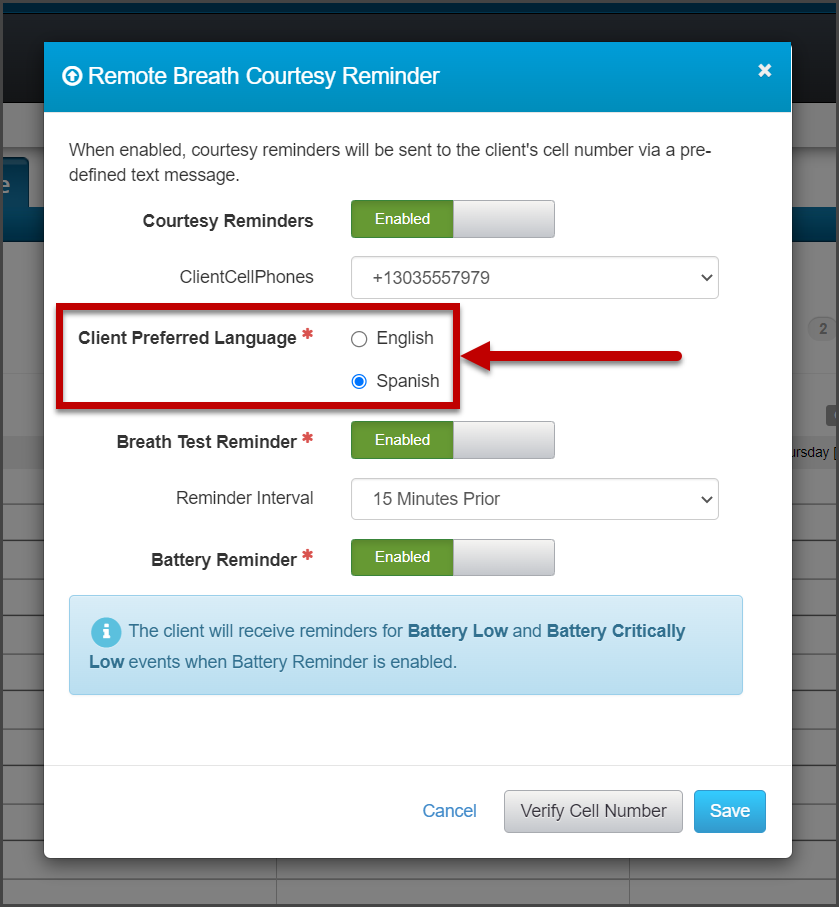
On, November 17, 2022, SCRAM Systems® will release an enhancement to Remote Breath and Remote Breath Pro Client Courtesy Reminders. With this update, you will select the client’s preferred language of English or Spanish when enabling Courtesy Reminders for your clients. Once selected, all courtesy reminders sent to the client will be in the selected language.  

Remote Breath Courtesy Reminder Pop-Up (click to enlarge)

For step-by-step instructions view the Client Courtesy Reminder Text Messages Help article.

Continue Reading

On, October 5, 2022, SCRAM Systems® will release three enhancements to the Remote Breath Pro (RB Pro) device. These enhancements are designed to aid the client when completing a breath test.

  1. After the client provides a “Passed” breath test, the device will produce a successful audible alert sound verifying the test is complete.
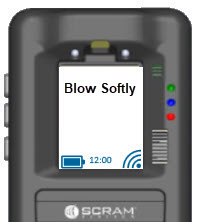
  2. While the client is actively providing a breath sample, if the client is blowing too hard into the breath tube, “Blow Softly” will display on the screen. This visual cue alerts the client to adjust the volume of airflow being provided.
click to enlarge
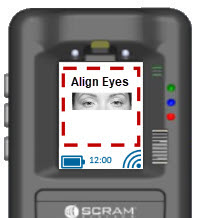
  1. To ensure accuracy, the visual prompt of “Align Face” will be updated to “Align Eyes.”
click to enlarge

The firmware download will be undetected by most clients as it will happen during one of the device’s 30-minute SCRAMNET check-in and synchronization intervals. If your client happens to be prompted to take a breath test at the time of the firmware update, your client will see verbiage on the screen that explains that firmware is being downloaded and installed. The process should take 10-15 minutes and then your client may resume as normal.

Continue Reading

Getting Ready for RB Pro

SCRAM Systems has released a new version of its SCRAM Remote Breath Program Participant Agreement (the “Agreement”). This new Agreement is now the default document that will appear whenever you click on the ‘SCRAM Program Participant Agreement’ link for an RB client in SCRAMNET. Language has been updated throughout the Agreement to make it work with either the current SCRAM Remote Breath device (“RB Classic”), or the soon-to-be-released SCRAM Remote Breath Pro device (“RB Pro”).

Dual Device Support… and more

Most of you will be offering some combination of both RB Classic and RB Pro devices in your monitoring programs until the end of July 2023; so we’ve consolidated the devices into a single Agreement to make administration of your programs easier. Updates were also made to the language surrounding courtesy reminders, replacement pricing, as well as how we handle the personal data we collect from clients. Terminology, like “Participant,” “Agency,” and “Device,” for example, are also defined more clearly at the beginning of this new Agreement.

A blank copy of the new Agreement is also available at the bottom of the Remote Breath Participant Agreements & Videos help page.
Continue Reading

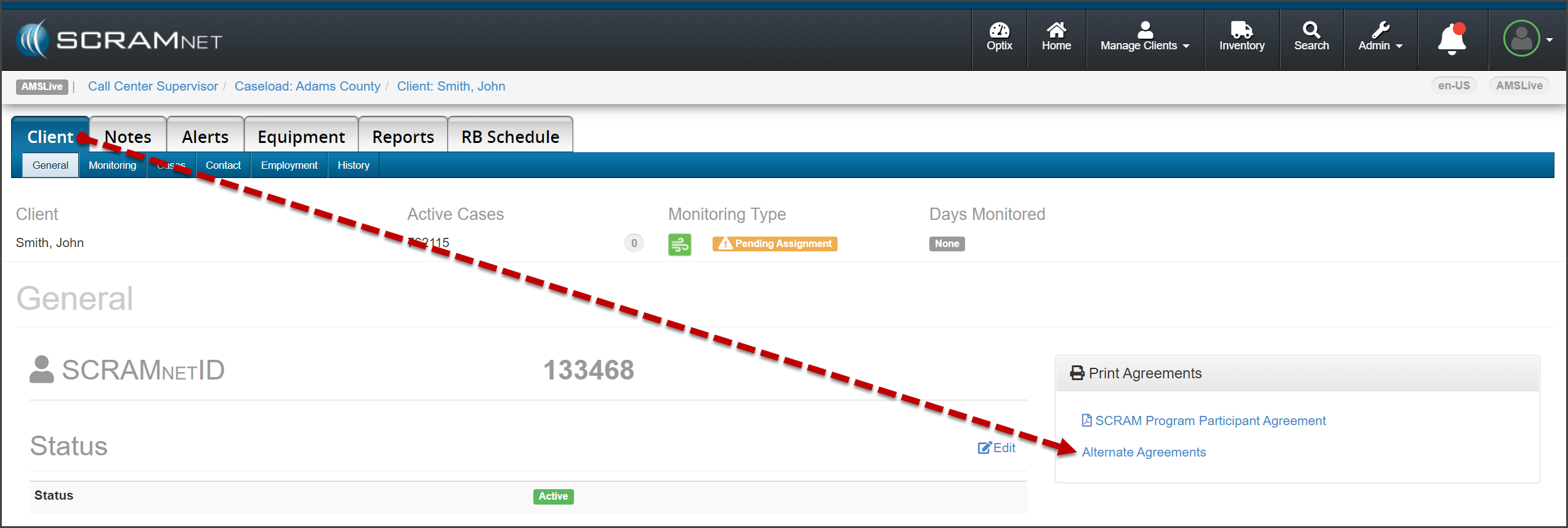
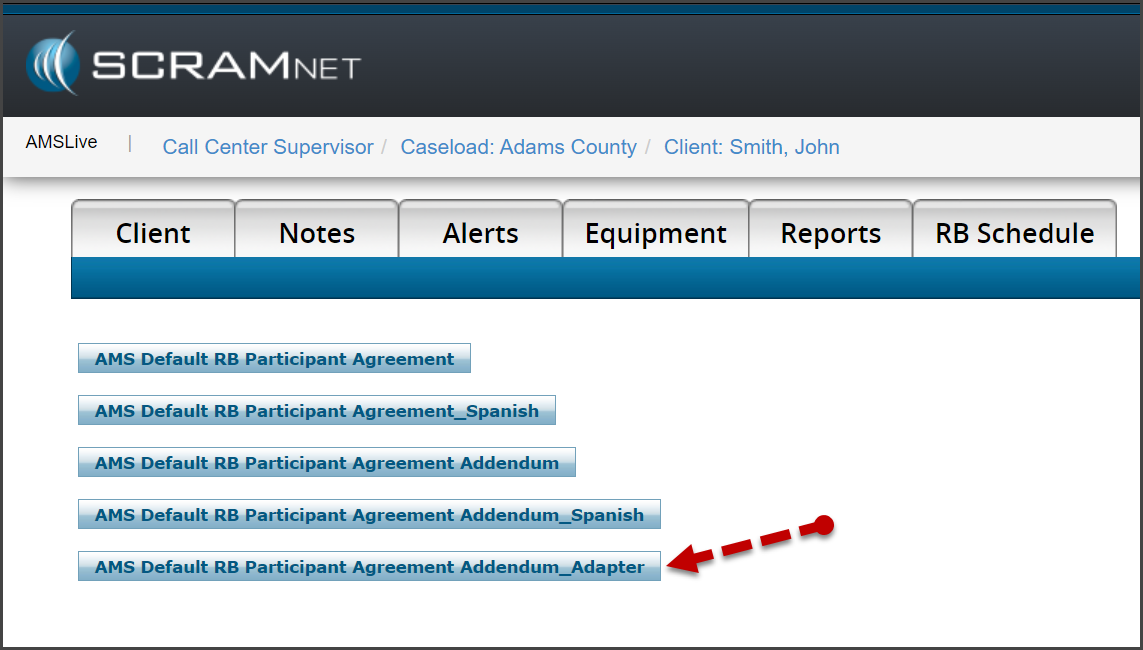
On, August 18, 2022, SCRAM Systems® will release a new SCRAM Remote Breath Participant Agreement Addendum – Adapter available on the Alternate Agreements page in SCRAMNET.

From the client’s page in SCRAMNET, access the SCRAM Remote Breath Participant Agreement Addendum – Adapter document whenever you assign a Remote Breath Adapter to the client for breath alcohol monitoring. This addendum to the SCRAM Remote Breath Participant Agreement contains specific adapter information, including the serial number and replacement cost.

click to enlarge
click to enlarge

To view a sample of the agreement, click here.

Continue Reading

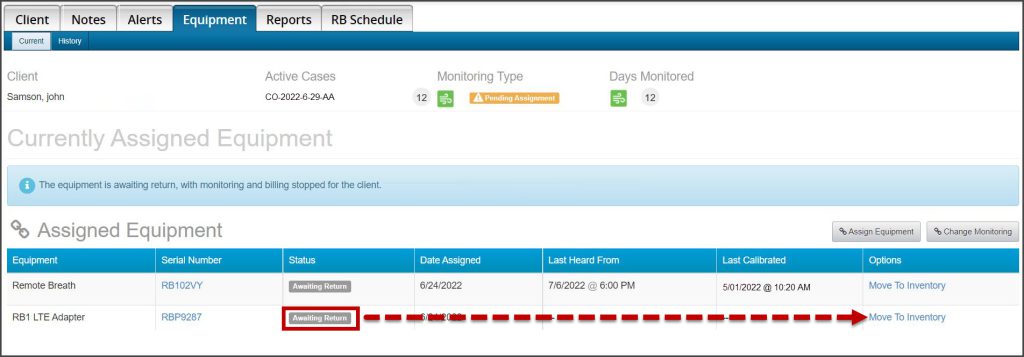
Effective July 7, 2022, SCRAM Systems® will release an update that will enable better inventory management of RB LTE Adapters that are placed in an “Awaiting Return” status.

Once the RB LTE Adapter is placed into an “Awaiting Return” status for the client, a new “Move To Inventory” hyperlink will display under the Options column on the client’s Equipment page. Once the adapter has been returned, simply select the “Move To Inventory” hyperlink to return the adapter to an “In Inventory” status.

Client Equipment page.
Click to enlarge

Continue Reading

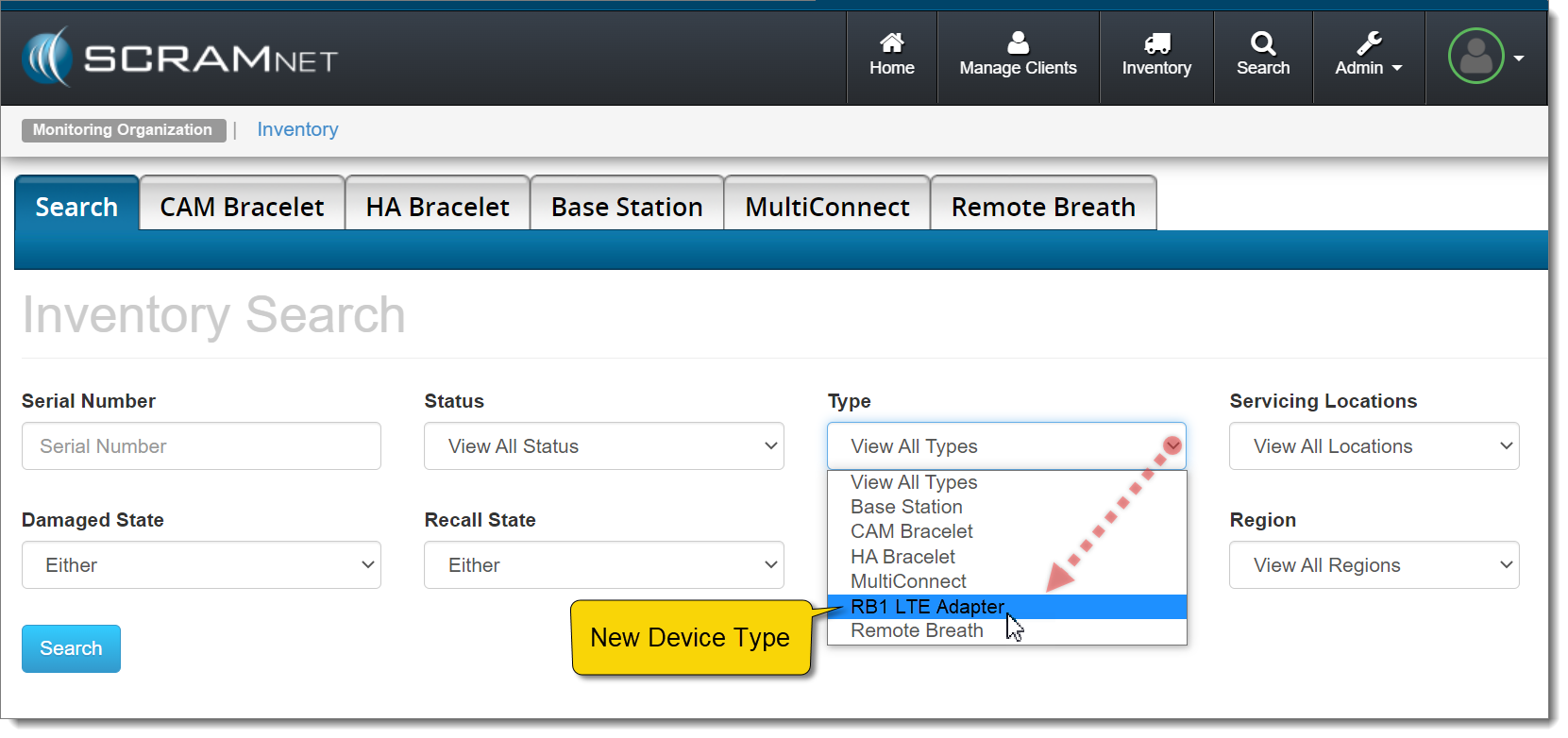
Effective January 6, 2022, SCRAM Systems will introduce an enhancement to the Inventory Search page in SCRAMNET. A new “RB1 LTE Adapter” device option will be added to the Type dropdown filter, in preparation for the launch of the new RB LTE Adapter later this month.

The new RB1 LTE Adapter option appears in the Type dropdown menu on the Inventory Search page in SCRAMNET
SCRAMNET Inventory Search page (click to enlarge)

Once selected, complete your inventory management using your current process. More information and instructions regarding RB LTE Adapter inventory management will be provided closer to the device’s release date.

Continue Reading

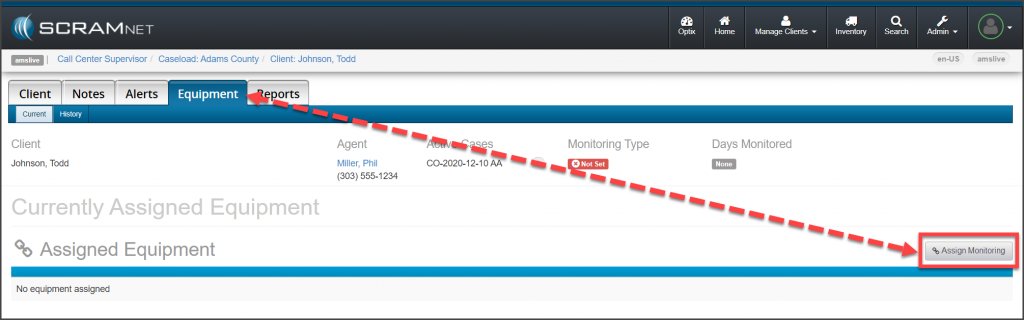
On November 18, 2021, the Change Monitoring button located on a new client’s Equipment page will display as “Assign Monitoring” until a monitoring type has been associated with the client. The updated verbiage on the button for this initial association to a monitoring type, more accurately reflects the action being completed for a new client.

Client's Equipment Page Assign Monitoring button
click to enlarge

Once the initial association to a monitoring type has been selected, the button will display as Change Monitoring from that point forward.

The process of adding a monitoring type to a new client itself has not changed; this is just a simple verbiage update to the action button. To review the process of creating a client in SCRAMNET, select the hyperlinks below to navigate to the corresponding monitoring technology’s Help articles:

Continue Reading

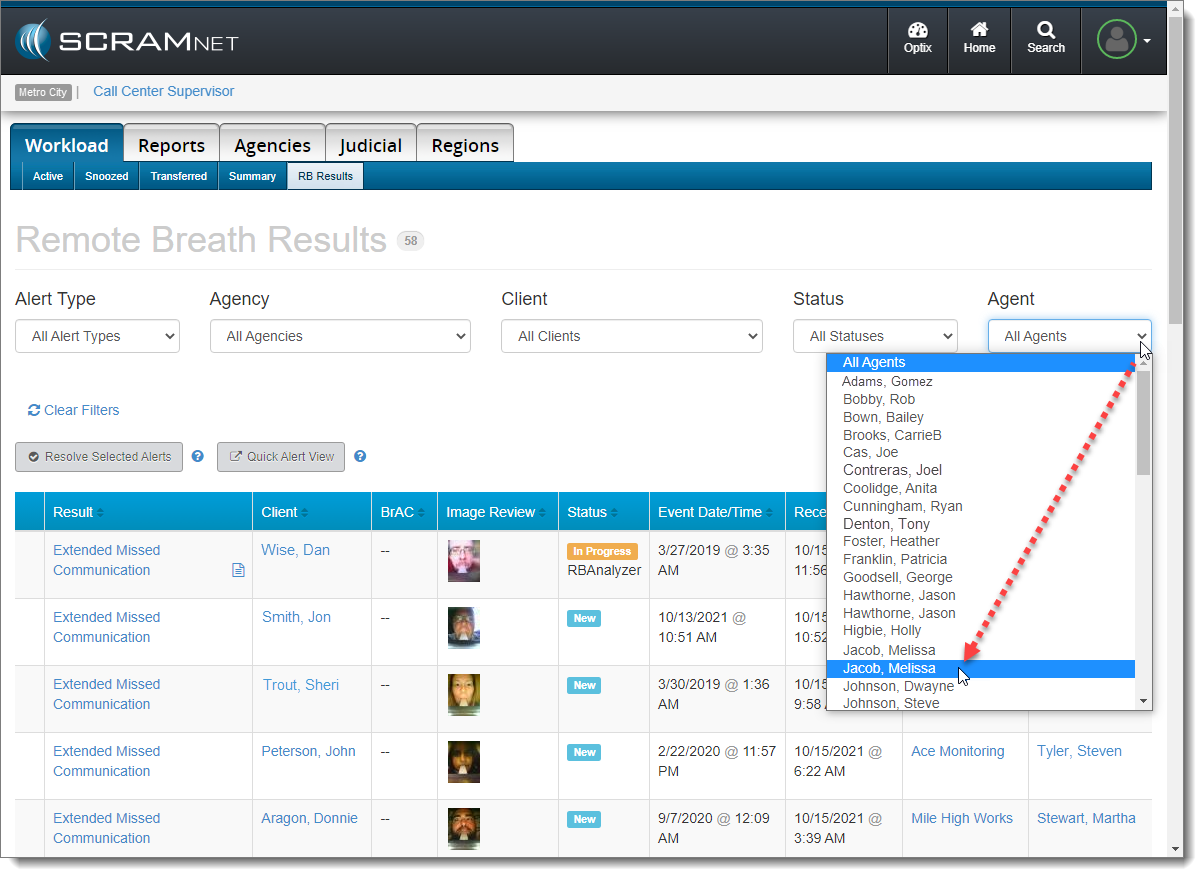
Effective today, SCRAM Systems® released a new Agent filter and associated column on the RB Results page in SCRAMNET­­®.

The Agent filter appears as a new dropdown menu on the far-right of the screen, and allows you to filter the list of results by a single agent. If an agent is assigned to more than one caseload, that agent will appear in the dropdown list multiple times, and you may have to select each instance of the agent until you get the desired agent/caseload combination.

Agent Filter (click to enlarge)

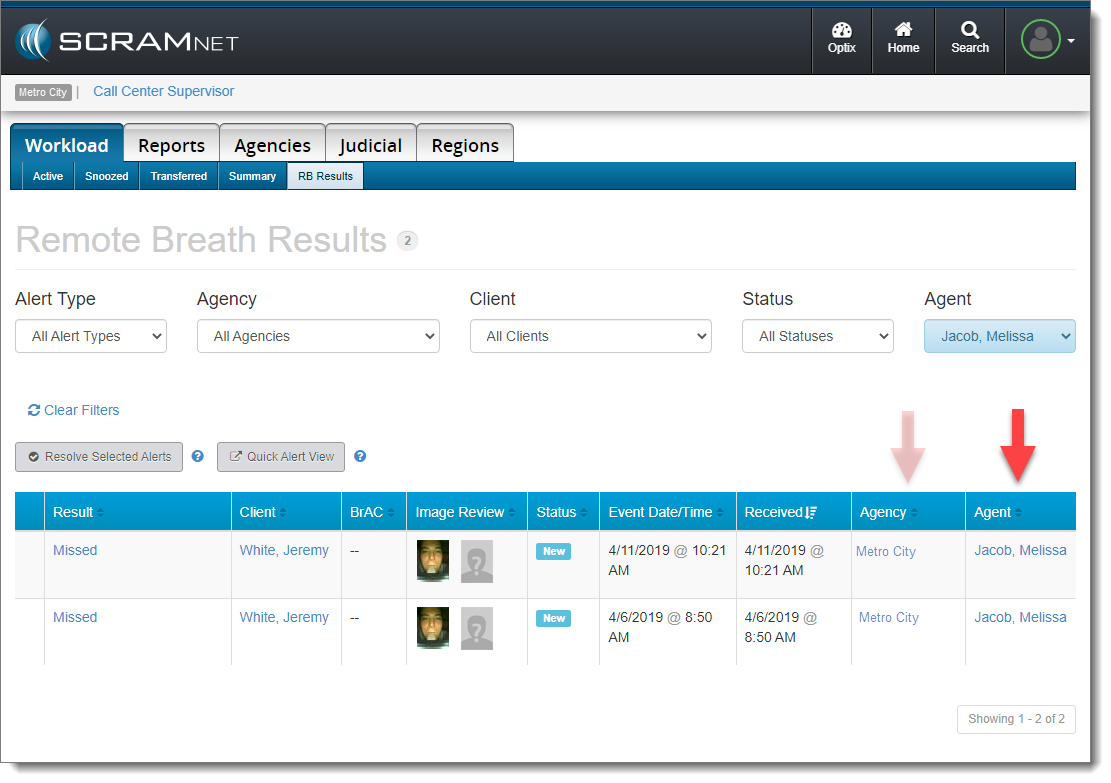
A new Agent column now appears on the Remote Breath Results page as well. Use this new column in conjunction with the existing Agency column to clarify which set of results you are viewing for that agent.

Agent-Related Columns (click to enlarge)
InformationEffective October 28, 2021, “Agencies” will be referred to as “Caseloads” in the SCRAMNET monitoring system. This change will bring SCRAMNET up-to-date with current terminology.

Continue Reading

SCRAM Systems is pleased to announce the addition of two NEW client participant videos to the Help page in addition to the SCRAM CAM participant agreement video already available! These videos describe what is expected of a client as a participant in the SCRAM CAM, Remote Breath, and GPS monitoring programs. Have your clients view the video prior to having them sign the Participant Agreement.

Continue Reading

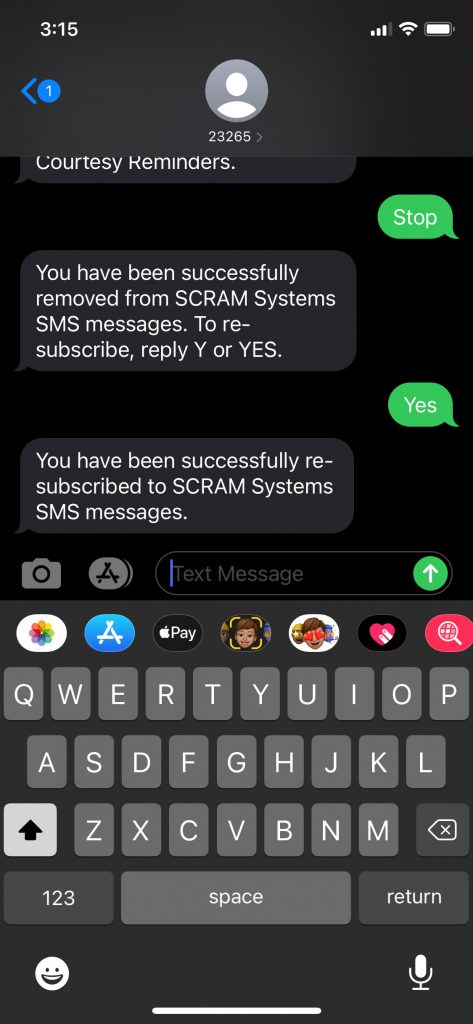
On April 29, 2021, SCRAMNET will display the text number and instructions a client can use to opt back into SCRAM Remote Breath Courtesy Reminders.

To view the opt-in text number and instructions in SCRAMNET,

  1. Navigate to the client’s RB Schedule page.
  2. Hover your mouse over the Invalid Phone number notification box.
  3. Provide the client with the information provided in the hover text box.

The client will need to text 23265 with a “Y” or “YES” to get opted back in for Courtesy Reminders. 

Client RB Schedule page
click to enlarge

If the client has access to the text message from which they opted out of Courtesy Reminders by texting STOP, they can reply Y or YES to the same text message to be opted back in.

iPhone text message
click to enlarge

Feedback

Please contact SCRAM Systems Customer Service with any recommendations for system improvements.

Continue Reading