At 5:00 AM MDT on Thursday, August 28, 2025, SCRAM Systems will introduce two important feature enhancements for SCRAM GPS 9 Plus devices in SCRAMNET GPS:
Enhancements to the Potential Cell Jamming Alert
Updates to the Battery Fully Charged Event
During the 15-minute deployment, you may not be able to access SCRAMNET GPS, but messages from the SCRAM GPS device will continue to be processed uninterrupted.
Potential Cell Jamming Alert
This enhancement release will enable SCRAMNET GPS to utilize data from additional sensors within SCRAM GPS 9 Plus devices to both generate and clear Potential Cell Jamming alerts. Communication and battery sensors, among others, will supplement the generation and clearing of these alerts.
Battery Fully Charged Event
Occasionally, events will come in from SCRAM GPS 9 Plus devices that indicate the battery has been fully charged when in fact the device has not. With this enhancement, additional data will be used and analyzed prior to the SCRAMNET GPS Dashboard displaying Battery Fully Charged events.
On August 21, 2025, SCRAM Systems will release an enhancement for your SCRAM Nexus Caseloads. With this improvement, the Personal section of the client’s Profile page has been expanded to include new optional identifying attributes, along with additional identification details.
To Edit the Client’s Profile
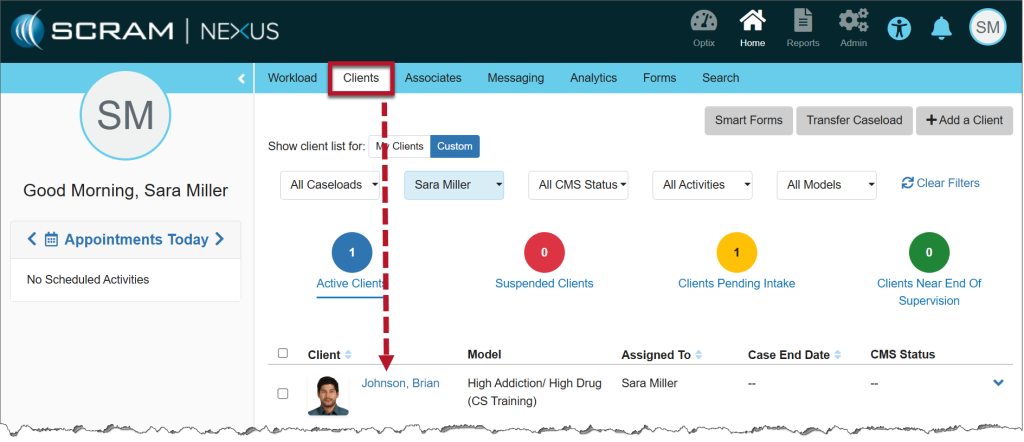
From the Clients tab in Nexus, select the client’s name hyperlink.
Nexus Clients tab – Click to enlarge
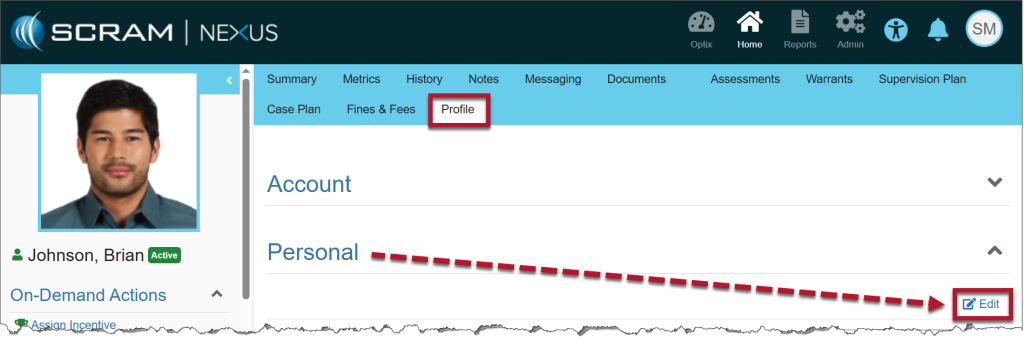
Select the Profile tab and then select the Edit hyperlink in the Personal section.
Nexus Profile tab – Click to enlarge
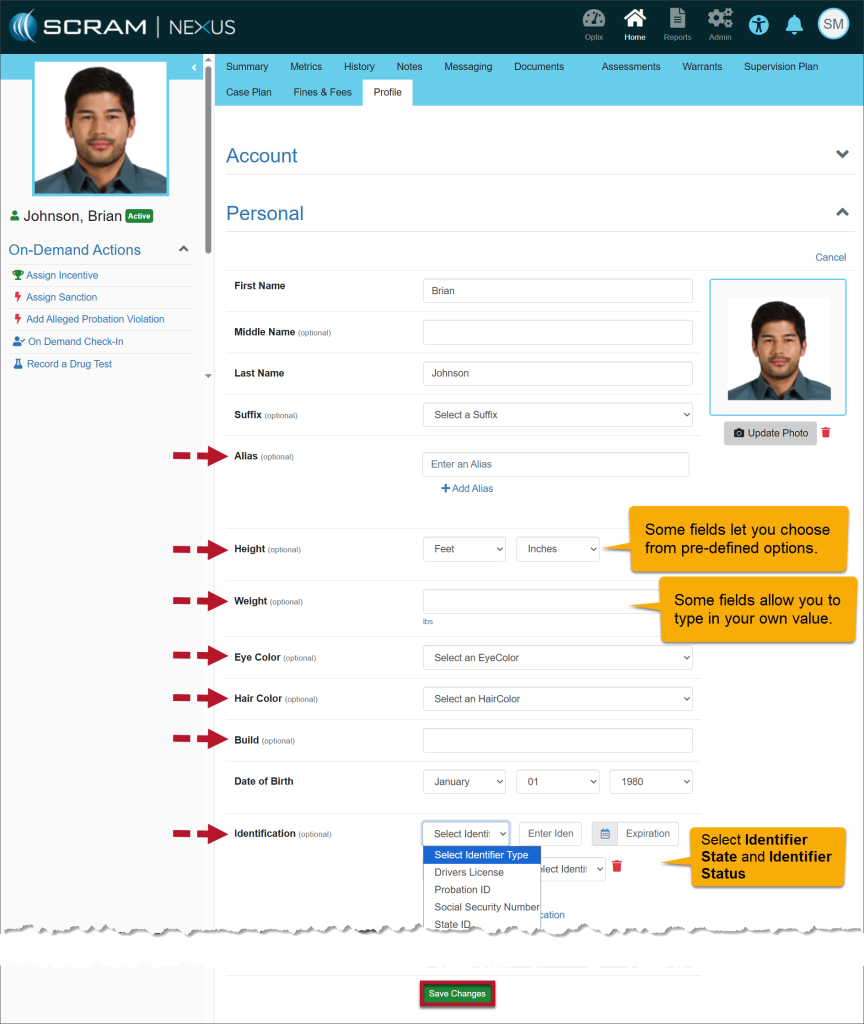
Add or edit all required fields, then enter any additional details in the new optional fields.
Nexus Profile page
After making any updates, select the Save Changes button.
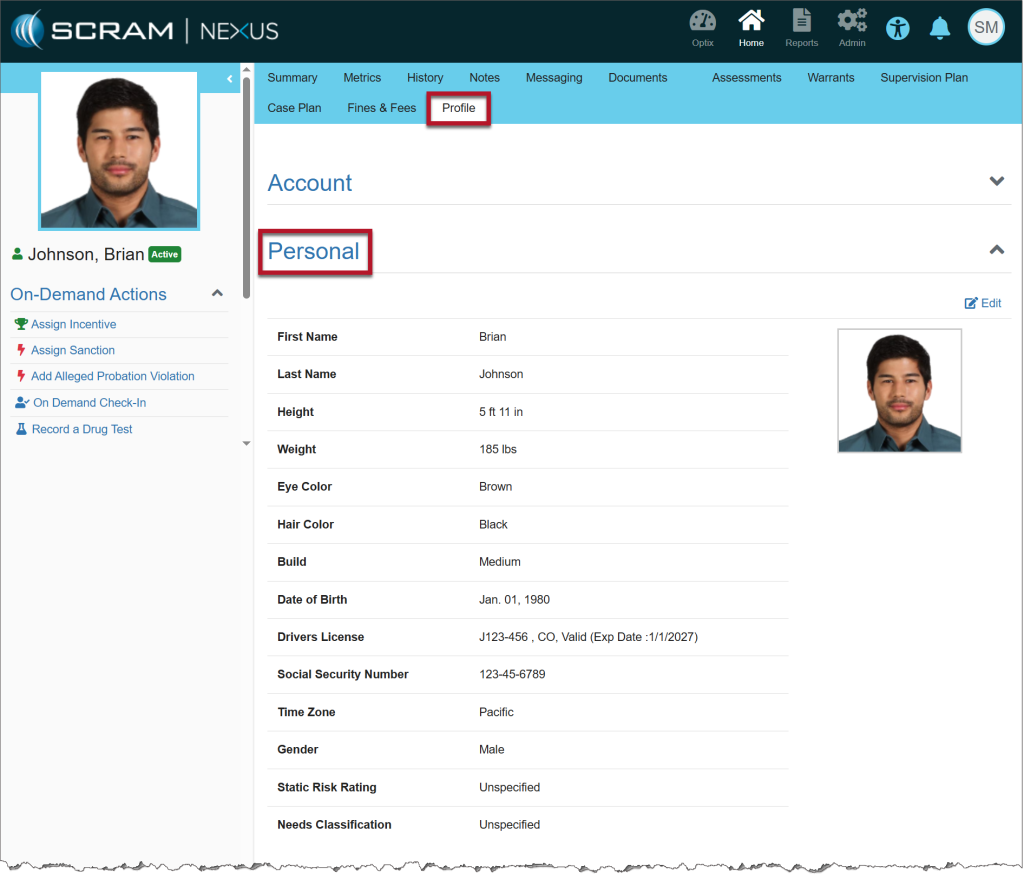
Once saved, the details entered are displayed under the Personal heading.
Saved Information on the Profile page
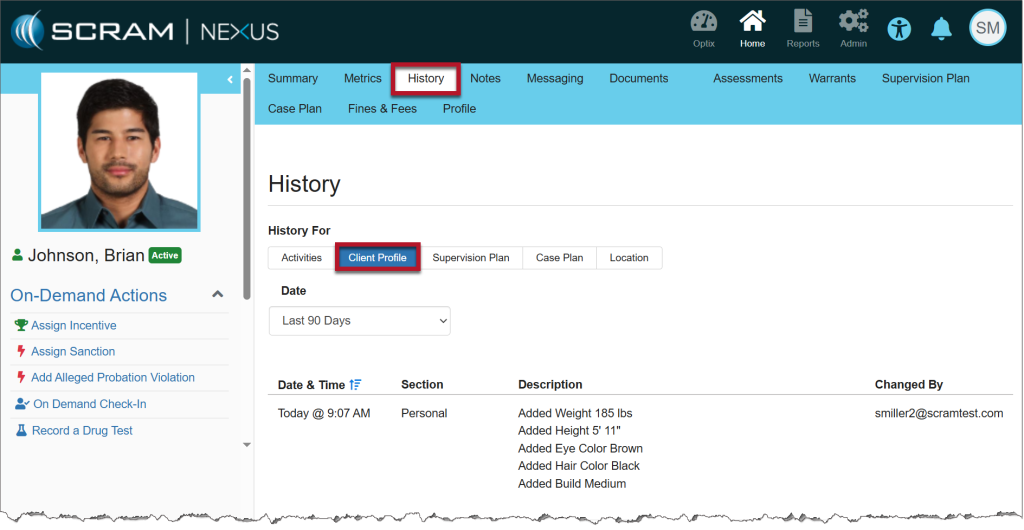
All updates made to the client’s profile may be viewed on their History page, Client Profile sub-tab.
On August 14th, 2025, a new version of the SCRAM Ally (Victim Notification mobile application) will be available for iOS users in the Apple Store. The enhancements in version 2.1.1 (2) include:
Logging into multiple Ally applications on multiple devices
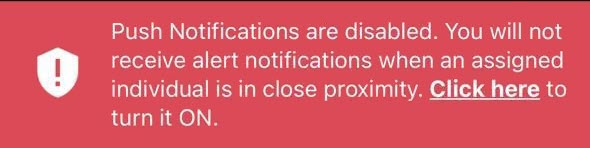
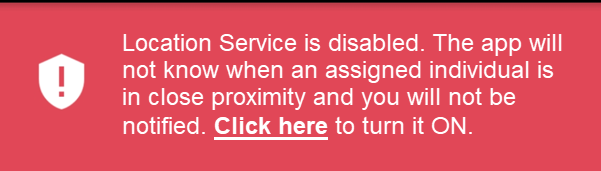
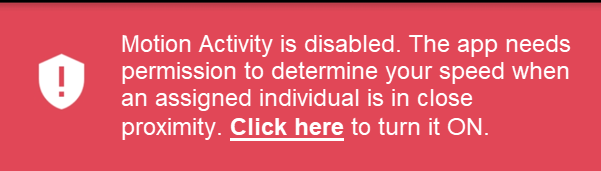
Updated Push Notifications, Location Service, and Motion Activity Disabled banners
Location information availability when the Ally Victim uses the application to call for help
As a best practice, SCRAM Systems recommends that all SCRAM Ally Victim app users enable their smartphones to automatically update their apps to make this process easier.
For accurate, continuous monitoring, SCRAM Ally requires permission to send Push Notifications, access Location Service, and Motion & Fitness Activity. SCRAM Ally requires these permissions to properly monitor Victims and deliver important alerts with regard to Victims’ proximity to their assigned individuals.
Tip: After updating the SCRAM Ally app, it is important that your Victim users open the app and visit the Homepage. This action will ensure alert notifications function properly.
Logging into Multiple Devices
If the client is currently logged into the Ally application on their smartphone and they attempt to log into the application on a second device, for example, an iPad or second smartphone, the following pop-up message will display on the second device: “Your Ally account is already registered with another phone. If you choose to continue, the account on your prior phone will be disabled, and only this phone will be used for monitoring. Do you want to continue?”
The Ally victim user is presented with two options to move forward. If they select:
Continue/OK – The user is automatically logged out of the first device and may sign into the app on the second device. The first device will display a message of, “Your Ally account is registered with a new phone. Your Ally account will be disabled on this phone and will not be used for monitoring.”
Cancel – This will cancel the login attempt on the second device, keeping the victim signed in on the first device. In this case, the first device is the smartphone being monitored.
Updated Push Notifications, Location Service, and Motion Activity Disabled Banners
For accurate, continuous monitoring, SCRAM Ally requires permission to send Push Notifications, access Location Service, and Motion & Fitness Activity. Even when the app requires permissions to function properly, Apple recommends making these permissions optional to give users more control over their data.
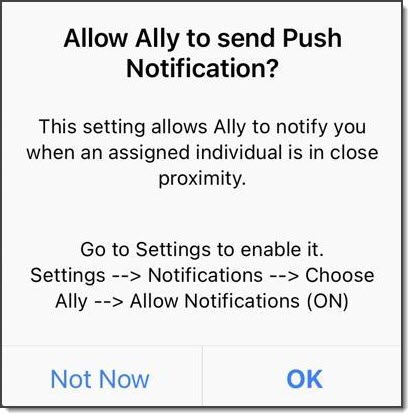
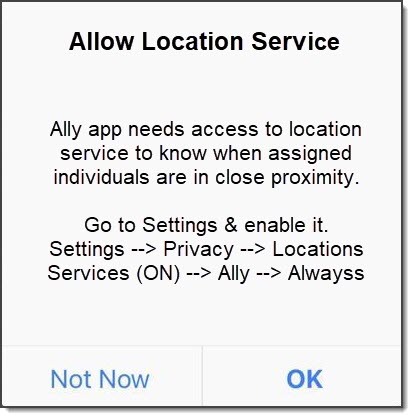
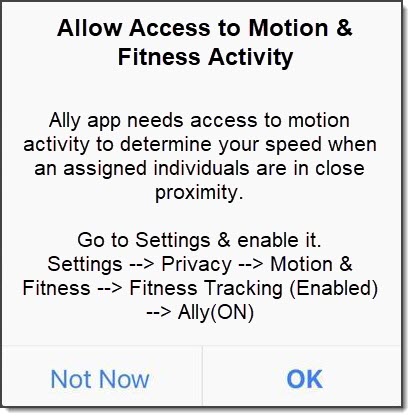
SCRAM Ally requires these permissions to properly monitor Victims and deliver important alerts with regard to Victims’ proximity to their assigned individuals. When Ally does not have these permissions, the following dialogs are displayed:
SCRAM Ally App Requests to send Push Notifications
SCRAM Ally App Requests Access to Location Service
SCRAM Ally Requests Access to Motion & Fitness Activity
If Victim users do not grant permission to these services, the following banner warnings are displayed in the SCRAM Ally app:
Warning Banner: Push Notifications are Disabled
Warning Banner: Location Service is Disabled
Warning Banner: Motion & Fitness Activity is Disabled
Additionally, when the Location Service is disabled, a critical alert is generated in SCRAMNET GPS. It is important to address this alert as it indicates the Victim is not properly monitored:
SCRAMNET Alert: Location Service Disabled – Victim (click to enlarge)
Location Information Availability when the Ally Victim Uses the Application to Call for Help
When Location Services are enabled for the Ally application and the victim uses the app to call the emergency number displayed, the current location information is reported.
If the victim disables Location Services while the application is open, when they call the emergency number displayed, the last known location will be reported.
If the victim disables Location Services and then closes the application on their smartphone, once reopened, unless Location Services are enabled, no location information is reported when making an emergency call from within the Ally application.
On July 9, 2025, SCRAM Systems released a client Document Management enhancement within SCRAM Optix, SCRAMNET GPS and SCRAM Nexus.
If you don’t see the enhancement, please clear your cache and cookies and refresh your browser window.
SCRAM Documents Page Enhancement
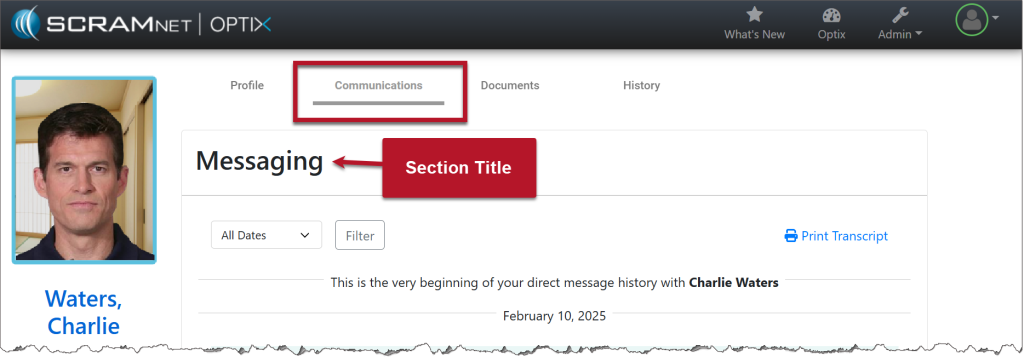
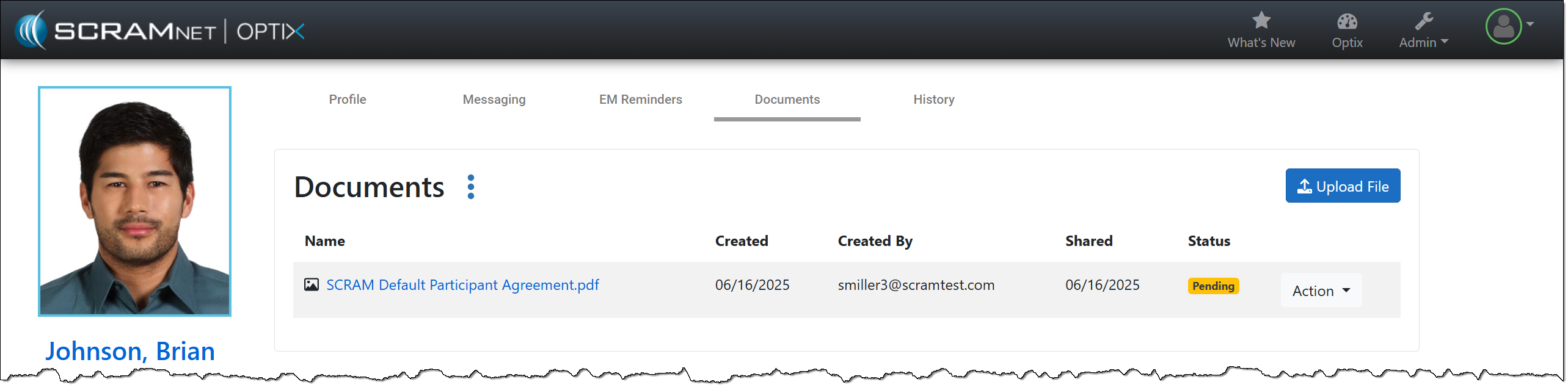
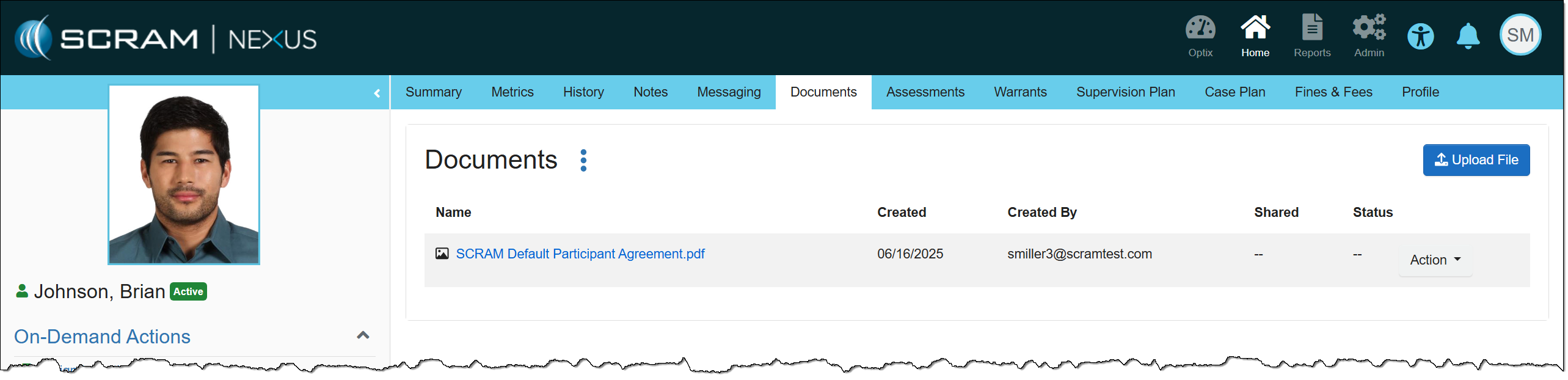
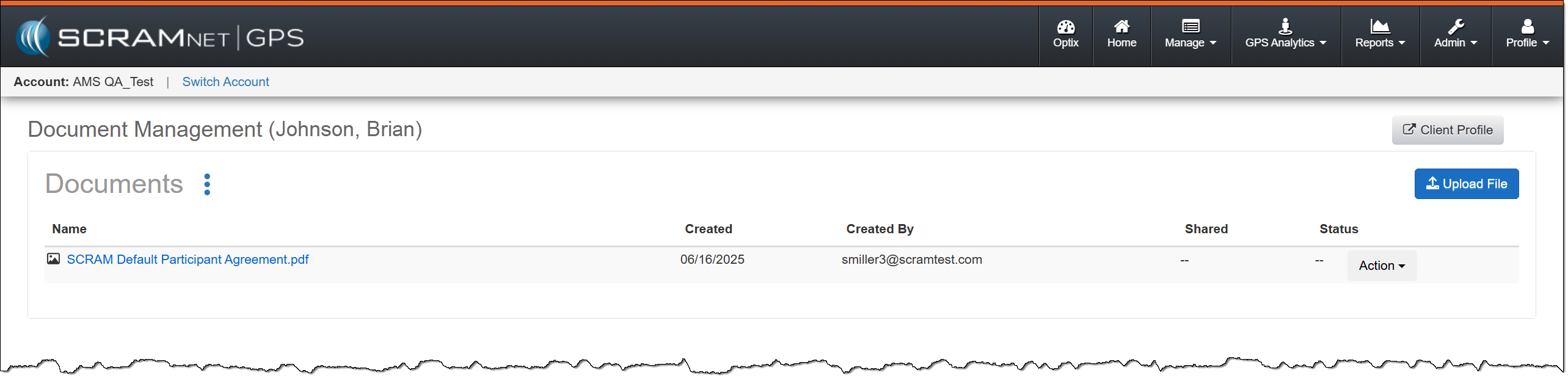
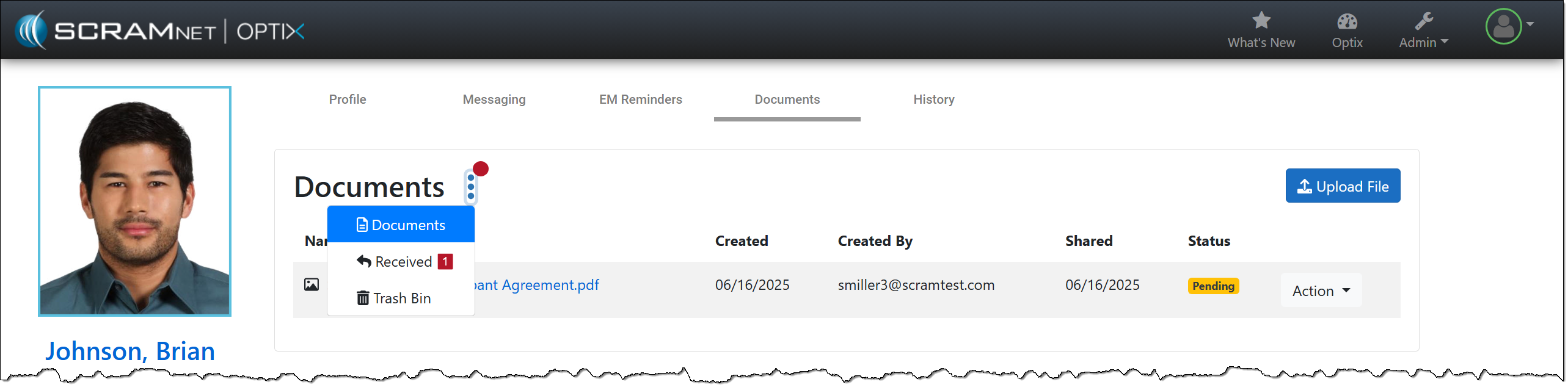
When viewing the client’s Documents page, you will notice a redesign. The “Documents, Received, and Trash Bin” options have been consolidated into an ellipsis menu, and the “Upload File” button has been moved to the right sideof the page.
SCRAM Optix Documents Page – click to enlargeSCRAM Nexus Documents Page – click to enlargeSCRAMNET GPS Documents page – click to enlargeExample of Notification Badge – click to enlarge
You may have noticed that when it is time to assign equipment, after adding your client to the SCRAMNET GPS monitoring system, you are now prompted to make a “Participant Agreement Acknowledgement.” A Participant Agreement is a legal contract between you – as agent for the monitoring services provider or supervising authority – and the client.
SCRAM Systems strongly recommends using a signed Participant Agreement for every client in your program.
Within the Agreement, you and your organization agree to fit the client with a SCRAM GPS device and provide all the necessary accessories (charging cable, e.g.) for your client to be successful in their monitoring program, and the client agrees to wear the device and follow the rules of the monitoring program as described in the Agreement.
Your organization may use its own agreement it has developed in-house and evolved over time, or your organization may use the SCRAM Systems-developed SCRAM GPS Program Participant Agreement that we too have evolved over time, and vetted with our internal legal counsel. Either way, SCRAM Systems strongly recommends using a signed Participant Agreement for every client in your program, as it provides legal protection to both you as agent and your organization.
Where to Find the SCRAM Systems GPS Participant Agreements
The SCRAM Systems developed GPS Participant Agreements are available in two places on the Help Site:
The SCRAM GPS Participant Agreements & Videos page (the SCRAM GPS Overview and Rules video is also an excellent resource available for you to use during device assignment)
The addition of the Acknowledgement to the enrollment process grew out of a need for better recordkeeping. The Acknowledgement is simply a record of which Agreement was used at the time of enrollment and does not impact the level of court support you receive from SCRAM Systems.
At 5:00 AM MDT on Thursday, June 26, 2025, SCRAM Systems will introduce a new Participant Agreement Acknowledgement feature in SCRAMNET GPS.
During the 15-minute deployment, you may not be able to access SCRAMNET GPS, but messages from the SCRAM GPS device will continue to be processed uninterrupted.
Device Assignment Enhancement
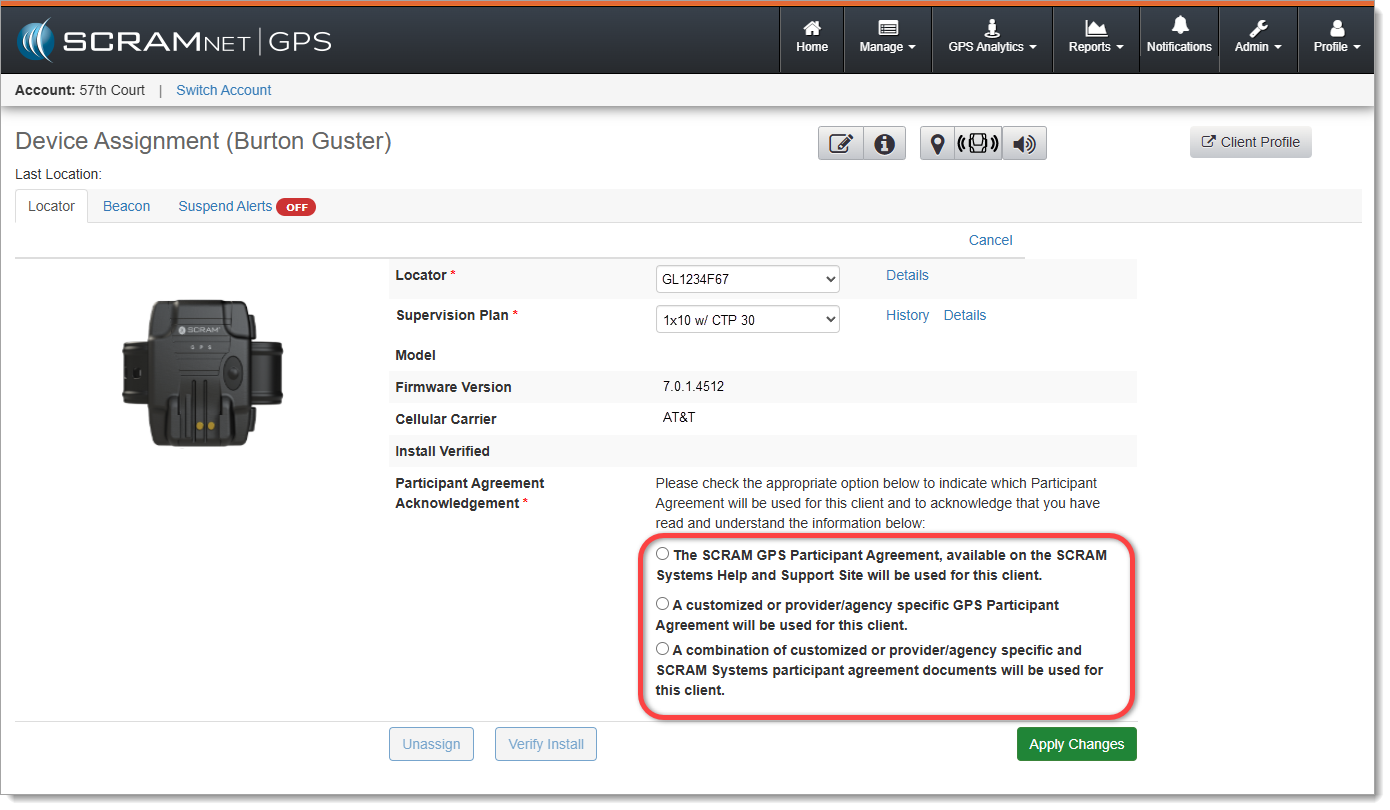
When it is time to assign equipment after adding your client to SCRAMNET GPS, before you may continue with the assignment process, you will have to make a “Participant Agreement Acknowledgement.” The addition of this acknowledgement to the enrollment process grew out of a need for better recordkeeping. This acknowledgement is simply a record of which Agreement was used at the time of enrollment and does not impact the level of court support you receive from SCRAM Systems.
You will be presented with two choices:
The SCRAM GPS Participant Agreement, available on the SCRAM Systems Help and Support Site will be used for this client.
A customized or provider/agency specific GPS Participant Agreement will be used for this client.
The new ‘Participant Agreement Acknowledgement’ section on the Device Assignment page in SCRAMNET GPS (click to enlarge)
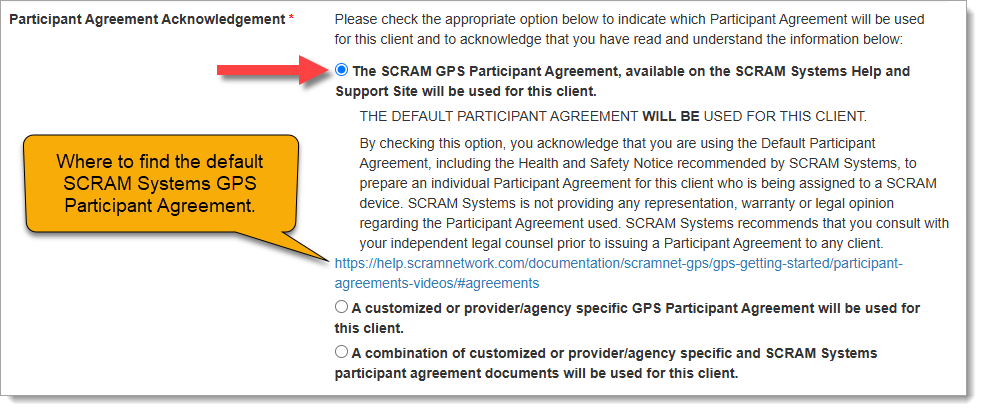
Customers who use the SCRAM Systems-provided SCRAM GPS Program Participant Agreement and Health & Safety Notice, which is available for download from SCRAM Systems Help & Support, will choose the first option, “The SCRAM GPS Participant Agreement, available on the SCRAM Systems Help and Support Site will be used for this client.” This option indicates that you are using the default SCRAM GPS Participant Agreement that was developed by SCRAM Systems and is currently available in SCRAM GPS Help.
Once you have chosen an option, a more detailed explanation of the choice you have made will appear:
Participant Agreement Acknowledgement Option 1 chosen (click to enlarge)
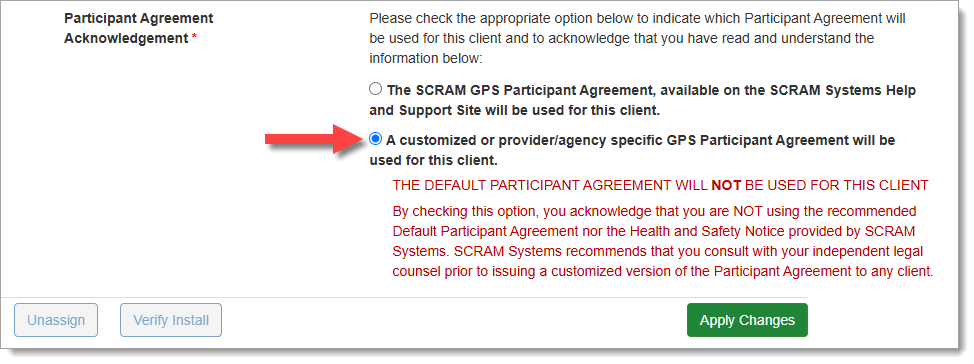
Customers who use their own monitoring program participation agreements, which they have developed in-house, independent of SCRAM Systems, and are NOT accessed from SCRAM Systems Help & Support, should choose the second option, “A customized or provider/agency specific GPS Participant Agreement will be used for this client,” as shown below:
Participant Agreement Acknowledgement Option 2 chosen (click to enlarge)
If you are unsure about the type of monitoring program participation agreement used by your organization, ask your supervisor or program administrator.
Completing the Device Assignment
Once you have chosen the appropriate Participant Agreement Acknowledgement, then Apply Changes and continue with the device assignment process as usual.
Tip: Regardless of which option you select, SCRAM Systems recommends you print two copies of the Participant Agreement and have the client and agent sign both copies – one copy for your records and one copy for the client’s records.
Audit Report
The Participant Agreement Acknowledgement selection made will be reflected in the Audit Report. This ensures a comprehensive and auditable history of agreement usage for each device assignment. The Audit Entry is shown as one of the following:
SCRAM Systems Approved Participant Agreement – YES
At 5:00 AM MDT on Thursday, June 5, 2025, SCRAM Systems will introduce a new feature that will allow users of the SCRAMNET GPS monitoring system to filter out inactive clients from Pattern of Life views.
During the 15-minute deployment, you may not be able to access SCRAMNET GPS, but messages from the SCRAM GPS device will continue to be processed uninterrupted.
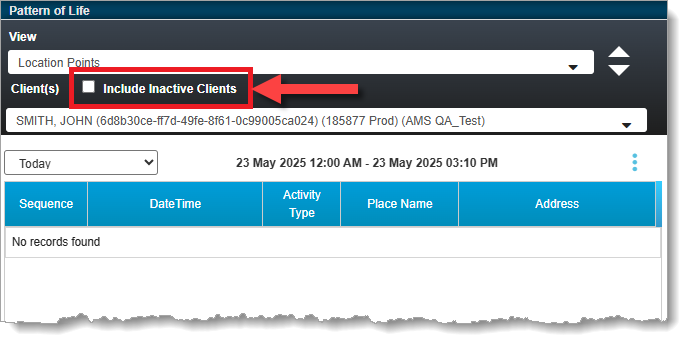
With this release, clients with Inactive statuses will be filtered from all applicable Pattern of Life views by default. This is useful in that it allows you to more quickly view Active clients only. This applies to the “Pattern of Life Analysis,” “Daily Activity Routine,” and “Location Points” views.
To see data for an Inactive client, select the Include Inactive Clients checkbox:
SCRAMNET GPS Pattern of Life ‘Include Inactive Clients’ Checkbox
On April 30th, 2025, SCRAM Systems will release multiple enhancements for your SCRAM 24/7 program.
These enhancements are:
Updates to the personally identifiable information (PII) that is available on the Add 24/7 Client page and the client’s Profile page.
Google Address validation for client address on the Add 24/7 Client page in the Contact Information section.
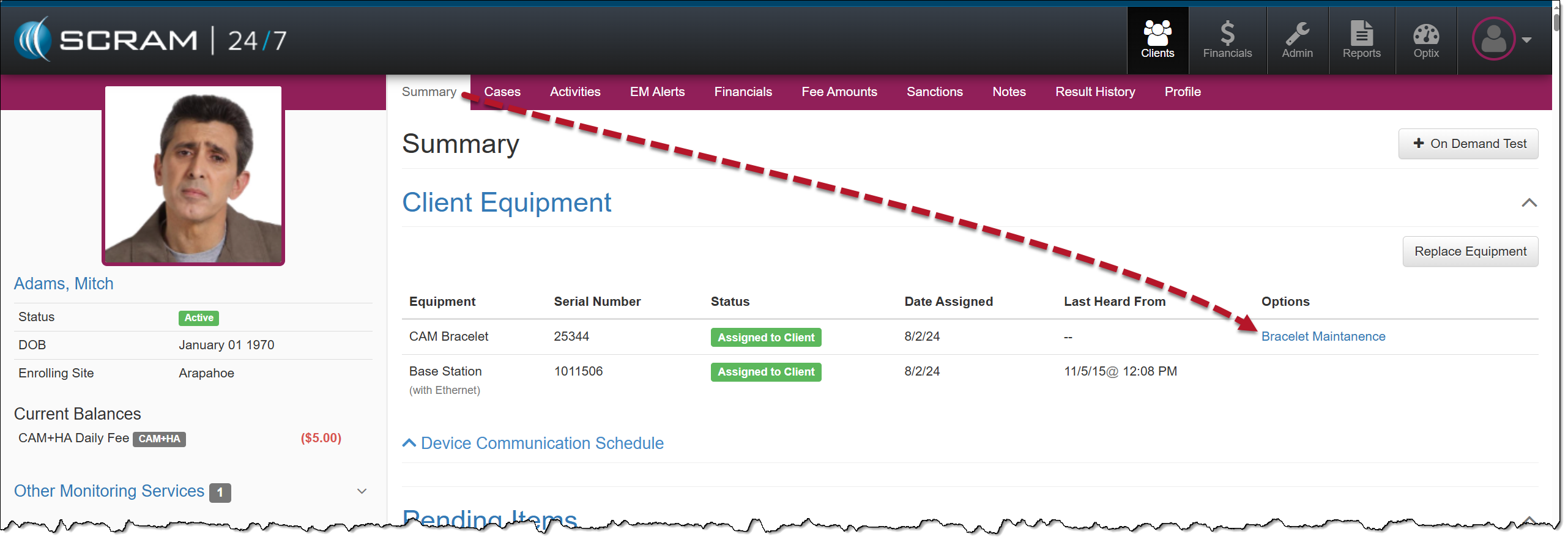
On the client’s Summary page, the Maintenance hyperlink located in the Options column will now display as “Bracelet Maintenance.”
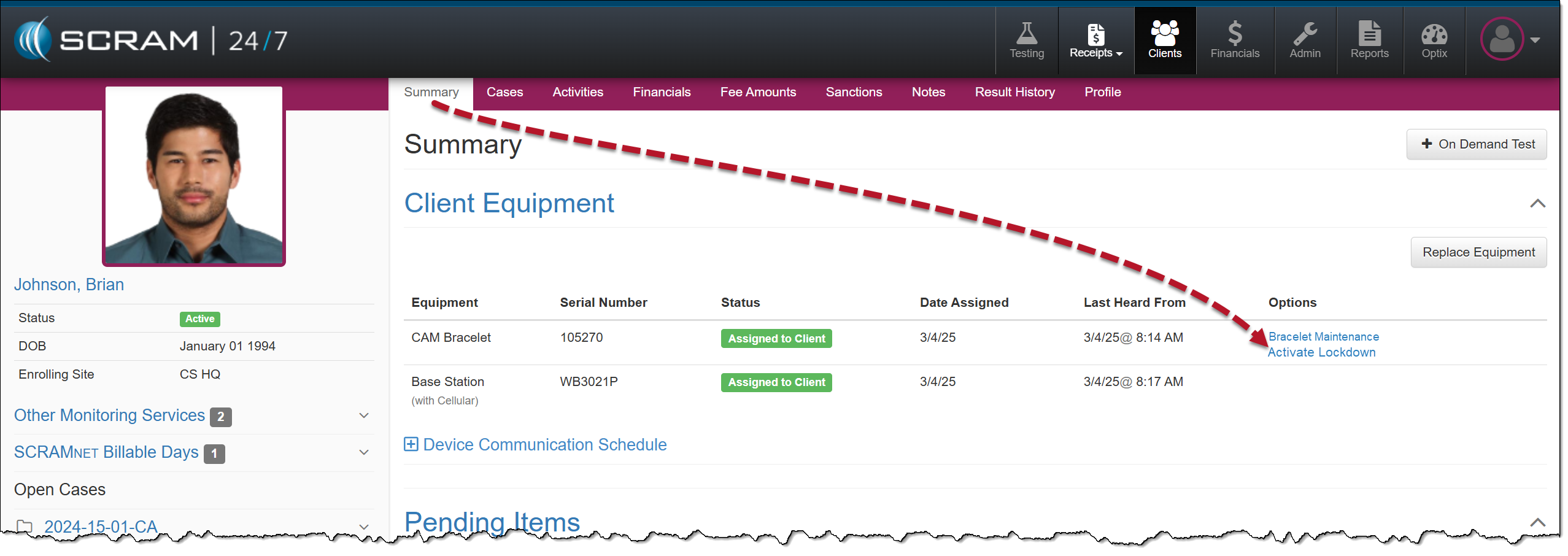
For clients participating in a CAM+HA or House Arrest Activity, an Activate Lockdown hyperlink is available in the Options column.
Personally Identifiable Information (PII)
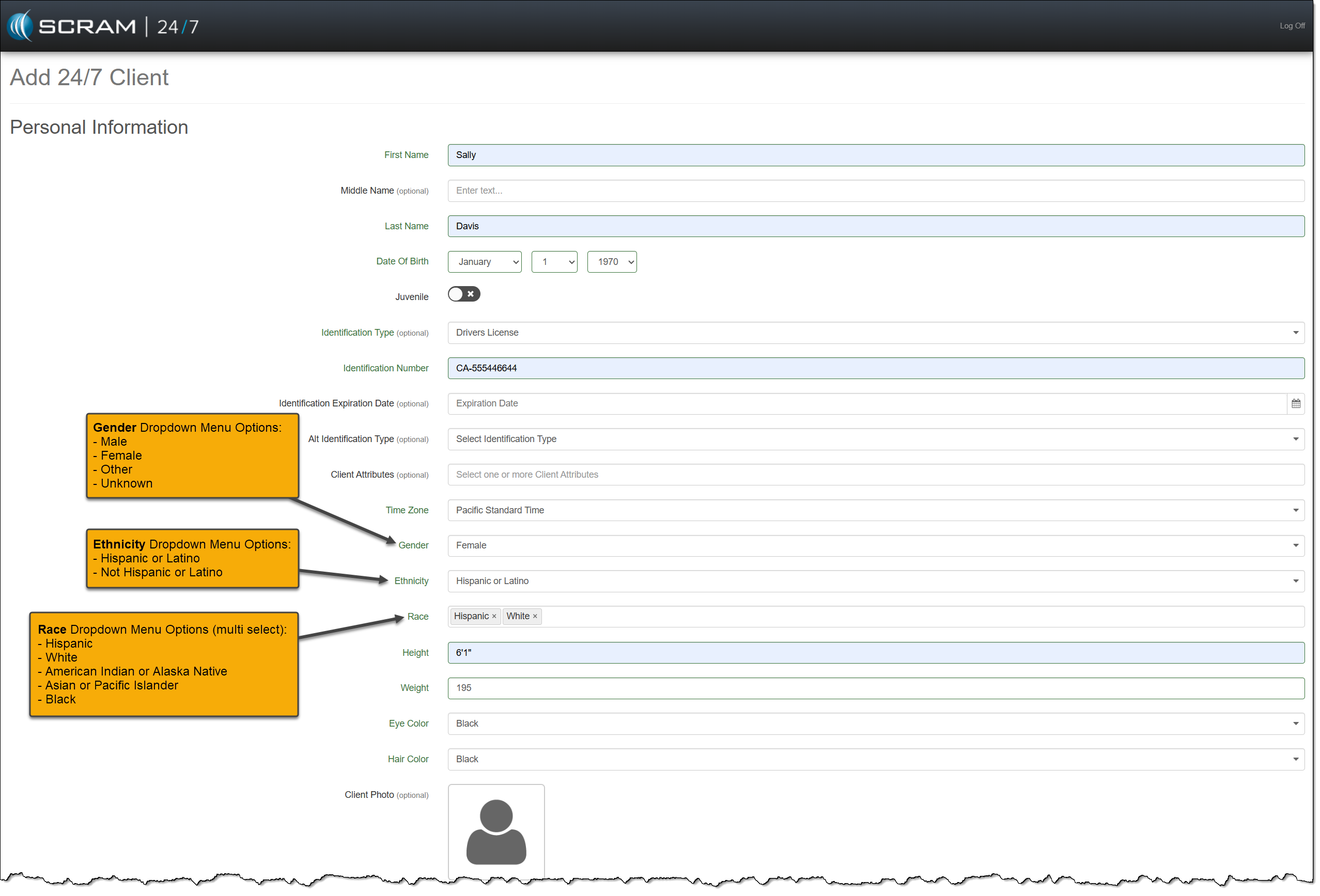
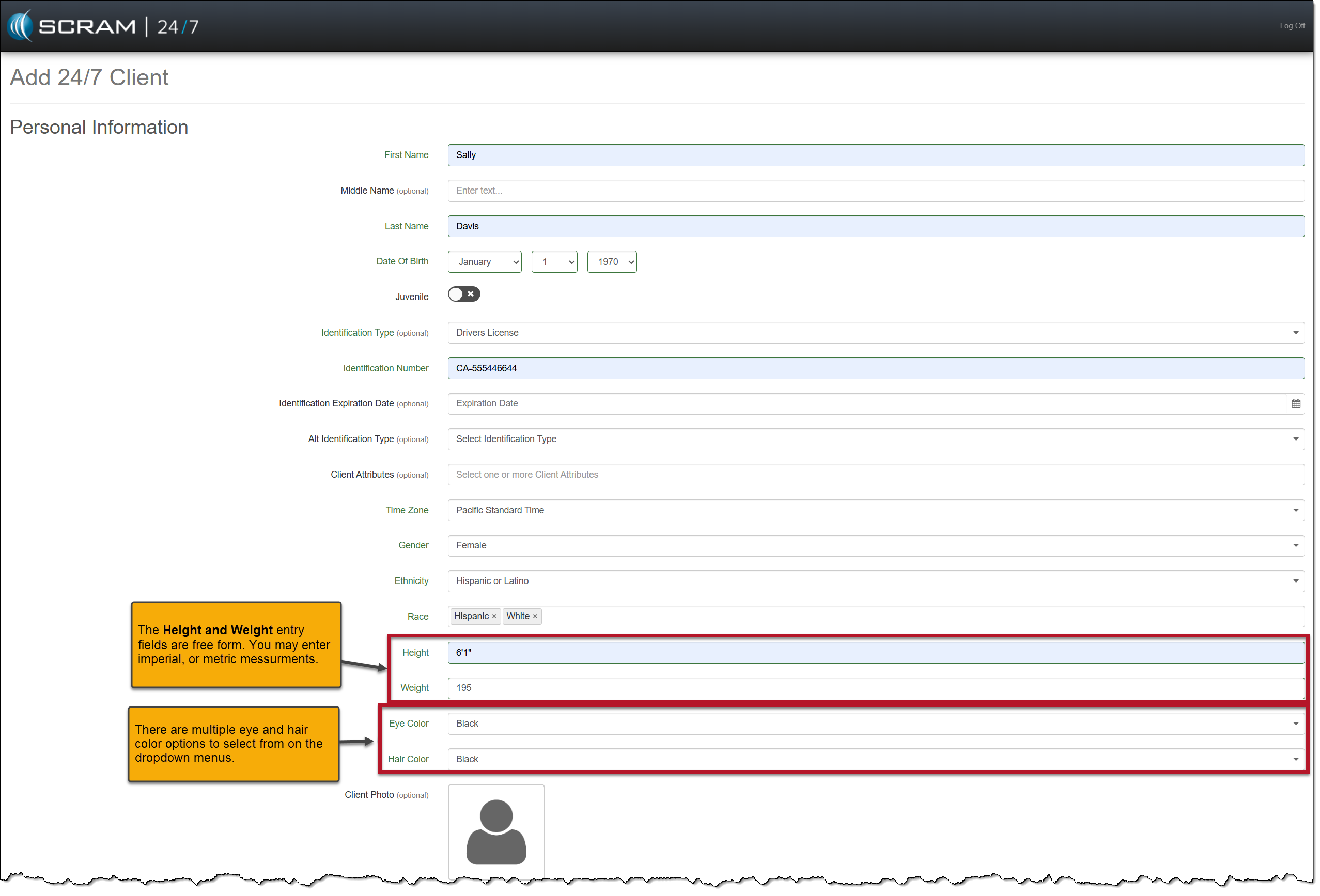
When adding a new client to the system, you will notice five additional required fields in the Personal Information section on the Add 24/7 Client page and some dropdown menu option updates. These updates allow you to include more detailed PII for your clients.
The additional PII fields are:
Race (multiple select)
Height
Weight
Eye Color
Hair Color
Updated dropdown menus include the following:
Gender
Ethnicity
Personal Information Section – Gender, Ethnicity, and Race options. Personal Information Section – Height, Weight, Eye and Hair Color options
You may also update an existing client’s PII on their Profile page.
Client Contact Information
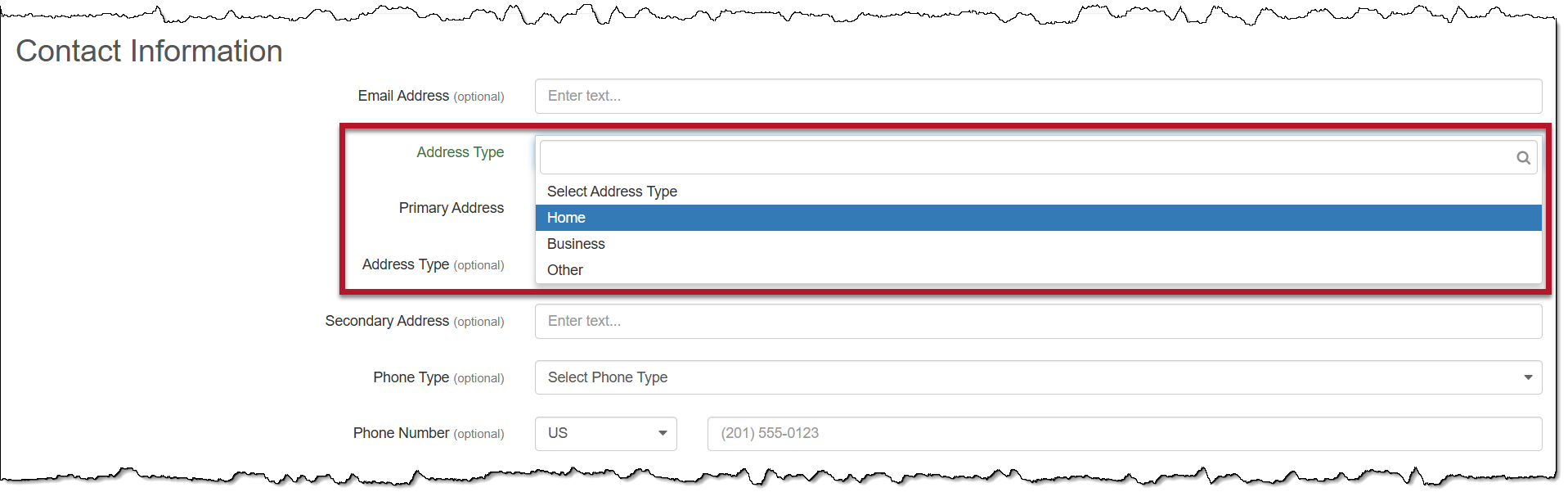
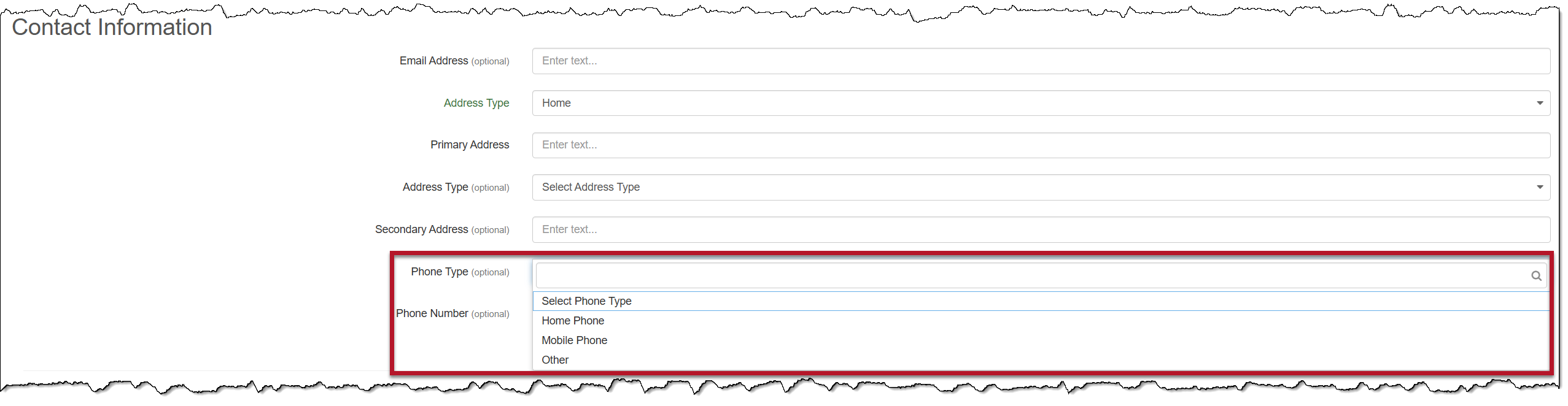
On the Add 24/7 Client page, you will notice a new Address Type dropdown menu, and the options for the Phone Type dropdown menu have been updated.
Address Type Dropdown Menu OptionsContact Information Section – Phone Type Dropdown Menu
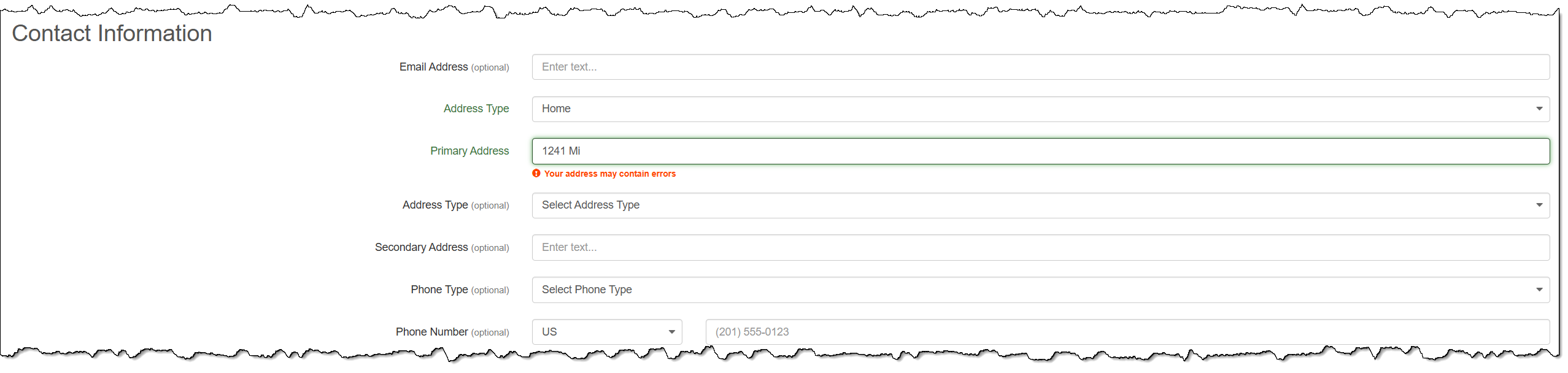
While entering the address details, you will notice an address validation warning.
Contact Information Section – Possible Address Error Message
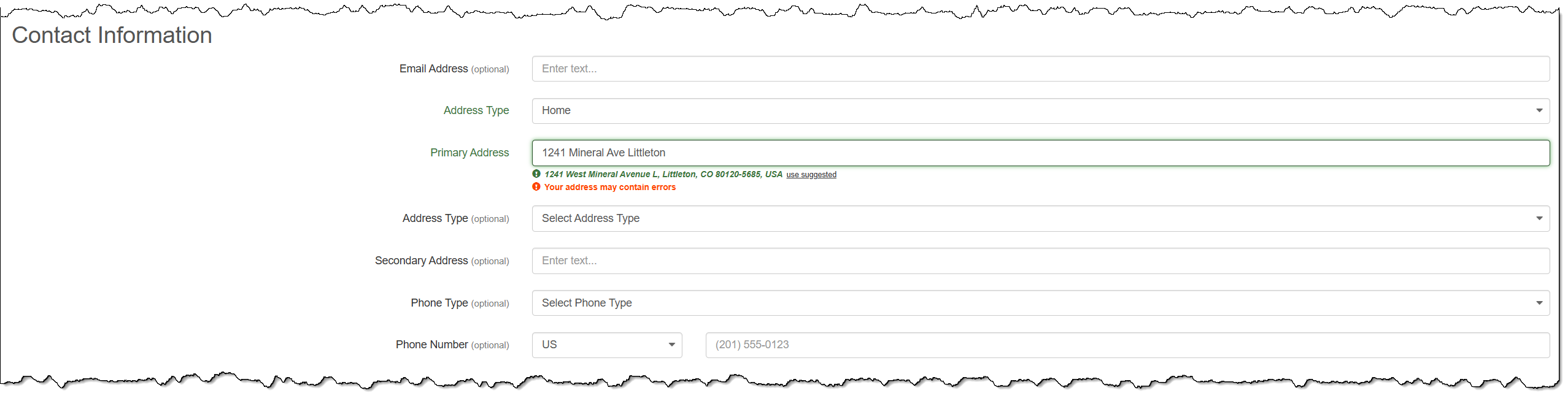
As you continue to add the details, Google will validate the address, and a suggested address will be available for you to select.
contact Information Section – Google Verified Address Suggestion
While entering the client’s address, you may save the information regardless of whether a Google-verified address suggestion is available to select.
After the release of this enhancement, your current clients’ address type will display as “Other.” You may update this option on their Profile page.
Bracelet Maintenance Hyperlink
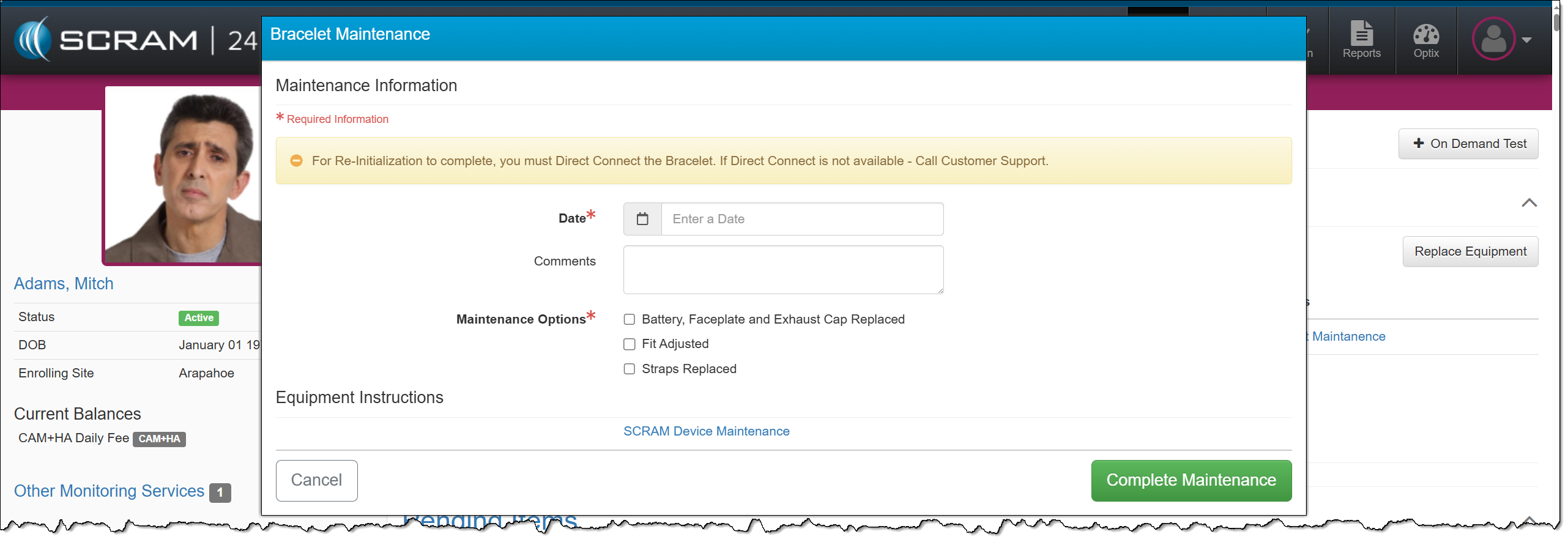
On the client’s Summary page, you will now access the Bracelet Maintenance hyperlink when completing maintenance on SCRAM CAM and SCRAM House Arrest bracelets. This maintenance includes Battery/Faceplate Replacement, Fit Adjustments, and Strap Replacement.
Clients participating in a curfew monitoring program, also known as house arrest, typically have permission to leave throughout the day to work or engage in other activities. These leaves are scheduled on the HA Schedule page in SCRAMNET. In some cases, non-compliant behavior or court orders may result in the revocation of the client’s freedom to leave their home.
When this occurs, quickly override the client’s HA Schedule by selecting the ActivateLockdown hyperlink in the Client Equipment section on the Summary page in SCRAM 24/7.
Activate Lockdown Hyperlink
Once the Lockdown status is active, an Unauthorized Leave alert is generated any time the client moves outside the range of the base station, regardless of the HA schedule.
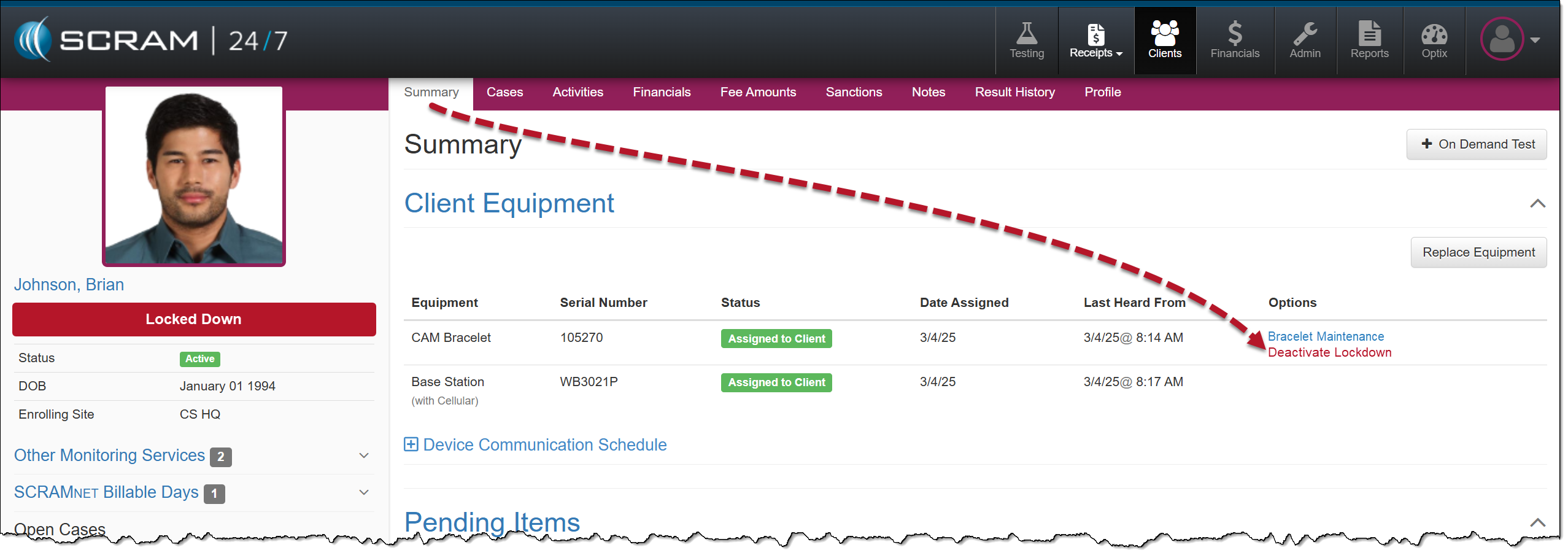
To remove the lockdown status, select the Deactivate Lockdown hyperlink, and the client may resume their activities based on the HA schedule saved in the system.
Deactivate Lockdown Hyperlink
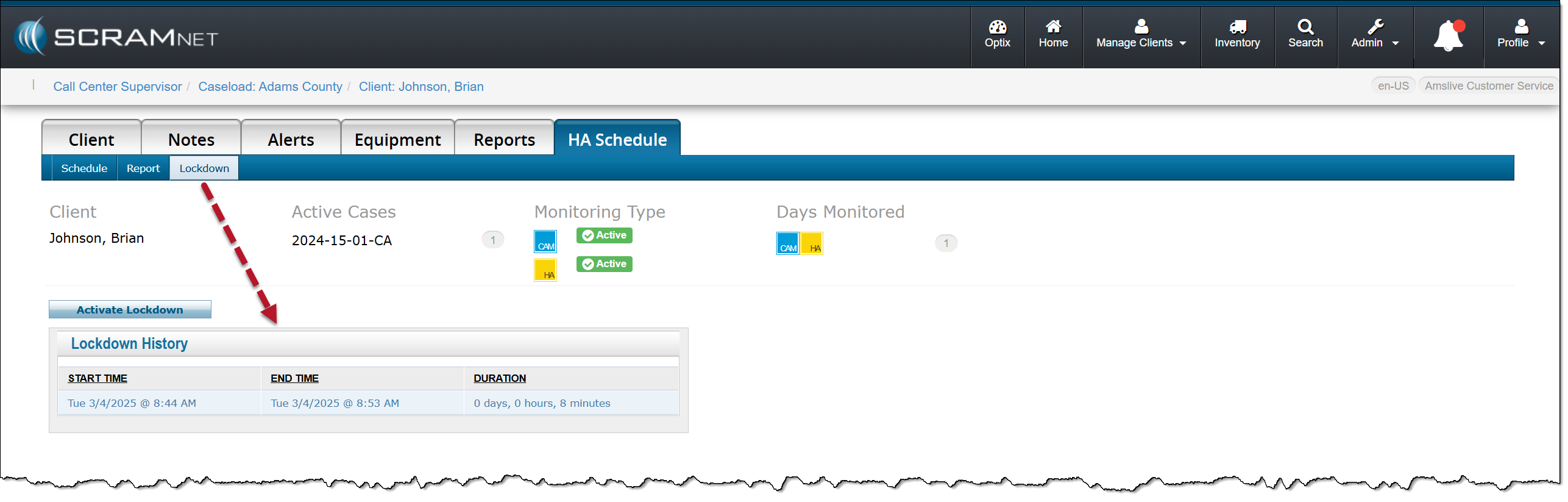
In SCRAMNET, you can view the client’s Lockdown History on the HA Schedule page, under the Lockdown subtab.
On the morning of Thursday, April 10, 2025, SCRAM Systems introduced the following new feature:
Preserve Schedules and Exceptions on Client Reactivation
When clients are inactivated, associated schedules and exceptions expire. With this release, your SCRAMNET GPS account can be configured to allow schedules and exceptions to remain active, even on Inactive client profiles. This can be useful in scenarios where clients are inactivated, but will be reactivated, due to a short-term incarceration, for example. This new feature means officers don’t have to re-create schedules and exceptions when they reactivate the client.
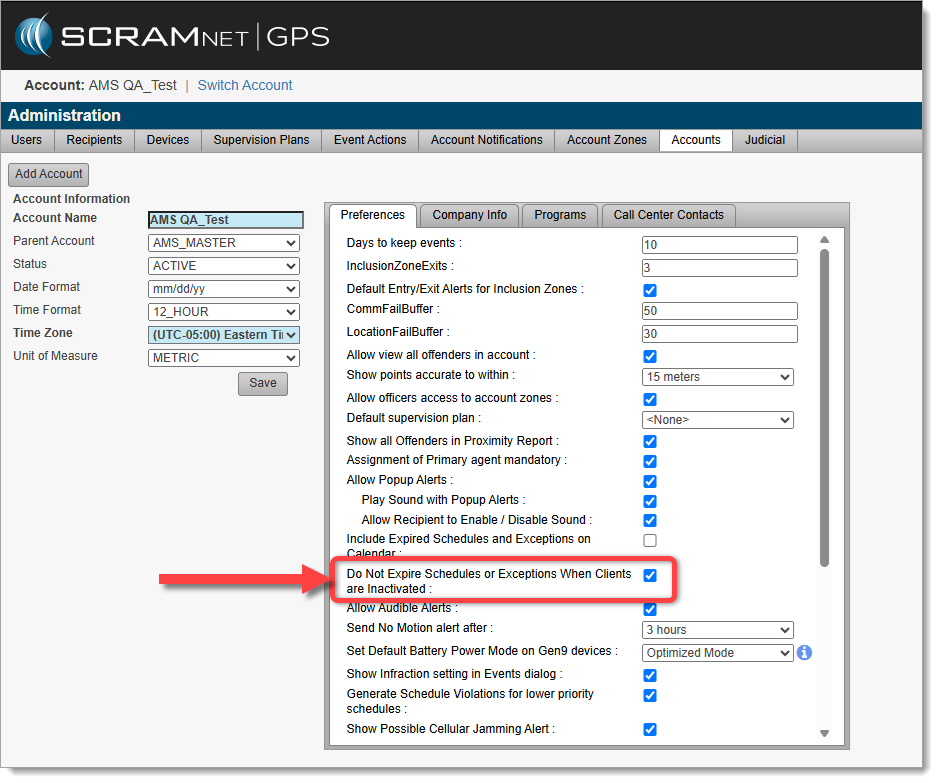
To use this new feature, an account Administrator must enable “Do Not Expire Schedules or Exceptions When Clients are Inactivated” in Administration / Accounts:
Check the “Do Not Expire Schedules or Exceptions When Clients are Inactivated” checkbox
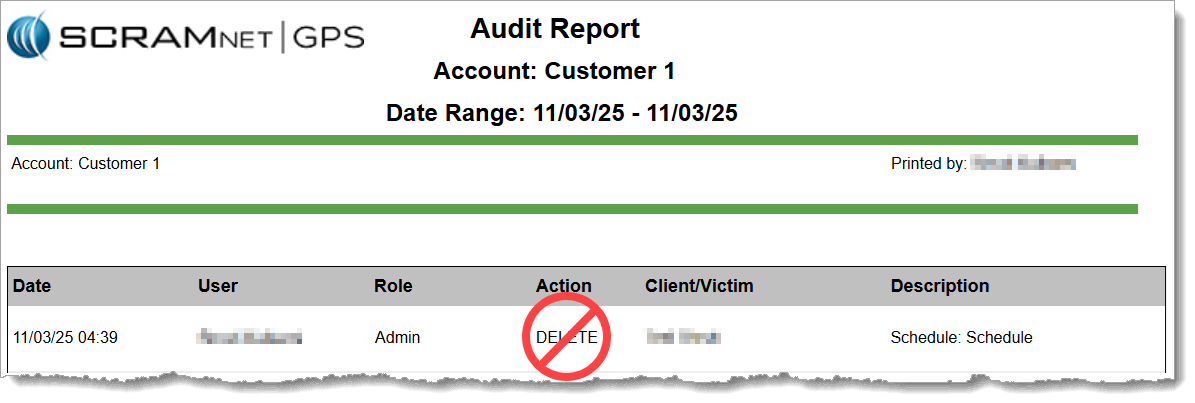
Tip: When this feature is activated, the Audit Report will no longer show “DELETE” entries for schedules or exceptions to Inclusion and Exclusion Zones, when a client is inactivated.
Audit Report no longer shows “DELETE” entries for Schedules or Exceptions