On August 14th, 2025, a new version of the SCRAM Ally (Victim Notification mobile application) will be available for iOS users in the Apple Store. The enhancements in version 2.1.1 (2) include:
- Logging into multiple Ally applications on multiple devices
- Updated Push Notifications, Location Service, and Motion Activity Disabled banners
- Location information availability when the Ally Victim uses the application to call for help
 |
|
 | Tip: After updating the SCRAM Ally app, it is important that your Victim users open the app and visit the Homepage. This action will ensure alert notifications function properly. |
Logging into Multiple Devices
If the client is currently logged into the Ally application on their smartphone and they attempt to log into the application on a second device, for example, an iPad or second smartphone, the following pop-up message will display on the second device: “Your Ally account is already registered with another phone. If you choose to continue, the account on your prior phone will be disabled, and only this phone will be used for monitoring. Do you want to continue?”
The Ally victim user is presented with two options to move forward. If they select:
- Continue/OK – The user is automatically logged out of the first device and may sign into the app on the second device. The first device will display a message of, “Your Ally account is registered with a new phone. Your Ally account will be disabled on this phone and will not be used for monitoring.”
- Cancel – This will cancel the login attempt on the second device, keeping the victim signed in on the first device. In this case, the first device is the smartphone being monitored.
Updated Push Notifications, Location Service, and Motion Activity Disabled Banners
For accurate, continuous monitoring, SCRAM Ally requires permission to send Push Notifications, access Location Service, and Motion & Fitness Activity. Even when the app requires permissions to function properly, Apple recommends making these permissions optional to give users more control over their data.
SCRAM Ally requires these permissions to properly monitor Victims and deliver important alerts with regard to Victims’ proximity to their assigned individuals. When Ally does not have these permissions, the following dialogs are displayed:
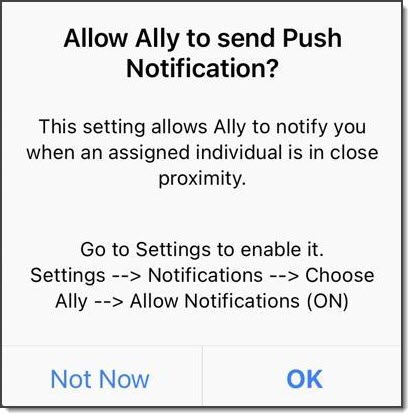
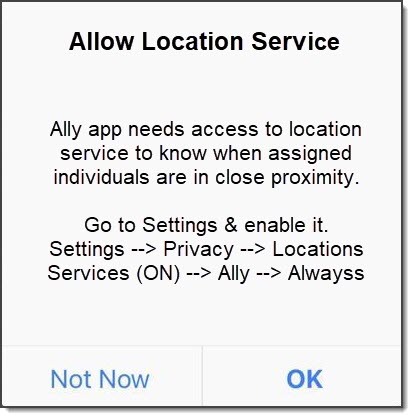
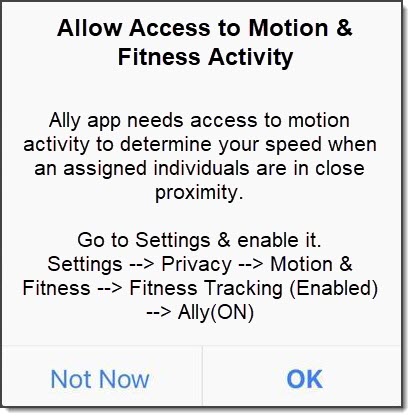
If Victim users do not grant permission to these services, the following banner warnings are displayed in the SCRAM Ally app:
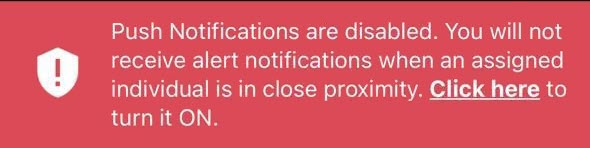
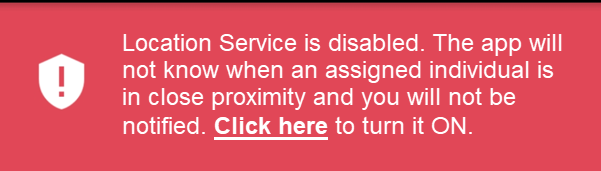
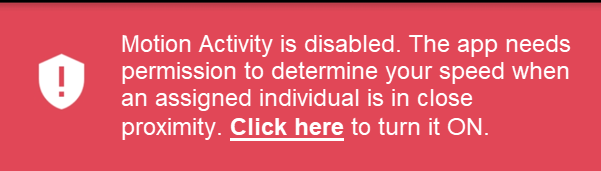
Additionally, when the Location Service is disabled, a critical alert is generated in SCRAMNET GPS. It is important to address this alert as it indicates the Victim is not properly monitored:

Location Information Availability when the Ally Victim Uses the Application to Call for Help
When Location Services are enabled for the Ally application and the victim uses the app to call the emergency number displayed, the current location information is reported.
If the victim disables Location Services while the application is open, when they call the emergency number displayed, the last known location will be reported.
If the victim disables Location Services and then closes the application on their smartphone, once reopened, unless Location Services are enabled, no location information is reported when making an emergency call from within the Ally application.