During the evening of July 27, 2022, SCRAM Systems® will deploy enhancements to the SCRAM Nexus Family and SCRAM Nexus Treatment Provider systems, including:
Suggested Activities for Nexus Family Case Plans
The Ability to Cancel a Session Series in the Nexus Treatment Provider Portal
Suggested Activities
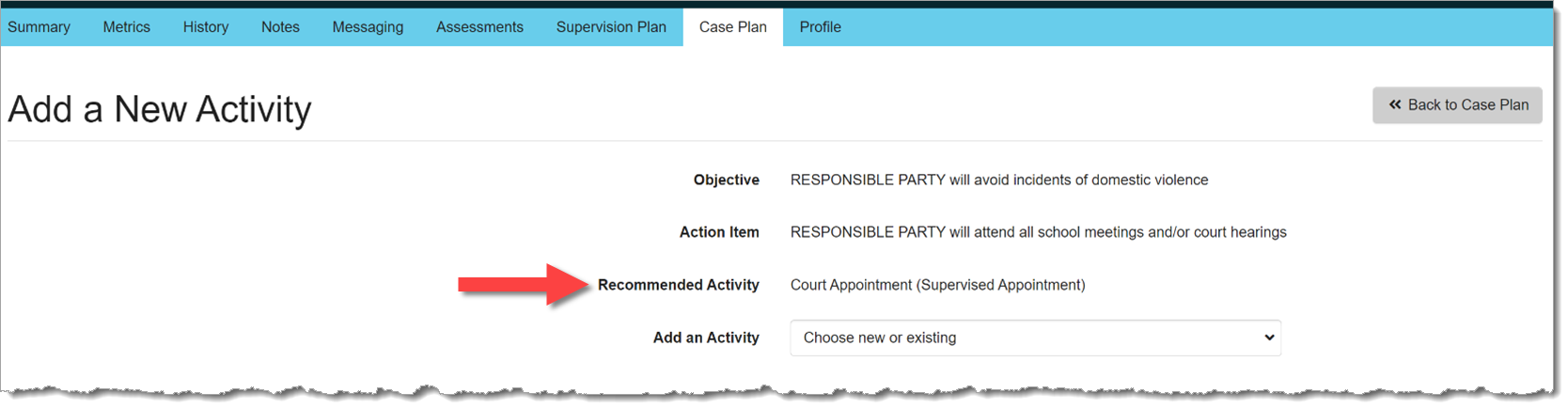
Based on configuration settings determined by your Administrator, with this release, Nexus Family will display Recommended Activities when a worker needs to add a new activity to an action item:
Recommended Activity (click to enlarge)
Cancel a Session Series
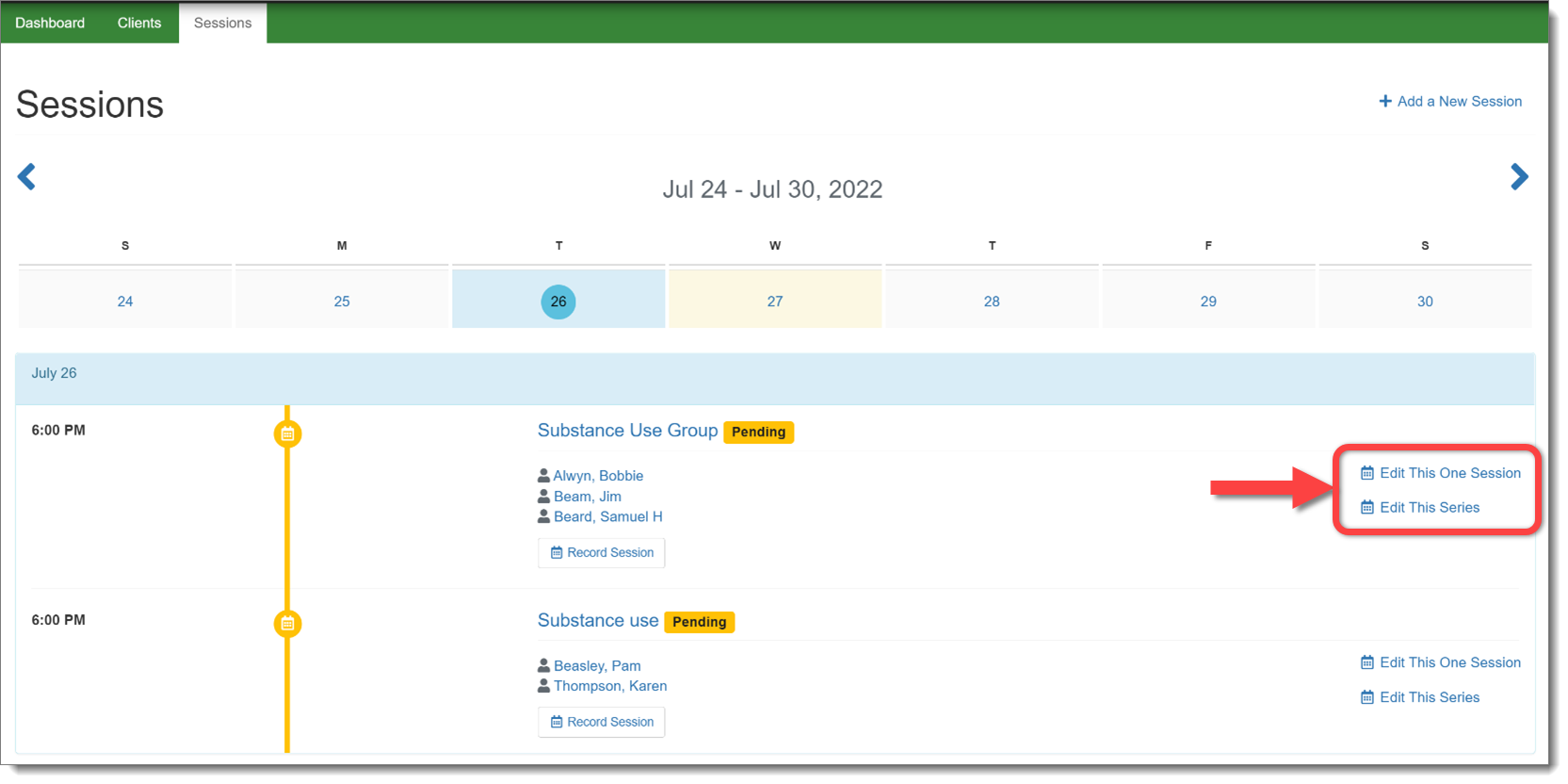
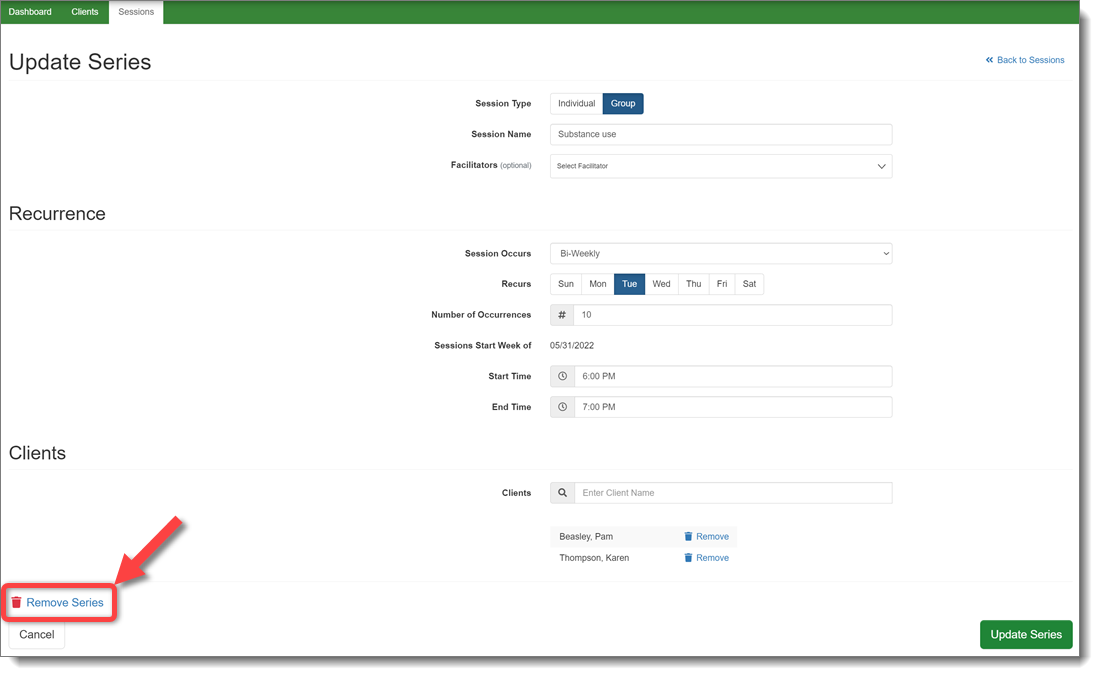
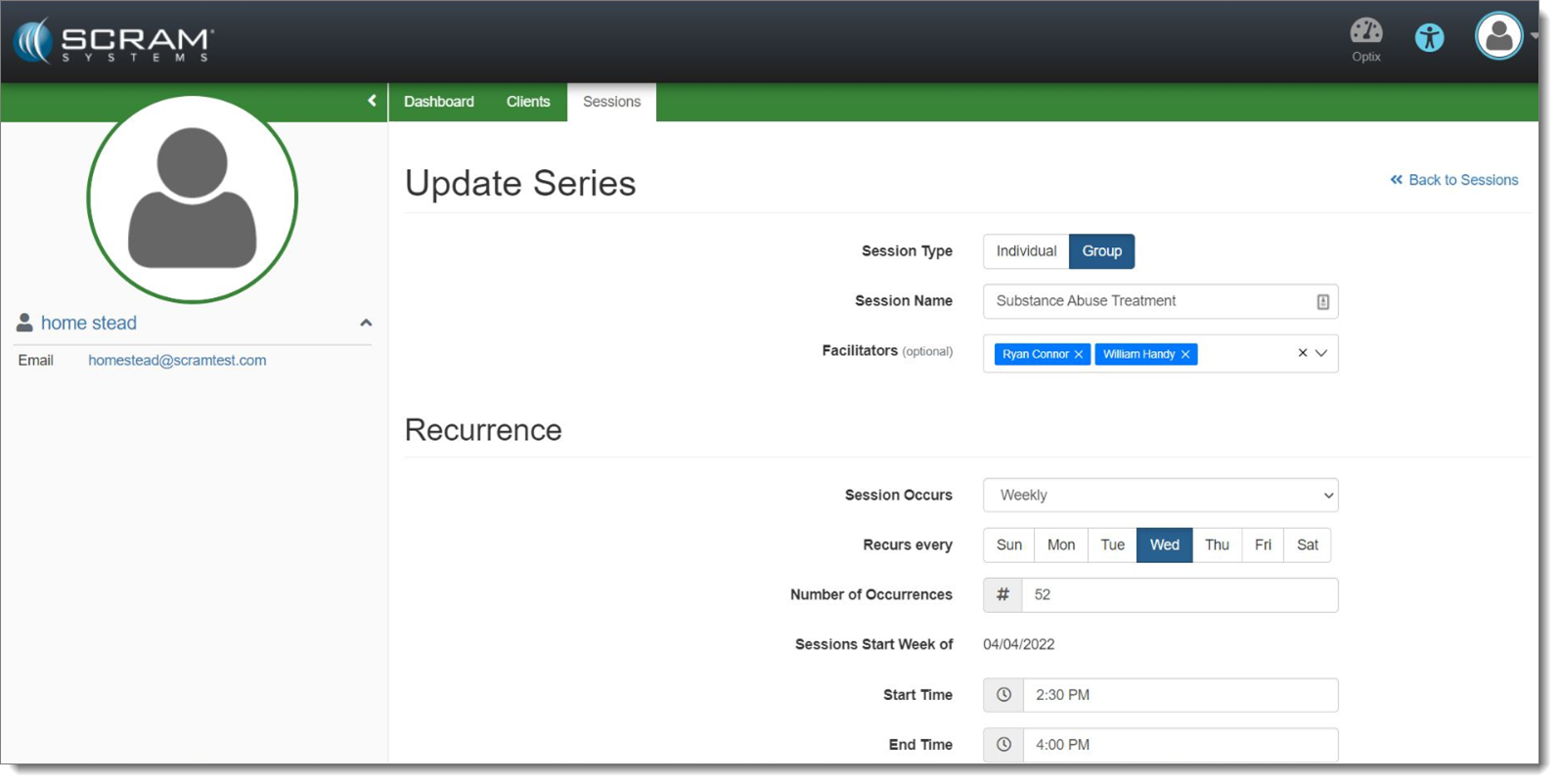
In the Nexus Treatment Provider portal, a provider will now have the ability to cancel an entire series of treatment sessions, rather than having to cancel individual sessions. This change will remove the session series from every client in the session.
Select the Appropriate Session Series to Edit (click to enlarge)Remove the Session Series (click to enlarge)
Note the additional updates designed to make it clear if the provider is editing one session or an entire session series.
During the evening of July 27, 2022, SCRAM Systems® will deploy a variety of Client Management and Supervisor-level enhancements to the SCRAM Nexus® system, including the ability to:
Add an Associate to a Client
Create Case Plans for a Client
Send an On-Demand Check-In to a Client Who is Enabled for TouchPoint Check-Ins
Approve Responses that Require Supervisor Approval (Supervisors and Administrators Only)
Cancel a Session Series in the Nexus Treatment Provider Portal
Client Management Enhancements
Add Associates to a Client Profile
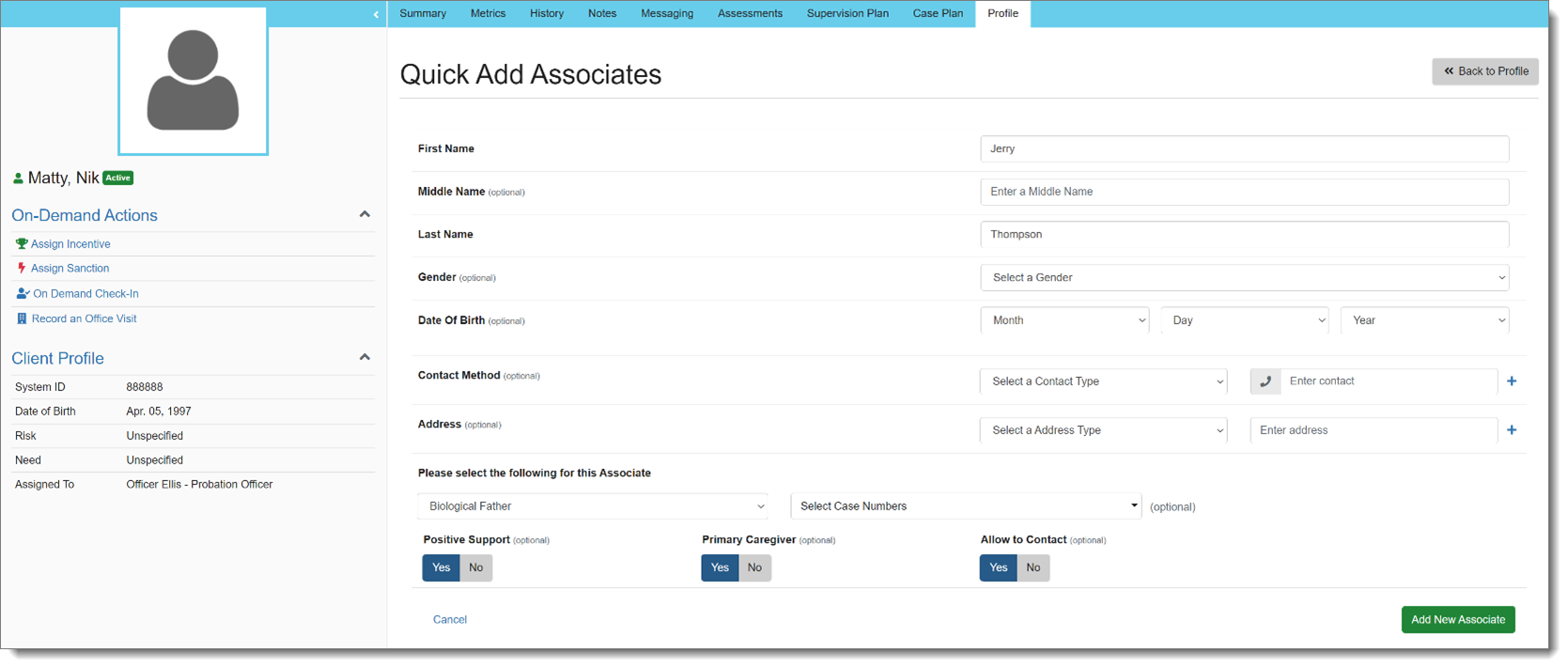
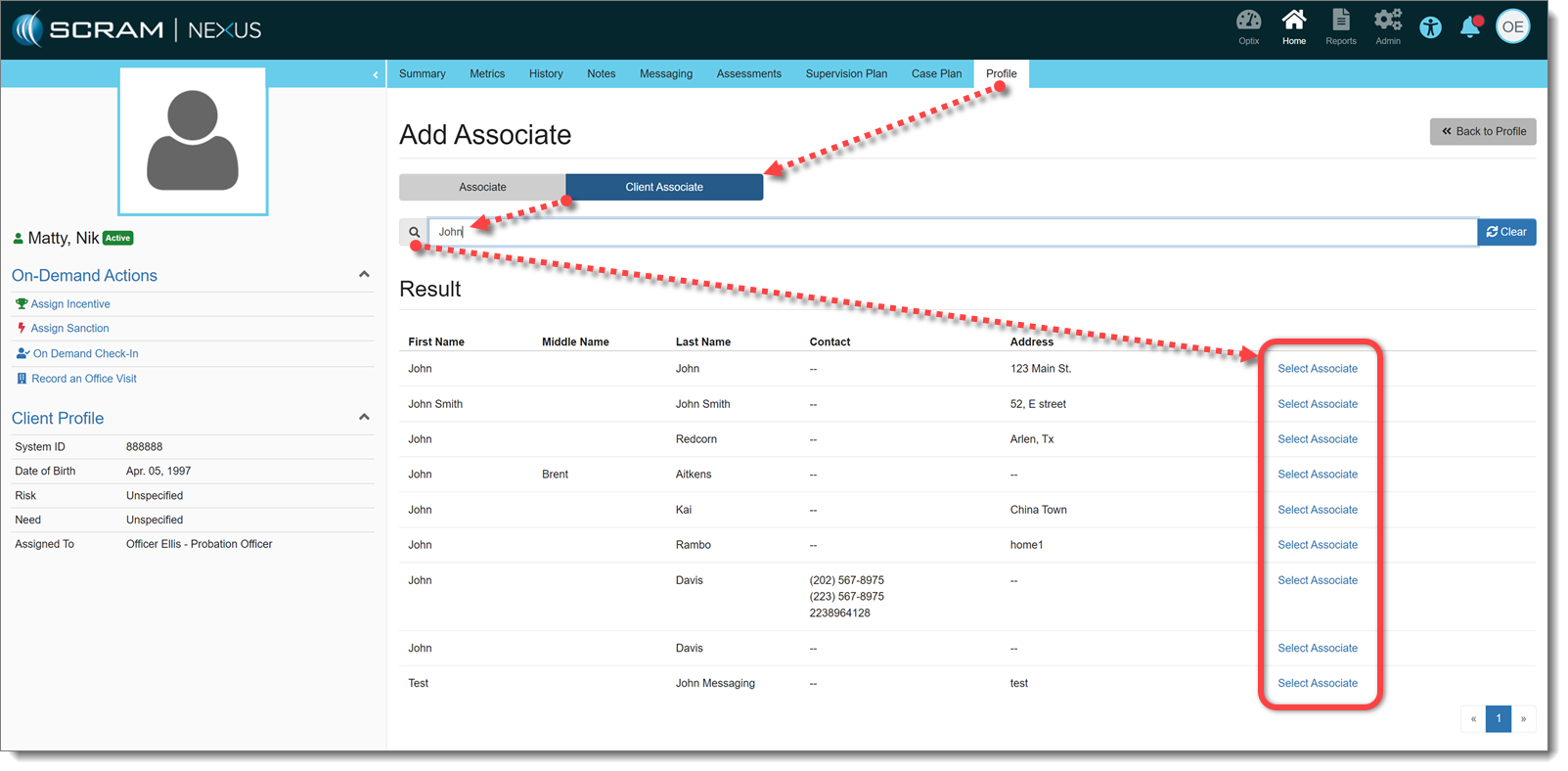
With this release, an Associate may be added to a client in Nexus. Associates are people who need to be added to the client for reference. Officers can search for existing Associates that have been added to other clients, or can quickly create a new Associate:
Quick Add Associate (click to enlarge)
Other clients can also be added as Associates, if needed. This will not add those clients to the Associates database, but rather make an association between clients:
Add Associated Client (click to enlarge)
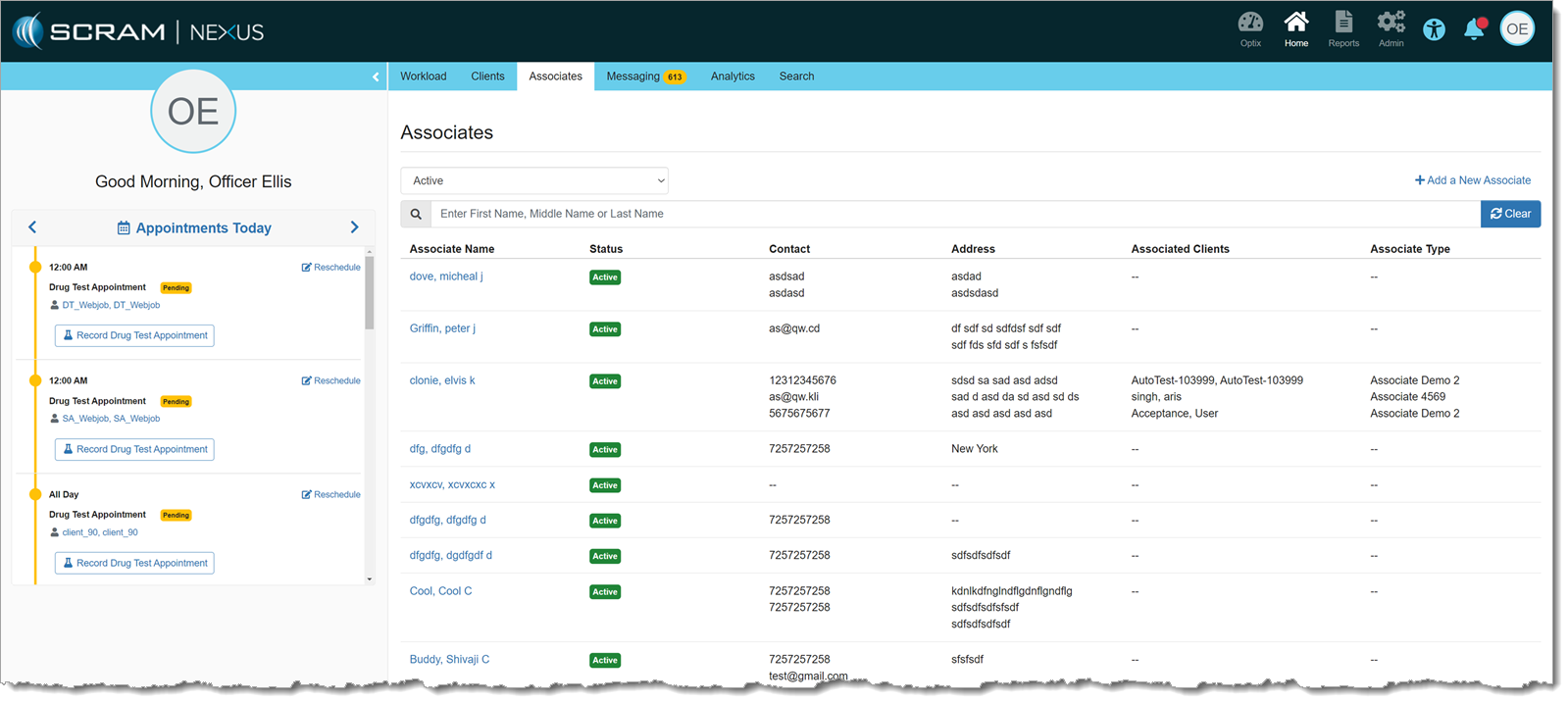
There is also a list of all Associates for a given customer on the main Officer page. Associates may be added and managed from this page as well. Clients cannot be added to an associate from this page, but clients can be removed from an associate, if needed:
Associates Page (click to enlarge)
Case Planning
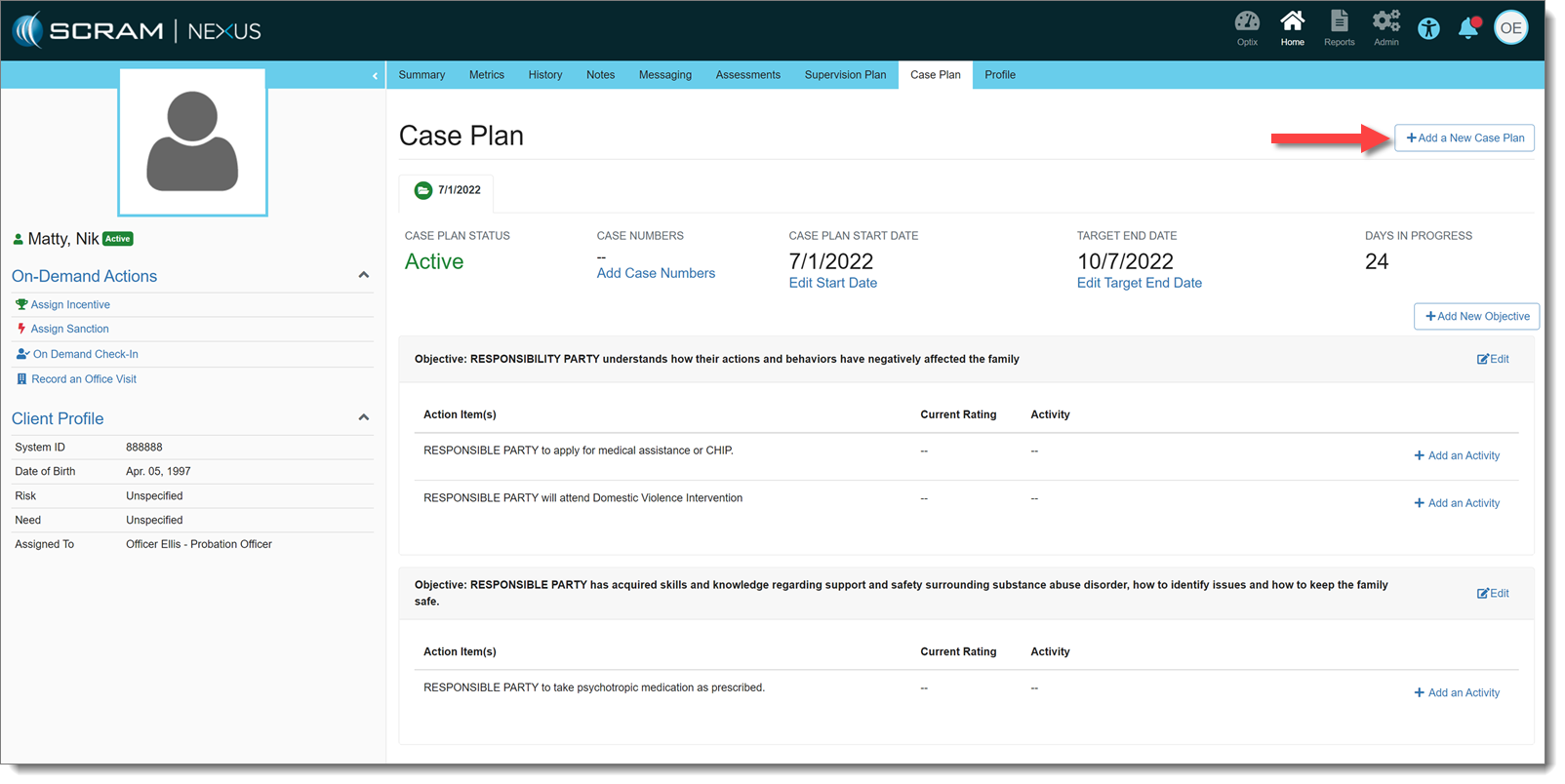
Also effective with this release, Officers may create Case Plans for a client. A Start Date and Target End Date may be entered for each Case Plan, individually. Objectives and Action Items to achieve those Objectives may be added to the Case Plan and, in turn, Activities may be added to Action Items to help track progress that the client is making on those items.
Case Plan (click to enlarge)
There can only be one Active Case Plan at a time.
Send On-demand TouchPoint Check-in
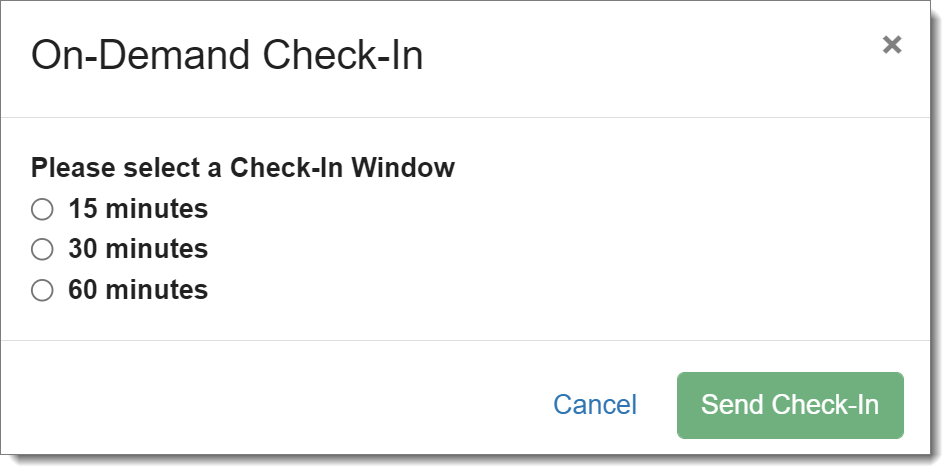
An officer can send an on-demand check-in to a client who is enabled for TouchPoint Check-Ins. There is a link on the client’s side profile that allows an officer to send a check-in to a client. The officer may select a 15-, 30- or 60-minute check-in window, during which the client must check-in before the check-in is marked as Missed.
On-Demand Check-In Window Choices (click to enlarge)
If there is already a scheduled check-in within that on-demand window, it will be auto-resolved once the client completes the on-demand check-in.
Supervisor Enhancement: Approve Responses that Require Approval
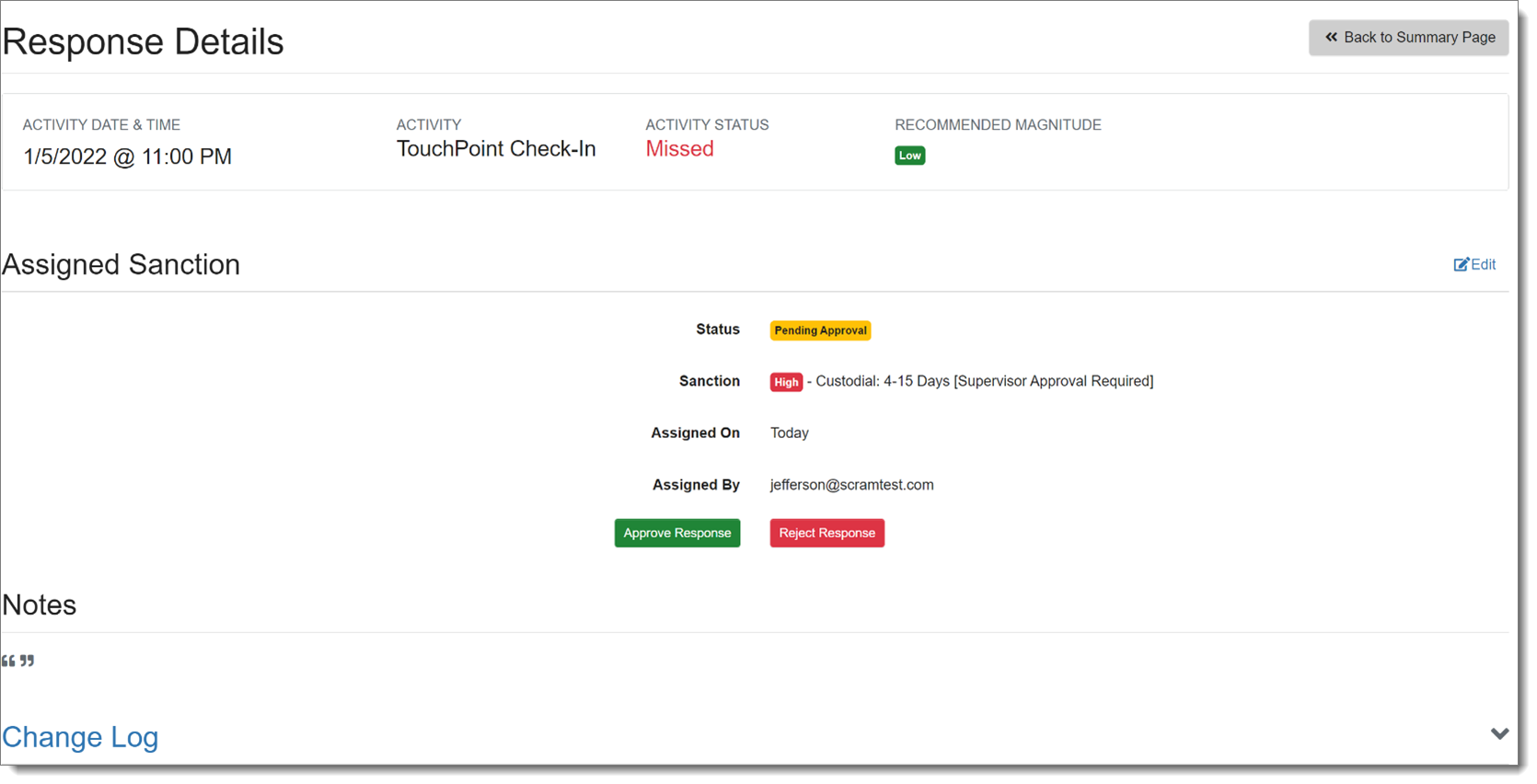
If a sanction or incentive response requires prior approval (as set forth in Admin Settings), Nexus will place that response in “Pending Approval” status.
Response Pending Approval (click to enlarge)
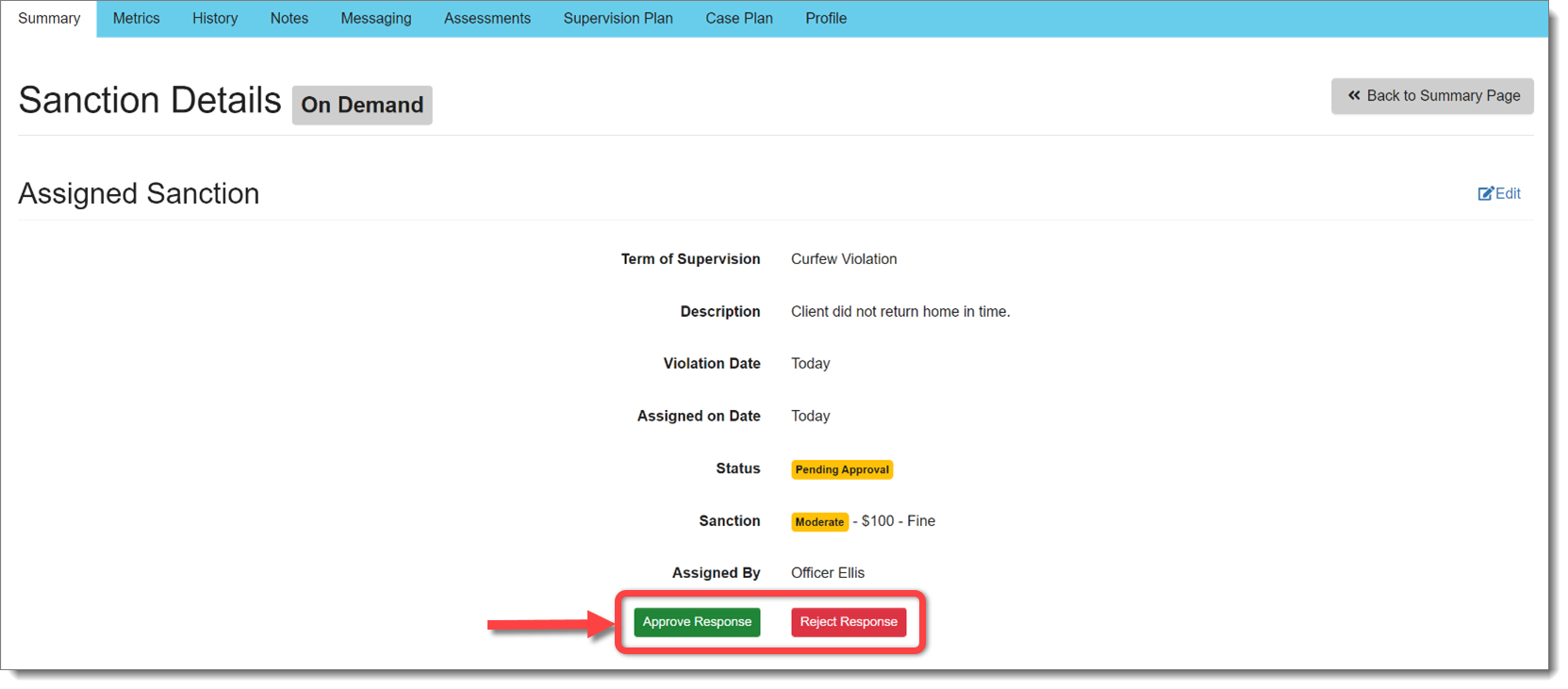
Supervisors and Administrators may Approve or Reject that response before it is assigned:
Approve or Reject Response (click to enlarge)
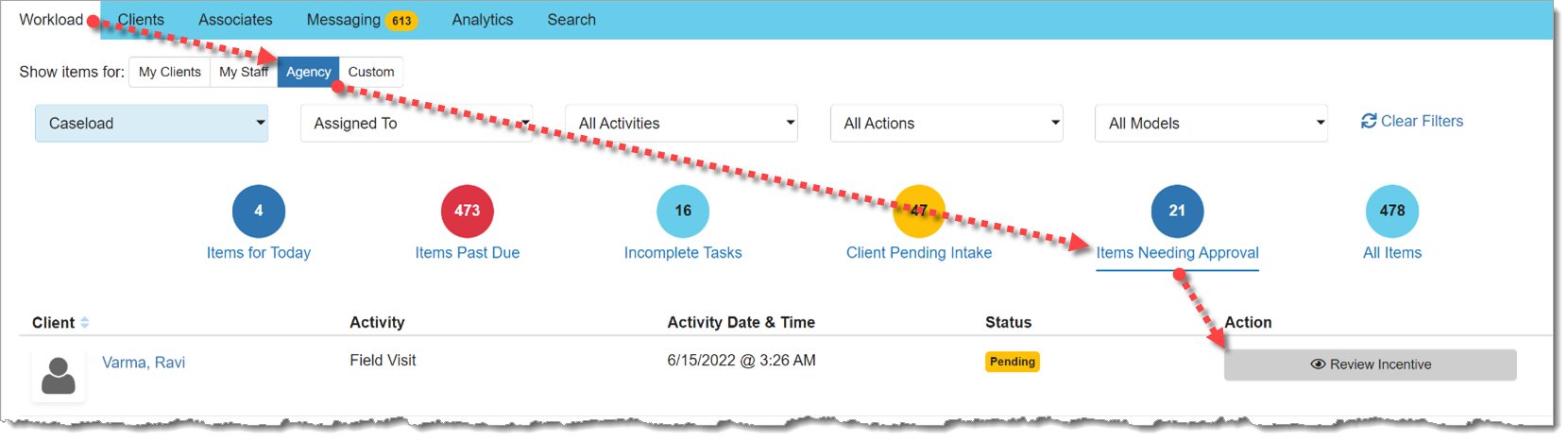
There is also a view for Supervisors on the Workload page that displays responses pending approval:
Items Needing Approval (click to enlarge)
Nexus Treatment Provider: Cancel a Session Series
In the Nexus Treatment Provider portal, a provider will now have the ability to cancel an entire series of treatment sessions, rather than having to cancel individual sessions. This change will remove the session series from every client in the session.
Select the Appropriate Session Series to Edit (click to enlarge)Remove the Session Series (click to enlarge)
Note the additional updates designed to make it clear if the provider is editing one session or an entire session series.
On July 21, 2022, SCRAM Systems® will deploy a Document Management enhancement for clients within the SCRAM Nexus® system.
With this release, a user can access the Documents tab on the client’s profile and upload documents to the systems.
Document Capture (click to enlarge)
For clients who are utilizing SCRAM TouchPoint Mobile application as a part of their program, a user can share documents to the app from within SCRAM Nexus. (Document Management activation required). Once the document has been shared and viewed by the client, the Status column will display as “Viewed” next to the document name.
In addition, a client is able to share documents from their app to SCRAM Nexus.
During the evening of June 16, 2022, SCRAM Systems® will deploy a variety of Client and Treatment-related enhancements to the SCRAM Nexus® system, including the ability to:
Limit the number of On-Demand Sanctions available to only those in the client’s Terms of Supervision
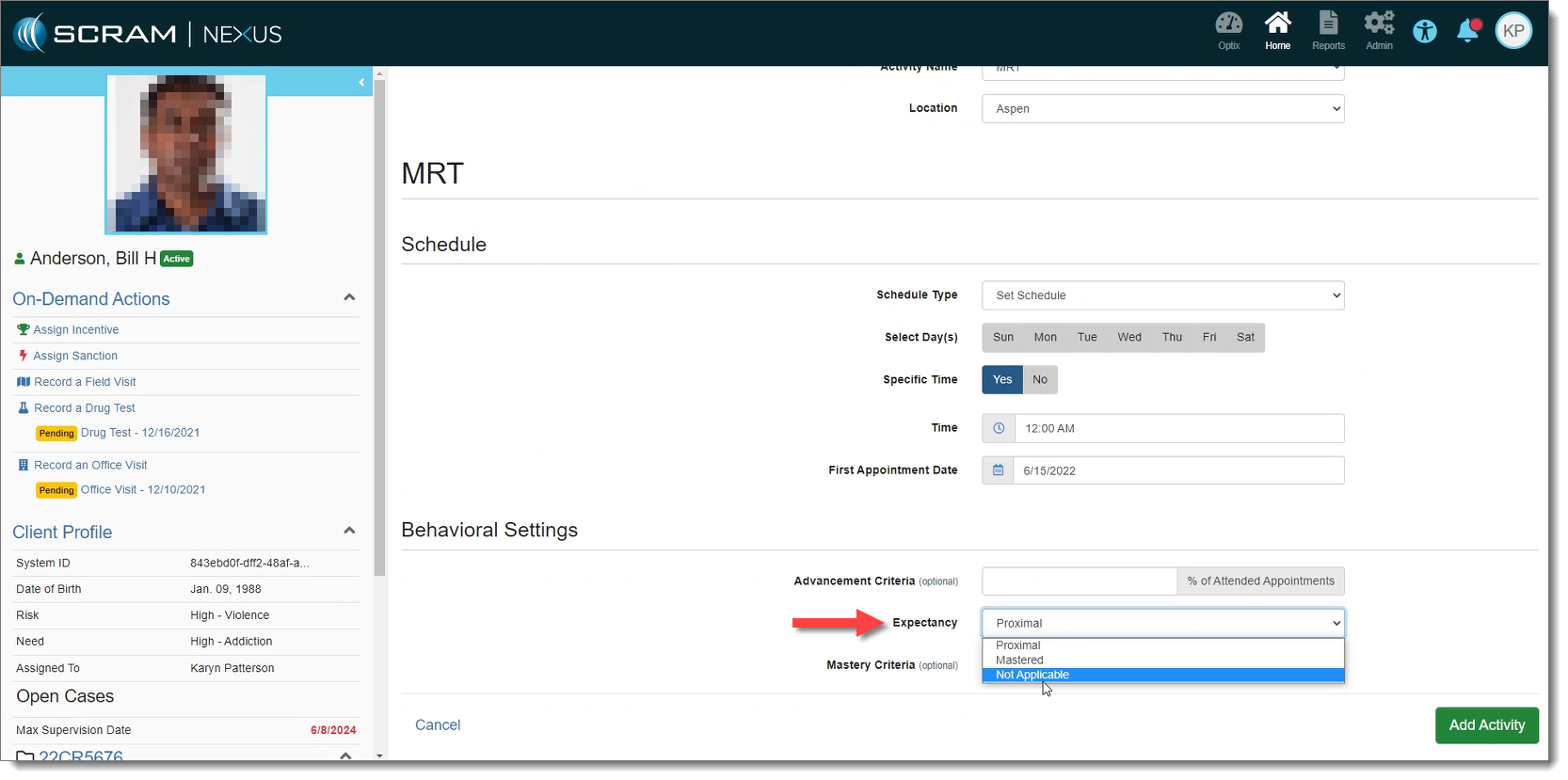
Deactivate ‘Expectancy’ for Activities
Require Supervisor approval on certain incentive or sanction responses
Add session facilitators to SCRAM Nexus Treatment Sessions
On-Demand Sanctions
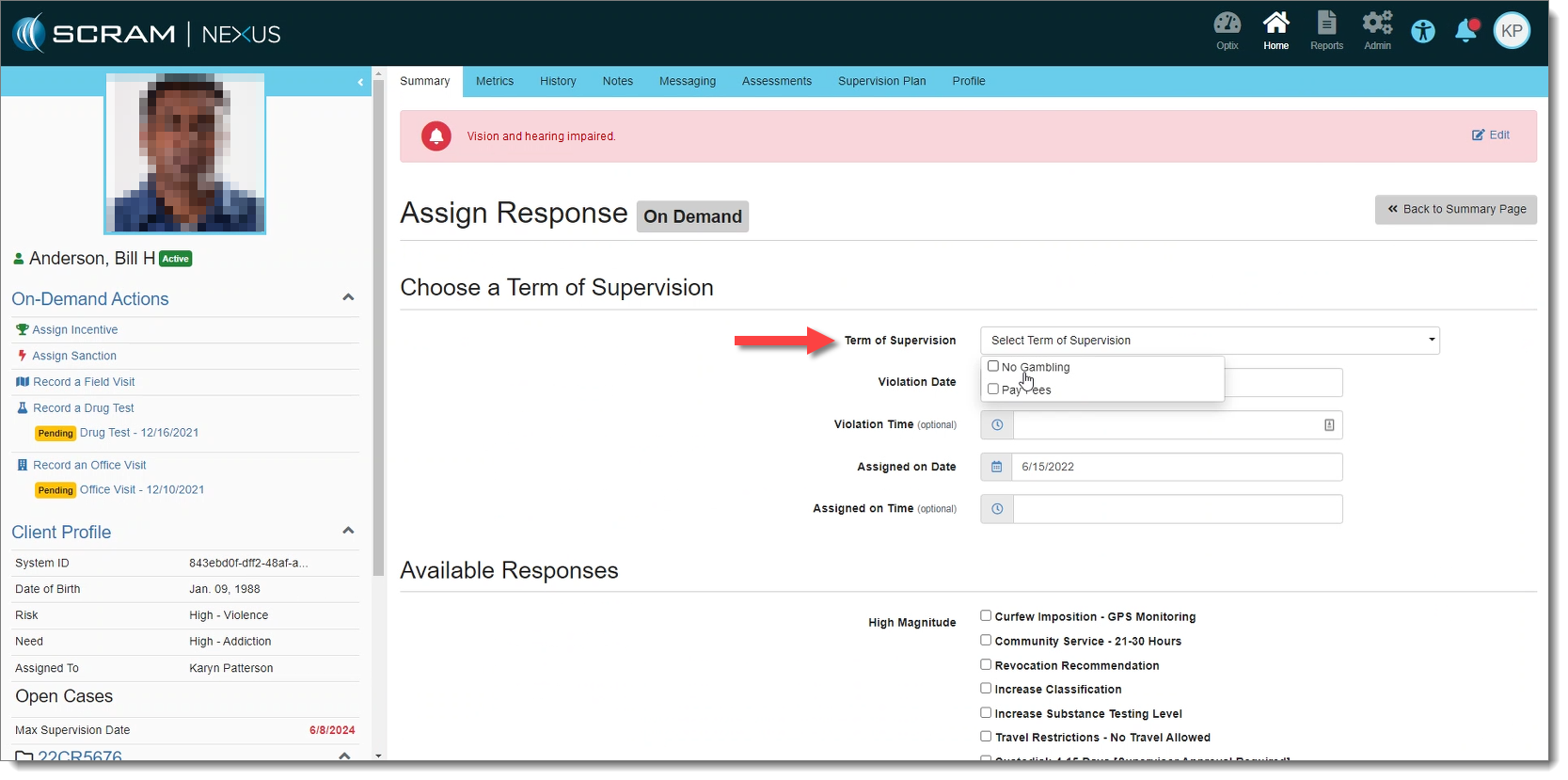
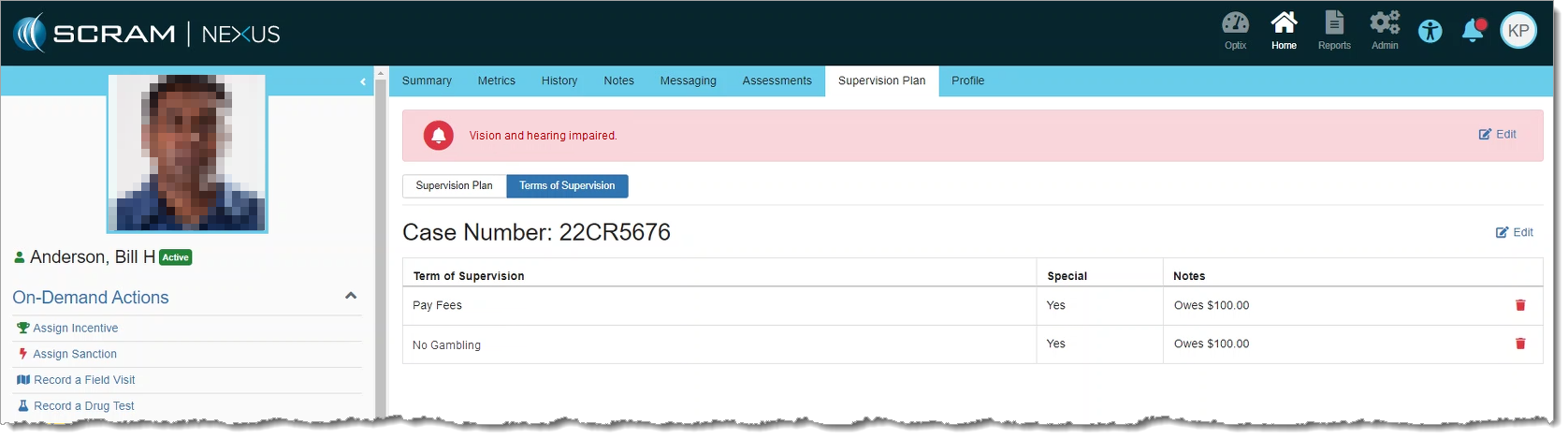
With this release, when a user initiates an on-demand sanction, Nexus will only display the terms of supervision that apply to the client’s individual cases.
Terms of Supervision Applicable to Case (click to enlarge)
These can be viewed from the Supervision Plan tab:
Terms of Supervision on Supervision Plan Tab (click to enlarge)
If specific Terms of Supervision have not been selected for the client’s case, then all terms appear during an on-demand sanction, just as they did previously.
Activity Expectancy
SCRAM Nexus includes a new “Not Applicable” option under Expectancy, for Conditions on the Model, and Activities on a client’s Supervision Plan. When selected, Nexus will not recommend a magnitude of response for that activity. This allows an agency to continue to use their own Response Matrix instead of the built-in SCRAM Nexus “Proximal / Distal / Mastered” logic.
Expectancy Set to ‘Not Applicable’ (click to enlarge)
Response Approval
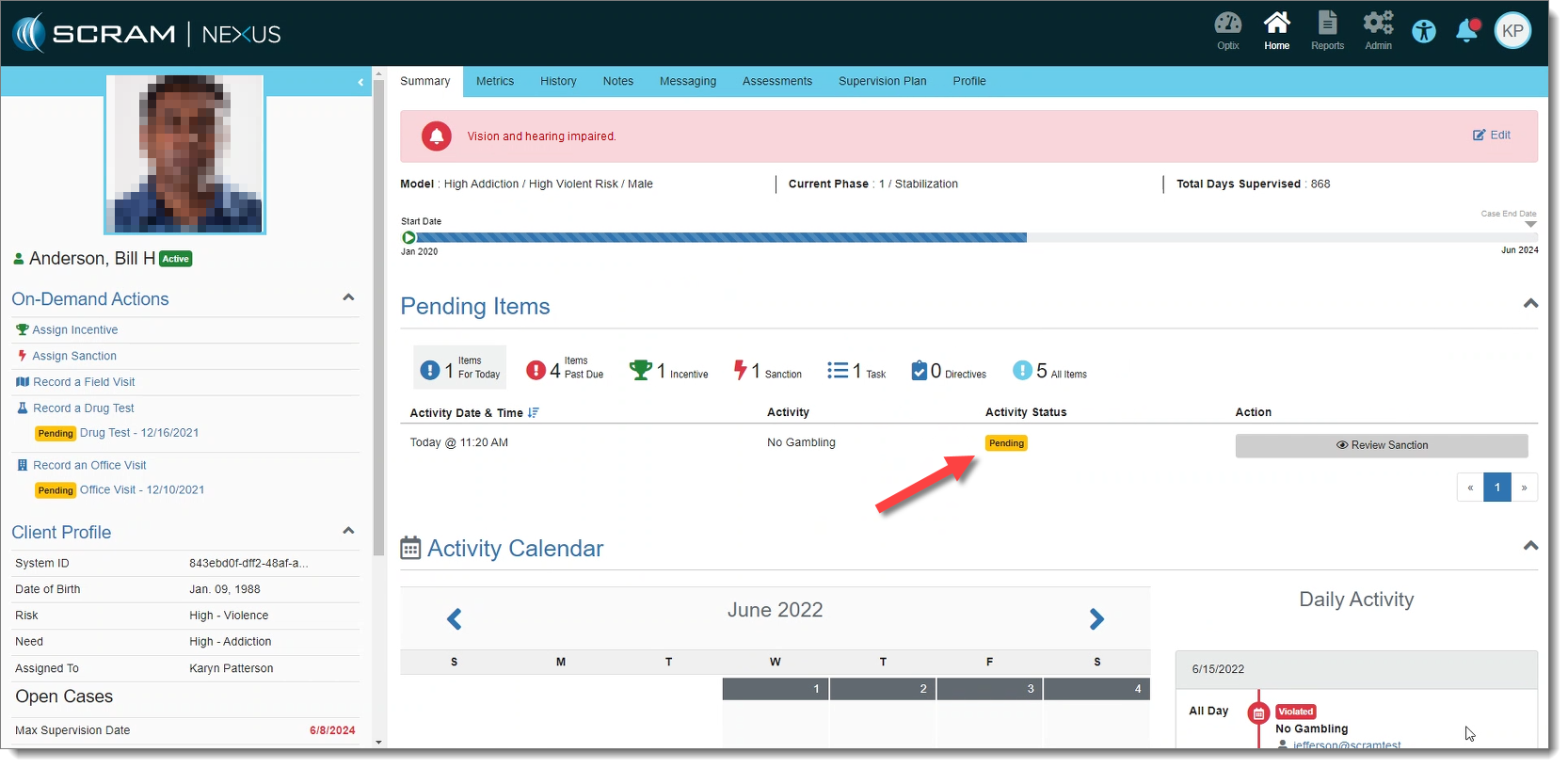
If a sanction or incentive response requires prior approval (as set forth in Admin Settings), Nexus will place that response in “Pending Approval” status if selected.
Response Pending Approval (click to enlarge)
Only supervisors may approve these responses. Once the response is approved, the status is changed to “Assigned.” If the response is rejected, Nexus changes the status of the response back to “Pending.”
Supervisor View of a Response Pending Approval (click to enlarge)
Coming Soon: A new view for Supervisors to see responses Pending Approval on the Workload page.
Session Facilitators – Nexus Treatment
With this release, Facilitators may now be assigned to a treatment session. This gives Treatment Providers the ability to select themselves and/or a co-facilitator from a dropdown menu when recording a session. The list of available facilitators is limited to only those treatment providers associated with the account. The assignment of facilitators is specific to each session and may be edited within the Session Details page.
During the evening of June 16, 2022, SCRAM Systems® will release a pair of enhancements to the SCRAM Nexus Family™ system, specifically, the ability to post a new Case Plan through Nexus Sync and the ability to retain Activities when the case is ‘Closed.’
Post Case Plan Through Nexus Sync
With this release, a new Case Plan may be posted through Nexus Sync. If there was a previous Case Plan for a case number, SCRAM Nexus Family will remove an Activity if there is not a related action item it should be associated with.
Retain Activities When Case is Closed
With this release, when a case is closed in Nexus Family, the Activities are retained on the Case Plan and no longer removed. This allows for Activities to still be tracked even if the case is closed in Case Management.
During the evening of May 24, 2022, SCRAM Systems® will deploy a variety of enhancements to the SCRAM Nexus Family system, including new Home Visit features and a new Objective Progress chart.
Home Visit Enhancements
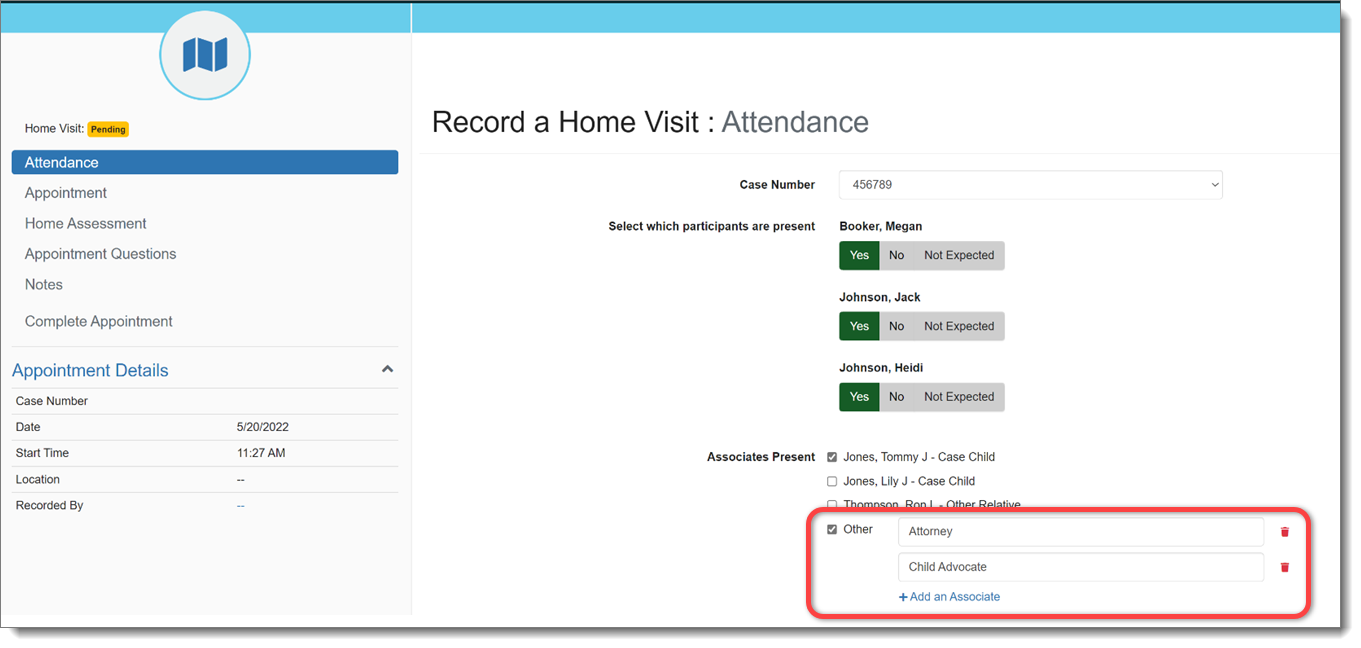
Multiple ‘Other’ Associates in Home Visit
While recording a home visit, a case worker may specify more than one ‘Other’ type of associate that was present in the home. These associates will be sent to the case management system for reference.
‘Other’ Associates on the Home Visit: Attendance Page (click to enlarge)
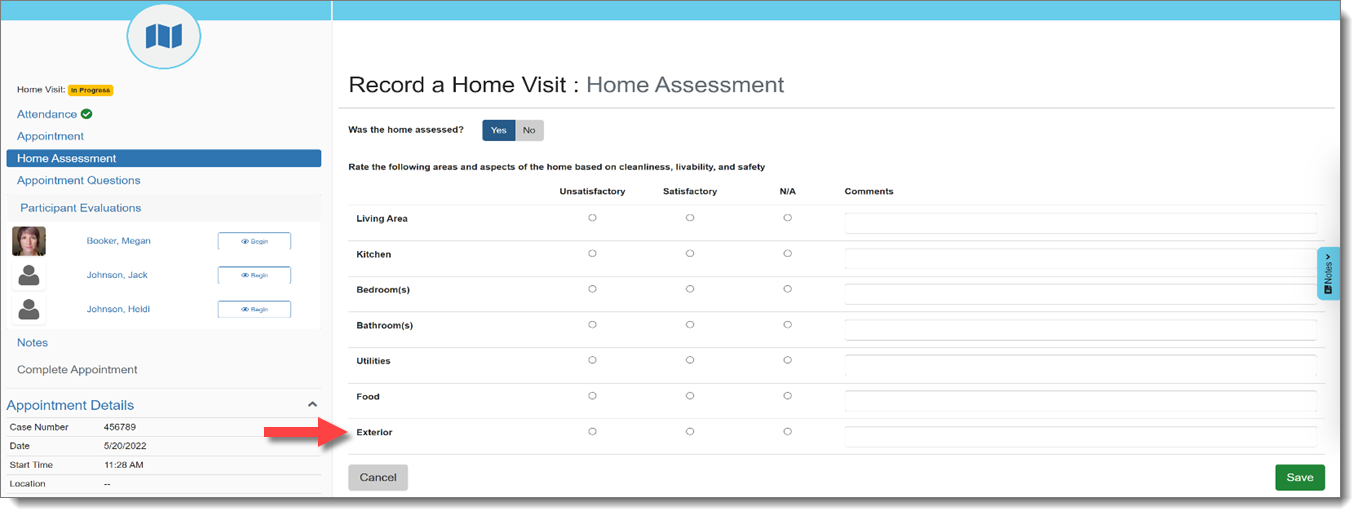
‘Exterior’ Option in Home Assessment
The “Exterior” of the home has been added as an option for home assessment when documenting a Home Visit. If this rating is unsatisfactory, the case worker will be required to enter a comment.
‘Exterior’ Option on the Home Visit: Home Assessment Page (click to enlarge)
Home Visit Questions Default to ‘NA’
When recording a Home Visit, appointment questions will default to ‘NA’ for any clients not present.
Objective Progress Chart
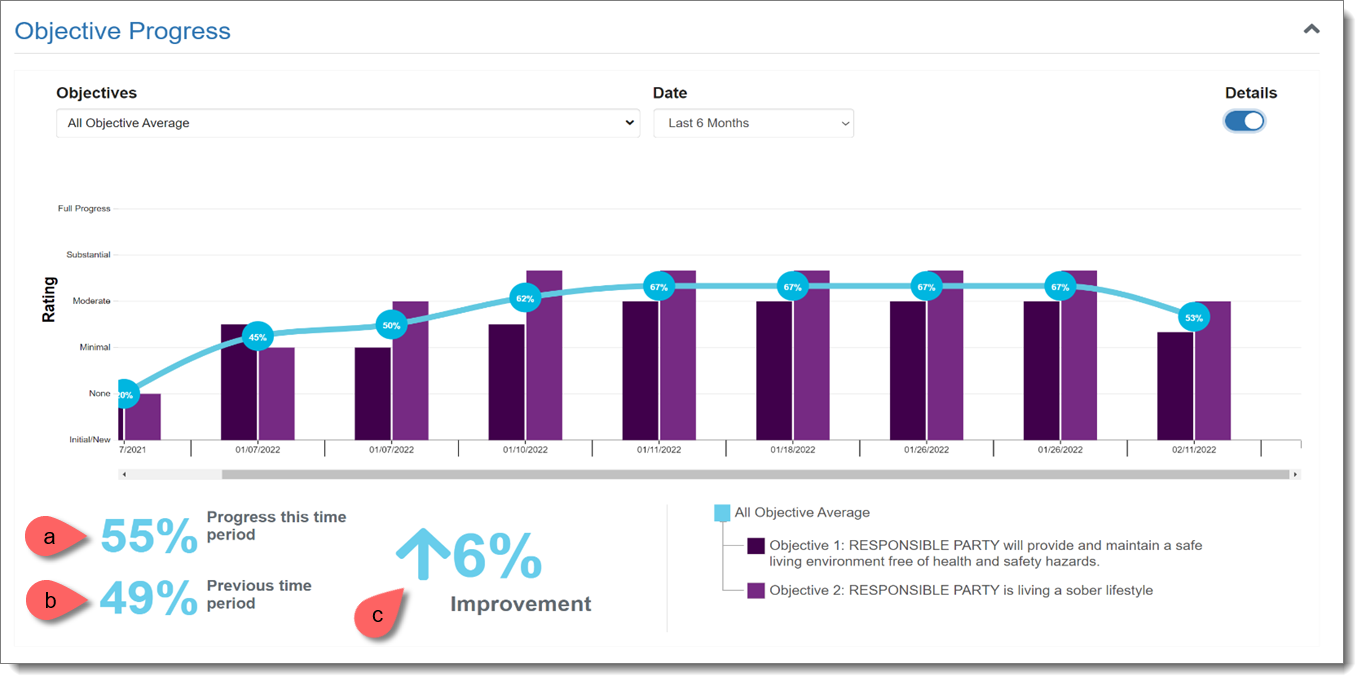
SCRAM Nexus Family now provides a visual chart to show you how a client is progressing over time for each Objective on their Case Plan.
Objective Progress Chart (click to enlarge)
For each Objective, an average value is calculated from each associated Action Item.
Progress This Time Period: Calculated by averaging scores in the current time frame.
Previous Time Period: Calculated by averaging scores in the previous time period.
Improvement/Decline: The percentage difference between scores in the previous time period and current time period. An upward arrow indicates improvement; while a downward arrow indicates a decline.
During the evening of May 24, 2022, SCRAM Systems® will deploy a variety of Client-related enhancements to the SCRAM Nexus® system, including:
The ability to add Terms of Supervision per client/case
Notes filtering and printing capabilities
The ability to add unique identifiers (driver’s license number, e.g.) to a client profile
Display the maximum sentence and default case dates for a client/case
Add Terms of Supervision to a Client
Individual Terms of Supervision may be added to a client on the Supervision Plan tab. This information will eventually feed into the dropdown options when assigning on-demand sanctions.
Add/Edit Terms of Supervision (click to enlarge)
Print Notes
Chronological records may be printed from the Notes tab. Printed notes may be filtered by contact type, note type, activity type, or with a searched word using the filter options.
Note Printing Filters (click to enlarge)
Client Unique Identifiers
Unique identifiers (Driver’s License number, State ID number, etc.) may be added in the client profile. These identifiers must be unique per client.
Client Unique Identifiers (click to enlarge)
Default Case Dates
Good Time Credit:
For agencies that incorporate Good Time Credit into case durations, SCRAM Nexus will auto-populate the Sentence Effective Dates and Maximum Supervision Dates by subtracting the credit from the original sentence. This default date may still be edited.
Formula: (Sentence Date minus Good Time Credit amount) equals Default Sentence Effective Date
SCRAM Nexus will auto-populate Sentence Effective Dates and Maximum Supervision Dates for any concurrent or consecutive cases based on the dates of the initial case entered.
Note: Nexus will display the overall Max Supervision (Sentence) Date in the client’s left side profile.
Effective May 5, 2022 at 8:30 PM MDT, SCRAM Systems will release a variety of enhancements to the SCRAM Nexus case management system, as well as the SCRAM Nexus Treatment application. These enhancements include:
Nexus:
Changes to the Roster Report
New Case Fields
New Read-Only User Permissions
Nexus Treatment App:
Limit Session Series to 100 Occurrences
Session Changes Still-in-Process Warning
Nexus:
Roster Report
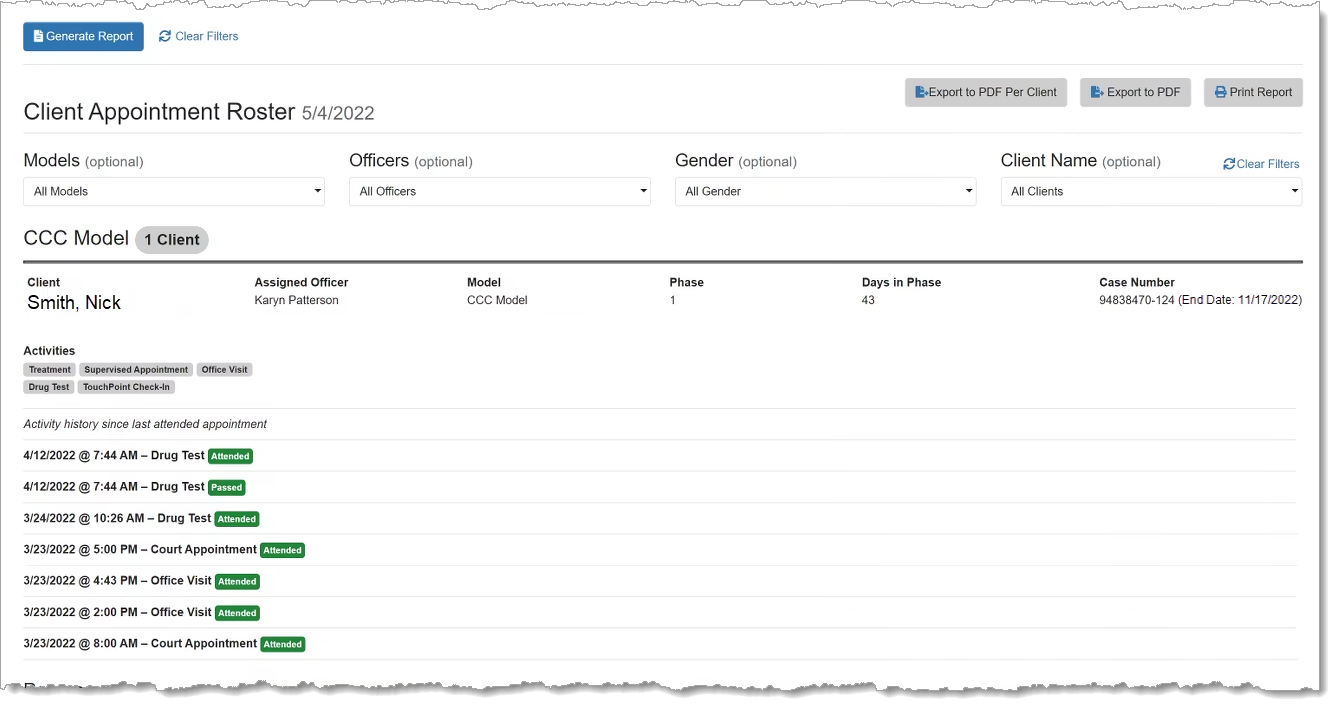
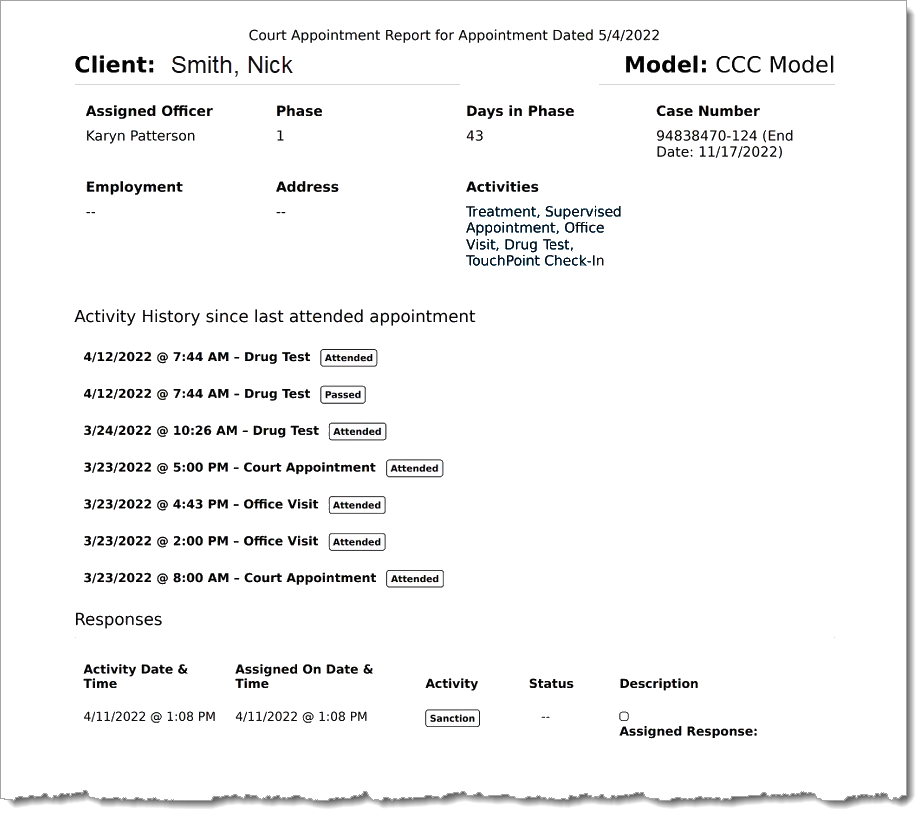
The Client Appointment Roster Report now displays active case numbers for a client in the report header. Closed cases will not display in the report.
Roster Report (click to enlarge)
Additionally, the font size in the Roster Report’s PDF output has been increased to make it easier to read for officers and court staff.
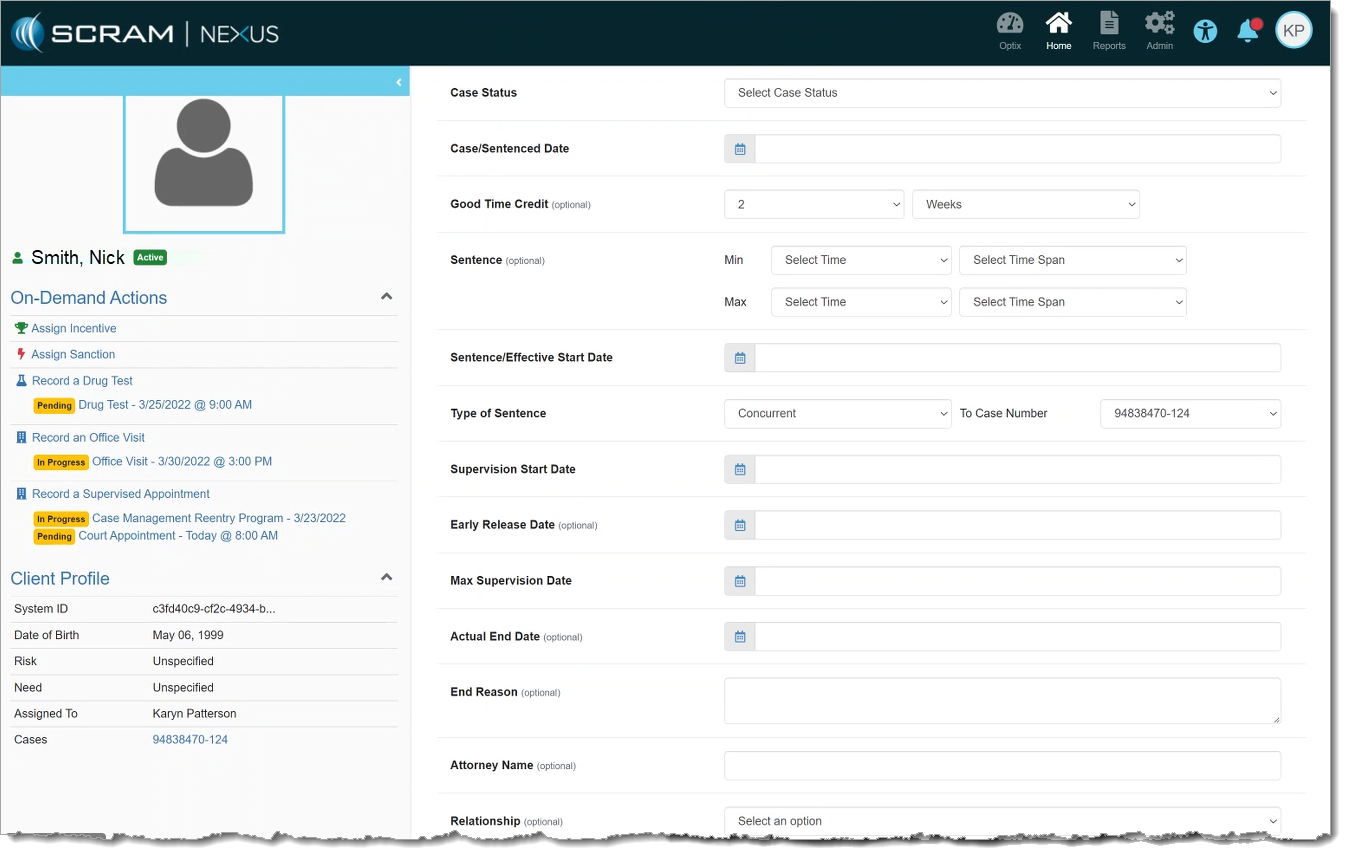
New Case fields have been added to SCRAM Nexus to facilitate the display of other information relevant to the case. These fields include:
Good Time Credit
Sentence Effective/Start Date
Sentence
Type of Sentence
The following fields have been renamed:
“Case Date” is renamed to “Case/Sentenced Date”
“Start Date” is renamed to “Supervision Start Date”
New Case Fields (click to enlarge)
These changes were made to enable the automatic calculation of the Max Supervision Date in a future release.
New Read-Only User Permissions
Users with Read-Only permissions will not be able to edit any area of Nexus. This includes Administrator settings, Officer pages, and Client pages. Users with Read-Only permissions can still view clients and client data, but cannot change anything.
Nexus Treatment App
Session Series Occurrences Limit
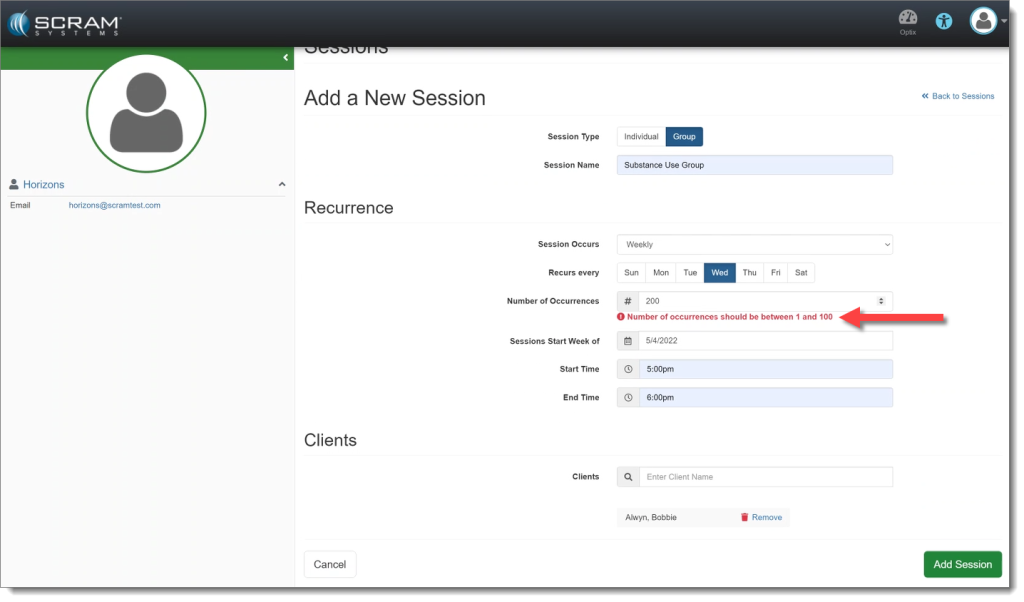
Treatment Sessions in the treatment application will now have a limit of 100 occurrences per session series. This prevents issues with too many appointments being scheduled into the future.
Nexus Treatment Sessions Limit Warning (click to enlarge)
Session Changes Still-in-Process Warning
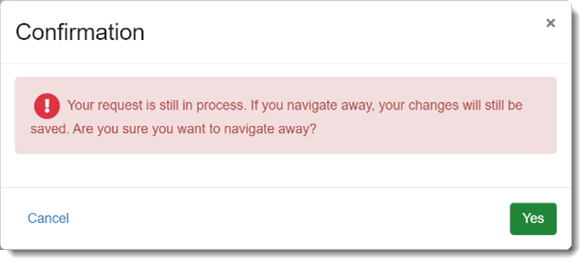
If a Treatment Provider saves a Session series and then attempts to navigate away from the page, the provider will receive a warning that their changes are still in process. This warning is intended as a safeguard to prevent a Treatment Provider from creating a duplicate Session, or from making changes to the existing Session before the prior change is complete.
Warning: Session Changes Still in Process (click to enlarge)
On the evening of April 12, 2022 at 8:30 PM MDT, SCRAM Systems implemented enhancements to the SCRAM Nexus Family case management system. These enhancements make it easier to manage Independent Living plans and improve the level of detail available in Case Plan History. Details below.
Independent Living Plans
Independent Living plans and clients are not in ACYS and may be added directly into Nexus instead of being transferred from ACYS. Clients may be added to the Independent Living plan from within Nexus, and then edits may be made to the client Addresses, Contact Methods, and Personal sections. A new caseload has also been added for Independent Living clients.
Case Plan History
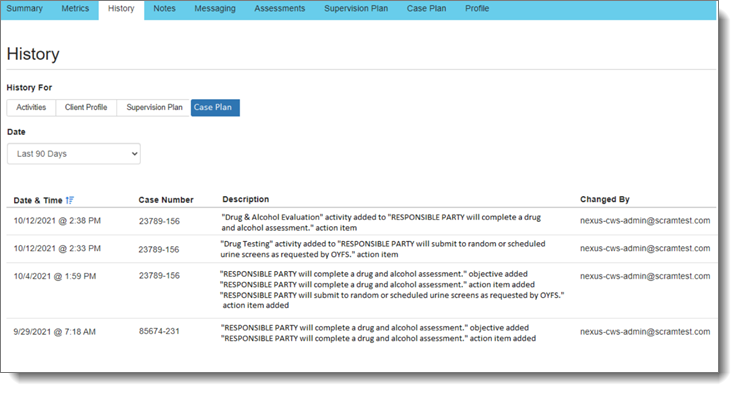
When changes are made to a Case Plan for a client, those changes will be tracked in the new Case Plan section under History. Any time an activity, Objective and Actions item is added, the Case Plan history will display this change.
This SCRAM Nexus release, scheduled for tonight, Wednesday, March 30, 2022, includes changes to the Roster report, response changes, and a new question for drug test lab results.
Roster Report: Include Client Characteristics
On the Roster report, an officer has the option to include client characteristics for all clients who appear on the report. Examples of client characteristics are Housing Status, Primary Diagnosis, and Secondary Diagnosis.
Responses: Choose Multiple Responses
When SCRAM Nexus recommends a response (incentive or sanction), or an officer assigns an on-demand response, the officer can select multiple responses in the list. The officer can select responses that are different magnitudes.
Drug Test: Have Results been Received?
A new question has been added to the Lab Results page for drug tests that asks the user if drug test results have been received from the lab. Asking this question prevents the user from mistakenly entering in the results before they are received from the lab. The question is changed to “Yes” when the results are automatically received from the lab.