Hardware

If you have been on the SCRAM GPS Help site recently, you have probably noticed that many of the help articles have been moved to new locations within the site, as indicated by a moving truck icon followed by a link to the article’s new location.
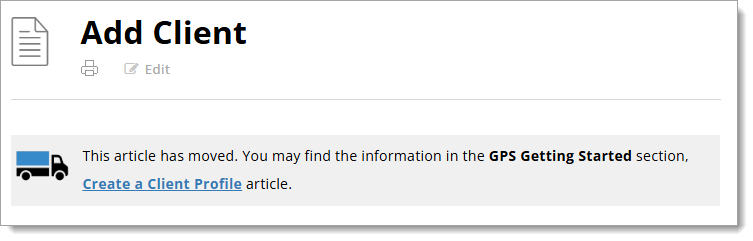
An example of the moving truck icon followed by a description of where the article has moved and a hyperlink to the article.
Moving Truck Example

We are in the process of redesigning the site to bring it in line with our other SCRAM products and services help sites.

How it Was

Previously, SCRAM GPS help was organized in a couple of different ways. There was a Getting Started section, which covered a wide array of SCRAM GPS-related device and monitoring software setup topics, followed by a series of monitoring system or individual device-specific help sections, which only covered topics related to the monitoring system or one specific device. This hybrid design created many duplicate articles. For example, the Add Client article was covered in both the Getting Started and the SCRAMNET GPS sections. Similarly, the SCRAM GPS Bracelet Installation article could be found in both the Getting Started and GPS Bracelet sections.

A help structure with a varying flow and duplicate articles is difficult to maintain and lends itself to potential article content mismatches. To improve the user experience, we decided to change the overall structure and flow of the site, and in so doing remove the duplicate articles.

How it Will Be

Moving forward, the SCRAM GPS Help portion of the SCRAM Systems Help & Support site will be organized in much the same way as the SCRAM CAM, HA, and RB portions of the site are organized. The help topics will be organized into a “client’s lifecycle on the program” flow, from Getting Started to Client Discharge. Between those two bookends will be topics like Client Management, Caseload Management, and Equipment Maintenance. A Program Administration section will round out the GPS Help topics.

The SCRAM GPS Help articles you’ve come to depend on will be – or already are – in the process of moving to these new top-level sections. We’ll even be adding some new help articles along the way. The “moving truck” will be there to guide you through the changes. Once the new structure is completely in place and we have given everyone a chance to update their help article bookmarks, we will “park” the moving trucks.

Thank You

Thank you for your patience during this redesign and transition. It will be worth it in the end.

Continue Reading

At 5:00 AM MDT on Thursday, August 28, 2025, SCRAM Systems will introduce two important feature enhancements for SCRAM GPS 9 Plus devices in SCRAMNET GPS:

  1. Enhancements to the Potential Cell Jamming Alert
  2. Updates to the Battery Fully Charged Event
Information During the 15-minute deployment, you may not be able to access SCRAMNET GPS, but messages from the SCRAM GPS device will continue to be processed uninterrupted.

Potential Cell Jamming Alert

This enhancement release will enable SCRAMNET GPS to utilize data from additional sensors within SCRAM GPS 9 Plus devices to both generate and clear Potential Cell Jamming alerts. Communication and battery sensors, among others, will supplement the generation and clearing of these alerts.

Battery Fully Charged Event

Occasionally, events will come in from SCRAM GPS 9 Plus devices that indicate the battery has been fully charged when in fact the device has not. With this enhancement, additional data will be used and analyzed prior to the SCRAMNET GPS Dashboard displaying Battery Fully Charged events.

Continue Reading

With the end of Summer closing in, some of your clients who are wearing SCRAM CAM Devices as part of their monitoring program requirements, may be looking forward to squeezing in a vacation before their kids head back to school, for example.

If you have clients who fit that description, SCRAM Systems recommends that Program Participants who will be traveling by air while wearing a SCRAM CAM Device, carry a printed copy of their signed SCRAM CAM or SCRAM CAM+HA Program Participant Agreement, along with a printed copy of our Air Travel Safety Statement, to share with airport security and airline personnel if needed.

Continue Reading

On July 16, 2025, SCRAM Systems® will release an enhancement for your Remote Breath Pro client Caseload. With this release, you may suspend your client’s monitoring and billing without using the Stop Monitoring process and unenrolling the device.

While a client is on your program, there may be a scenario where you need to suspend their monitoring temporarily. This enhancement allows you to set a suspension start and end date to temporarily stop monitoring and billing for a client for up to 30 days.

To suspend a client’s monitoring, 

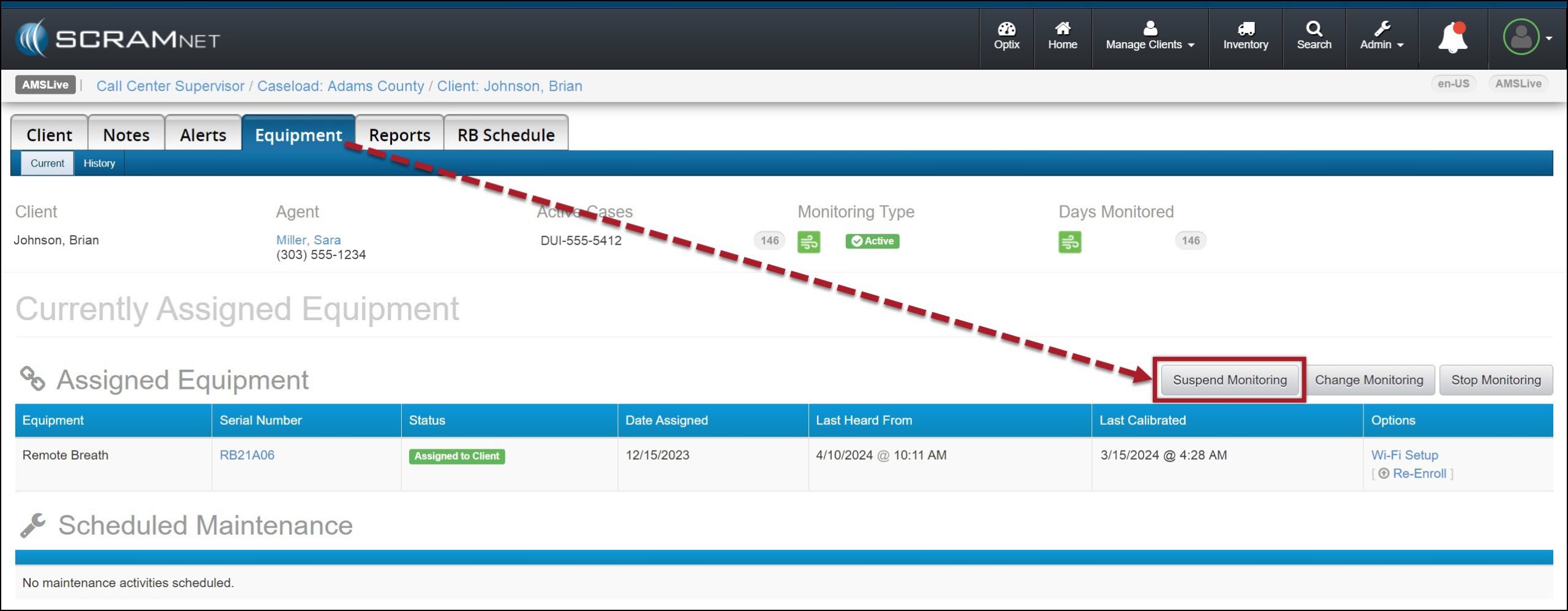
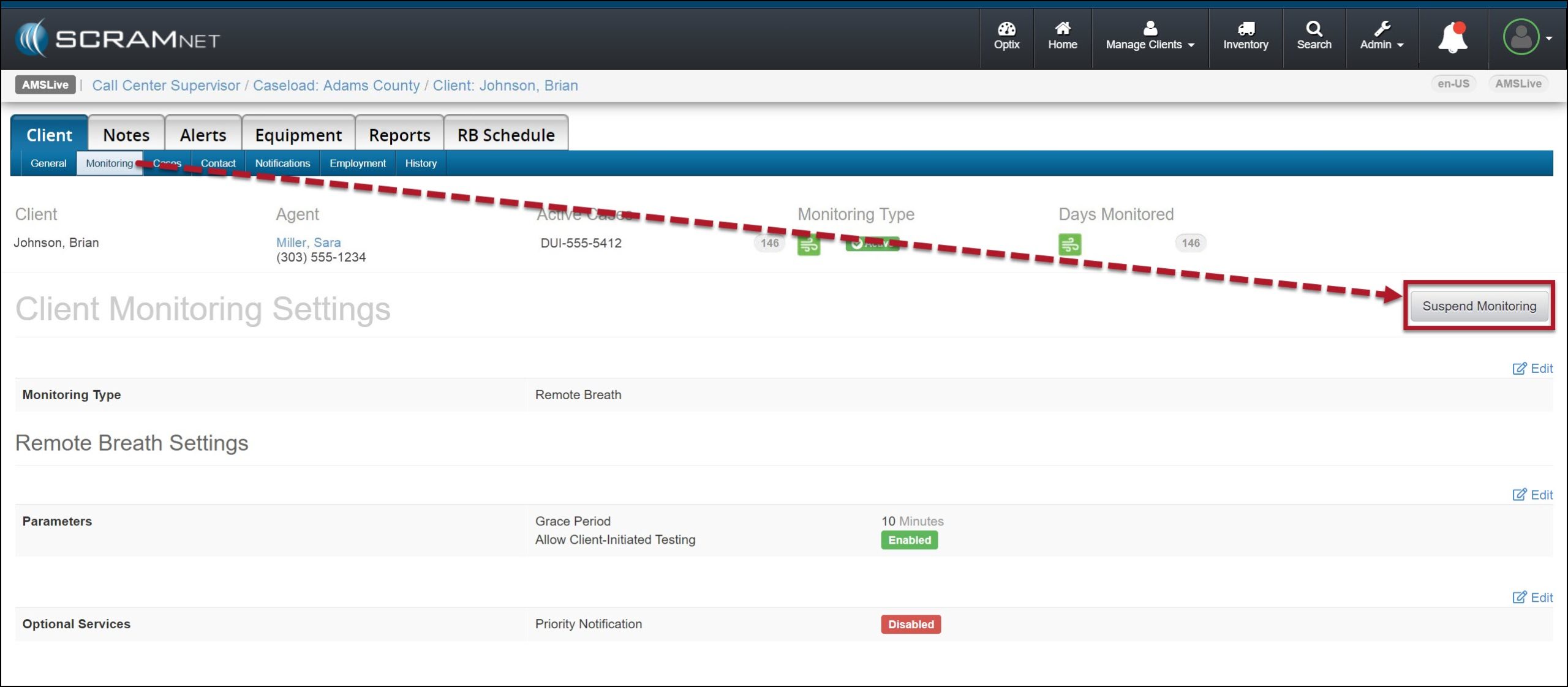
  1. Navigate to the client’s Equipment page and select the Suspend Monitoring button.
Client’s Equipment Page, Suspend Monitoring Button – click to enlarge
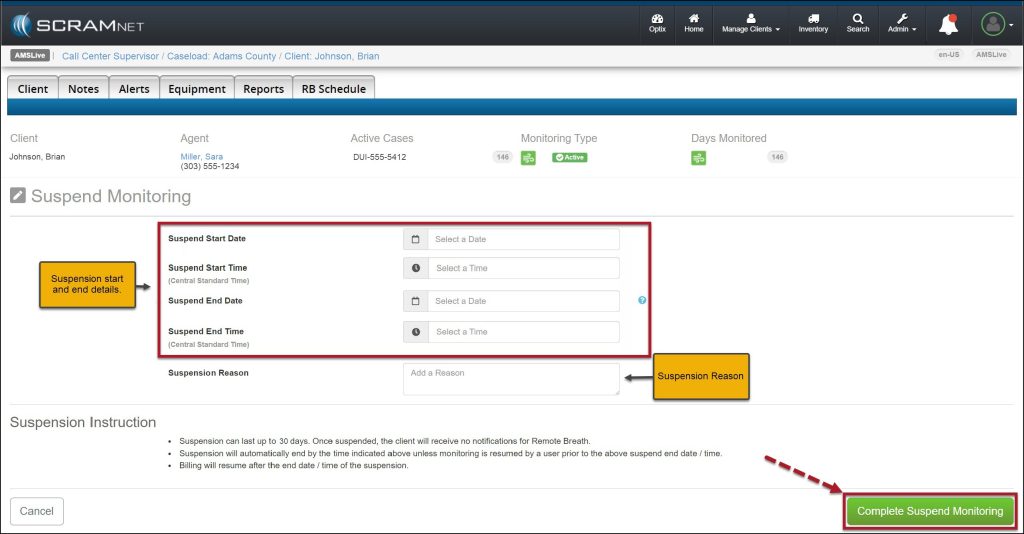
  1. On the Suspend Monitoring page, enter the start and end date and time, and the Suspension Reason.
    • When selecting the start date, you may enter the current date or schedule the suspension of monitoring for a future date.
  2. Select the Complete Suspend Monitoring button.
Suspend Monitoring Page – click to enlarge

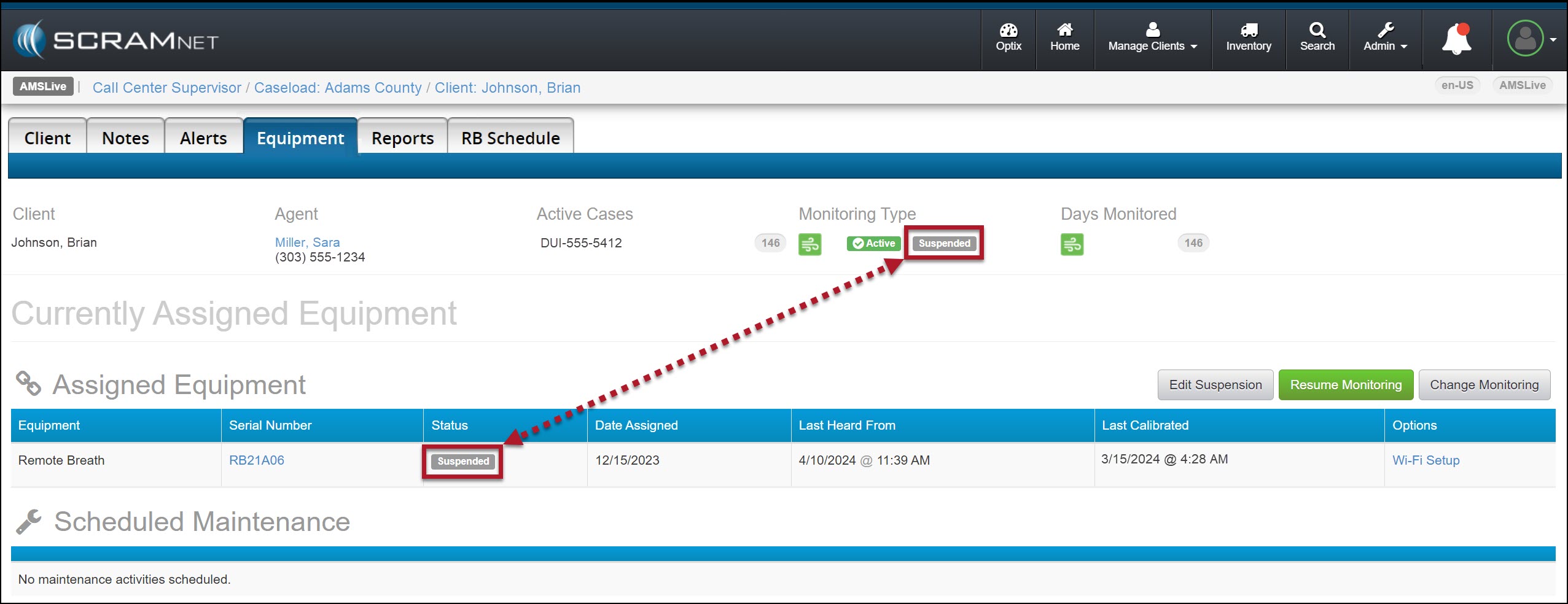
Once the suspension period has begun, the Monitoring Type banner and the Status column will display a status of “Suspended.”

Monitoring Status Displaying Suspended – click to enlarge
InformationDuring the suspension period:
  • The client’s Remote Breath Pro device will continue to display Monitoring on the screen.
  • On-Demand and “Client-Initiated” testing is not available.
  • The client will not be prompted to provide a breath sample.
  • Only Calibration Required alerts are generated when required.

Once the suspension period has ended, monitoring and billing will resume, “On Demand” and “Client-Initiated” tests are available, and the status will reflect active monitoring.

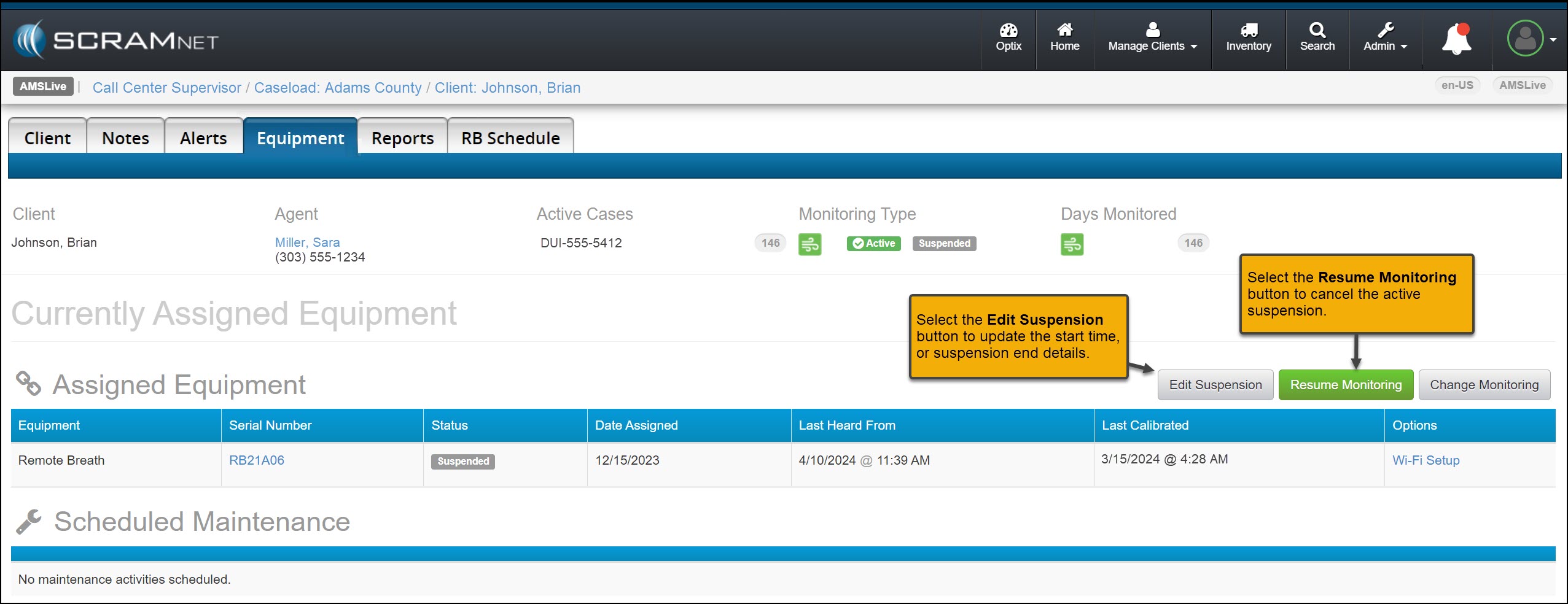
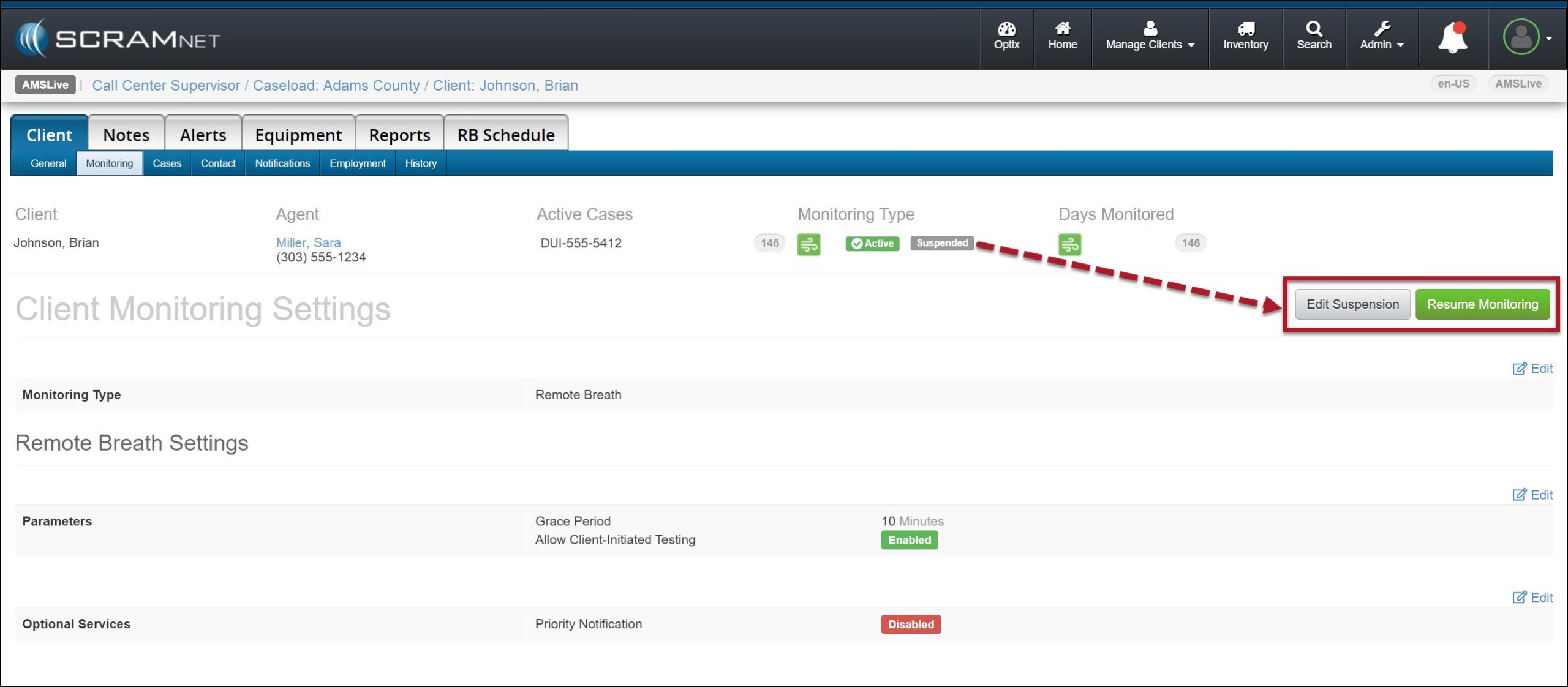
You may select the Resume Monitoring button to end the current suspension or the Edit Suspension button to update the suspension details.   

Edit Suspension and Resume Monitoring Buttons – click to enlarge

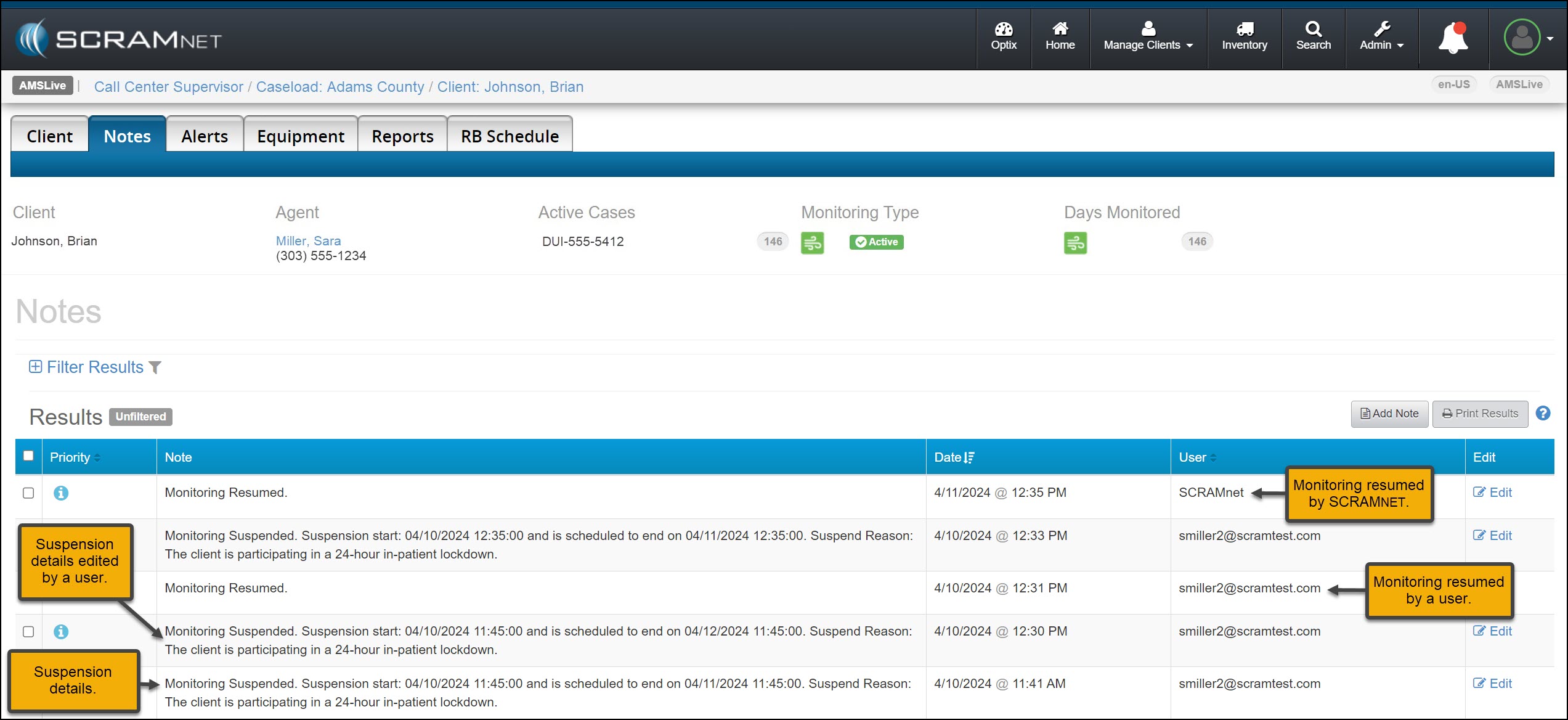
A history of the suspension details may be viewed on the client’s Notes page.

Client’s Notes page with Suspension Results Displayed – click to enlarge

You may also suspend a client’s monitoring or edit and resume monitoring from their Monitoring sub-tab.

Client’s Monitoring Sub-Tab – Click to enlarge

Continue Reading

You may have noticed that when it is time to assign equipment, after adding your client to the SCRAMNET GPS monitoring system, you are now prompted to make a “Participant Agreement Acknowledgement.” A Participant Agreement is a legal contract between you – as agent for the monitoring services provider or supervising authority – and the client.

SCRAM Systems strongly recommends using a signed Participant Agreement for every client in your program.

Within the Agreement, you and your organization agree to fit the client with a SCRAM GPS device and provide all the necessary accessories (charging cable, e.g.) for your client to be successful in their monitoring program, and the client agrees to wear the device and follow the rules of the monitoring program as described in the Agreement.

Your organization may use its own agreement it has developed in-house and evolved over time, or your organization may use the SCRAM Systems-developed SCRAM GPS Program Participant Agreement that we too have evolved over time, and vetted with our internal legal counsel. Either way, SCRAM Systems strongly recommends using a signed Participant Agreement for every client in your program, as it provides legal protection to both you as agent and your organization.


Where to Find the SCRAM Systems GPS Participant Agreements

The SCRAM Systems developed GPS Participant Agreements are available in two places on the Help Site:

  1. The SCRAM GPS Participant Agreements & Videos page (the SCRAM GPS Overview and Rules video is also an excellent resource available for you to use during device assignment)
  2. The SCRAM GPS Documents page located in the References section of SCRAM GPS Help.

The New Participant Agreement Acknowledgement

The addition of the Acknowledgement to the enrollment process grew out of a need for better recordkeeping. The Acknowledgement is simply a record of which Agreement was used at the time of enrollment and does not impact the level of court support you receive from SCRAM Systems.

Learn more about the Participant Agreement Acknowledgement enhancement to SCRAMNET GPS.

Continue Reading

At 5:00 AM MDT on Thursday, June 26, 2025, SCRAM Systems will introduce a new Participant Agreement Acknowledgement feature in SCRAMNET GPS.

Information During the 15-minute deployment, you may not be able to access SCRAMNET GPS, but messages from the SCRAM GPS device will continue to be processed uninterrupted.

Device Assignment Enhancement

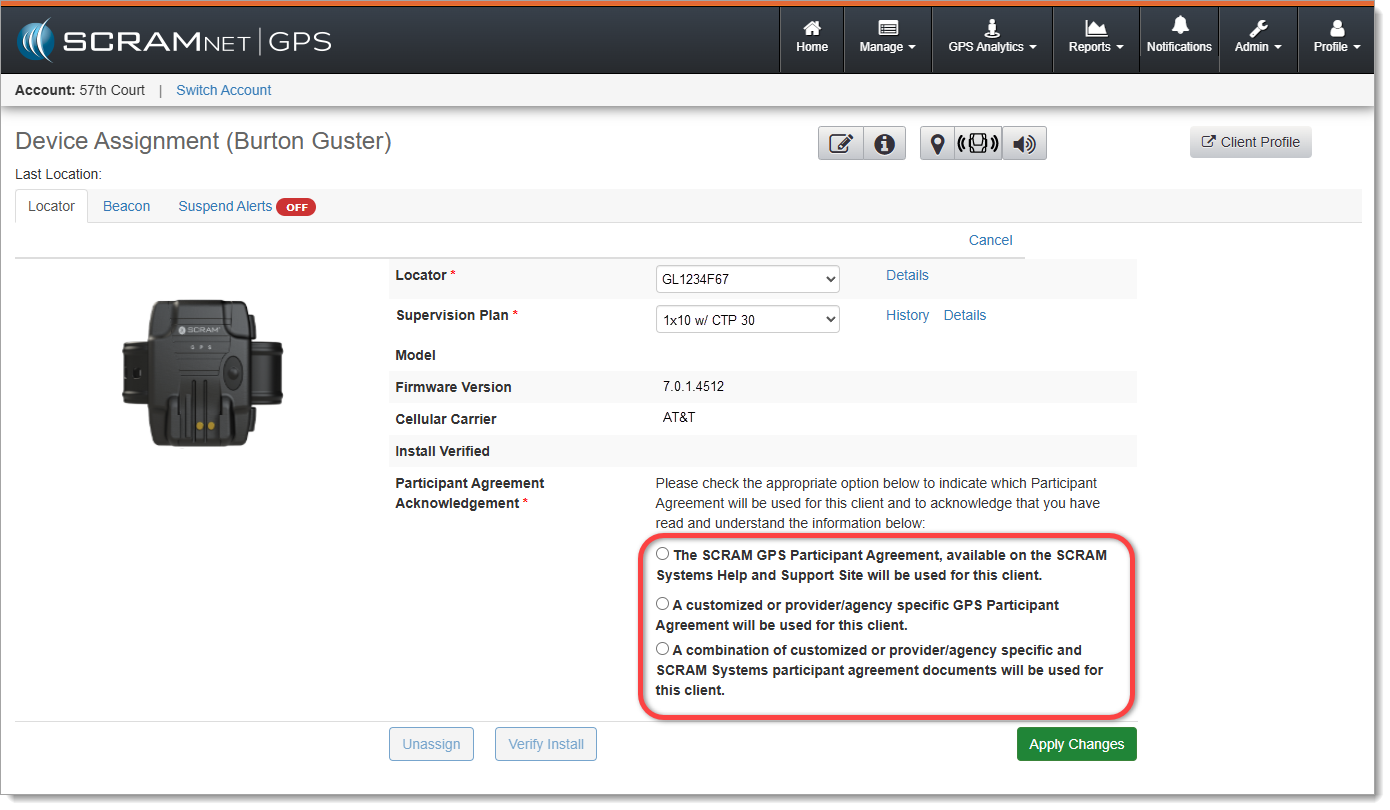
When it is time to assign equipment after adding your client to SCRAMNET GPS, before you may continue with the assignment process, you will have to make a “Participant Agreement Acknowledgement.” The addition of this acknowledgement to the enrollment process grew out of a need for better recordkeeping. This acknowledgement is simply a record of which Agreement was used at the time of enrollment and does not impact the level of court support you receive from SCRAM Systems.

You will be presented with two choices:

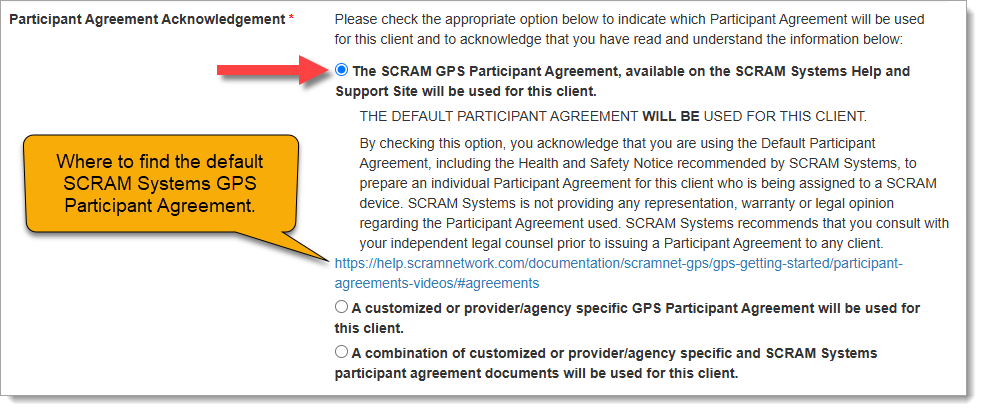
  1. The SCRAM GPS Participant Agreement, available on the SCRAM Systems Help and Support Site will be used for this client.
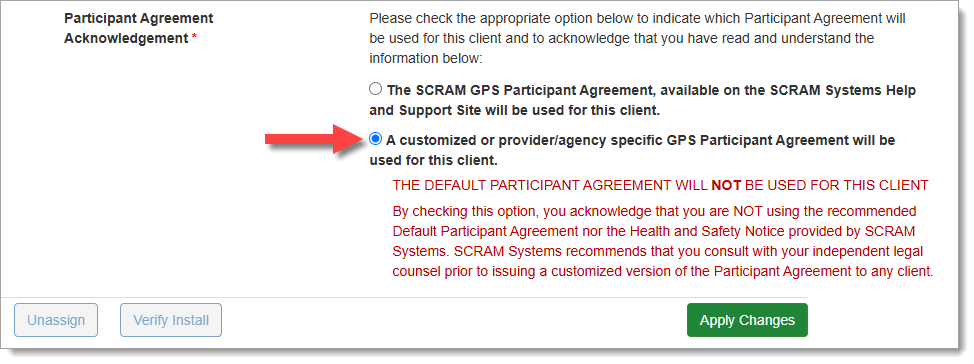
  2. A customized or provider/agency specific GPS Participant Agreement will be used for this client.
The new ‘Participant Agreement Acknowledgement’ section on the Device Assignment page in SCRAMNET GPS (click to enlarge)

Customers who use the SCRAM Systems-provided SCRAM GPS Program Participant Agreement and Health & Safety Notice, which is available for download from SCRAM Systems Help & Support, will choose the first option, “The SCRAM GPS Participant Agreement, available on the SCRAM Systems Help and Support Site will be used for this client.” This option indicates that you are using the default SCRAM GPS Participant Agreement that was developed by SCRAM Systems and is currently available in SCRAM GPS Help.

Once you have chosen an option, a more detailed explanation of the choice you have made will appear:

Participant Agreement Acknowledgement Option 1 chosen (click to enlarge)

Customers who use their own monitoring program participation agreements, which they have developed in-house, independent of SCRAM Systems, and are NOT accessed from SCRAM Systems Help & Support, should choose the second option, “A customized or provider/agency specific GPS Participant Agreement will be used for this client,” as shown below:

Participant Agreement Acknowledgement Option 2 chosen (click to enlarge)
ImportantIf you are unsure about the type of monitoring program participation agreement used by your organization, ask your supervisor or program administrator.

Completing the Device Assignment

Once you have chosen the appropriate Participant Agreement Acknowledgement, then Apply Changes and continue with the device assignment process as usual.

TipTip: Regardless of which option you select, SCRAM Systems recommends you print two copies of the Participant Agreement and have the client and agent sign both copies – one copy for your records and one copy for the client’s records.

Audit Report

The Participant Agreement Acknowledgement selection made will be reflected in the Audit Report. This ensures a comprehensive and auditable history of agreement usage for each device assignment. The Audit Entry is shown as one of the following:

  • SCRAM Systems Approved Participant Agreement – YES
  • SCRAM Systems Approved Participant Agreement – NO

Continue Reading

At 5:00 AM MDT on Thursday, June 5, 2025, SCRAM Systems will introduce a new feature that will allow users of the SCRAMNET GPS monitoring system to filter out inactive clients from Pattern of Life views.

Information During the 15-minute deployment, you may not be able to access SCRAMNET GPS, but messages from the SCRAM GPS device will continue to be processed uninterrupted.

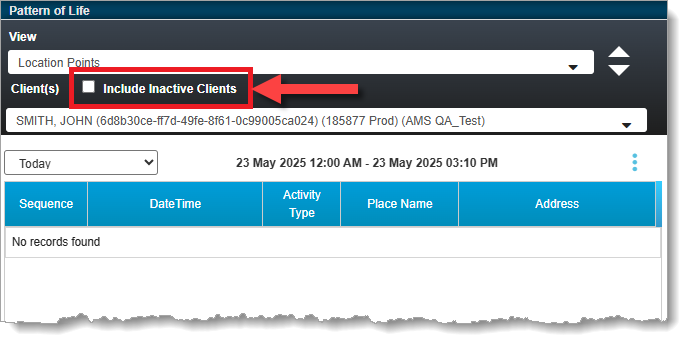
With this release, clients with Inactive statuses will be filtered from all applicable Pattern of Life views by default. This is useful in that it allows you to more quickly view Active clients only. This applies to the “Pattern of Life Analysis,” “Daily Activity Routine,” and “Location Points” views.

To see data for an Inactive client, select the Include Inactive Clients checkbox:

SCRAMNET GPS Pattern of Life ‘Include Inactive Clients’ Checkbox

Continue Reading

Re: Fraudulent Phone Calls, Client Safety, & Data Security Assurance

To Our Valued Partners,

We want to take a moment to reassure you that there has been no data breach at SCRAM Systems. Our internal security teams have conducted a thorough review of recent reports, and there is no indication that any data has been accessed or compromised from SCRAM Systems’ servers.

What we are observing appears to be part of a broader scam targeting individuals on Electronic Monitoring (EM) programs nationwide—regardless of the device manufacturer or service provider. These fraudulent calls have been reported by clients wearing a variety of monitoring devices from multiple vendors and appear to stem from publicly available information or data obtained through unrelated means.

SCRAM Systems is actively monitoring the situation and remains in close contact with partners and relevant authorities to ensure the integrity of our systems and support the safety of monitored individuals.

In the meantime, we continue to recommend the following:

  • If a client receives a suspicious or threatening call, they should immediately contact local law enforcement and report the incident.
  • If you have any client reports or specific details to share, we welcome you to pass them along so we can escalate internally and contribute to broader awareness and monitoring efforts.

We are also available to set up a call should you wish to discuss this matter further.

Thank you for your continued partnership and vigilance.

Sincerely,

John Hennessey

Chief Operating Officer

SCRAM Systems

jhennessey@scramsystems.com

815-342-4469

Download a copy of this letter

Continue Reading

At 5:00 AM MDT on Thursday, April 3, 2025, SCRAM Systems is introducing two new features in SCRAMNET GPS. Enhancements include:

  1. Changes to the SCRAM Ally mobile app registration and login process
  2. Enhanced performance with HTTP/2 support
Information During the 15-minute deployment, you may not be able to access SCRAMNET GPS, but messages from the SCRAM GPS device will continue to be processed uninterrupted.

Changes to SCRAM Ally Registration & Login

Victim Notification: Background

The SCRAMNET GPS Victim Notification service, paired with its companion smartphone app, SCRAM Ally™, allows officers and case managers to automatically inform victims when an assigned GPS client is in close proximity to the victim’s smartphone, and possibly in violation of a restraining order.

Important! IMPORTANT: Activation of the Victim Notification service requires a contract amendment. If you are interested in the service, please contact your SCRAM Systems Account Manager or Sales Representative.


Changes That Impact Existing Victim Notification Customers

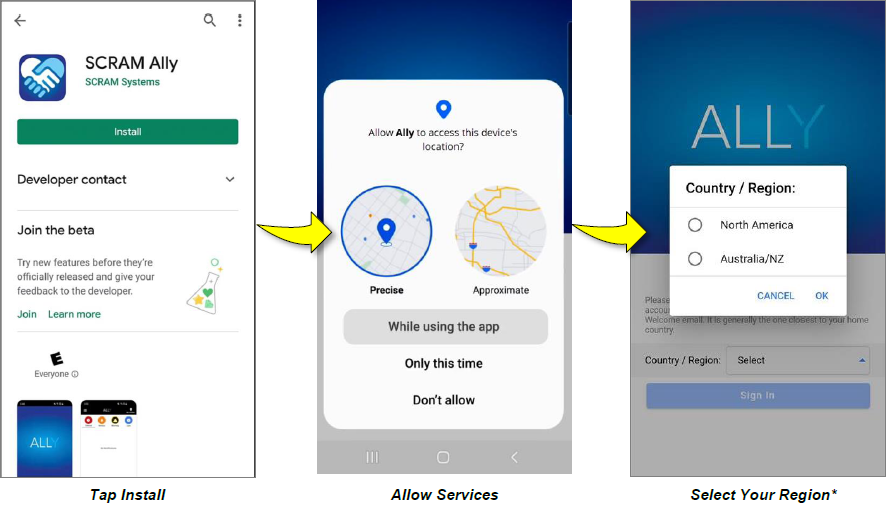
New victim-users of the SCRAM Ally mobile app must now select their home Country / Region* when registering the app:

Install Ally, allow services, and select your region.
Select the image above to open the SCRAM Ally App Victim Instructions help page
Important! IMPORTANT NOTES:
  • *If a new victim-user selects the wrong Region by mistake during registration, contact SCRAM Systems Customer Support for assistance immediately.
  • Existing users of the SCRAM Ally app will not need to take any action to continue using the app.

Enhanced Performance with HTTP/2 Support

SCRAMNET GPS now supports HTTP/2, a modern standard for allowing web browsers to communicate more efficiently with SCRAM Systems servers, which results in faster page-load times. You don’t need to do anything to take advantage of this feature. It is automatically enabled on your browser.

TipTip: For optimal performance we suggest clearing your browser’s cache and cookies following the April 3rd deployment of the feature.

Continue Reading

SCRAM Systems has recently learned of a telephone-based scam that targets the clients of electronic monitoring (EM) programs. Currently, the scam appears to be centered in the states of North Carolina and Tennessee, and focused on EM clients. In this scam, a caller poses as a member of local law enforcement – or in one case, as a SCRAM Systems representative – and then demands payment and/or bank account information from the client over the phone for EM device monitoring services. The scammer additionally threatens arrest or other legal consequences for failure to comply.

Please be aware that SCRAM Systems will never contact your clients to request payments. We have engaged our Security Team to investigate this further, and we encourage you to share news of this potential fraud with your monitoring program clients, as well as any monitoring program team member who interfaces with clients.

You may also wish to share news of this scam with recently-released clients who are not court-ordered to be fitted with an EM device, as they may be targeted by scammers who claim they are to be fitted with one and must pay for it in advance.

If you have any questions or receive reports of fraud attempts, please contact SCRAM Systems Customer Service.

Continue Reading