This video is designed to walk you through the fundamentals of installing a SCRAM GPS bracelet.
SCRAM CAM Device, SCRAMNET GPS
Bracelet Reminder: Disposal of SCRAM Equipment That May Pose Health Hazard
What: Disposal of SCRAM equipment that may pose health hazard
SCRAM Systems would like to remind our valued partners that Cleaning and Disinfecting Instructions for SCRAM Systems Products are located on the SCRAMNET® Help page. This document lists approved cleaning products, such as Sporicidin®, that can be used to remove any viruses and bacteria that could pose a health risk.
If, however, you determine that the potential health risk is serious enough that the SCRAM equipment should be disposed of locally, follow any state and/or local guidelines that may apply. Do NOT return the contaminated equipment to SCRAM Systems. It is important that as few people as possible handle equipment with a known or suspected contaminant. Returning this equipment could needlessly expose many people, such as postal workers and SCRAM Systems equipment receiving personnel, to serious health risks. For more information, refer to the Cleaning and Disinfecting Instructions for SCRAM Systems Products document on the SCRAMNET® Help page.
Do not hesitate to contact our Customer Services department at 1-303-785-7879 with any questions that you may have regarding this important information.
This video is designed to provide you with a quick navigation overview to the SCRAMnet GPS Dashboard.
The attached document provides a quick reference sheet for further information on the CAM strap, buckle, and tamper clip compatibilities.
SCRAM has created a new “Just In Time” training series to deliver quick workflow tutorials for using our products. In this video we will illustrate the steps to quickly changing the straps on a CAM device.
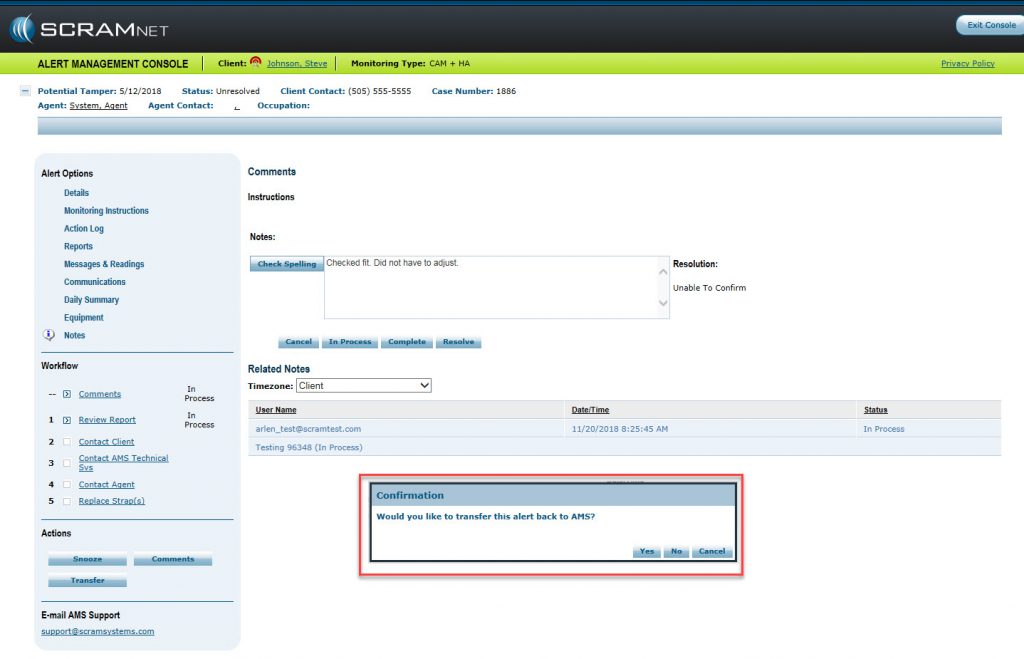
New Feature Release: As part of AMS’s initiative to enhance alert handling and management for CAM activities, we have released a new Alert Handling workflow. To learn more, please review the attached description document.
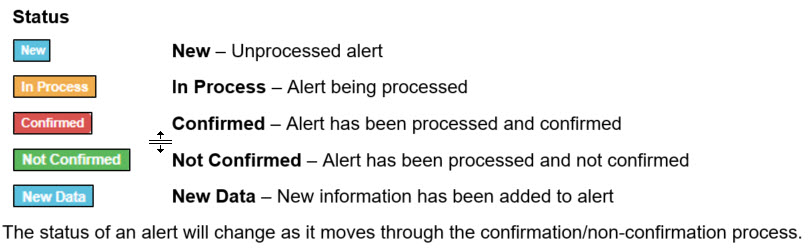
With the update to SCRAMnet yesterday, there is now a new series of color-coded, alerts status, information that is displayed on the workload page.