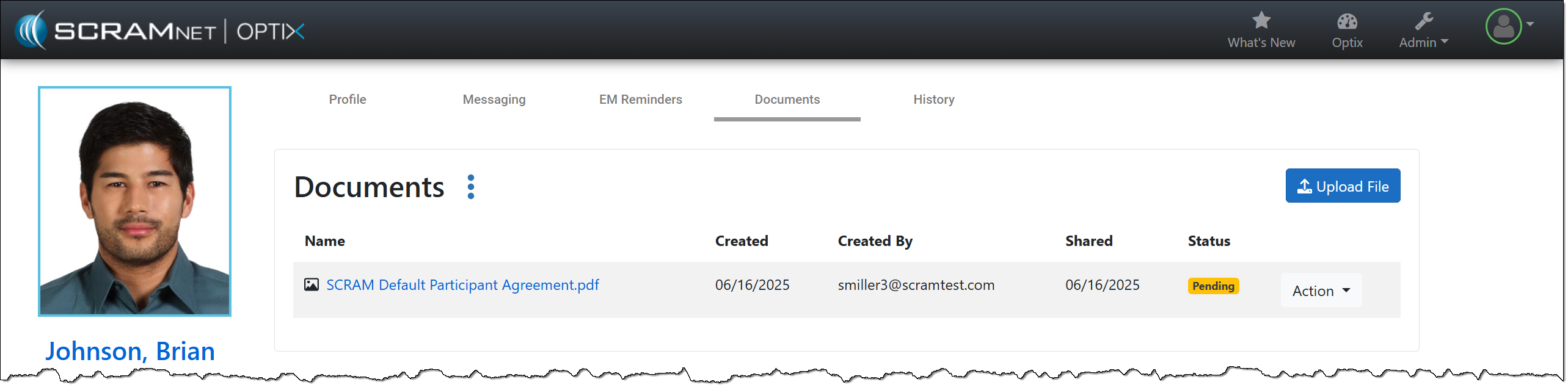
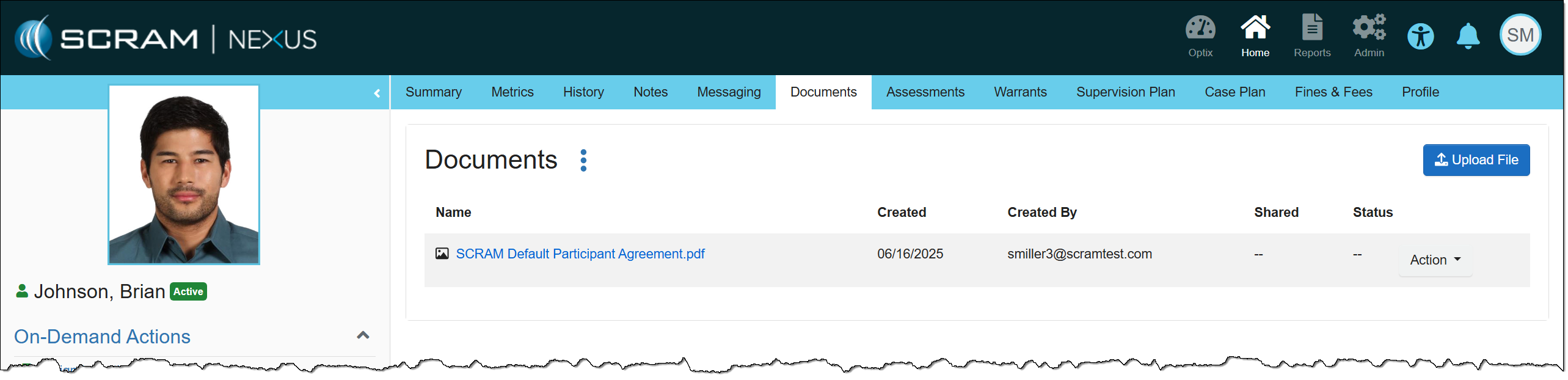
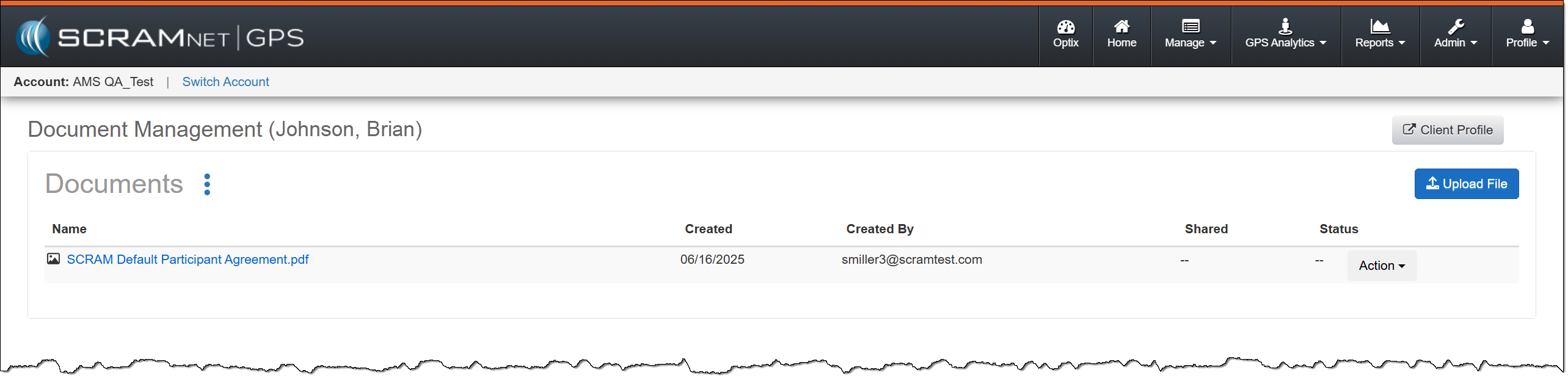
On July 9, 2025, SCRAM Systems released a client Document Management enhancement within SCRAM Optix, SCRAMNET GPS and SCRAM Nexus.
If you don’t see the enhancement, please clear your cache and cookies and refresh your browser window.
SCRAM Documents Page Enhancement
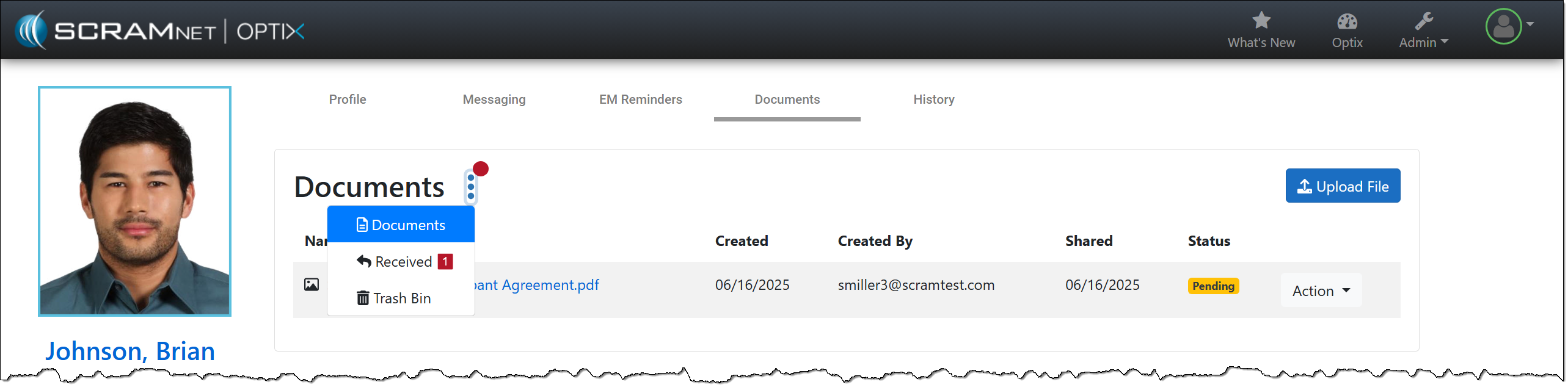
When viewing the client’s Documents page, you will notice a redesign. The “Documents, Received, and Trash Bin” options have been consolidated into an ellipsis menu, and the “Upload File” button has been moved to the right sideof the page.
SCRAM Optix Documents Page – click to enlargeSCRAM Nexus Documents Page – click to enlargeSCRAMNET GPS Documents page – click to enlargeExample of Notification Badge – click to enlarge
You may have noticed that when it is time to assign equipment, after adding your client to the SCRAMNET GPS monitoring system, you are now prompted to make a “Participant Agreement Acknowledgement.” A Participant Agreement is a legal contract between you – as agent for the monitoring services provider or supervising authority – and the client.
SCRAM Systems strongly recommends using a signed Participant Agreement for every client in your program.
Within the Agreement, you and your organization agree to fit the client with a SCRAM GPS device and provide all the necessary accessories (charging cable, e.g.) for your client to be successful in their monitoring program, and the client agrees to wear the device and follow the rules of the monitoring program as described in the Agreement.
Your organization may use its own agreement it has developed in-house and evolved over time, or your organization may use the SCRAM Systems-developed SCRAM GPS Program Participant Agreement that we too have evolved over time, and vetted with our internal legal counsel. Either way, SCRAM Systems strongly recommends using a signed Participant Agreement for every client in your program, as it provides legal protection to both you as agent and your organization.
Where to Find the SCRAM Systems GPS Participant Agreements
The SCRAM Systems developed GPS Participant Agreements are available in two places on the Help Site:
The SCRAM GPS Participant Agreements & Videos page (the SCRAM GPS Overview and Rules video is also an excellent resource available for you to use during device assignment)
The addition of the Acknowledgement to the enrollment process grew out of a need for better recordkeeping. The Acknowledgement is simply a record of which Agreement was used at the time of enrollment and does not impact the level of court support you receive from SCRAM Systems.
At 5:00 AM MDT on Thursday, June 26, 2025, SCRAM Systems will introduce a new Participant Agreement Acknowledgement feature in SCRAMNET GPS.
During the 15-minute deployment, you may not be able to access SCRAMNET GPS, but messages from the SCRAM GPS device will continue to be processed uninterrupted.
Device Assignment Enhancement
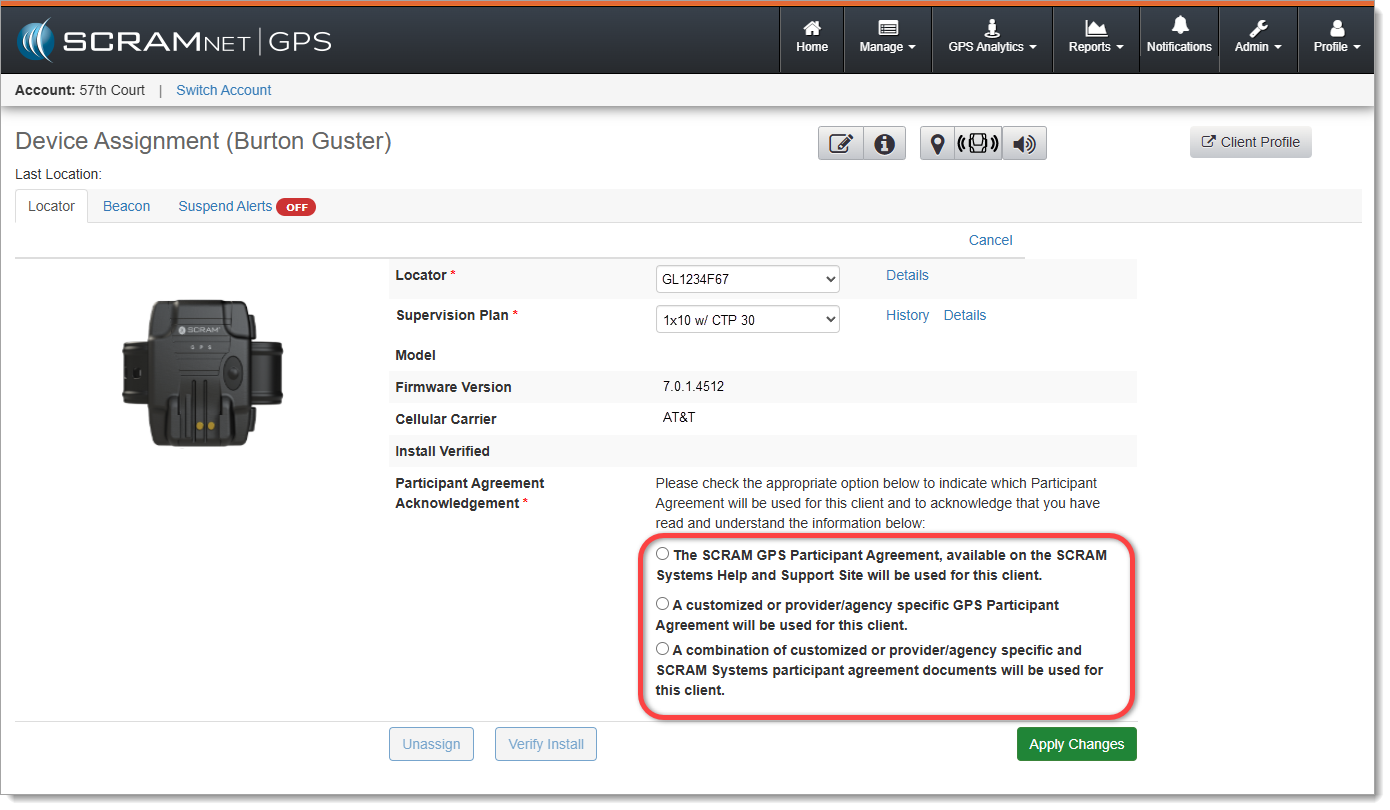
When it is time to assign equipment after adding your client to SCRAMNET GPS, before you may continue with the assignment process, you will have to make a “Participant Agreement Acknowledgement.” The addition of this acknowledgement to the enrollment process grew out of a need for better recordkeeping. This acknowledgement is simply a record of which Agreement was used at the time of enrollment and does not impact the level of court support you receive from SCRAM Systems.
You will be presented with two choices:
The SCRAM GPS Participant Agreement, available on the SCRAM Systems Help and Support Site will be used for this client.
A customized or provider/agency specific GPS Participant Agreement will be used for this client.
The new ‘Participant Agreement Acknowledgement’ section on the Device Assignment page in SCRAMNET GPS (click to enlarge)
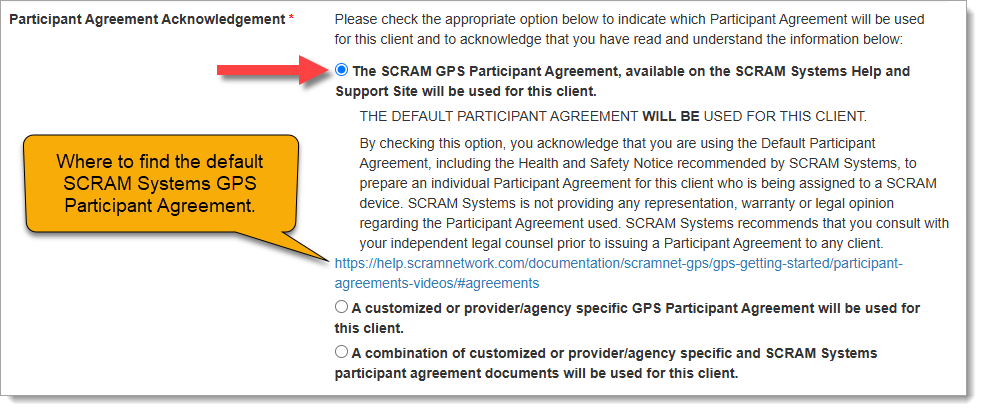
Customers who use the SCRAM Systems-provided SCRAM GPS Program Participant Agreement and Health & Safety Notice, which is available for download from SCRAM Systems Help & Support, will choose the first option, “The SCRAM GPS Participant Agreement, available on the SCRAM Systems Help and Support Site will be used for this client.” This option indicates that you are using the default SCRAM GPS Participant Agreement that was developed by SCRAM Systems and is currently available in SCRAM GPS Help.
Once you have chosen an option, a more detailed explanation of the choice you have made will appear:
Participant Agreement Acknowledgement Option 1 chosen (click to enlarge)
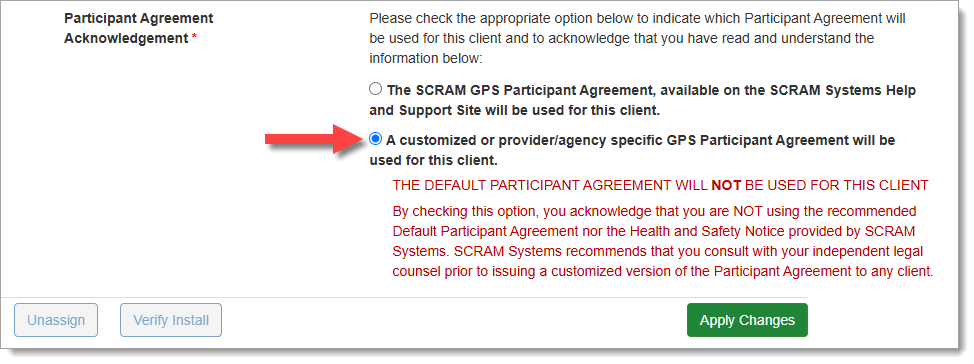
Customers who use their own monitoring program participation agreements, which they have developed in-house, independent of SCRAM Systems, and are NOT accessed from SCRAM Systems Help & Support, should choose the second option, “A customized or provider/agency specific GPS Participant Agreement will be used for this client,” as shown below:
Participant Agreement Acknowledgement Option 2 chosen (click to enlarge)
If you are unsure about the type of monitoring program participation agreement used by your organization, ask your supervisor or program administrator.
Completing the Device Assignment
Once you have chosen the appropriate Participant Agreement Acknowledgement, then Apply Changes and continue with the device assignment process as usual.
Tip: Regardless of which option you select, SCRAM Systems recommends you print two copies of the Participant Agreement and have the client and agent sign both copies – one copy for your records and one copy for the client’s records.
Audit Report
The Participant Agreement Acknowledgement selection made will be reflected in the Audit Report. This ensures a comprehensive and auditable history of agreement usage for each device assignment. The Audit Entry is shown as one of the following:
SCRAM Systems Approved Participant Agreement – YES
At 5:00 AM MDT on Thursday, June 5, 2025, SCRAM Systems will introduce a new feature that will allow users of the SCRAMNET GPS monitoring system to filter out inactive clients from Pattern of Life views.
During the 15-minute deployment, you may not be able to access SCRAMNET GPS, but messages from the SCRAM GPS device will continue to be processed uninterrupted.
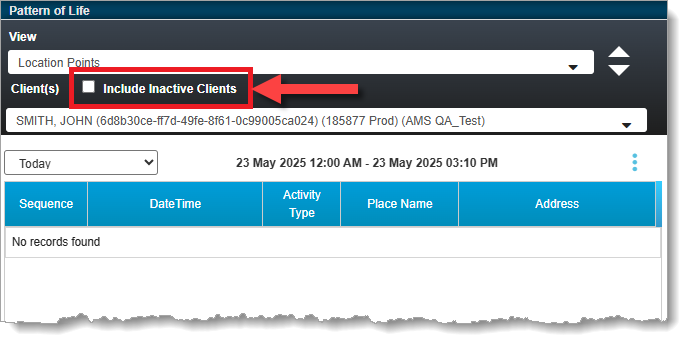
With this release, clients with Inactive statuses will be filtered from all applicable Pattern of Life views by default. This is useful in that it allows you to more quickly view Active clients only. This applies to the “Pattern of Life Analysis,” “Daily Activity Routine,” and “Location Points” views.
To see data for an Inactive client, select the Include Inactive Clients checkbox:
SCRAMNET GPS Pattern of Life ‘Include Inactive Clients’ Checkbox
On the morning of Thursday, April 10, 2025, SCRAM Systems introduced the following new feature:
Preserve Schedules and Exceptions on Client Reactivation
When clients are inactivated, associated schedules and exceptions expire. With this release, your SCRAMNET GPS account can be configured to allow schedules and exceptions to remain active, even on Inactive client profiles. This can be useful in scenarios where clients are inactivated, but will be reactivated, due to a short-term incarceration, for example. This new feature means officers don’t have to re-create schedules and exceptions when they reactivate the client.
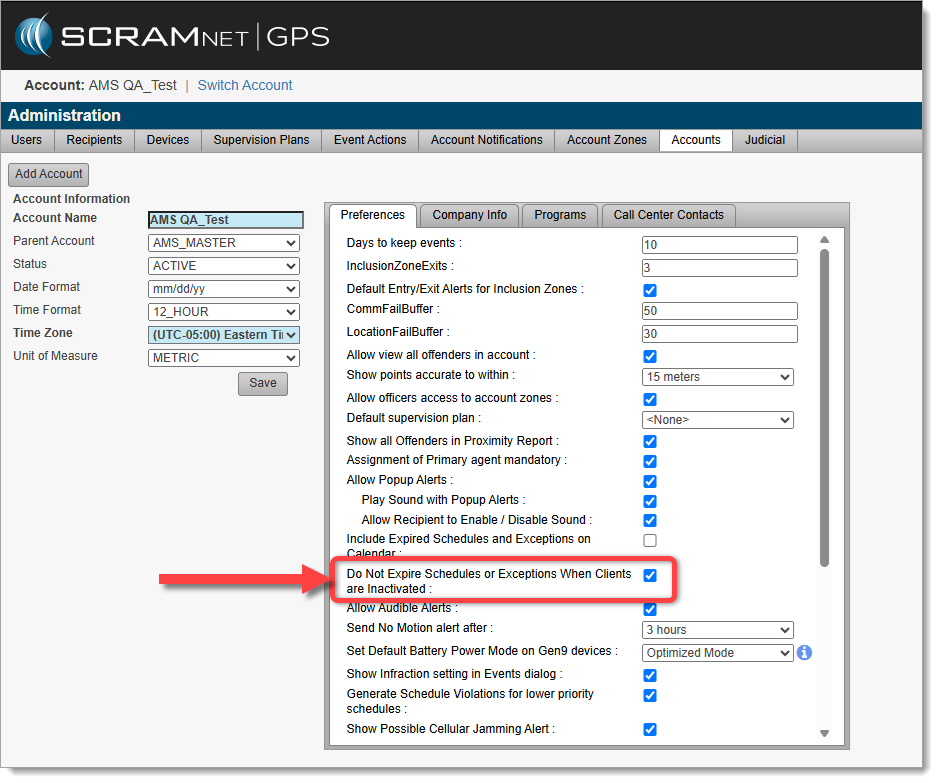
To use this new feature, an account Administrator must enable “Do Not Expire Schedules or Exceptions When Clients are Inactivated” in Administration / Accounts:
Check the “Do Not Expire Schedules or Exceptions When Clients are Inactivated” checkbox
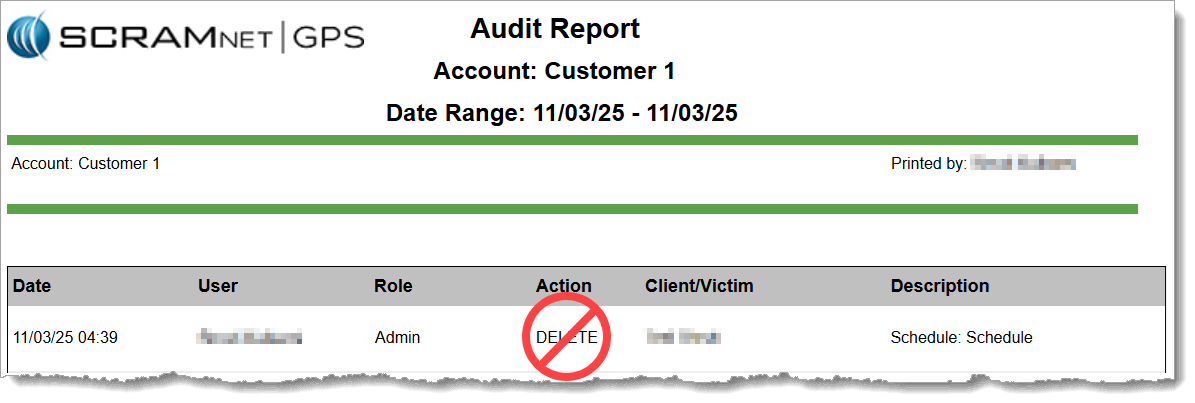
Tip: When this feature is activated, the Audit Report will no longer show “DELETE” entries for schedules or exceptions to Inclusion and Exclusion Zones, when a client is inactivated.
Audit Report no longer shows “DELETE” entries for Schedules or Exceptions
At 5:00 AM MDT on Thursday, April 3, 2025, SCRAM Systems is introducing two new features in SCRAMNET GPS. Enhancements include:
Changes to the SCRAM Ally mobile app registration and login process
Enhanced performance with HTTP/2 support
During the 15-minute deployment, you may not be able to access SCRAMNET GPS, but messages from the SCRAM GPS device will continue to be processed uninterrupted.
Changes to SCRAM Ally Registration & Login
Victim Notification: Background
The SCRAMNET GPS Victim Notification service, paired with its companion smartphone app, SCRAM Ally™, allows officers and case managers to automatically inform victims when an assigned GPS client is in close proximity to the victim’s smartphone, and possibly in violation of a restraining order.
IMPORTANT: Activation of the Victim Notification service requires a contract amendment. If you are interested in the service, please contact your SCRAM Systems Account Manager or Sales Representative.
Changes That Impact Existing Victim Notification Customers
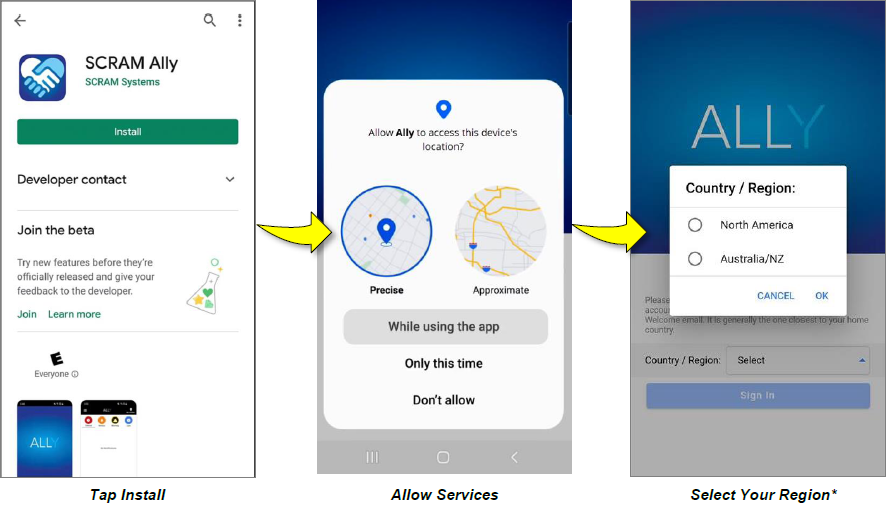
New victim-users of the SCRAM Ally mobile app must now select their home Country / Region* when registering the app:
Select the image above to open the SCRAM Ally App Victim Instructions help page
IMPORTANT NOTES:
*If a new victim-user selects the wrong Region by mistake during registration, contact SCRAM Systems Customer Support for assistance immediately.
Existing users of the SCRAM Ally app will not need to take any action to continue using the app.
Enhanced Performance with HTTP/2 Support
SCRAMNET GPS now supports HTTP/2, a modern standard for allowing web browsers to communicate more efficiently with SCRAM Systems servers, which results in faster page-load times. You don’t need to do anything to take advantage of this feature. It is automatically enabled on your browser.
Tip: For optimal performance we suggest clearing your browser’s cache and cookies following the April 3rd deployment of the feature.
A new version of the SCRAM Ally (Victim Notification) mobile app is available on the Google Play Store. Users are encouraged to update to the latest version (2.1.0), which includes the following changes:
Support for newer versions of the Android OS
Updates to the core messaging system used for alert notifications
Permissions to access Location Service and Motion Activity are now optional
Support for Newer Versions of the Android OS
SCRAM Ally supports Android versions 9 through 15, and this latest update provides a smoother, more optimized experience for users on Android 14 and 15 devices.
Updates to the Core Messaging System Used for Alert Notifications
The SCRAM Ally app’s core messaging system – Firebase Cloud Messaging (FCM) – was updated for improved reliability and performance. Android smartphone users are strongly encouraged to visit the Google Play Store and update to the latest version of SCRAM Ally for Android to ensure proper delivery of important alerts via push notifications.
Tip: After updating the SCRAM Ally app, it is important that your Victim users open the app and visit the Homepage. This action will ensure alert notifications function properly.
Access to Location Service and Motion Activity
For accurate, continuous monitoring, SCRAM Ally requires permission to access Location Service and Motion & Fitness Activity. Even when permissions are required by the app to function properly, both Apple and Google recommend making these permissions optional, to give users more control over their data.
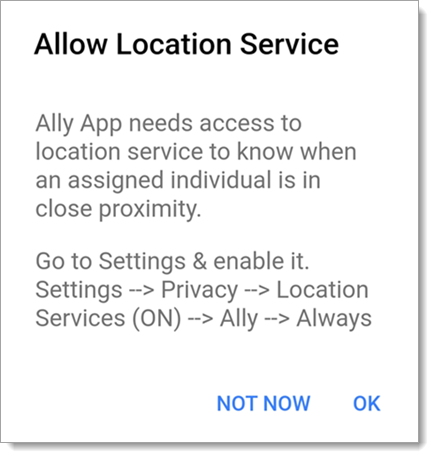
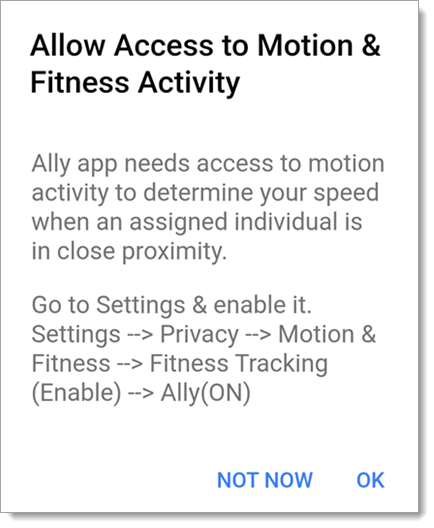
SCRAM Ally requires these permissions to properly monitor Victims and deliver important alerts with regard to Victims’ proximity to their assigned individuals. When Ally does not have these permissions, the following dialogs are displayed:
SCRAM Ally App Requests Access to Location Service
SCRAM Ally Requests Access to Motion & Fitness Activity
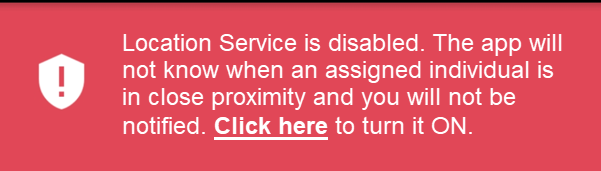
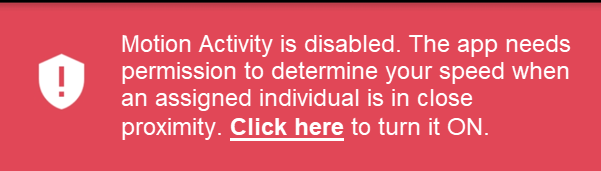
If Victim users do not grant permission to either of these services, the following banner warnings are displayed in the SCRAM Ally app:
Warning Banner: Location Service is Disabled
Warning Banner: Motion & Fitness Activity is Disabled
Additionally, when the Location Service is disabled, a critical alert is generated in SCRAMNET GPS. It is important to address this alert as it indicates the Victim is not properly monitored:
SCRAMNET Alert: Location Service Disabled – Victim (click to enlarge)
At 5:00 AM MDT on Monday, January 13, 2025, SCRAM Systems will release four enhancements for your SCRAM GPS monitoring program.
These enhancements are:
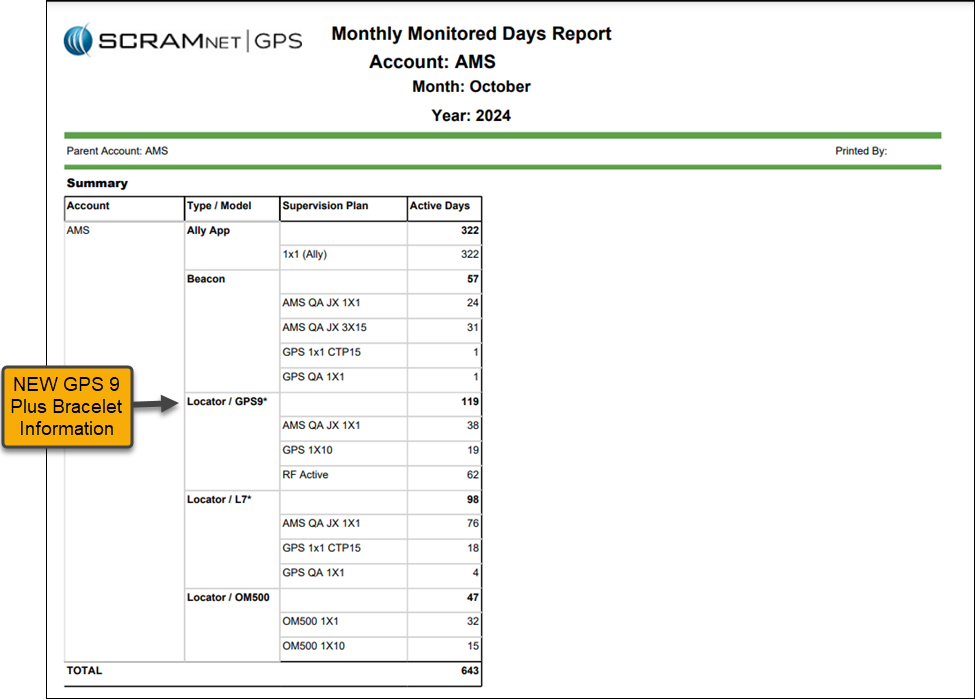
The Monthly Monitored Days report will track the GPS 9 Plus bracelets separately
Optionally include Client ID in Text and Email Notifications
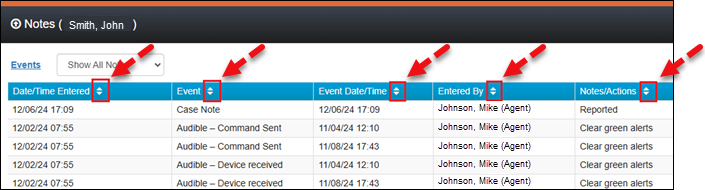
Notes Can Be Sorted by Any Column
Device Assignment “Classic View” No Longer Available
During the 15-minute deployment, you may not be able to access SCRAMNET GPS, but messages from the SCRAM GPS device will continue to be processed uninterrupted.
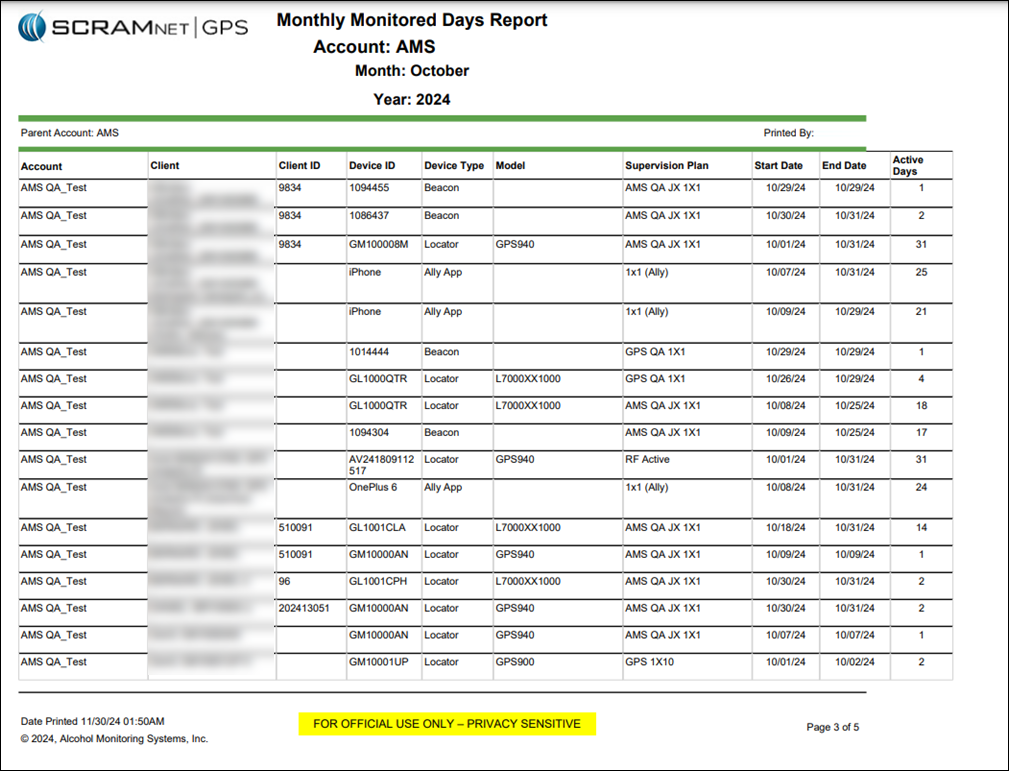
Update to the Monthly Monitored Days Report – GPS 9 Plus Bracelets Type / Model Added
The Summary section of the Monthly Monitored Days Report will display the total active days by device type, supervision plan, and services, providing a clear view of reporting and billing for your monitoring program.
The Type / Model column is broken out into the following devices and services:
Ally App
Beacon
Locator/Gen7* (Standard GPS Bracelet)
Locator/GPS9* (GPS 9 Plus Bracelet)
Locator/OM500
GPS Monthly Monitored Days Report – Summary Page
GPS Monthly Monitored Days Report – Detail Section
Include the Client ID in Text and Email Notifications
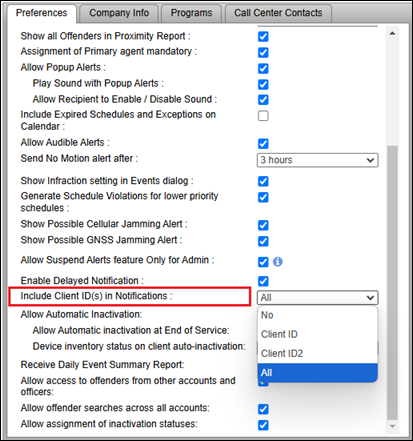
An Administrator for your program may include one or both of the Client ID fields in Text and Email notifications. This can be useful for programs relying on the Client ID fields to identify clients.
To include Client ID field(s):
Select the Admin button and then the Account Settings option.
On the Administration page, select the Accounts tab.
On the Preferences tab, locate the “Include client ID(s) in Notifications” option and open the dropdown menu to select your options.
Include Client ID(s) in Notifications Option
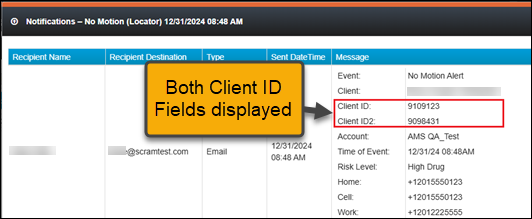
Once selected in Account Administration, one or both (depending on what is selected) Client IDs will be included in Notifications sent to recipients.
Event Notification Example
When the client ID field has been identified as a social security number (SSN), only the last four (4) numbers are visible on the Text or Email notification.
Filter Client Notes by Column
With this update, you may filter how the Notes are displayed for client Events using the filter icons on each column header. This can be useful to filter for specific Event types or usernames (Entered By).
Client Notes Pop-Up
Device Assignment “Classic View” No Longer Available
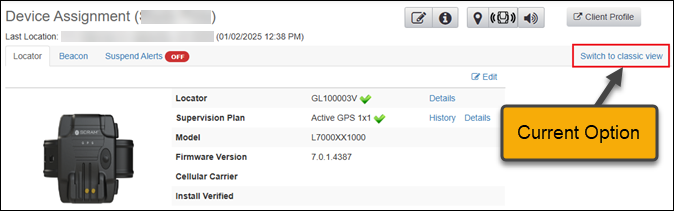
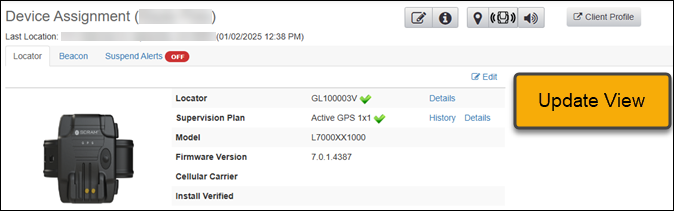
To ensure SCRAMNET GPS supports both the Standard and GPS 9 Plus features, the “Classic View” will no longer be available on the Device Assignment page.
Current Device Assignment ViewUpdated Device Assignment Page
At 5:00 AM MDT on Tuesday, October 22, 2024, SCRAM Systems is introducing a new feature in SCRAMNET GPS that will allow Officers, Agents, and Case Managers to send audible alarms to SCRAM GPS devices for longer than the standard 30-second duration.
SCRAMNET GPS deployments typically occur on Thursdays at 7:00 AM EST in the US, 10:00 PM AEST in Australia, and the following 12:00 AM EST (Friday) in Canada. Please refer to the official SCRAM Systems email communication associated with this release for more details. During the 15-minute deployment, you may not be able to access SCRAMNET GPS, but messages from the SCRAM GPS device will continue to be processed uninterrupted.
Send the Audible Alarm for Longer Duration
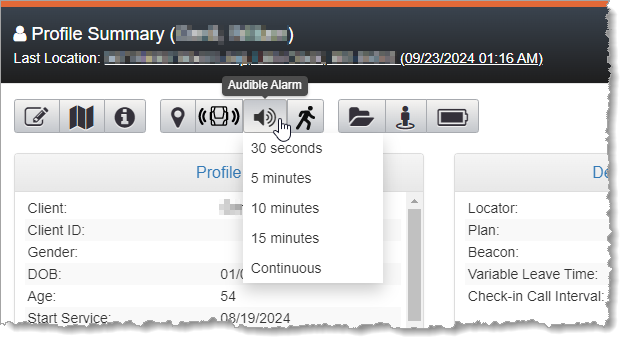
SCRAMNET GPS users may now send the Audible Alarm for durations longer than 30 seconds. This can be useful when the client is in a loud environment, or to help you find a lost bracelet.
The Audible Alarm can be sent from various pages in SCRAMNET GPS. The Audible Alarm now supports the following durations:
30 seconds
5 minutes
10 minutes
15 minutes
Continuous
Audible Alarm Duration Dropdown
SCRAMNET GPS will automatically send audible alarms in 30-second intervals followed by a brief pause between alarms, until the client presses the button or until the selected duration has elapsed.
To stop an Audible Alarm that has been set for a long (or continuous) duration, change the duration to 30 seconds.
The Client Events Dialog
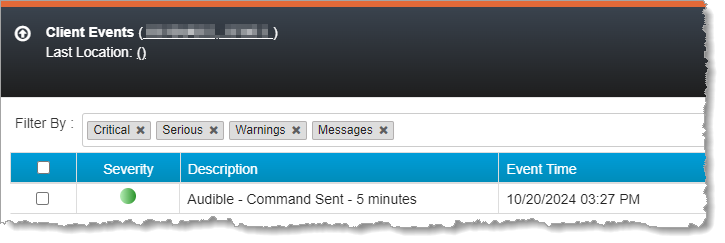
The “Audible – Command Sent” message is shown in the Client Events dialog. The message shows the duration selected by the user.
Audible Alarm on Client Events Dialog
If the client presses the button for the Audible Alarm, then an “Audible – Offender pushed button event” is shown in the Client Events dialog. If the client has not pressed the button and the selected duration is reached, then an “Audible – Offender did not push button” event is shown.
At 5:00 AM MDT on Tuesday, September 17, 2024, SCRAM Systems released an enhancement for SCRAMNET GPS. This enhancement allows you to view notes added to an active event on the Dashboard.
View Active Event Notes on the Dashboard
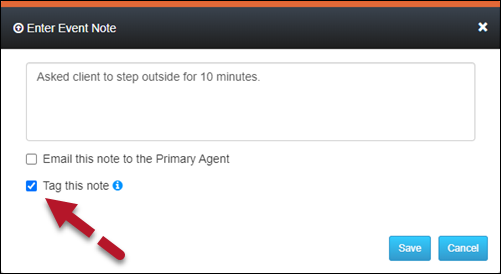
When adding an event note, you may “tag” it so it is visible on the Dashboard. This lets you quickly view the recorded actions taken to resolve the alert.
To tag an Event note:
Select the Tag this note option in the Enter Event Note pop-up.
Select the Save button.
Enter Event Note Pop-Up (click to enlarge)
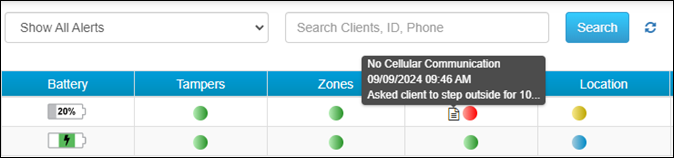
Once saved, the active alert is tagged, and a note icon will appear next to the alert on the Dashboard. Mouse over the note icon to view the abbreviated text of the note.
SCRAMNET GPS Dashboard Event Hover with “Tagged” Note (click to enlarge)