Hardware

CAM Client Interactions – Best Practices

Below are some helpful tips to assist your team in maintaining the integrity of your monitoring program. Please contact SCRAM Customer Service for questions or if any assistance is needed.

Document, Document, Document

We recommend agents document each and every client interaction* – whether in-person or over the phone – in SCRAMNET®. This will promote clarity when preparing client updates.
*Examples include bill payments, maintenance, phone discussions, etc.

Inspect the Equipment

Each time the client is in the office, regardless of the reason, inspect the bracelet.

  • Wake bracelet with magnet until you see the green light illuminate to ensure the bracelet powers up.
  • Check the fit of the bracelet to ensure it is properly tethered and is not loose enough to slide over the heel of the foot.
  • Visually inspect bracelet body, straps, and buckle for pry marks, scratches, and/or signs of tamper or removal.
  • Move tamper clips side-to-side with your fingers to ensure they are still securely fastened and have no visible signs of removal.

Alerts & Maintenance

Check the Alerts tab in SCRAMNET to see if client has any pending alerts that require additional information.

If the client will be away for an extended period, consider performing maintenance on the device to avoid near-future maintenance alerts from generating.

To properly reinitialize the bracelet:

  1. Be sure to use the Maintenance link on the Equipment page first,
  2. Perform physical maintenance second, and
  3. Direct Connect the bracelet on the client’s leg last
Continue Reading

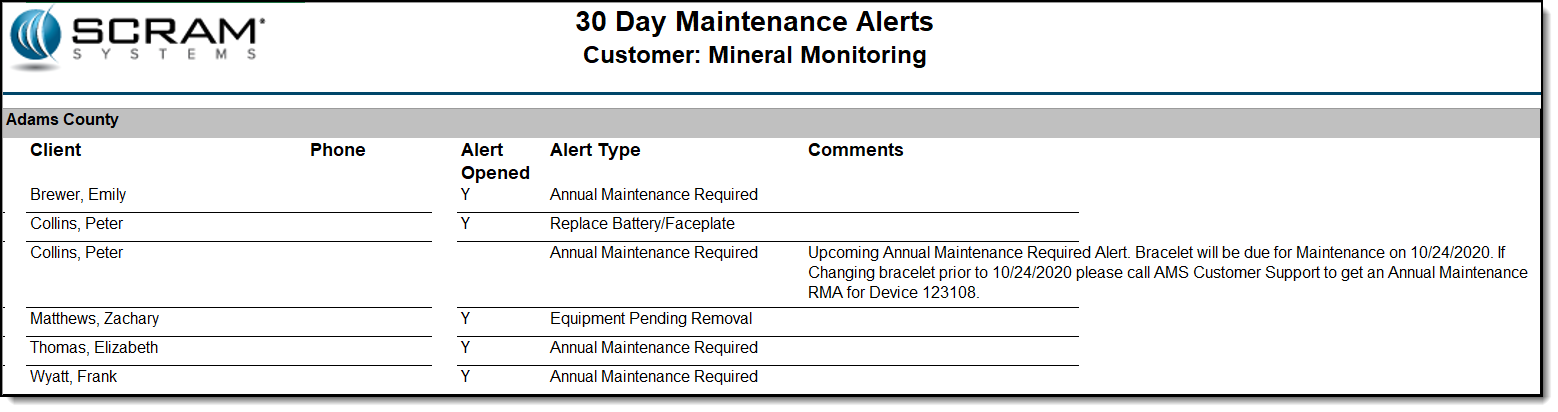
To facilitate efficient processing of specific SCRAM CAM® alert types, a new 30-Day Maintenance Alerts report is being made available in SCRAMNET®. The report, available at the Service Provider level for Admin-level users and sorted by caseload, lists all current and upcoming CAM maintenance alerts for the next 30 days.

In the example below, Peter Collins has a bracelet assigned that needs the battery and faceplate replaced. Viewing this report, you see that the bracelet is also scheduled for a maintenance replacement in the next few weeks. Knowing this, you can have the client come in for a bracelet replacement…saving you the cost of needlessly replacing the battery and faceplate when the bracelet itself is scheduled to be replaced in the near future. By having this complete picture, you will have reduced the number of times the client must be called in to meet with you in a very short time period.

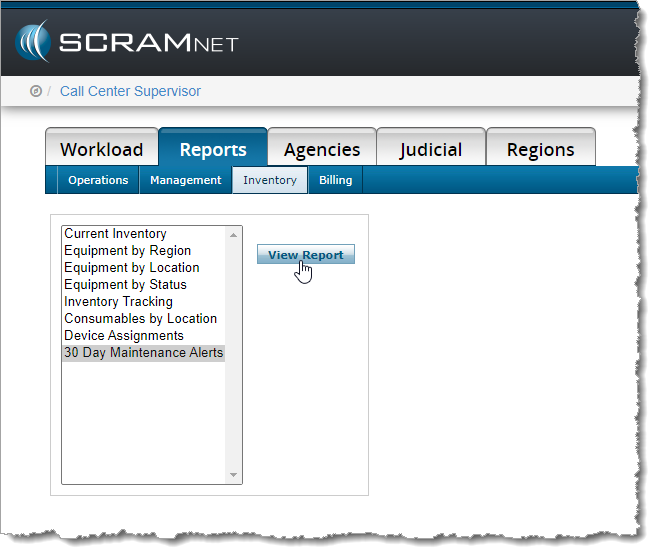
To run the report, click the Reports -> Inventory sub-tab, select the 30 Day Maintenance Alerts option, and click the View Report button.

How to access the 30-Day Maintenance Alerts Report

Continue Reading

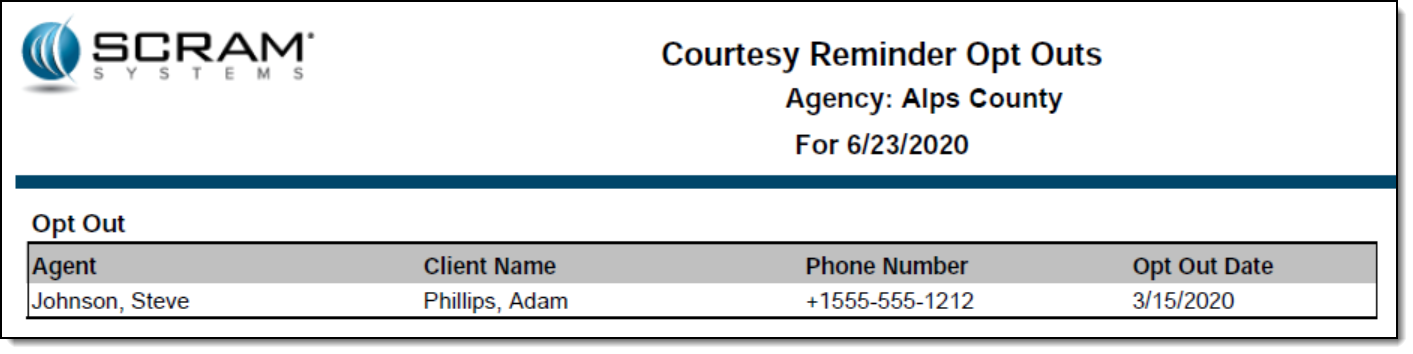
A new Courtesy Reminder Opt Outs report is now available for each caseload in SCRAMNET®. This report lists all SCRAM Remote Breath® clients who elected to opt out of receiving courtesy reminders that assist those clients with performing each breath test at the scheduled time.

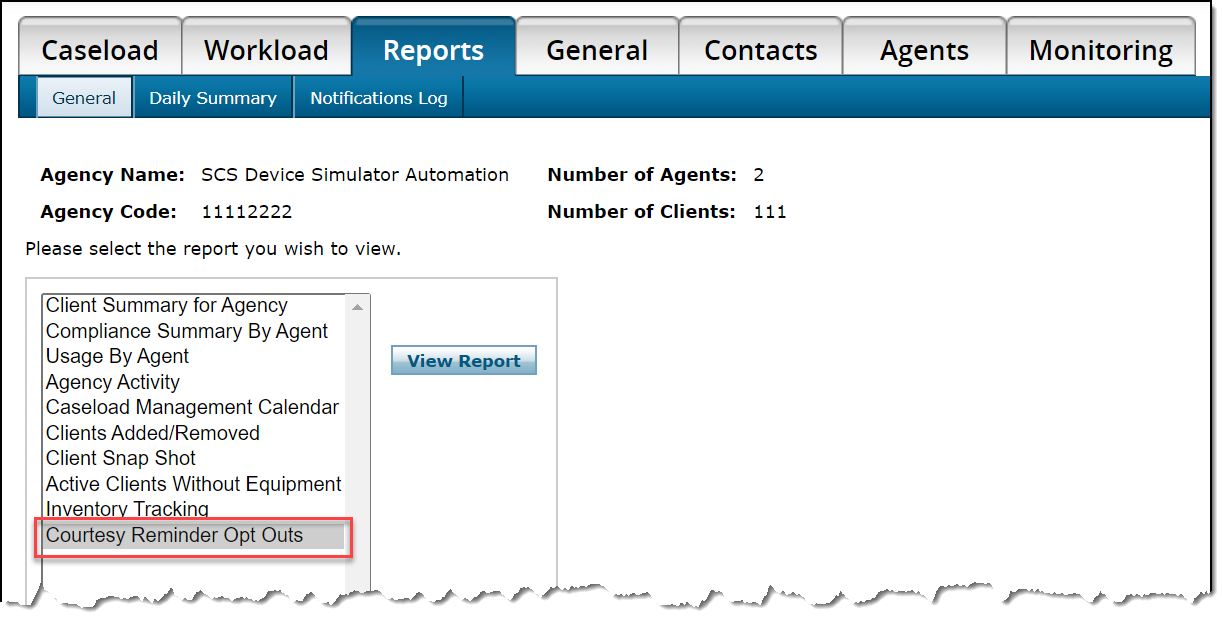
To access the report:

  1. Access the caseload in SCRAMNET.
  2. Click the Reports tab.
  3. Select the Courtesy Reminder Opt Outs option in the left report list.
  4. Click the View Report button.

All active SCRAM Remote Breath clients in the caseload who have ever opted out of receiving courtesy reminders will appear on the report.

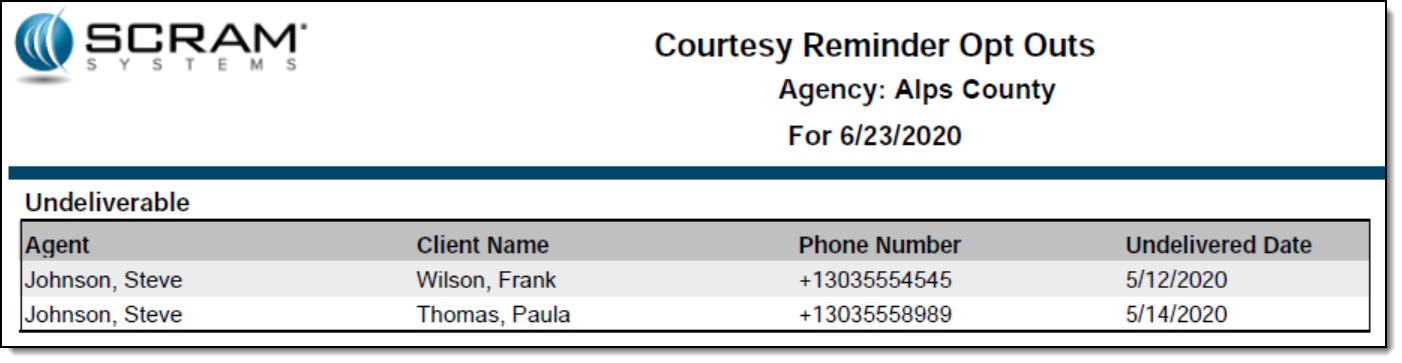
The second page of the report will list each client with an associated phone number that resulted in an “Undeliverable” message being generated when a courtesy reminder was sent.

Feedback

As always, please feel free to contact SCRAM Systems Customer Services at 1-303-785-7879 with any recommendations for system improvements.

Continue Reading

SCRAM Systems understands how important it is for you to keep your monitoring devices in your available inventory. Keeping units on-site and functional saves precious time and money for your monitoring business. To help you keep your SCRAM devices operating at peak performance; our engineers have researched and developed a series of recommended cleaning and maintenance procedures that enable you to get the most out of your SCRAM equipment investment.

SCRAM CAM and House Arrest Bracelet Deep Cleaning (Between Clients)
SCRAM Bracelet-Faceplate Maintenance (in-office)
SCRAM Bracelet-Faceplate Maintenance (Field Installer)

Continue Reading

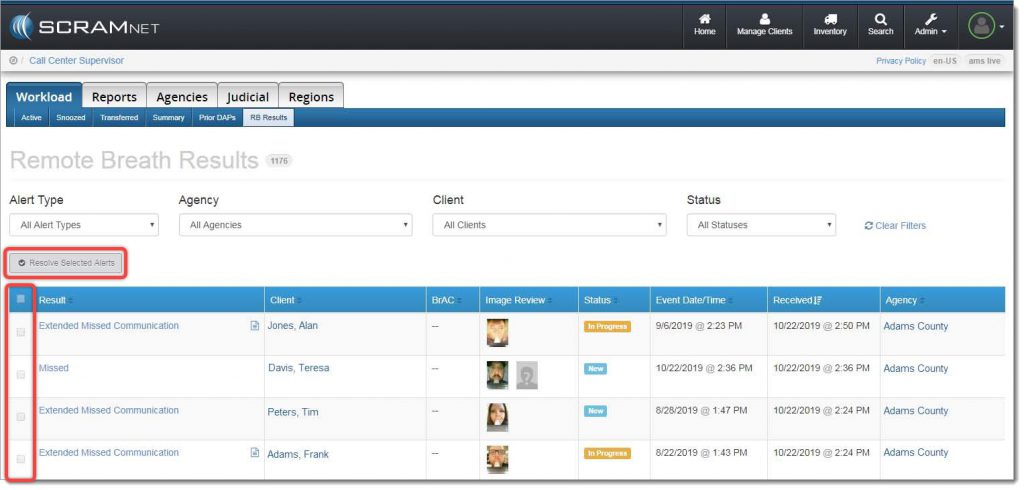
With the October 24, 2019 release, SCRAMNET® offers you a simple way to resolve multiple SCRAM Remote Breath® alerts in one action. A real time-saver when you are managing a heavy client caseload! To accomplish this, navigate to the RB Results page (shown below), and locate the new Resolve Selected Alerts button and checkbox column.

Remote Breath Results page


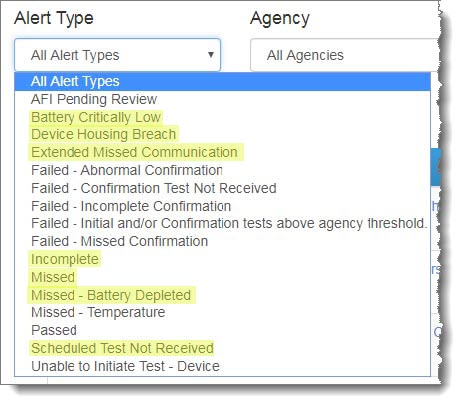
Next, select the specific type of alert you wish to bulk resolve from the Alert Type dropdown menu:

Alert Type dropdown menu
IMPORTANT: Bulk Resolve is only available for the following Alert Types:
  • Battery Critically Low
  • Battery Low
  • Device Housing Breach
  • Extended Missed Communication
  • Incomplete
  • Missed
  • Missed – Battery Depleted
  • Scheduled Test Not Received


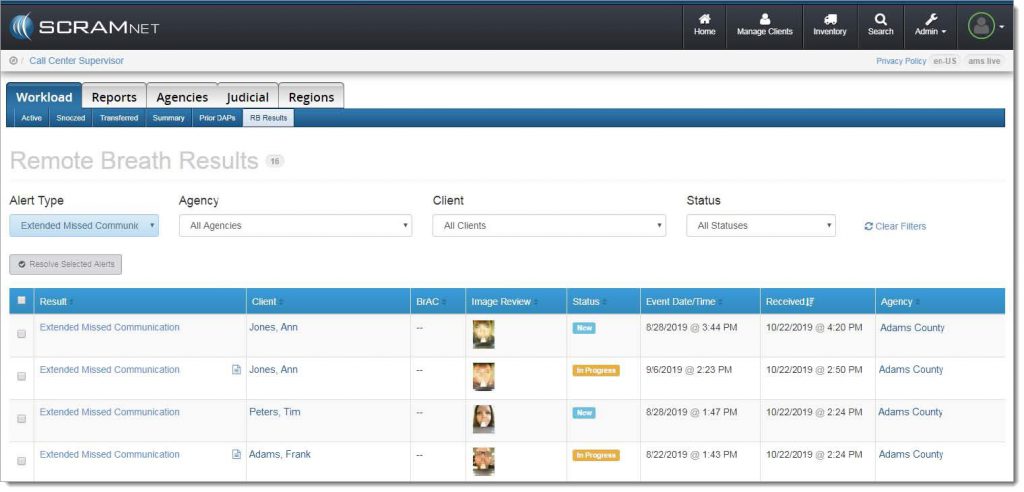
The alert list will be filtered to display only the selected alert type:

Filtered results

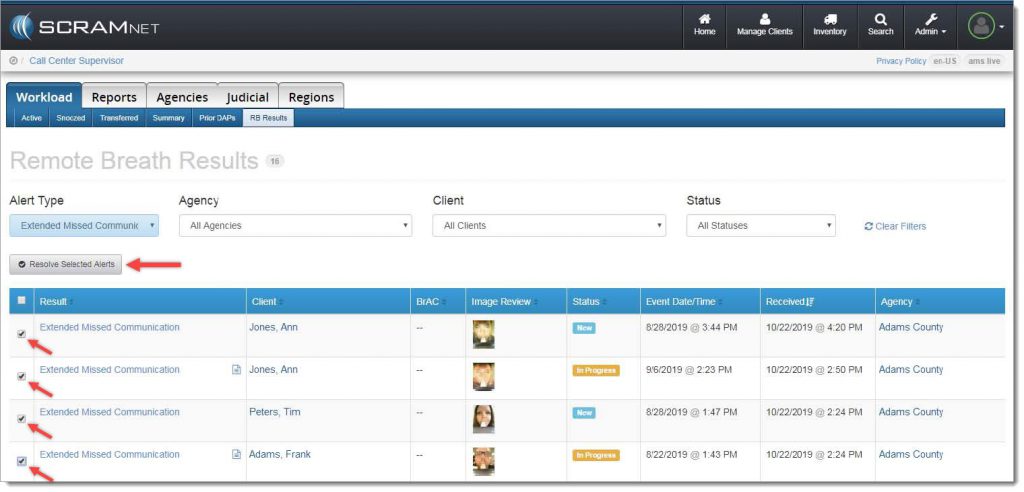
Select the checkbox for each individual alert to be resolved, or select the checkbox in the blue table header at the top of the list to select all alerts listed, and then click the Resolve Selected Alerts button.

Resolve the selected alerts

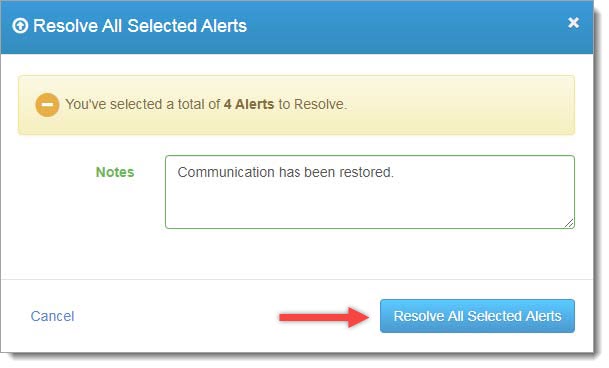
A confirmation pop-up window will appear as shown below. To complete the process, enter a note (required), and then click the Resolve All Selected Alerts button.

Confirmation pop-up window

The resolved alerts will no longer appear on the RB Results page.

Feedback

As always, please contact SCRAM Systems Customer Service at 1-303-785-7879 with any recommendations for system improvements.

Continue Reading

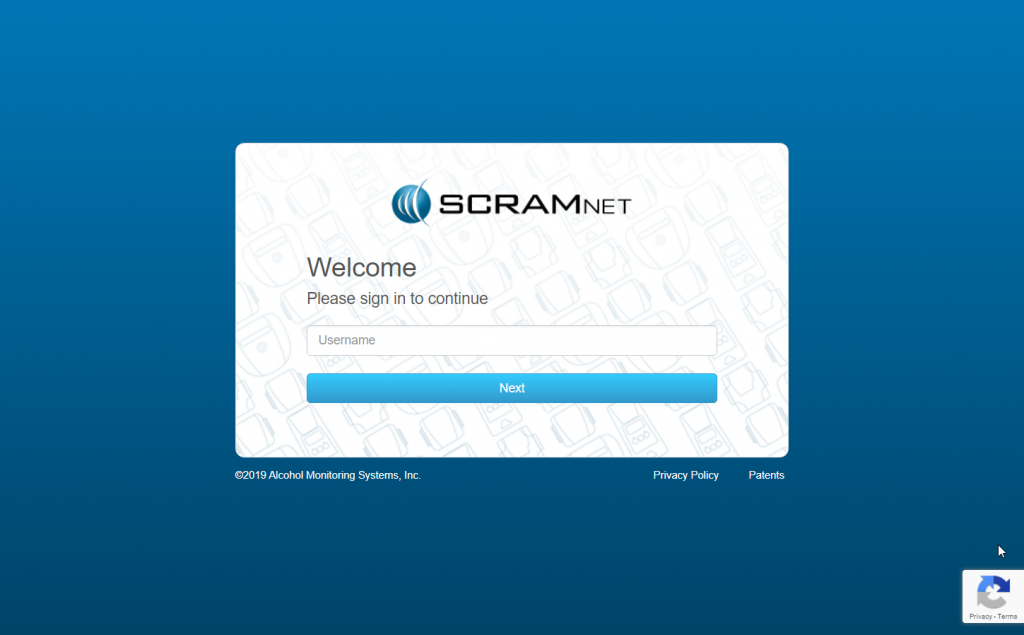
Starting this Wednesday, September 18, 2019, when you log into any of our SCRAM client management systems, you will notice newly designed login pages. Simply enter your user name, click the Next button, enter your password, and click the Sign In button to access the system.

The primary reason for notifying you regarding this change is to ensure you that, when you see this new look-and-feel, you are actually logging into the correct site and not a pirated or “spoofed” site.

Continue Reading

This new Getting Started video was designed to walk you through the fundamental steps of setting up your Remote Breath clients.

Continue Reading

SCRAM Systems is pleased to notify you that we are rolling out the second phase of the Daily Action Plan enhancements — Automated Transfers! With a release scheduled for Thursday, September 12, 2019 at 10:00 AM MDT, the system will automatically transfer high-priority alerts back to SCRAM Systems when additional information is needed, and a final disposition has not been determined (confirmed/not confirmed).

For more information please review:

Daily Action Plan Quicksheet

Daily Action Plan FAQ

Continue Reading

On August 29, SCRAM Systems will be deploying a new SCRAMnet feature that provides extensive enhancements to the Alert Management Console’s graphing and data visualization capabilities.

SCRAMnet Graphing Tool Quicksheet

Continue Reading

Next week, SCRAM systems will be deploying new functionality designed to:

  • Provide CAM Customers with a better global view of Alerts and Caseloads
  • Self Management of Daily Action Plan and Subscription to the DAP
  • DAP Can Now Be Configured By Customer for Frequency and Time Preferences

This deployment is the first phase of upcoming new functionality designed to enhance the SCRAMnet experience for CAM customers.  To learn more about how to best set up and use this new feature set.

Continue Reading