This page guides you through the steps necessary to activate SCRAM House Arrest for a client that is presently being monitored for alcohol consumption only using the SCRAM CAM Bracelet.
Before completing the steps in this quick sheet, ensure that a SCRAM CAM Bracelet and SCRAM Base Station are assigned to the client.
Procedure
Perform the following steps when the client arrives with the equipment.
-
- In SCRAMNET, navigate to the client who is having SCRAM House Arrest activated.
- On the client’s General page, click the Monitoring sub-tab.
The Monitoring Types page appears.
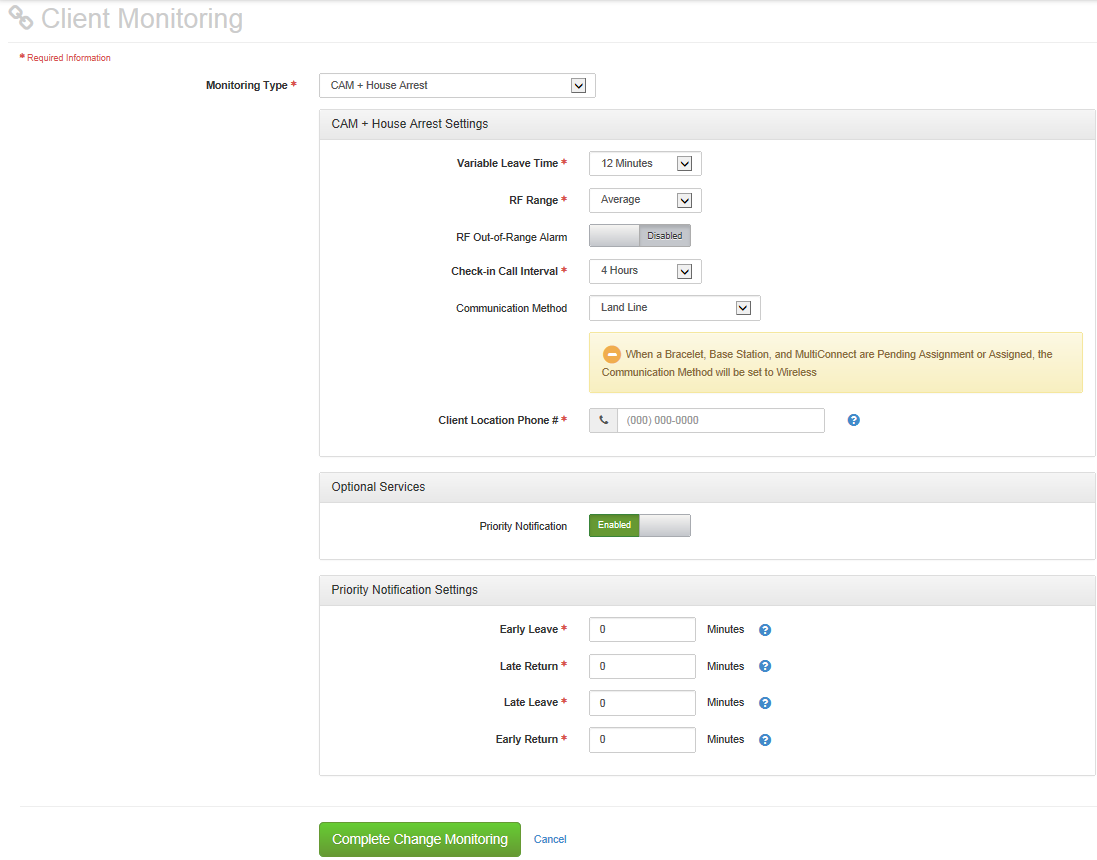
Monitoring Types Page - Select the CAM + House Arrest option in the Monitoring Type drop-down list.
- If you wish to establish an expedited communication standard, select the Priority Notification button.
- The CAM + House Arrest Settings default to the caseload-level settings. Make any changes to the settings that will be unique to the client.
- The Priority Notification Settings section will only appear when the Priority Notification button is selected. Like the CAM + House Arrest settings, the Priority Notification Settings default to the caseload-level settings. Make any necessary changes.
- Click the Complete Change Monitoring button.
- Contact the client to unplug and re-plug in the base station to change the status from “Inactive” to “Active”.
- Wait 15 minutes for the bracelet and base station to communicate and refresh the page.
The CAM and HA monitoring status is set to “Active” and the client is being monitored for SCRAM House Arrest.
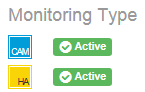
If an Information icon ( ) appears for House Arrest, perform the following:
- Hover over the icon.
The HA Installation Status pop-up appears.
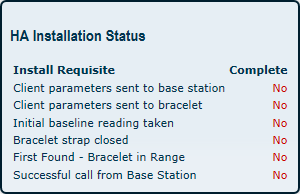
HA Installation Status Pop-up - Resolve any installation criterion that are NOT completed:
- Client parameters sent to base station – Contact the client to again unplug and re-plug in the base station. If the criterion is NOT set to “Yes”, instruct the client to come into the office to connect the base station to your computer using the Direct Connect USB cable so the base station can communicate with SCRAMNET.
- Client parameters sent to bracelet – Contact the client to come into the office to attach the Direct Connect device and wake up the bracelet.
- Initial baseline reading taken – Contact the client to come into the office to attach the Direct Connect device and wake up the bracelet, and connect the base station to your computer using the Direct Connect USB cable so the base station can communicate with SCRAMNET.
- Bracelet Strap Closed – Contact the client to come into the office to refit the bracelet.
- Successful call from Base Station – Contact the client to determine why the phone number entered into SCRAMNET does NOT match the phone number that the base station is using to communicate with SCRAMNET.
- First-found bracelet in range – Contact the client to again unplug and re-plug in the base station and stay within the range of the base station until the criterion is set to “Yes”. If the criterion cannot be set to “Yes”, instruct the client to come into the office to attach the Direct Connect device and wake up the bracelet, and connect the base station to your computer using the Direct Connect USB cable so the base station can communicate with SCRAMNET.