In SCRAM Nexus, you can view metrics data for a client by clicking the client’s name link on the Workload page then clicking the Metrics sub-tab.
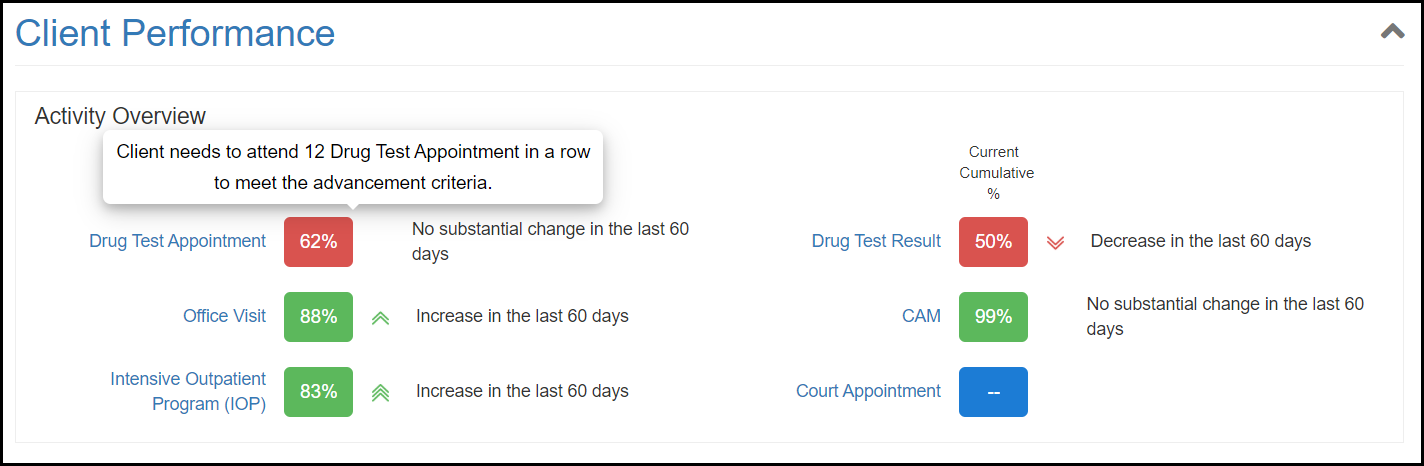
There are two main sections within Client Metrics. The first, Client Performance, gives the officer quick insight into how the client is performing with assigned activities (e.g., drug tests, treatment, court appointments). For each activity, the officer is provided with the percent of completed/attended, indicators if performance is increasing or decreasing, and information on how many activities need to be completed/attended in a row to meet expectations. This section is intended to be shared and discussed with the client to create an open dialog around their performance.
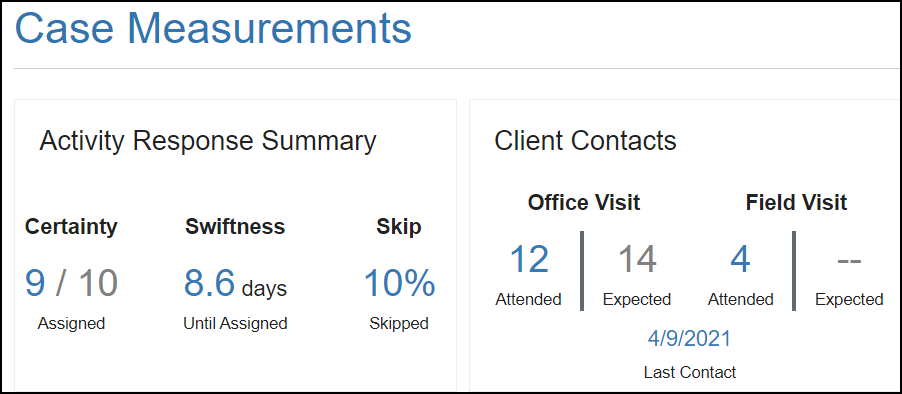
The second section, Case Measurements, is designed to provide the officer with feedback on their interactions with the client. Here officers are provided with the certainty, swiftness, and percent skipped of Activity Responses (incentives/sanctions) and how they are performing with contact standards.