Performing a calibration check on the SCRAM Remote Breath Pro device is a simple process that takes just a few minutes to complete.
Components needed to complete a calibration check include:
- Gas Cylinder (0.10% Ethanol dry gas)
- Regulator (4LPM)
- Rubber Tubing
- RB Pro Breath Tube
Calibrations and calibration checks must be performed by an AMS-certified calibration technician. To become certified, send an e-mail to training@scramsystems.com requesting enrollment in the SCRAM Remote Breath Pro Calibration Certification Training course.
Key Steps to follow while completing a calibration:
- Ensure nothing obstructs the air vent on the back of the RB Pro device during calibration. For example, do not lay the device flat on any surface or block the vent with your hand while holding the device.
- When the device is in an “In Inventory” status, power up the device and ensure the device can communicate before initiating a calibration.
- When the device is in an “Assigned to Client” status, ensure the device can communicate before initiating a calibration. The device will “wake-up” and begin the calibration process when assigned.
Assemble Remote Breath Pro Calibration Equipment
- Screw the regulator onto the canister by hand until snug.
- You should hear a click as you tighten the regulator.
- The pressure gauge will display the gas pressure in the canister when attached correctly.
- Firmly attach one end of the rubber tubing to the barbed fitting on the regulator.
Initiate the calibration check in SCRAMNET
- Select the Inventory button.
- Enter the serial number of the device in the Serial Number field and select the Search button.
- Select the Serial Number hyperlink.
- On the Device Details page, select the Initiate Cal-Check button.
- Power on (In Inventory) or wake up (Assigned to Client) the device. The device displays the following steps:
-
- PLEASE WAIT
- SERIAL #[device s/n]
- ATTACH EQUIPMENT
- START FLOW OF GAS
- Connect one end of the plastic tubing to an RB Pro breath tube. The rubber tubing fits inside the end of the breath tube with the larger diameter.
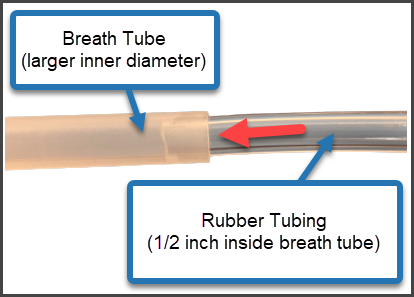
click to enlarge
- Connect the breath tube to the RB Pro device.
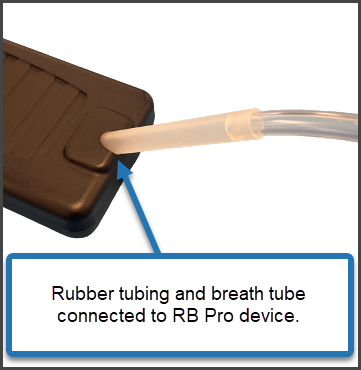
click to enlarge
- Press and hold the push button on the top of the regulator until the device’s screen displays:
Reminder: Ensure nothing obstructs the air vent on the back of the RB Pro device during calibration. For example, do not lay the device flat on any surface or block the vent with your hand while holding the device.
-
- STOP FLOW OF GAS
- CAL-CHECK SUCCESSFUL
- REMOVE EQUIPMENT
- CAL-CHECK COMPLETE
Once the Cal-Check is complete, the device will return to the pre-calibration state. “Device Unassigned” for In Inventory devices, or “Monitoring” for Assigned to Client devices.
- Verify results in SCRAMNET. On the Device Details page select the Refresh Page to Latest Status button. A record of the calibration check appears in the Calibration History section.