The SCRAMNET monitoring software has the ability to automatically detect irregularities with the RB Pro device’s breath tube in the breath test photo. This feature works much like Remote Breath Automatic Facial Intelligence (AFI), in that the system scans test result photos automatically and surfaces alerts to the RB Results page when a photo triggers the need for an agent to review the image.
Irregularities that trigger a Possible Face Obstruction alert include, but are not limited to:
- Anything – like hands, fingers, clothing, the RB Pro case itself, etc. – that blocks the camera’s view of the entire breath tube, from where it leaves the RB Pro device to where it enters the client’s mouth.
- Irregularities in the color, size, or shape of the breath tube.
- Attachments connected to the breath tube.
- Breath tube is missing altogether.
Alert Logic
The automatic face obstruction system will only run against breath tests that are not already on the SCRAMNET Workload RB Results page for another reason. In other words, when the breath test results and photo both pass BrAC and AFI, automated face obstruction scanning commences. If the software then detects an irregularity in the photo, it will flag the breath test results with a Possible Face Obstruction alert on the RB Results sub-tab of the SCRAMNET Workload page.
Locate and Open the Alert
You may filter Remote Breath Results to see only these Alerts by selecting “Possible Face Obstruction” from the Alert Type filter dropdown menu:
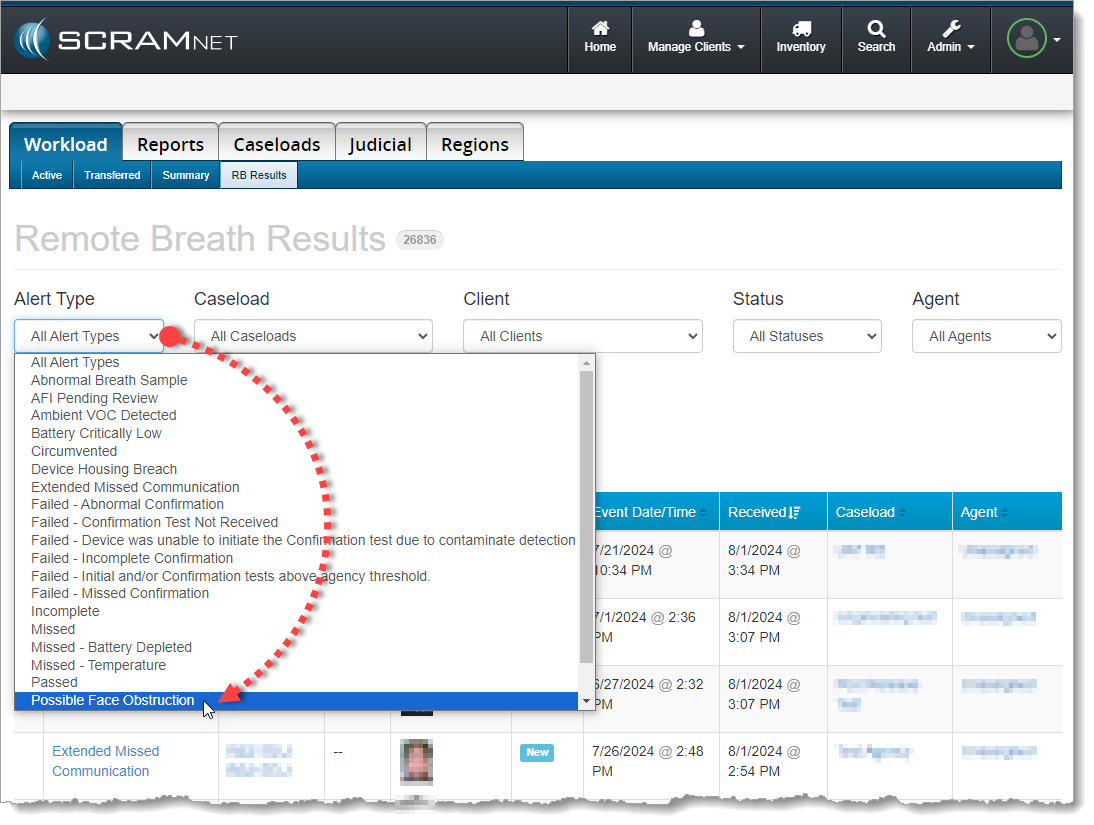
Filter by ‘Possible Face Obstruction’ if Desired (click to enlarge)
Select the Possible Face Obstruction result from the table of breath test results to open it in the Alert Management Console:
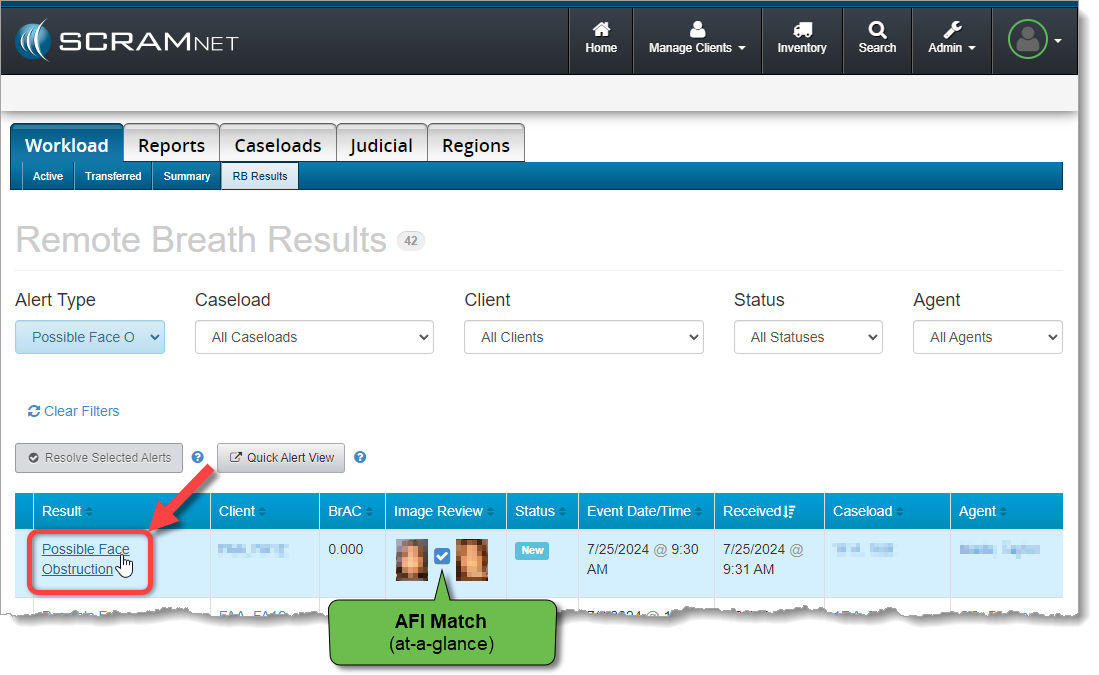
Select the ‘Possible Face Obstruction’ Result Hyperlink (click to enlarge)
Agent Match / Passed Scenario
You review the breath test photo for obstructions to the breath tube. You notice the client is grasping the breath tube near her mouth and obscuring the view of the breath tube entering her mouth:
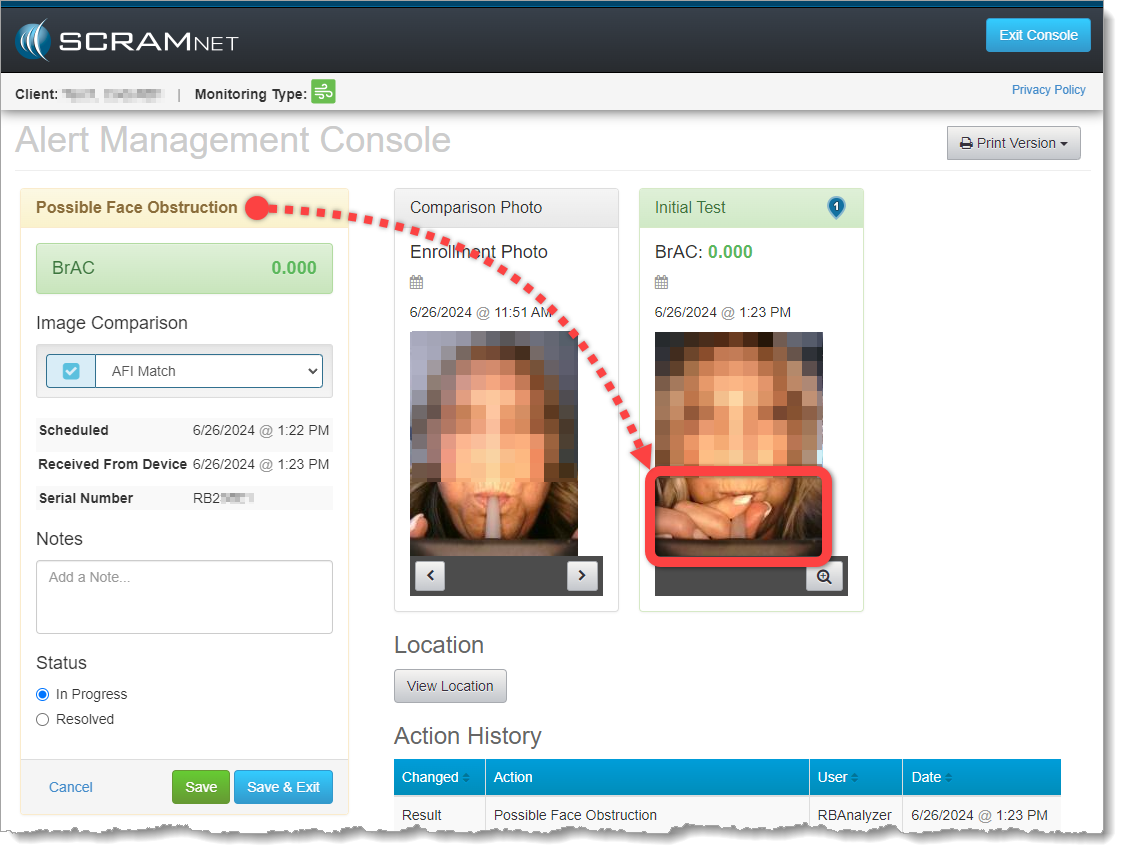
Possible Face Obstruction Alert on the Alert Management Console (click to enlarge)
You’ve worked with this client for awhile and you are fairly confident that the client did not grasp the breath tube in an effort to obscure a circumvention. You decide this is a coaching opportunity; so you will pass this test, but you plan to reach out to the client to advise her NOT to grasp the tube while delivering a breath sample going forward.
You perform the following actions:
- Select Agent Match from the Image Comparison dropdown menu
- Add Notes describing the coaching actions you plan to take with the client
- Change the test result Status to Resolved
- Save & Exit the Alert Management Console
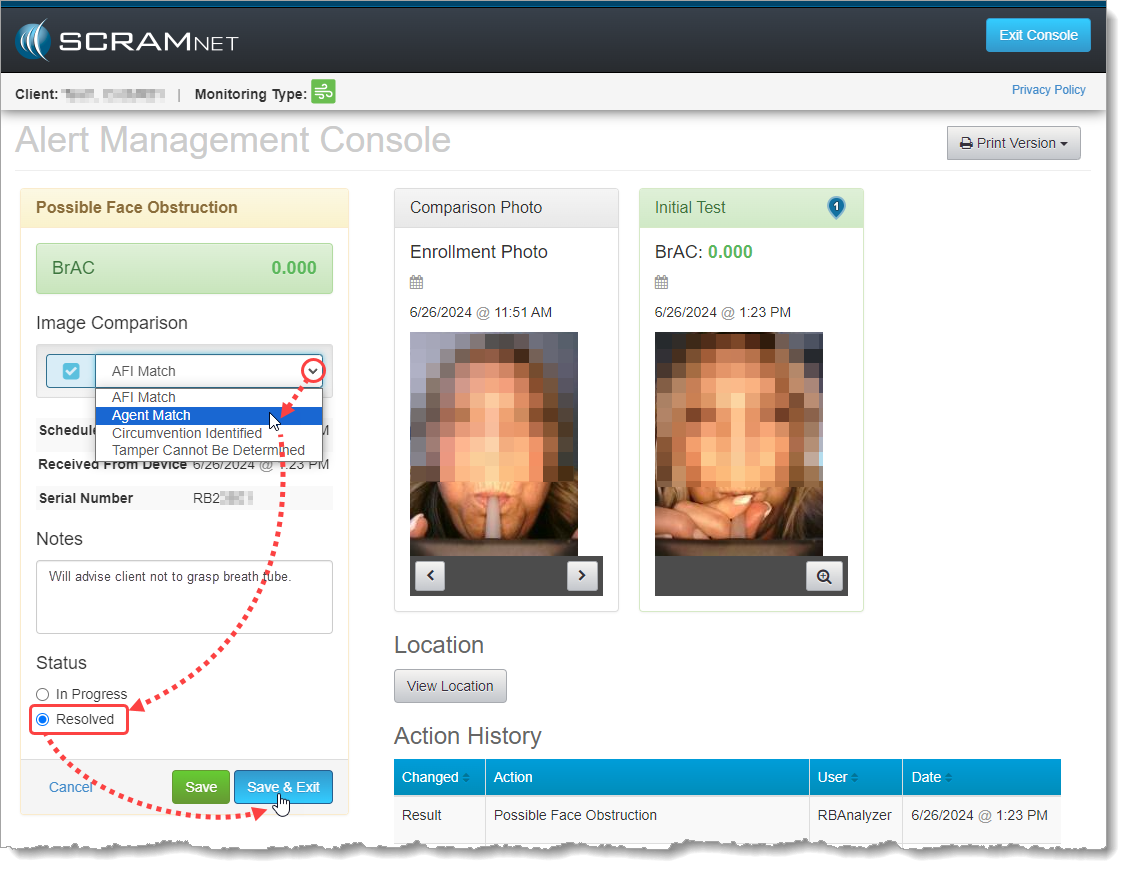
Resolving the Possible Face Obstruction Alert as Passed (click to enlarge)
The test will fall off the SCRAMNET Workload RB Results page, but you will find it as a “Passed” test result on the individual client’s RB Results page:
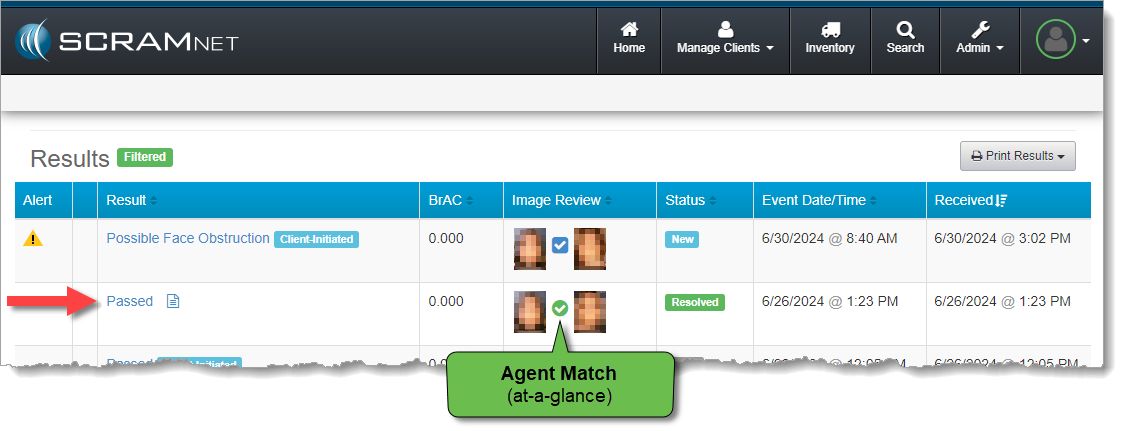
Resolved Test Result Shows ‘Passed’ on Client RB Results Page (click to enlarge)
Circumvention Identified Scenario
In this scenario, you review the breath test result photo and notice that the client has fed an additional external tube into his mouth. It is highly likely that the additional tube is feeding fresh air into the end of the RB Pro breath tube so that the client is not actually providing a sample of his own breath for testing. You decide that this is a circumvention of the device and you will record it as such.
You perform the following actions:
- Select Circumvention Identified from the Image Comparison dropdown menu
- Change the test result Status to Resolved
- Save & Exit the Alert Management Console
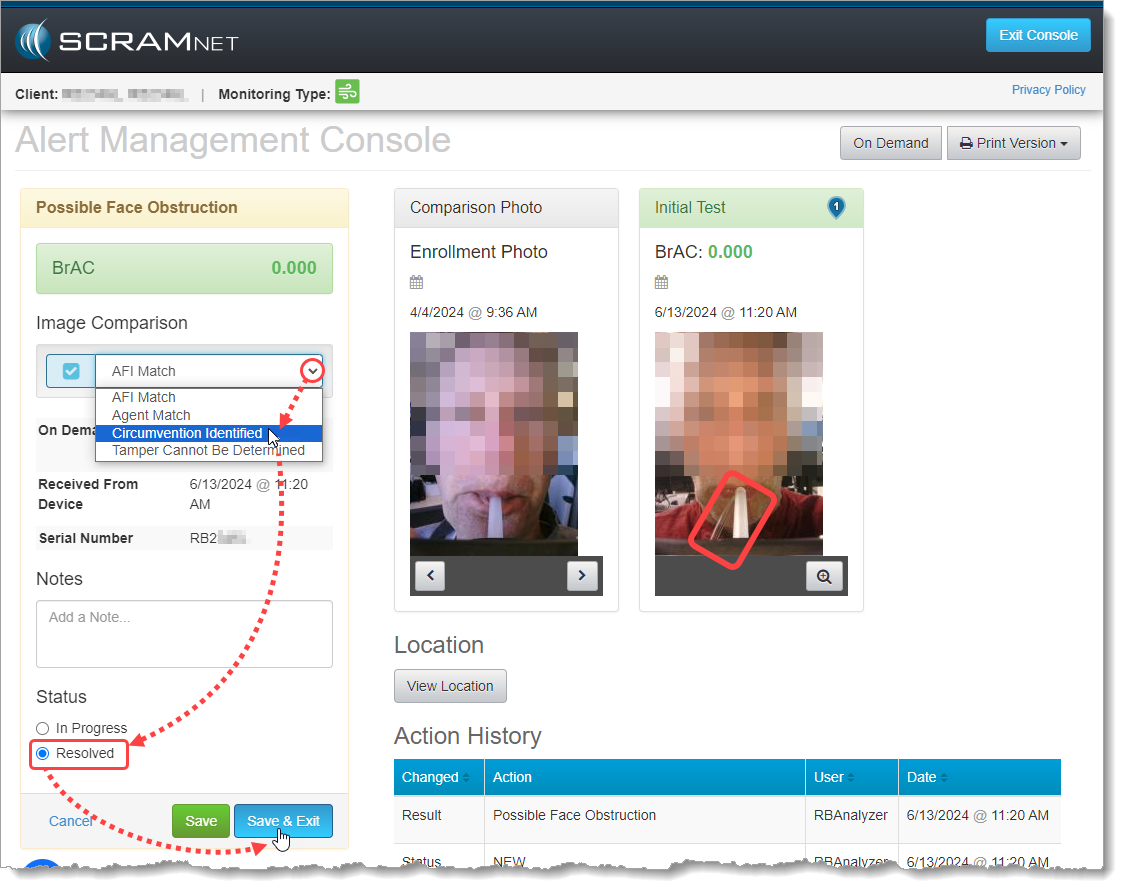
Resolving the Possible Face Obstruction Alert as a Circumvention (click to enlarge)
The test will fall off the SCRAMNET Workload RB Results page, but you will find it as a “Circumvented” test result on the individual client’s RB Results page:
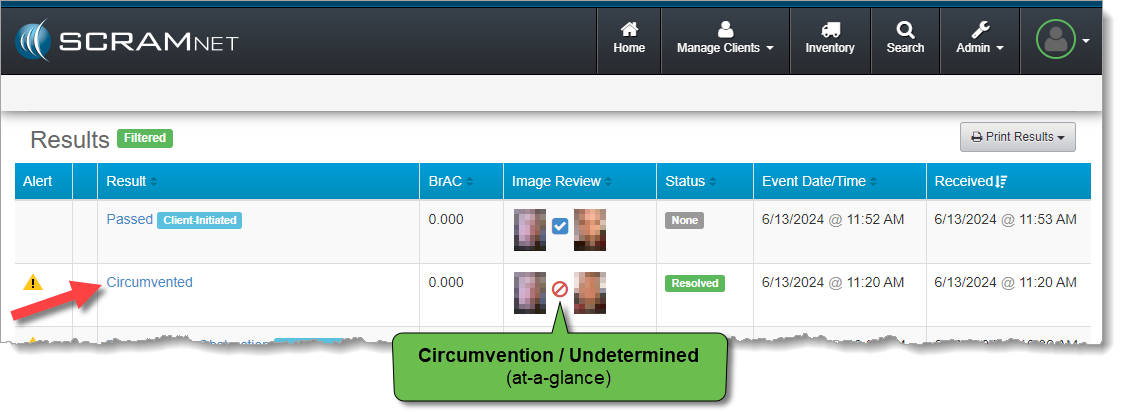
Resolved Test Result Shows ‘Circumvented’ on Client RB Results Page (click to enlarge)
Tamper Cannot Be Determined Scenario
You review the breath test photo for obstructions to the breath tube, but this time rather than an obstruction, you notice a small irregularity in the breath tube itself. You are covering for a colleague who is on vacation and you are not completely familiar with this client; so you decide to mark the test results as “Tamper Cannot Be Determined” and follow-up with the client regarding the breath tube he is using. You also decide to leave the test results “In Progress” so they do not fall off the SCRAMNET Workload RB Results page just yet.
You perform the following actions:
- Select Tamper Cannot Be Determined from the Image Comparison dropdown menu
- Add Notes describing the follow up actions you plan to take with the client
- Leave the test result Status as In Progress
- Save & Exit the Alert Management Console
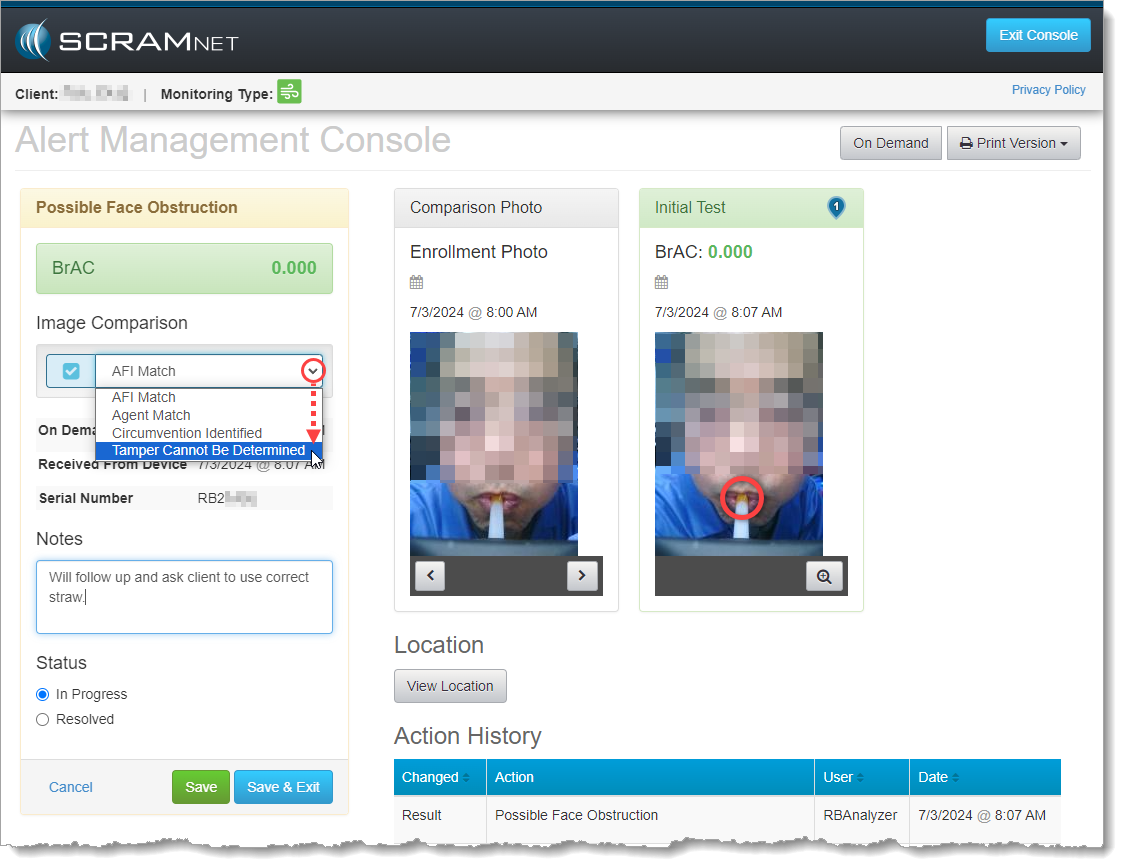
Marking the Possible Face Obstruction Alert as Cannot Be Determined (click to enlarge)
When you return to the SCRAMNET Workload RB Results page, you will note that the client’s breath test result has updated to “Passed,” because the BrAC was 0.000 and circumvention was not clear. The alert, however, remains In Progress because you have not resolved it yet. Your email address appears in the Status column along with the In Progress Status to indicate you are the agent working the alert.
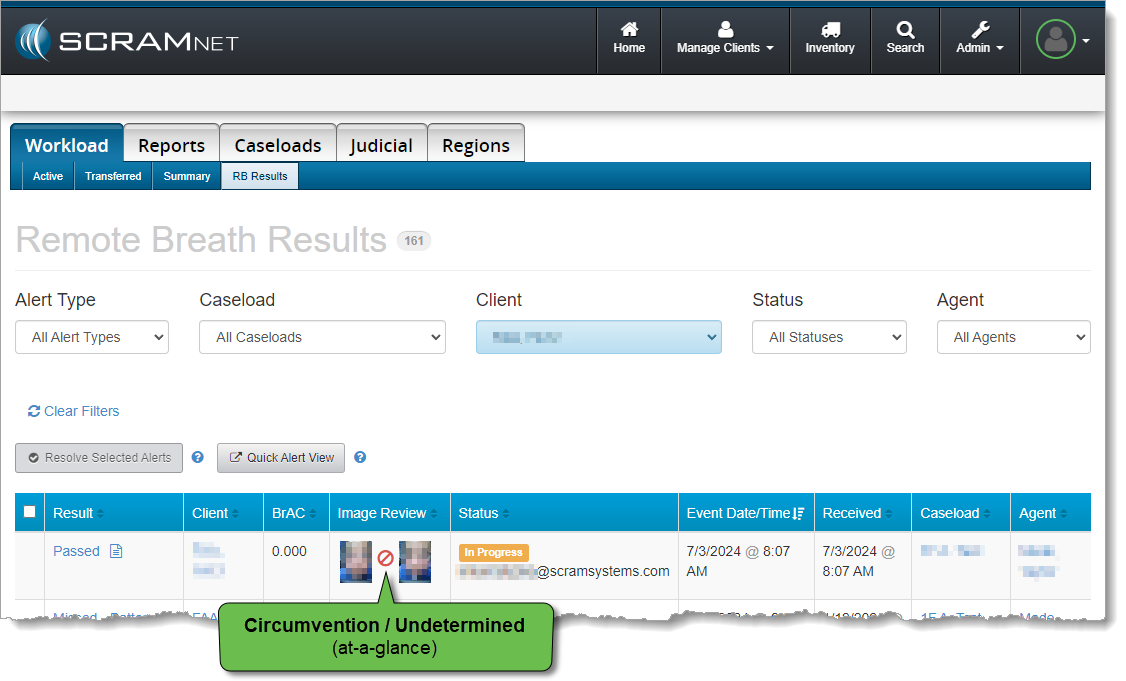
Unresolved In Progress Test Result Shows ‘Passed’ on Workload RB Results Page (click to enlarge)
Once you have completed your follow up with the client – and perhaps your vacationing colleague as well – you may wish to update the Result, or leave it and simply Resolve the alert.