The Clients tab in Optix provides a consolidated view of all of the clients under supervision for your program. Additionally, add new TouchPoint client or add one of the TouchPoint services to an existing client by clicking the +Add TouchPoint Client button.
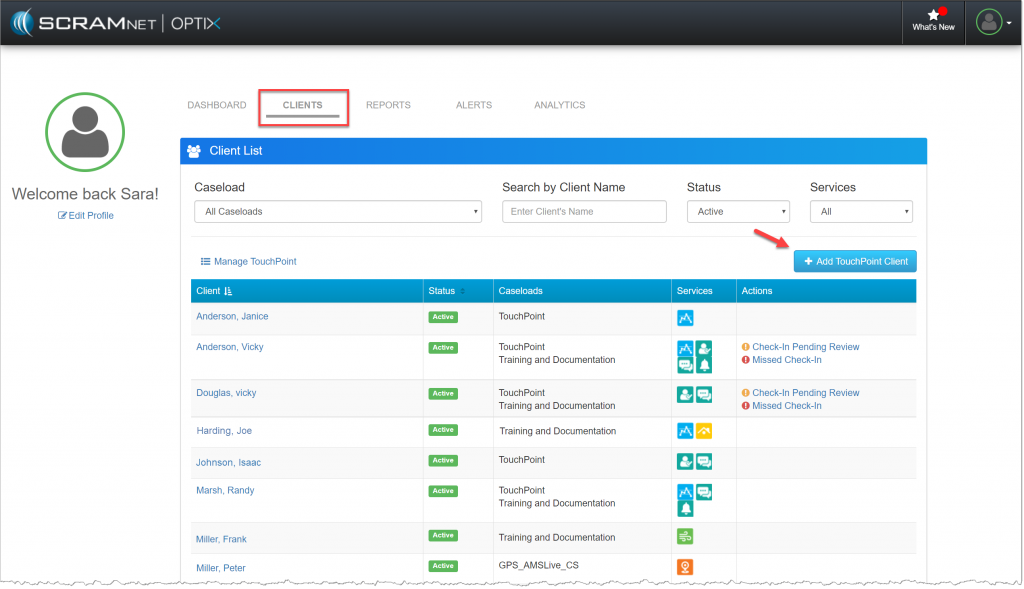
Optix Clients page (click to enlarge)
Use the filters to customize the search results displayed on the page by:
- Caseload
- Search by Client Name
- Status
- Services
The client information displayed:
- Client Name: The client’s name is a hyperlink to their Optix Profile page.
- Status: Active or Inactive.
- Caseload: Agency assigned caseload(s).
- Services: Icons display the type of EM equipment assigned and TouchPoint mobile application services the client is using such as Check-In, Messaging, and EM Reminders.
- Actions: For TouchPoint clients it provides the officer the ability to review unread Messages and Client Check-Ins needing further actions.