The 24/7 Monitoring and Compliance reports provide you with an in-depth look at the overall performance of your SCRAM 24/7 Program. This information can be used to report compliance success to governing bodies, help optimize your program to meet the needs of your community, and take a deep dive into the activities that your program provides.
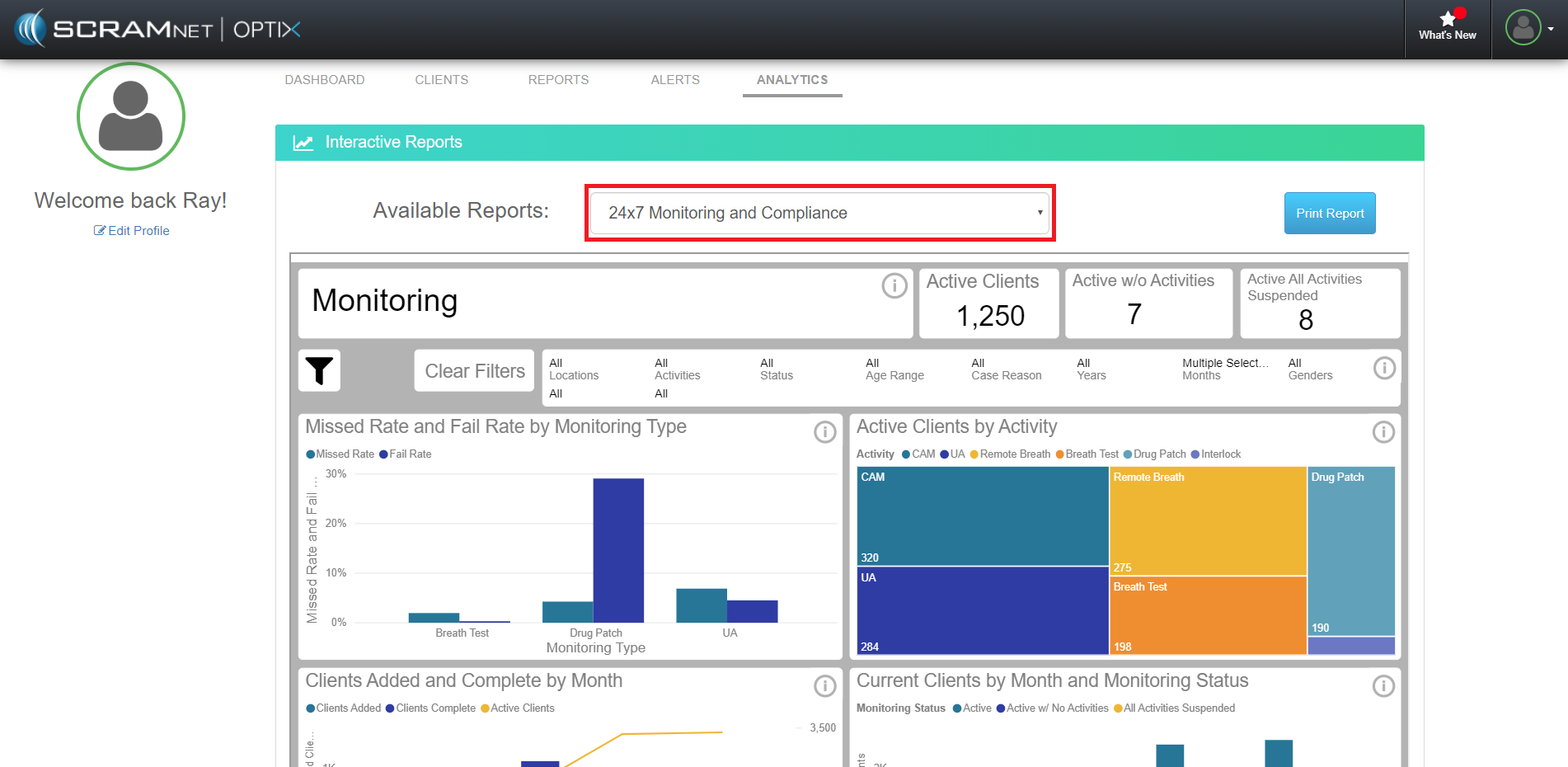
24/7 Monitoring and Compliance Reports on the Optix Analytics Tab (click to enlarge)
Filters
Each report is equipped with filters that allow you to dissect the data to reach the desired information. To open the filter pane, click the New Filter icon  and select the desired values. Once all filters are selected, click the Close icon
  to close the pane. The data displayed in each report automatically reloads to match the selections, which are then be displayed in the Filter Items bar. Click the Clear Filters button
  to reset the filters to their default settings.
The Reports
The 10 24/7 Monitoring and Compliance reports available are:
- Monitoring
- Client Break Down
- Appointments
- DUI Caseload
- Breath Testing
- Drug Patch
- UA
- Mouth Swab
- Client Test Check In
- Sanction
Monitoring Report
Data displayed in this report include:
- Active Clients: Active and has at least one activity assigned.
- Active w/o Activities: Active but has no active activities.
- Active All Activities Suspended: Active with all activities in a suspended state.
- Missed Rate and Fail Rate by Monitoring Type: Fail and missed test rate for Drug or Alcohol tests.
- Activity Clients by Activity: Number of clients by monitoring type. Clients can have more than one activity and will be counted once in each bucket.
- Clients Added and Completed by Month: New clients added and completed during each month. “Added” is defined as when a client is created or changed to an Active status. “Complete” is defined as a client being inactivated.
- Current Clients by Month and Monitoring Status: Client status at the end of each month. The monitoring statuses are Active, Active with no current Activities, and Active with all activities suspended.
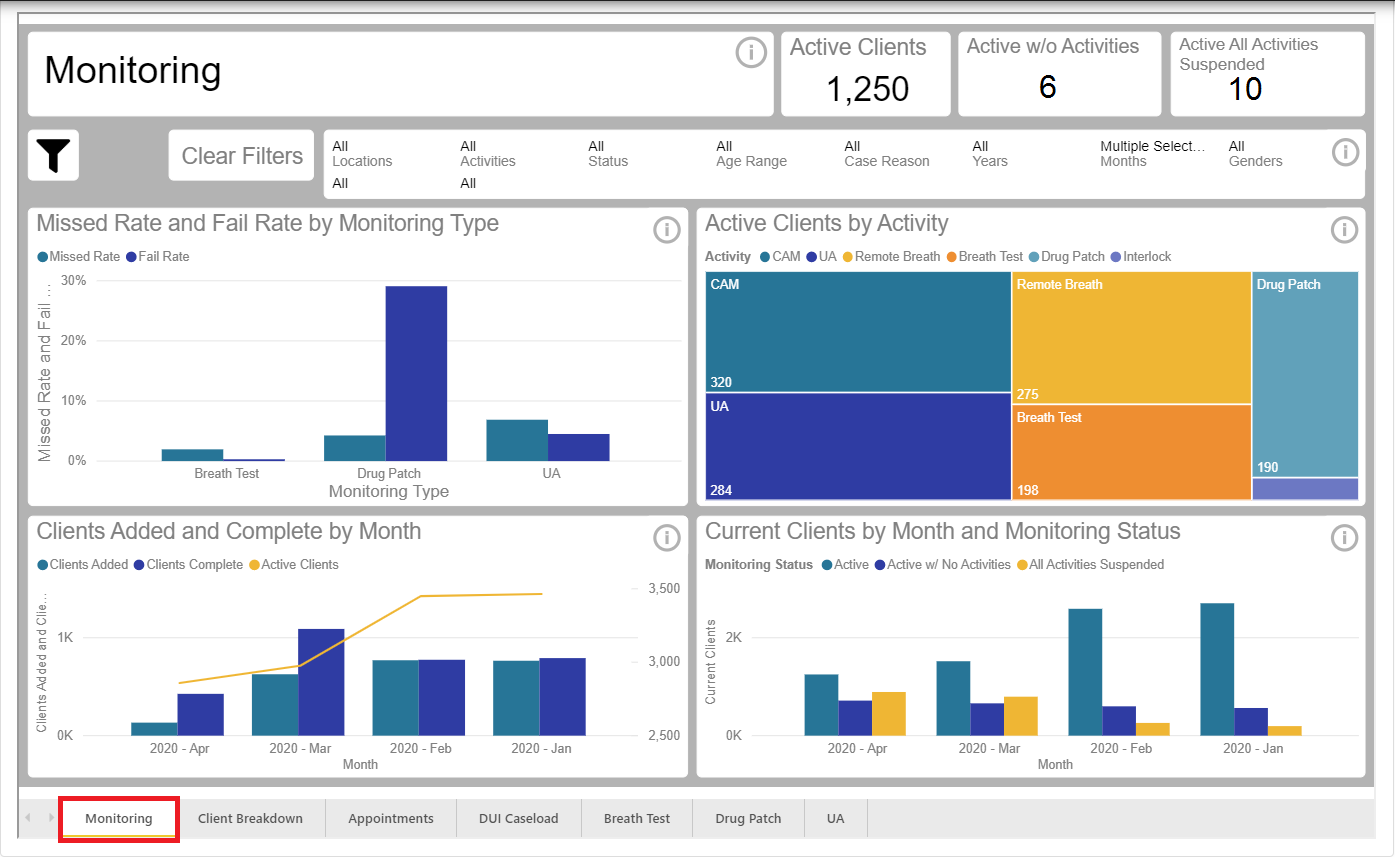
Monitoring Report (click to enlarge)
Client Breakdown Report
Data displayed in this report include:
- Clients by Latest Case Type: Clients by case type.
- Total Clients by Age and Gender: Total clients by age and gender.
- Clients by Referring Entity: Clients by referring entity.
- Client Counts by Failed Tests Category by Test Type: Number of clients by case type and that failed at least one test. Failed tests are defined as a test being failed or missed.
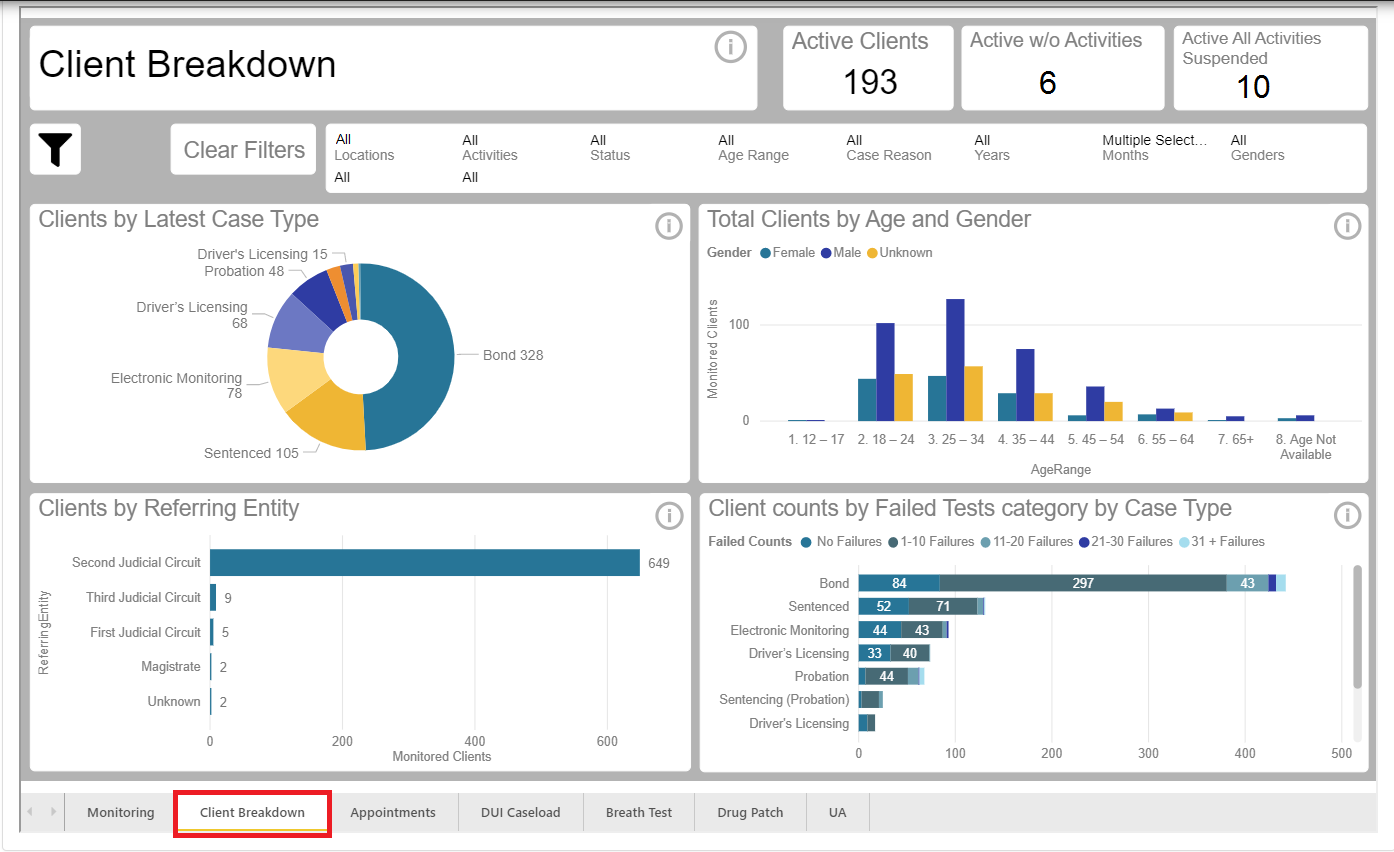
Client Breakdown Report (click to enlarge)
Appointments Report
Data displayed in this report include:
- Appointments by Time of Day: Clients with appointments by time of day.
- Appointment Count by Activity Type: Total appointments by activity type for a specific time period.
- Appointment by Month and Activity Type: How many appointments occurred by activity type for a specific month.
- Appointments by Location and Activity Type: How many appointments occurred by activity type for a specific location.
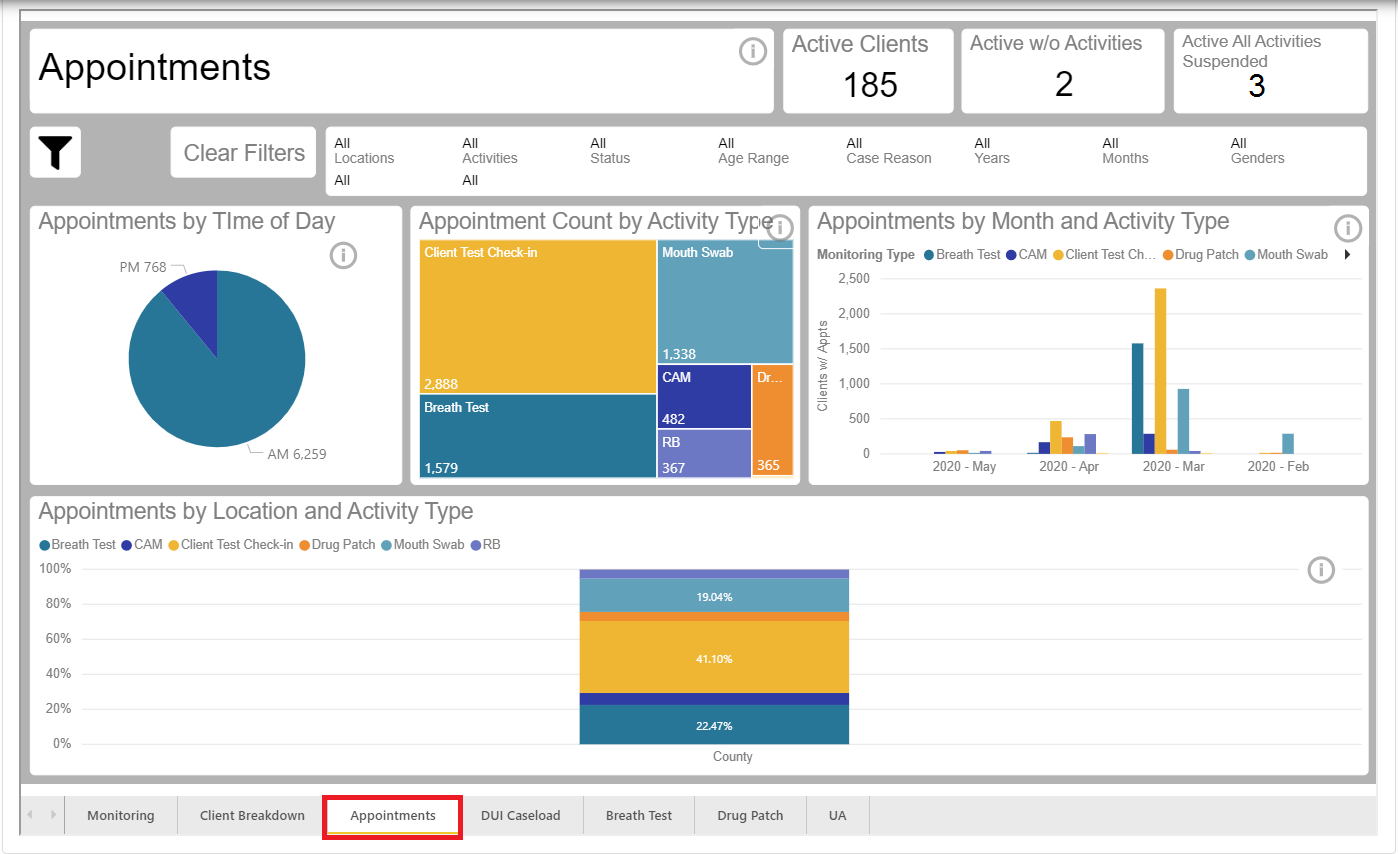
Appointments Report (click to enlarge)
DUI Caseload Report
Data displayed in this report include:
- DUI vs Non-DUI: Number of clients where the latest case reason is related to DUI compared to clients where the case reason is other than DUI.
- Number of Clients by Referring Entity: Number of clients by referring entity.
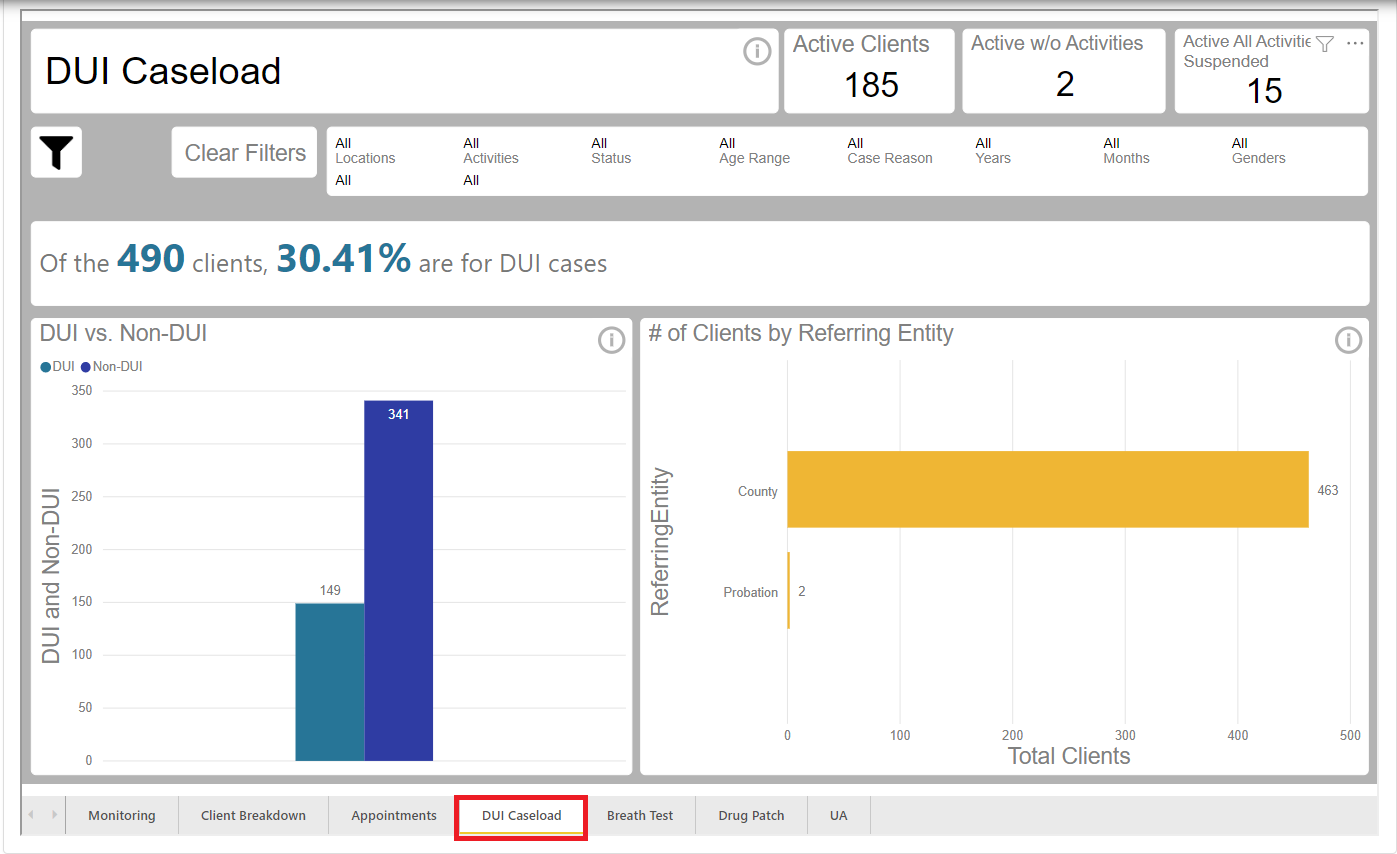
DUI Caseload Report (click to enlarge)
Breath Test Report
Data displayed in this report include:
- Test by Status: Breath Tests by Test Status: The statuses are Passed, Missed, and Failed.
- Test by Month and Status: Breath test statuses by month. The statuses are Passed, Missed, and Failed.
- Not Completed Tests by Appointment Status: Breath tests that were not completed.
- Failed Tests AM vs PM by Weekday: Failed breath tests by time taken AM vs PM. AM = 12:00 AM thru 11:59 AM. PM = 12:00 PM thru 11:59 PM.
- Appointments by Month Name: Appointments by month. This report is useful for determining trends for test volume. It includes Excused, Missed, Pending and Cancelled appointments.
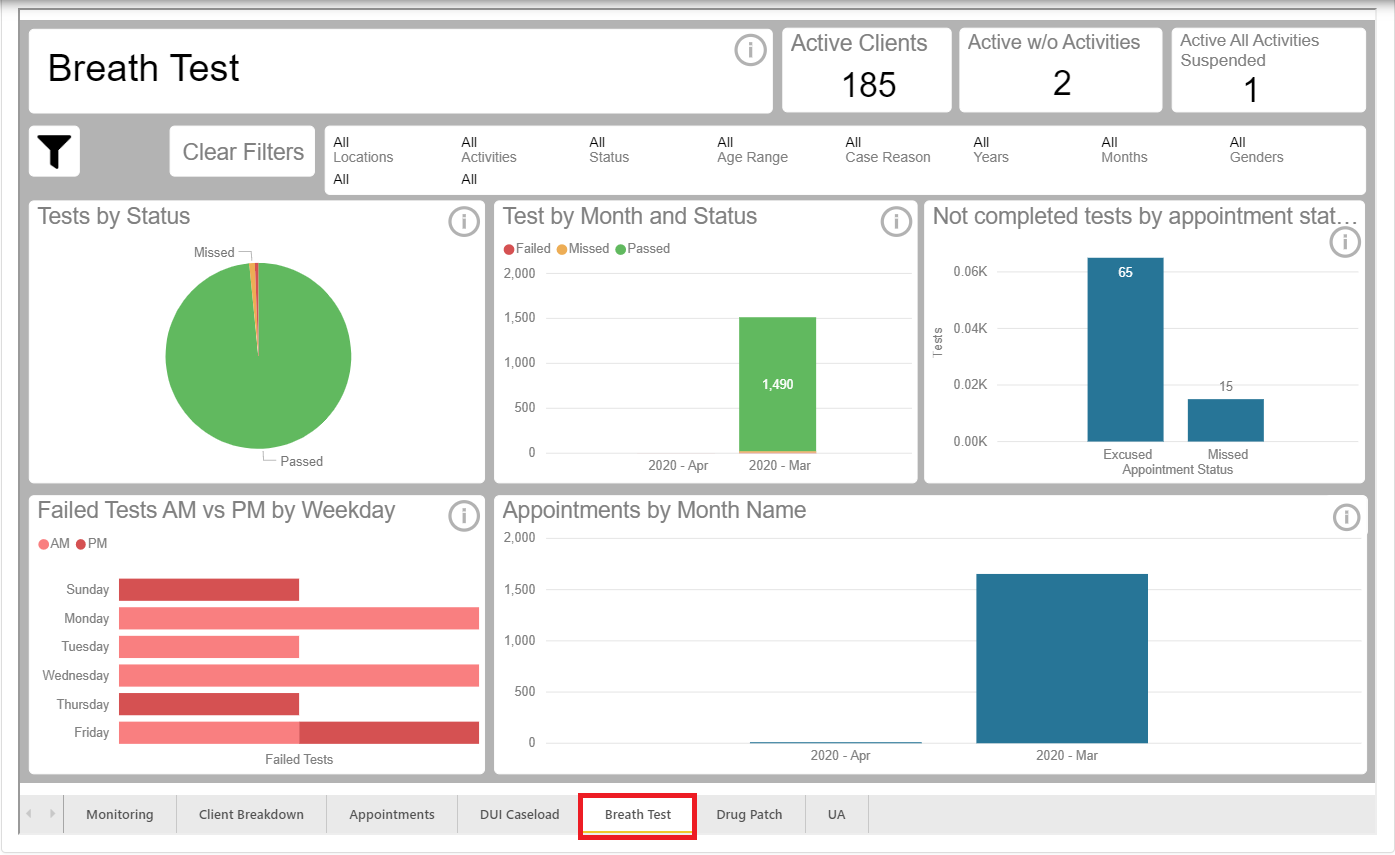
Breath Test Report (click to enlarge)
Drug Patch Report
Data displayed in this report include:
- Test Results: Drug Patch tests by test status. Tests statuses are Passed, Missed, and Failed.
- Tests by Month and Test Status: Drug Patch statuses by month. The statuses are Passed, Missed, and Failed.
- Tests by Appointment Type and Test Status: Drug Patch tests by status and appointment type. Appointments types are Installation, Replace and Remove.
- Failed Test by Weekday: Failed tests by weekday. Date used is the day the Drug Patch was removed.
- Appointment by Month: Appointments by month. This report is useful for determining trends for test volume. Includes Excused, Missed, Pending, and Cancelled appointments.
- Failed Tests and Clients by Substance: Total failed tests by substances and number of clients with the substance.
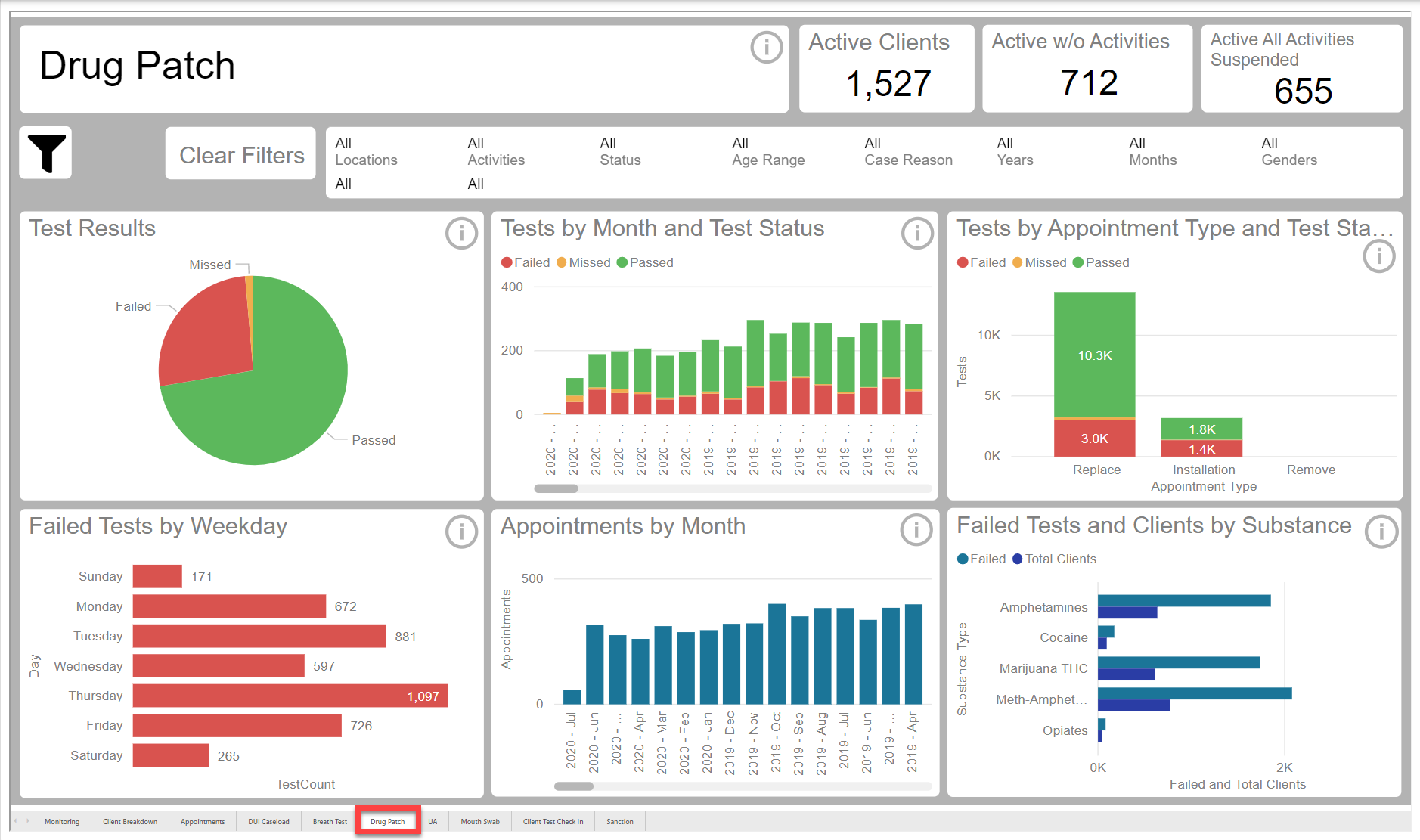
Drug Patch Report (click to enlarge)
UA Report
Data displayed in this report include:
- Test Results: UA tests by test status. Tests statuses are Passed, Missed, and Failed.
- Test Results by Month: UA tests results by month. Includes appointments where test was taken, or appointment was missed.
- UA’s Not Completed by Status: UA tests were not completed by appointment status. The statuses are Excused, Missed and Pending.
- Failed Tests AM vs PM by Weekday: Failed tests by time taken AM vs PM. AM = 12:00 AM thru 11:59 AM. PM = 12:00 PM thru 11:59 PM.
- Appointment by Month: UA appointments by month. This report is useful for determining trends for test volume. Includes Excused, Missed, and Pending appointments.
- Failed Tests and Clients by Substance: Total failed tests by substances and number of clients with the substance.
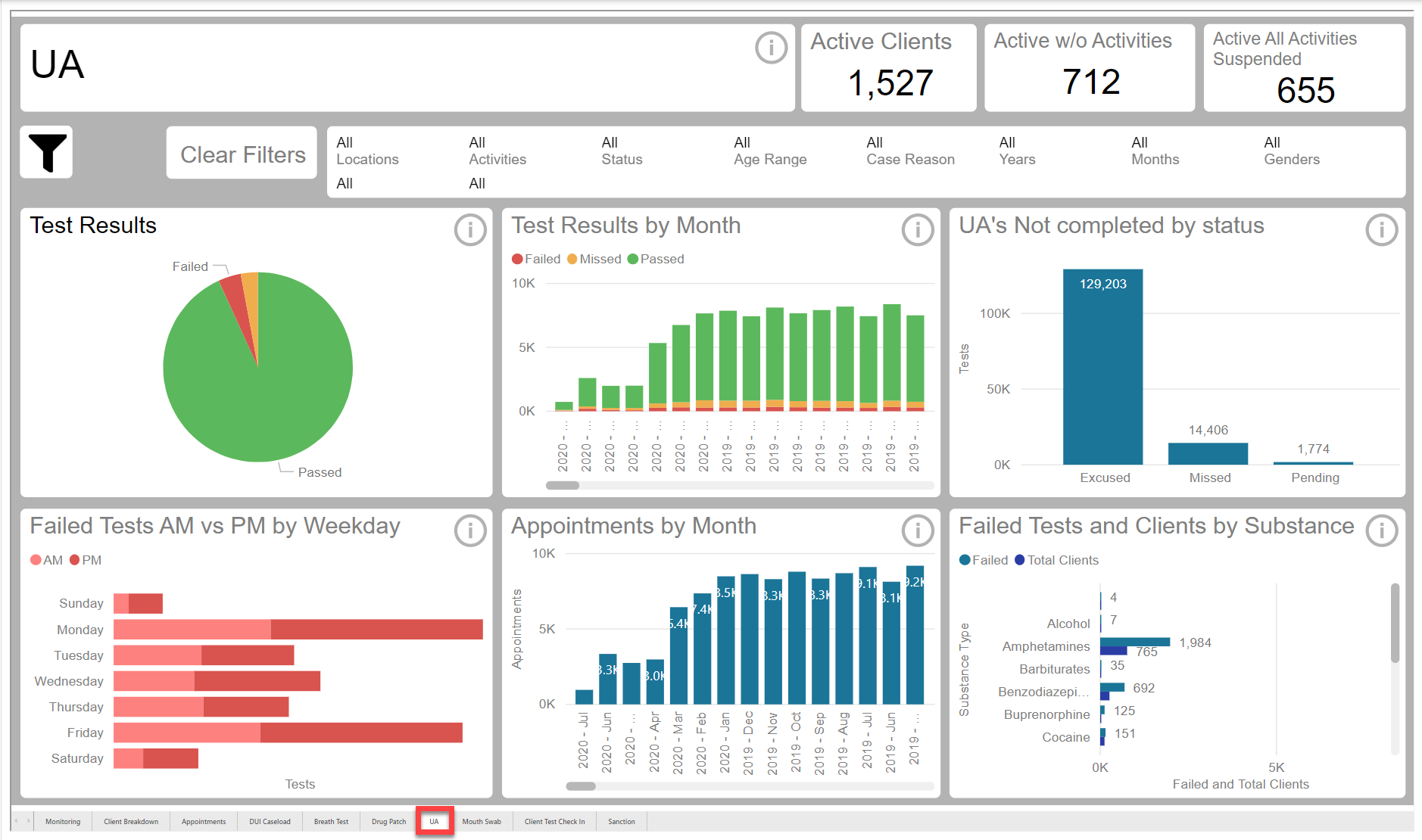
UA Report (click to enlarge)
Mouth Swab Report
Data displayed in this report includes:
- Test Results: Mouth swab test by test status. Report includes Passed, Missed and failed tests.
- Test Results by Month: Test by test status by month. Includes appointments where the test was passed, Missed and failed.
- Mouth Swab not completed by status: Test not completed by appointment status. Report includes Excused, Missed and pending tests.
- Failed Tests AM vs PM by Weekday: Failed tests by time taken AM vs PM. AM = 12:00 AM thru 11:59 AM. PM = 12:00 PM thru 11:59 PM.
- Appointments by Month: Mouth Swab appointment by Month. Useful for determining trends for test volume. Includes Passed, Excused, Missed and Pending appointment.
- Failed Test and Clients by Substance: Total failed tests by substances and number of clients with the substance.
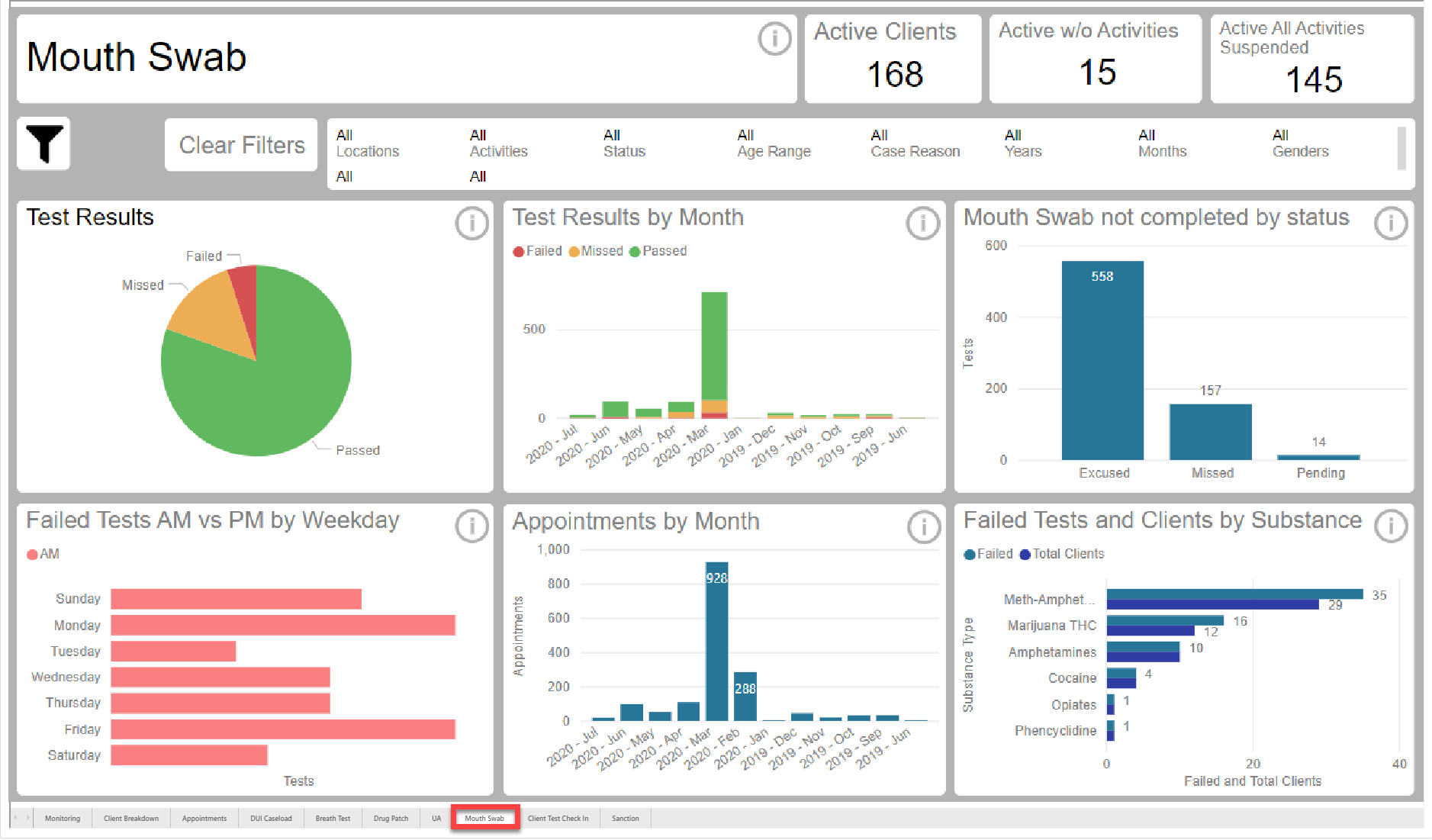
Mouth Swab Report (click to enlarge)
Client Test Check In Report
Data displayed in this report includes:
- Completed Check Ins by Month: Check ins completed by Month. Only includes appointments where check in was completed.
- Check Ins not completed by status: Check Ins where not completed by status. The report includes Check Ins that were Excused, Missed and Canceled.
- Check Ins by month: Check ins by month. Useful for determining trends for test volume. Includes Completed, Excused, Missed, and Cancelled appointments.
- Check Ins by Location: Number of Check ins by location.
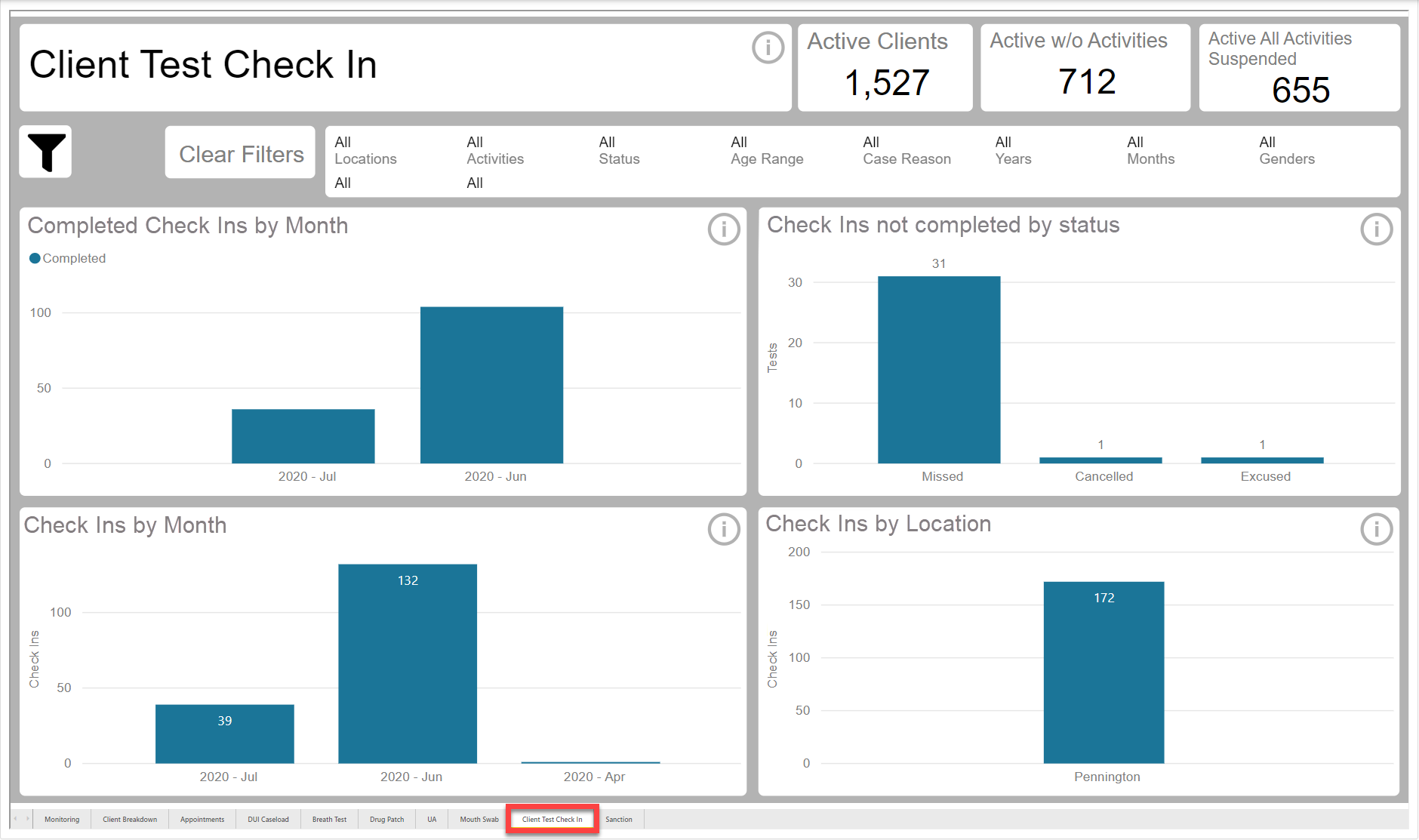
Client Test Check In (click to enlarge)
Sanction Report
Data displayed in this report includes:
- Sanctions by Activity Type: Displays the number of Sanctions for each activity type.
- Sanctions by Month and Activity type: Sanctions by month and Activity type. Useful for determining trends for each activity type.
- Sanctions by Sanction Type: This report displays the disbursement of each Sanction by Sanction type.
- Sanctions by Location and Activity type: Total number of Sanctions by Location and each Activity type.
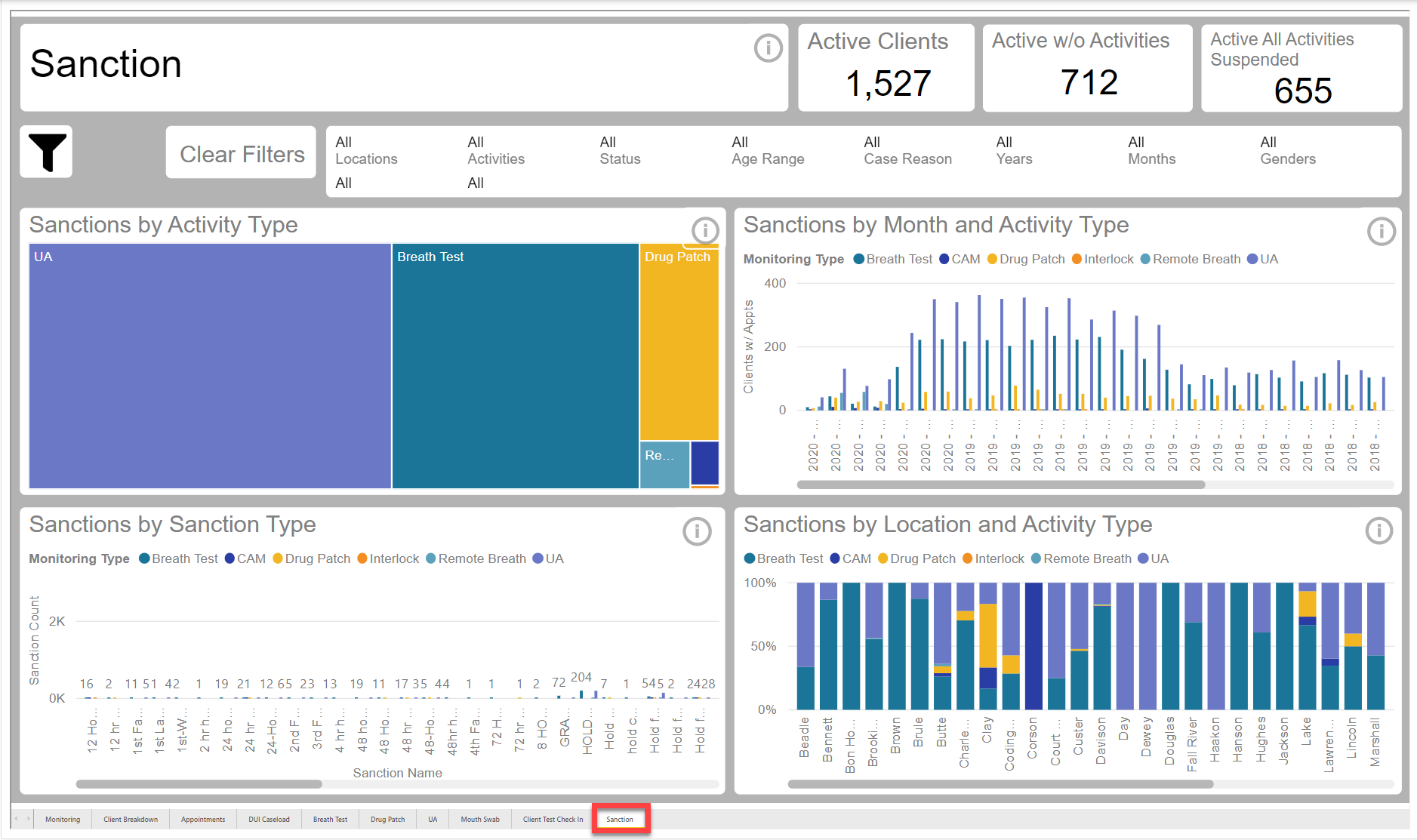
Sanction Report (click to enlarge)