At 11:00 PM MDT on April 30, 2024, SCRAM Systems® will release a firmware update to the SCRAM Remote Breath Pro (RB Pro) device, which will result in multiple enhancements to your Remote Breath client Caseloads.
 | Firmware Download Tips:
|
Enhancements included in this firmware update:
Client Breath Test Enhancements:
- RB Pro Grace Period “Sleep” Mode – The screen will go dark during test windows to conserve battery
- Automated VOC Detection and Mitigation
- New On-screen Message: “Stop Blowing”
Additional Usability Improvements:
- RB Pro Indicator Lights – The lights now stay on full time to convey current device status
- Wi-Fi Sleep Mode
Client Breath Test Enhancements
RB Pro Grace Period “Sleep” Mode
Currently, when the device prompts the client to provide a breath sample, it will “wake up,” provide visual instructions on screen, an audible tone, and a solid red light to alert the client that it is time to give a breath sample. The screen will continue to display the instructions and an audible alert sound until the client completes the breath test or the Grace Period expires. If the client does not provide a breath sample in a timely manner, this causes the device to consume a lot of its battery power.
With this update – to conserve power and extend battery life between charges – if the client is not actively blowing into the breath tube 30 seconds after the initial breath test alert, then the screen will “sleep.” All three of the green, blue, and red indicator lights will remain on. Specifically, the red light remains on to remind the client a breath test is pending.
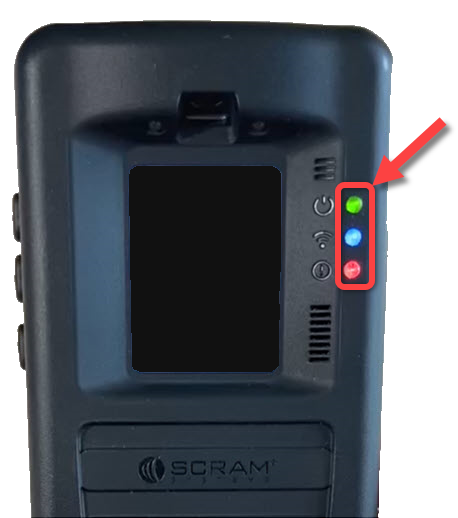
At set intervals throughout the Grace Period, the device’s screen will “wake up” and produce an audible tone to remind the client to complete the breath test as well.
When the client sees a solid red light on the device, with or without on-screen instructions, this indicates a pending breath test. If the screen is asleep, instruct the client to press one of the buttons on the side of the device to “wake” it, and then follow the on-screen prompts.
 | When the device’s battery level is Low or Critically Low, the red indicator light flashes continuously and does not stay solid to signify a pending breath test. Instruct the client to press one of the buttons on the side of the device if the screen is asleep, follow the on-screen prompts to complete a breath test, and then connect the device to a charging cable. |
Automated VOC Detection and Mitigation
 | Enhancement Update: On December 4th, 2024 SCRAM Systems updated this Ambient VOC Detected Mitigation process. You may view the updated process here. |
Once a breath test has been requested for the client, and before the RB Pro prompts the client to “Align Eyes,” the device will complete a VOC (Volatile Organic Compound) flow path check. When the device detects a VOC in the breath flow path, “Remove Straw and Place Unit In Well Ventilated Area” will be displayed on the screen:
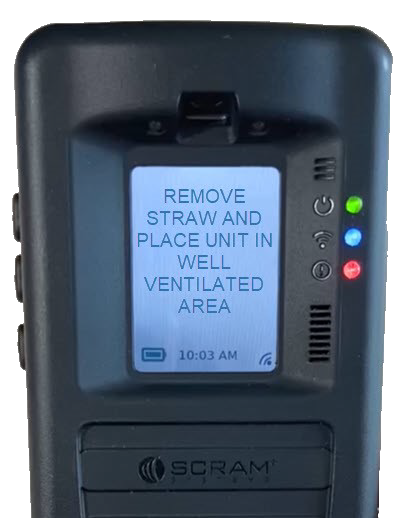
Instruct the client to follow the on-screen instructions by having the client:
- Remove the breath tube from the device.
- Relocate the RB Pro device to an area of fresh air and free of chemicals (like air fresheners) and cleaning agents (including freshly cleaned countertops).
- Ensure the RB Pro device is not in its carrying case. Place the device on its side on a tabletop or other clean surface away from contaminants, with the vent and breath tube port unobstructed.
After a period of time, the RB Pro’s screen will update to “Blow Again” and the device will complete a second VOC flow path check.
If VOCs are still detected, the screen will update to “Please Wait,” then “Remove Straw and Place Unit In Well Ventilated Area” for an additional period of time…
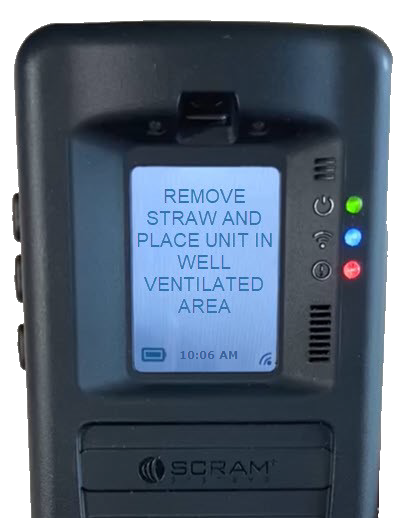
…followed by “Please Wait” with a timed countdown:
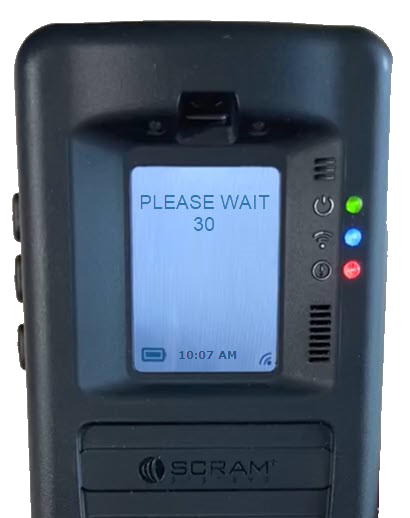
At the end of the countdown, the device will complete another VOC flow path check.
After three to four attempts (depending on the level of VOCs detected), if VOCs are still being detected, the screen will update to “Monitoring.” In SCRAMNET, an “Ambient VOC Detected“ result will be displayed on the client’s RB Results page.
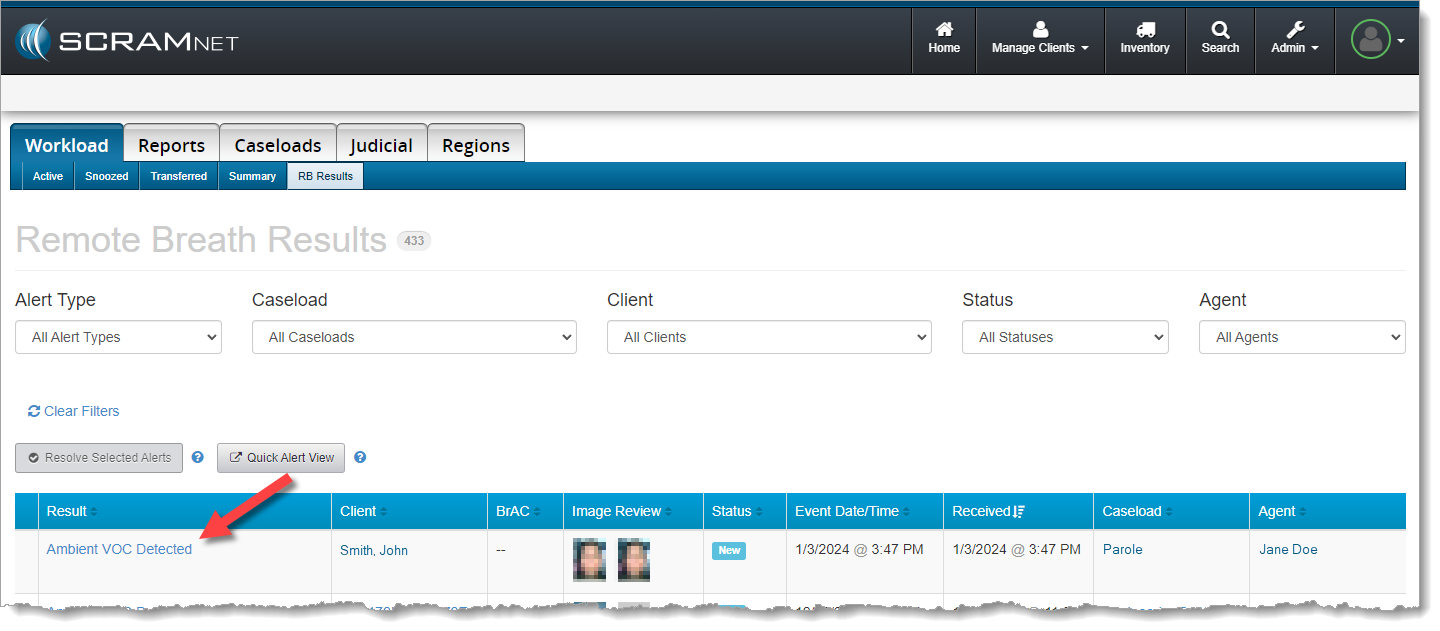
| When the client is set up for Test to Zero, an On-Demand test will be sent – automatically – 20 minutes after the “Ambient VOC Detected” test result is received in SCRAMNET. |
New “Stop Blowing” Message
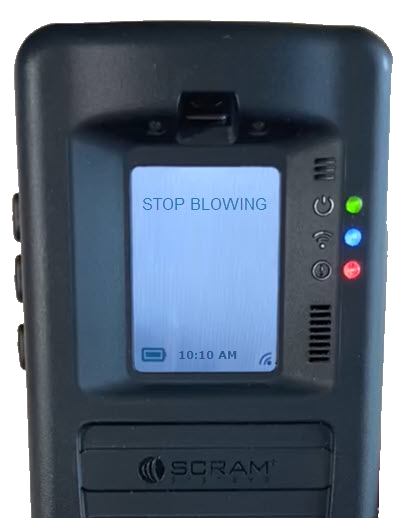
When a breath test is requested, if the client is actively blowing into the device without being prompted, a new “Stop Blowing” message will be displayed on the device’s screen. The client should follow the on-screen instructions when providing a breath sample.
Additional Usability Improvements
RB Pro Indicator Lights
Currently, when an RB Pro is in “sleep” mode, the green, blue, and red lights to the right of the RB Pro display screen will turn off. With this firmware update, the lights will remain on, even during sleep.
In addition to the lights remaining on, the blue and red lights will display as solid or flashing, based on the device’s current status. Indicator light statuses are:
- Green Light: Active, assigned device
- Solid Blue Light: Connected to a Data or Wi-Fi Network
- Flashing Blue Light: Establishing a Data or Wi-Fi Network Connection
- No Blue Light: No Data or Wi-Fi Network Connection
- Solid Red Light: Breath Test Required
- Slow Flashing Red Light: Low Battery
- Quick Flashing Red Light: Critically Low Battery
Periodically, the screen will wake up when the device is in sleep mode. This occurs during communication with SCRAMNET, or when an indicator light’s status changes. The client should be instructed to follow on-screen prompts when appropriate.
Wi-Fi Sleep Mode
With this update, the device will now go to sleep during inactive periods while connected to a Wi-Fi network. This will extend the battery life between charges while connected to Wi-Fi.
| Internal testing has revealed that – thanks to this firmware update – battery life more than doubled as compared to the current battery life of an RB Pro device connected to a Wi-Fi network. Regardless of this improvement, the client should still be instructed to connect the device to a charging cable whenever possible to ensure proper device operation. |