Effective September 3, 2020, SCRAM Systems® has improved access to the Manage TouchPoint page with the addition of a new SCRAM TouchPoint™ tile on the SCRAM OPTIX® Dashboard.
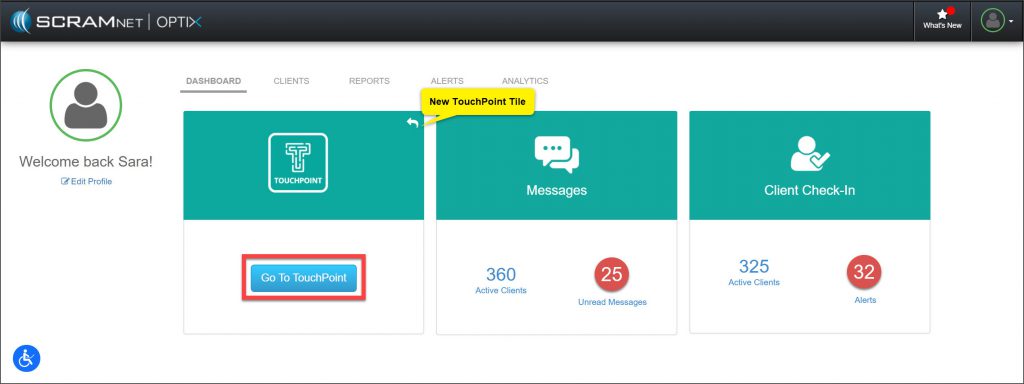
Click on the Go To TouchPoint button within the tile, to open the Manage TouchPoint page. From here, access the Manage Check-In information and the Messaging Text to All feature.
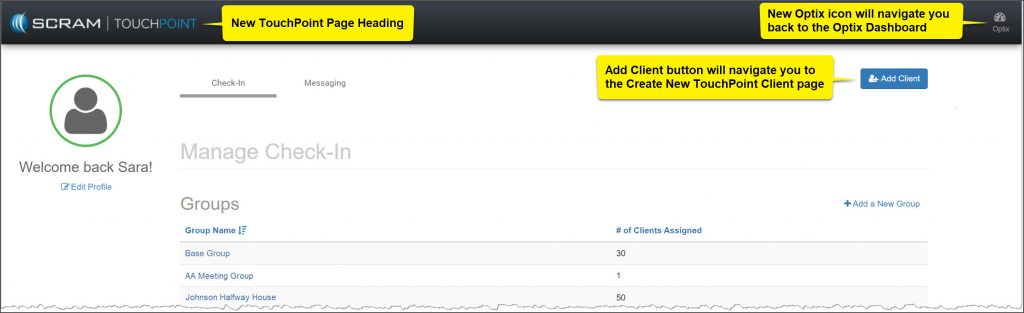
Additional updates to the Manage TouchPoint page include:
- The top banner will now display as SCRAM TouchPoint.
- An Optix icon will provide a smooth transition back to the OPTIX Dashboard.
- An Add Client button navigates you directly to the Create New TouchPoint Profile page.
Feedback
As always, please feel free to contact SCRAM Systems Customer Services at 1-303-785-7879 with any recommendations for system improvements.