At 5:00 AM MDT Tuesday, October 18, 2022, SCRAM Systems® is introducing three new features to SCRAMNET GPS.
These enhancements are:
- Suspend Alerts for the SCRAM GPS Call Center Application
- Pattern of Life Home (Inferred) Location
- Pursuit Mode in Ally Mobile Application
 | During the 15-minute deployment, you may not be able to access SCRAMNET GPS but messages from the SCRAM GPS Bracelet will continue to be processed uninterrupted. |
Suspend Alerts for the SCRAM GPS Call Center
The SCRAM GPS Call Center application is a centralized location where client non-compliance events are displayed and managed according to pre-established processes and procedures. The GPS Call Center can be managed by SCRAM Systems, or by our service partners’ monitoring centers.
When a non-compliance event occurs – like when a client enters an Exclusion Zone – an event ticket is generated in the Call Center application where call center agents will take the appropriate action for the alert. The actions taken might include calling the client or the officer. Once the call center agents have completed the specific procedure for the alert, the alert is then resolved.
On some occasions, the client may be allowed to temporarily enter an Exclusion Zone for example. With this release the supervising authority may temporarily suspend the specific alert, therefore the alert will not generate an alert ticket in the Call Center application. This feature is useful when no action should be taken by the call center agent for the violation.
During the suspension period, the client’s information on the Dashboard will be highlighted. To view the details of the suspension period, hover your mouse over the highlighted area.
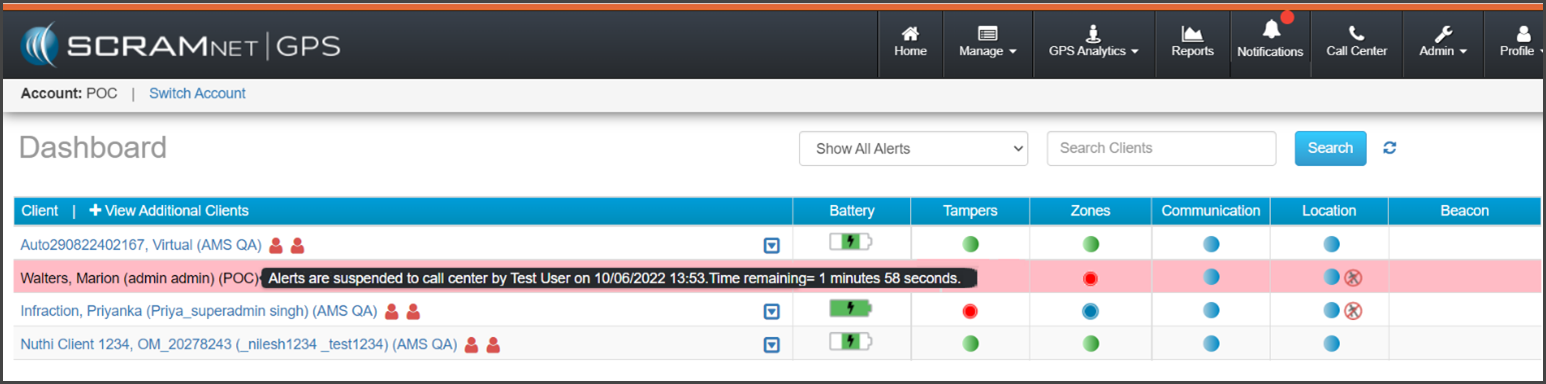
| All suspended non-compliant violations will display on the Dashboard and all notifications will be sent. Only the Call Center alert ticket is suspended (not sent). |
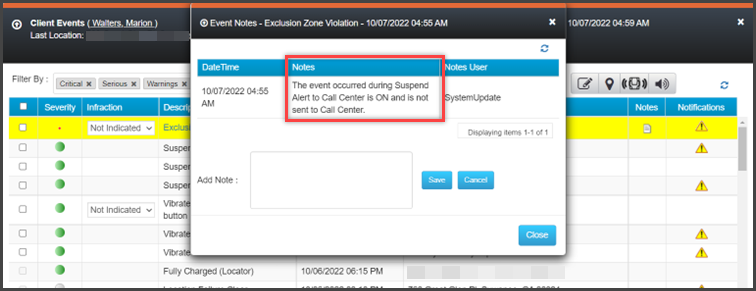
When the event or alert generates during a suspension period, a system note is added to the Event Notes indicating that the Call Center ticket was not sent to the Call Center:
To temporarily suspend events and alert(s) from generating event tickets in the Call Center application for a client:
- Select the client’s name on the Dashboard.
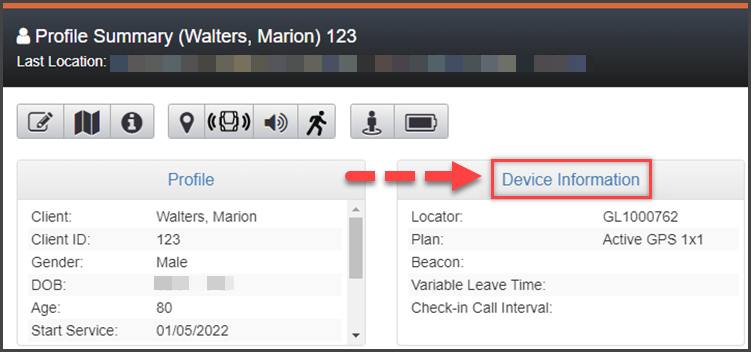
- On the Profile Summary dialog box, select the Device Information hyperlink.
- On the Device Assignment page, toggle ON the Enable Suspend Alerts option.
- Select the Suspend Alerts to Call Center Only radio button.
- On the Select Alert dropdown menu, select which alert(s) you would like to suspend.
- Next, set the duration or date and timeframe for the suspension:
- If the suspension is to start now, select the radio button next to the “Suspend for” option, and then select the duration from the dropdown menu.
- If the suspension is for a future date, select the radio button next to the “Only suspend during this range” option, and enter the Start Time and End Time.
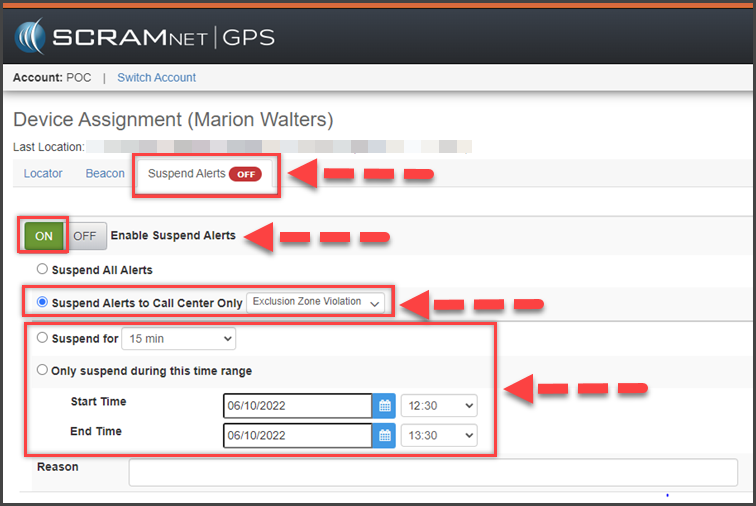
- Enter the reason for the suspension.
- To save the information, select the Save button.
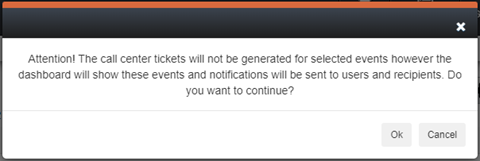
- Read and acknowledge the information on the pop-up by selecting the Ok button.
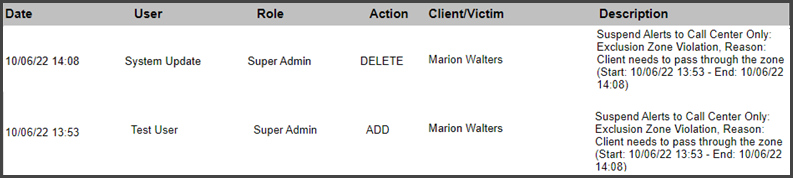
The suspension details including the start and end times are recorded in the Audit Report.
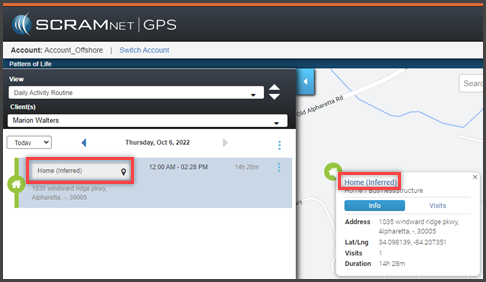
Pattern of Life – Home (Inferred) Location
SCRAMNET GPS® Pattern of Life identifies and associates the client’s location to an activity location category. When reporting the client’s “Home” location and activity category in Pattern of life, the Home Zone created for the client is used. The location and activity category’s label will reflect the Home Zone’s name entered in the system. For example, “John’s Home Zone” would display in Pattern of Life as “John’s Home Zone” on the map and reports.
When the client does not have a Home Zone recorded in the system, the Pattern of Life location may not be correctly identified or grouped into a different activity location category altogether.
With this enhancement, if the client does not have a Home Zone saved in the system, Pattern of Life will use the client’s home address to identify the location and activity location’s category. Once identified, the label of “Home (Inferred)” will display on the map and report detail information. In addition, when the client’s address is updated, the “Home (Inferred)” location is also updated.
Pursuit Mode in Ally Mobile Application
SCRAM Ally is a victim notification mobile app. The app is installed on the victim’s smartphone to create a moving exclusion zone around the victim. When paired to one or more clients, the SCRAMNET GPS application can alert the victim and officers when a client is inside the victim’s moving exclusion zone.
Pursuit Mode is started automatically on the client’s SCRAM GPS device when the following alerts occur:
- Panic Button Pressed (from SCRAM Ally) – this will start Pursuit Mode for the victim who pressed the button, as well as all the clients associated with the victim.
- Victim Zone Violation – this will start Pursuit Mode for the victim whose zone was breached, as well as the client who breached the zone
|
SCRAM Ally continues to send location points every minute (1) while in Pursuit Mode. Location points from both the client(s) and victim can be seen on the Location Information page in SCRAMNET GPS. |