The August 4, 2020 SCRAM Nexus® release includes: Displaying the temporary password for TouchPoint, changes to the Add Client flow for TouchPoint, supporting ‘Assigned on’ and ‘Behavior’ dates with On-Demand Incentive/Sanctions, and re-opening the client in the same tab.
Client: Display TouchPoint Temporary Password
When a client is assigned TouchPoint for the first time, a temporary password will be generated for them. The password will be displayed in the Client Mobile section of the client profile in Nexus. The password will disappear once the client successfully logs into TouchPoint. The client can reset their password if they no longer want to use the temporary password by selecting “Don’t Remember your Password” link within the application.

Client: Add TouchPoint Check-In Activity
Adding the TouchPoint Check-In activity to a client’s supervision plan has been simplified by splitting it into two separate steps.
- First, TouchPoint Check-In will be added either through Model Assignment or by clicking the ‘Add a new Activity’ link on the client’s Supervision Plan page.
- Once the activity has been added, setup can be completed through the Add Client page for TouchPoint.
This new flow simplifies each step and allows for delaying client registration until the client is ready to install the TouchPoint app and verify credentials.
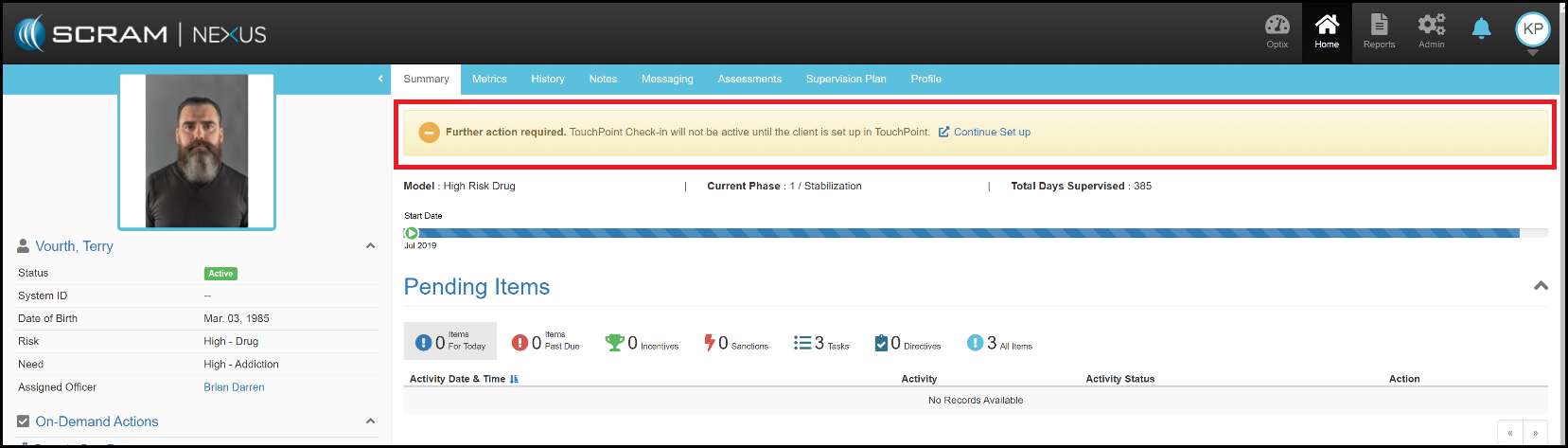
‘Further Action Required’ Banner in Client Summary
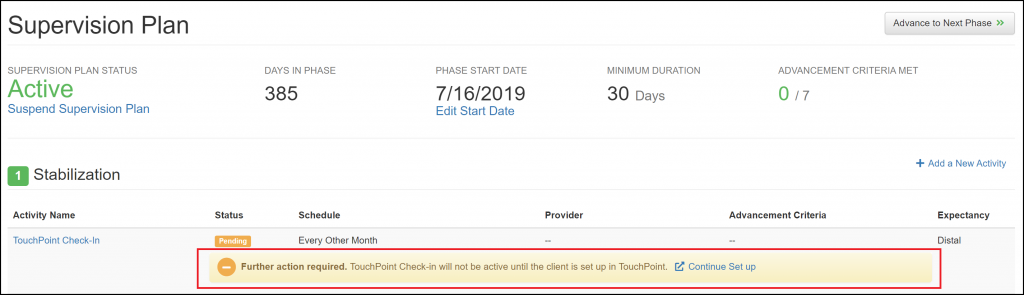
‘Further Action Required’ Banner Under the Activity in the Supervision Plan
Client: Dates for On-Demand Incentives and Sanctions
With this enhancement, an Officer can now enter an Assigned on Date along with the Violation Date for On-Demand Sanctions. This allows an Officer to backdate On-Demand Sanctions.
An Officer may also enter in a Behavior Date along with the Assigned on Date for On-Demand Incentives. The Behavior Date is the date that the actual activity/event occurred. This date is often different than the Assigned on Date.
Client: Minimizing Nexus Tabs
If an instance of a client is already open in a browser tab and a user begins another action for that client, the Officer will be directed to the already-opened browser tab. This prevents multiple tabs from being open for the same client. In the event that an Officer is in the middle of a task in that already-opened tab, the Officer will be asked if they want to save changes before the tab refreshes.
Feedback
As always, please contact SCRAM Systems Customer Service at 1-303-785-7879 with any recommendations for system improvements.