This evening, October 26, 2021, SCRAM Systems is introducing several new features in SCRAM Nexus. Those features include:
For Officers and Case Managers:
- Recording/Rescheduling Tasks with a Start/Due Date
- Filter Selections Remain on Client History
- Remove Default Option for Search During Field Visit
- Only Display Known SCRAM TouchPoint Check-Ins in SCRAM Nexus History
For Administrators:
- Default Time on Model/Phase for Tasks
For Officers & Case Managers:
Recording/Rescheduling Tasks with a Start/Due Date
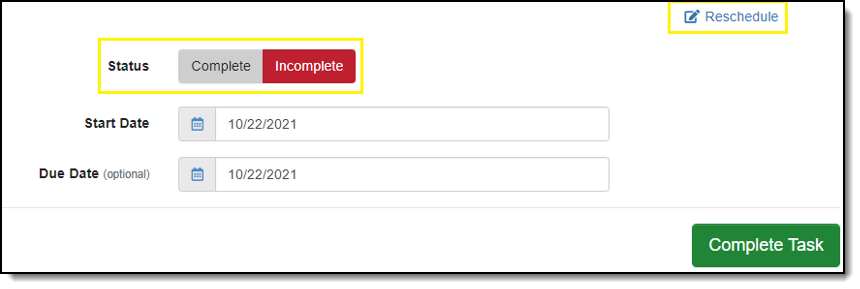
Tasks can now be recorded and rescheduled. When recording a task, an officer may mark the task as Complete or Incomplete. When marked as Complete, the officer is required to enter a Completion Date. When the status is Incomplete, tasks may be rescheduled from both the client calendar activity stream and from within the task itself.
Filter Selections Remain on Client History
Filters set in the client history now remain selected until the user clears the filters. All filters applied to the client history are highlighted in blue to make it more apparent which data is being filtered. Filters are remembered when moving between pages and during a page refresh. The filter(s) are cleared once the user logs out and back in. At that point, the client history displayed is unfiltered.
Remove Default Option for Search During Field Visit
Officers must now select whether the premises may be searched when adding the field visit activity to the supervision plan. The ‘Search Premise Allowed’ field no longer has a default value of ‘Yes.’
Only Display Known SCRAM TouchPoint Check-Ins in SCRAM Nexus History
The SCRAM Nexus history and client calendar now only display SCRAM TouchPoint client check-ins that occur when the activity is active on a client’s supervision plan. Check-ins no longer appear if the SCRAM TouchPoint check-in activity is enabled in SCRAM Optix and is not on the supervision plan. If there are pending check-ins when the SCRAM TouchPoint check-in activity is removed from the supervision plan, SCRAM Nexus does not remove those pending check-ins.
For Administrators:
Default Time on Model/Phase for Tasks
Administrators can now enter an expected timeframe for tasks in the model setup. The timeframe in which that the task must be completed will set the due date for the task. The timeframes may be expressed as days, weeks, months, or years.
