Today, December 18th, 2025, SCRAM Systems released an enhancement for your SCRAM TouchPoint Monitoring program. With this update, clients enrolled in both SCRAM GPS monitoring and SCRAM TouchPoint may now view their GPS bracelet’s battery level within their TouchPoint mobile app.
 | The latest version of the TouchPoint app is available to clients in the app stores. As a best practice, SCRAM Systems recommends that all TouchPoint app users enable automatic app updates on their smartphones to make this process easier. |
What’s New
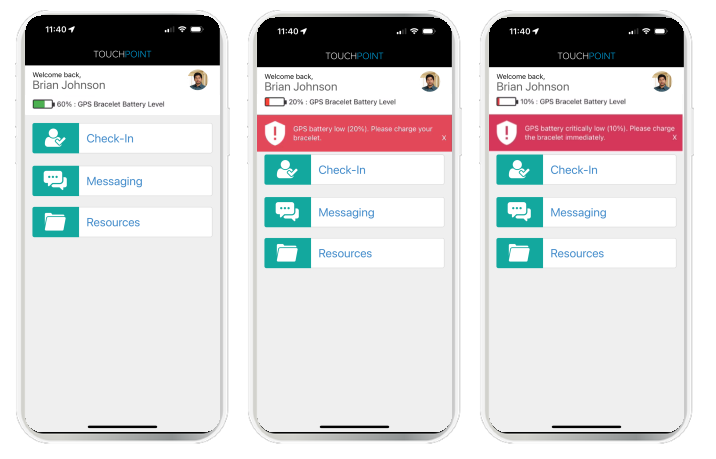
- The client’s last reported SCRAM GPS bracelet’s battery level is displayed at the top of the home screen within the TouchPoint mobile application.
- A red banner with charging instructions for the client will display on the Home screen within the app when the device requires charging. The banners will display when the device’s battery level is:
- Below 20%, indicating a Battery Low alert.
- Below 10%, indicating a Critically Low Battery alert.
Important Reminder
The battery level shown in the client’s TouchPoint mobile app is for reference only. The client should not rely solely on the app’s display to manage charging. To remain compliant and avoid interruptions in monitoring, clients must continue to charge their GPS device regularly, following program instructions.
 |
The battery level shown in the TouchPoint mobile app may not exactly match the battery level displayed on the GPS Dashboard in the agent view. In TouchPoint, battery levels are shown in 10% increments. For example, if the GPS Dashboard shows a battery level of 66%, the TouchPoint app will display 70%. |