Enhancements included are:
- Search by Primary Agent in Manage Clients Pop Up
- Move Clients Between Sub Accounts
Search by Primary Agent in Manage Clients Pop Up
Two new features have been added to the Manage Clients pop up. To access the pop up, select the Manage -> Clients top menu option. The Primary Agent assigned to a client will be listed in the Manage Clients pop up window, as shown below. Additionally, you may search clients by Primary Agent.
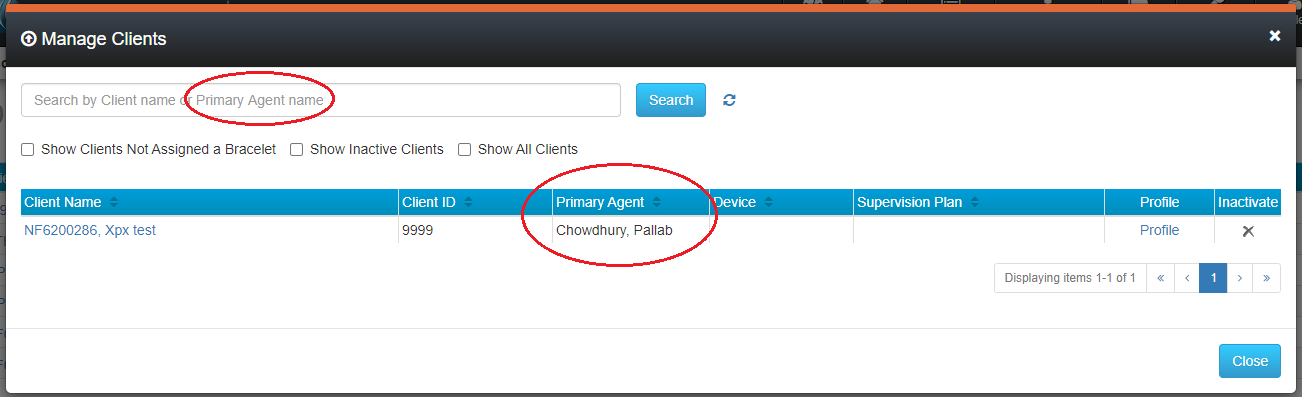
To search clients by Primary Agent, enter all or part of the Primary Agent’s first or last name in the search bar and click the Search button.
Move Clients Between Sub Accounts
Designated users can now move clients between sub accounts. While clients are being moved, all messages from the SCRAM GPS® bracelet continue to be processed, and the client continues to be monitored. Moving a client from one sub account to another also moves all historical data associated with that client to the new sub account. No reference to the client remains in the prior account. The following conditions apply:
- Only users in the Admin role can move clients
- Clients can only be moved within accounts in which the Admin user has access
- Clients can only be moved within the account’s hierarchy
See the SCRAMNET GPS -> Client Management -> Move Client to Another Account page in GPS Help for details.